YOOBIC BI
Welcome to the YOOBIC BI documentation.
The YOOBIC BI documentation is designed for the use of BI leaders who are interested in building custom BI reports or dashboards using YOOBIC data or by merging data collected by YOOBIC with their own data collected from other tools (e.g. CRM).
This documentation will provide an overview of YOOBIC BI design, tables and provide sample usages for each table, allowing you to easily implement business intelligence.
Below is a list of recent enhancements/changes to the YOOBIC BI.
July 9, 2026
Added new points_transactions table with all point transactions (lessons, courses, battles, adjustments).
The battles_activity table now contains battle transactions only.
July 8, 2026
- Added
price,currency,product_discountandquestion_discountcolumns on missionsdata_product and inventory_product tables.
March 12, 2026
- Added
smartquiz_pointson users table.
October 25, 2025
- Add
category_idcolumn on events table.
March 12, 2024
- Add new courses_learning_paths table.
October 23, 2023
- Add
da,fi,nbandsvfields on translations.
September 1, 2023
- Add _lmt and _ect indexes to missionsdata table.
June 27, 2023
- Add new campaign_questions table.
June 25, 2023
Add new campaigns_scorm table.
Add new scorm_registrations table.
June 19, 2023
- Add index information for the following tables campaigns, inventory, inventory_data, missions, missionsdata, photos, translations
May 10, 2023
- Add new campaigns_archive table.
March 28, 2023
Add new activities table.
Add new battles_activity table.
March 14, 2023
Add new skus_image_recognition table.
Add new kpis_image_recognition table.
February 21, 2023
- Add new missionsdata_image_recognition table.
January 04, 2023
Add new store_ratings table.
Add new photos_geoloc table.
Add new missionsdata_product table.
Add new mission_workflows table.
January 03, 2023
Add new inventory_data table.
Add new inventory_product table.
Add new lessonsdata_confidence_quiz table.
Add new lessonsdata_confidence_quiz_history table.
Add new mission_action_plans table.
Add new mission_todos table.
January 02, 2023
Add new campaigns_plans table.
Add new communities table.
Add new community_comments table.
Add new community_news table.
Add new events table.
December 13, 2022
- Added support for new question type
advanced formulamissionsdata.
November 15, 2022
Added
is_rating_enabledfield on plans.Added
is_questions_enabledfield on plans.Added
is_featuredfield on plans.Added
time_constraint_modefield on plans.
October 25, 2022
- Updated courses table.
October 20, 2022
- Add new questions table.
October 13, 2022
- Add new answers table.
July 24, 2022
- Add new weekly_user_activity table.
May 17, 2022
February 20, 2022
- Add new visits_custom_data table.
July 18, 2021
- Add new lessonsdata_history table.
July 8, 2021
Add new users_custom_data table.
Add new stores_custom_data table.
May 18, 2021
Add
devicefield on users.Add
is_boostfield on users.Add
role_idfield on users.Add new client_role_extension table.
March 16, 2021
- Add
out_of_stockfield on products.
January 17, 2020
November 25, 2020
Add new users_archive table.
Add new stores_archive table.
November 19, 2020
Add
capacityfield on stores endpoint.Add
last_seenfield on users.Add
mobile_versionfield on users.Add
desktop_versionfield on users.
August 17, 2020
- Add
action_plan_progressmissions table.
July 05, 2020
Add waitlist-customers table.
Add waitlist-yoobic-visits table.
May 11, 2020
- Add
timezonestores.
February 25, 2020
- Add
store_type_idgeofilters.
November 4, 2019
- Add new missionsdata_pricecheck table.
October 2, 2019
September 5, 2019
- Add new visit table.
August 8, 2019
- Add new inventory table.
August 5, 2019
Add
scoringfield on campaigns.Add
recurringfield on campaigns.Add
bodyfield on notifications.Add
user_idsfield on notifications.Add
badge_typefield on notifications.Add
manufacturerfield on products.Add
brandfield on products.Add
categoryfield on products.Add
imagesfield on products.
July 9, 2019
July 3, 2019
Add
users_countfield on groups.Add groups_news table.
June 13, 2019
Add
republish_when_startedfield on missions.Add
republish_when_finishedfield on missions.Add
booked_untilfield on missions.Change
validatedtocompliantfield on missions.Add
compliant_by_defaultfield on missions.Add
reason_not_compliantfield on missions.Add
republished_with_answersfield on missions.Add
original_mission_idfield on missions.Add
original_reason_not_compliantfield on missions.
June 3, 2019
Add
average_completed_lessonfield on plans.Add
photofield on stores.Add
addressfield on users.Add
telephonefield on users.Add
photofield on users.
May 16, 2019
Add algorithm_results table.
Add
durationfield on missions.Add
durationfield on lessons.
May 8, 2019
- Add
markup_urlfield on photos.
Mar 24, 2019
- Add
vipfield on stores.
Mar 7, 2019
- Add salesdata table.
Jan 6, 2019
- Add
propertiesfield on stores.
The YOOBIC BI database is available as a Database-as-a-Service (DaaS), in the form of a single tenant mySQL database.
The database is decoupled from the native database of the application and read only. Data is refreshed usually within minutes from the moment they are inserted to the application database. Our schema is mostly based on views instead of tables, which is transparent for most BI tools.
Data-as-a-Service brings the notion that data quality can happen in a centralized place, cleansing and enriching data and offering it to different systems, applications or users, irrespective of where they were in the organization or on the network. As such, data-as-a-service solutions provide the following advantages:
Agility - Customers can move quickly due to the simplicity of the data access and the fact that they don't need extensive knowledge of the underlying data. If customers require a slightly different data structure or have location specific requirements, the implementation is easy because the changes are minimal.
Cost-effectiveness - No need for additional storage (sftp), or security measures.
Data quality - Access to the data is controlled through the data services, which tends to improve data quality, as there is a single point for updates. Once those services are tested thoroughly, they only need to be regression tested, if they remain unchanged for the next deployment.
In a nutshell:
YOOBIC BI DaaS is not the native database of the application, and it is managed on our side as a decoupled architecture, with a strong contract on the schema so that it is not directly affected by changes in the underlying application and remains stable over time.
YOOBIC BI DaaS is a read only, secured single tenant database that is completely re-constructed every night, so there is no risk to jeopardise or lose data.
YOOBIC BI DaaS offers strongly typed data rather than error-prone flat files (boolean, double precision, binary data, json fields etc...).
YOOBIC BI DaaS is hosted as a service and it is guaranteed to be always available.
YOOBIC BI DaaS offers efficient data transfers. The fact that queries can be runned against the tables makes it more efficient for transferring data (as only the relevant data can be pulled out by a simple query, unlike flat files that need to be all uploaded first before they are transformed). The code that needs to be written for data transformation becomes a lot easier, and can be seamlessly integrated with standard ETL pipelines tools.
YOOBIC BI DaaS uses SSL to secure connections by encrypting the data in transit and protecting it from snooping on the wire.
YOOBIC BI DaaS is configured to use and enforce SSL and secure connections.
If the client connecting to YOOBIC BI DaaS is not configured to use SSL the connection will be rejected.
No one, even with access to the network, can watch any of the traffic and inspect the data being sent or received between client and server.
YOOBIC BI DaaS supports encrypted connections between clients and the server using the TLS (Transport Layer Security) protocol. TLS is sometimes referred to as SSL (Secure Sockets Layer) but it does not actually use the SSL protocol for encrypted connections because its encryption is weak, and only uses TLS.
TLS uses encryption algorithms to ensure that data received over the network can be trusted. It has mechanisms to detect data change, loss, or replay. TLS also incorporates algorithms that provide identity verification using the X.509 standard.
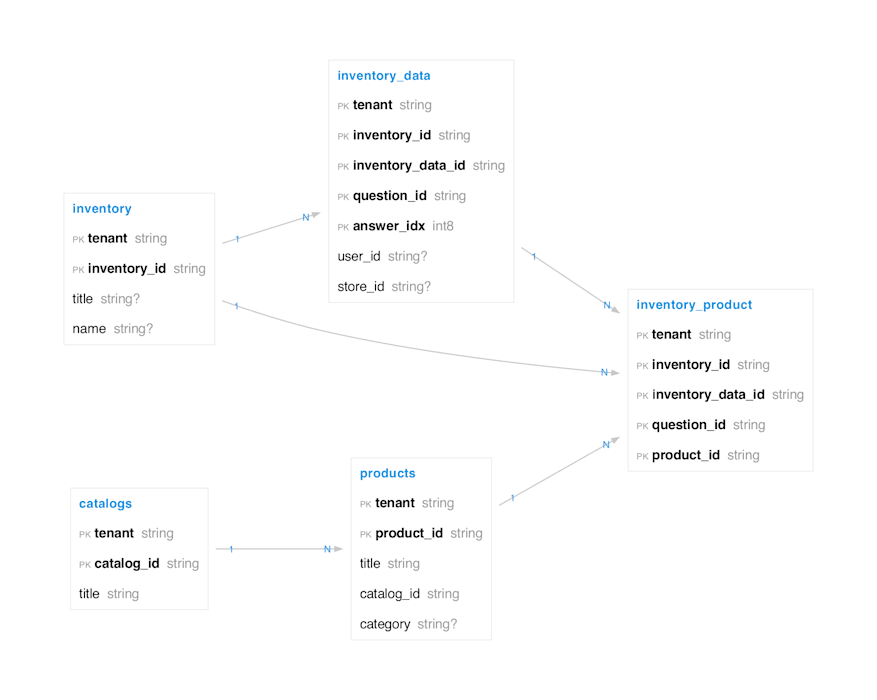
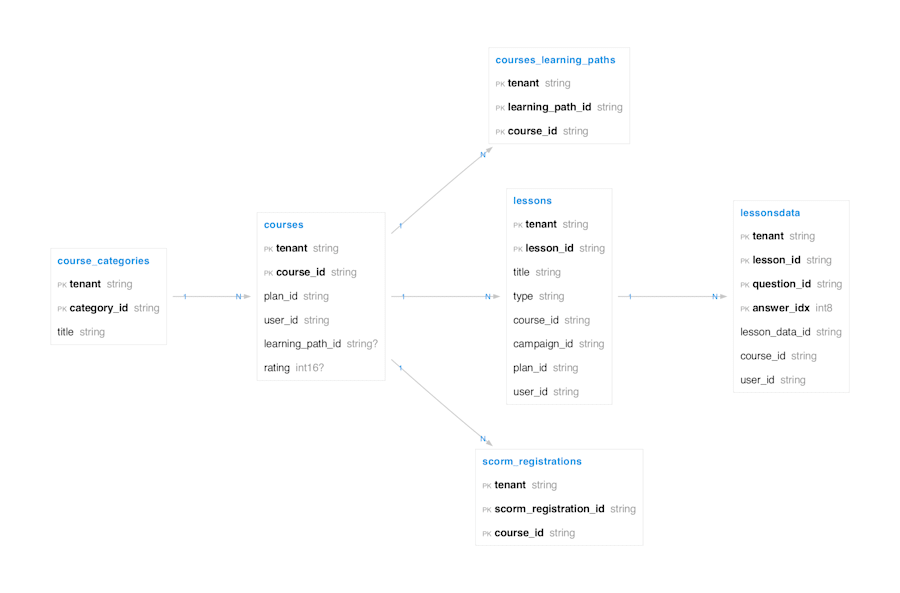
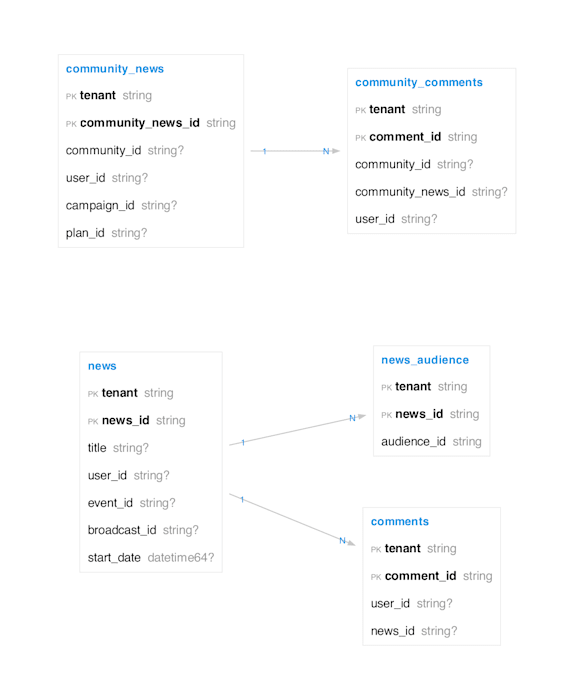
The YOOBIC BI schema is organised around three foundational domains and three product pillars. The diagrams below outline the main tables in each area and how they relate to one another, providing a high-level map before the per-table reference that follows. Note that the diagrams are not exhaustive — they show only a representative subset of columns per table to keep relationships readable; refer to the per-table sections below for the complete column list.
Users & Access —
tenants,users,groups,groups_users,audiences,communities,community_members,competencies,user_competency_score.Stores —
regions,stores,geofilters,store_types,store_type_groups.Inventory & Products —
inventory,inventory_data,inventory_product,catalogs,products.Work (missions and campaigns) —
missions,missionsdata,campaigns,campaign_questions,campaigns_plans,plans,mission_todos,mission_action_plans,mission_workflows,step_workflows.Learn (lessons, courses, and learning paths) —
courses,course_categories,courses_learning_paths,lessons,lessonsdata,scorm_registrations.Comms (news and community) —
news,news_audience,comments,community_news,community_comments.



This table provides information about engagement activities performed by users in the app, such as viewing or liking a post. It also contains the last attendance status of users for the events they receive in their calendar: for activities with entity_name = calendarEvents, action can be join, maybe, or decline.
Table activities
| Column | Type | Description |
|---|---|---|
| activity_id | varchar(24) | Unique ID of the activity |
| user_id | varchar(24) | User who did the activity |
| entity_name | varchar(100) | Entity of the activity (can be missions, feeds, notifications, files, calendarEvents…) |
| entity_id | varchar(24) | Id of the entity that was interacted with during this activity |
| action | varchar(100) | Action performed by the user (can be view, like …) |
| _ect | timestamp | Creation date of the activity record |
| _lmt | timestamp | Last update date of the activity record |
This table contains information about aisles in stores, including their titles and delays for withdrawal and markdown.
Table aisles
| Column | Type | Description |
|---|---|---|
aisle_id |
varchar(24) | Unique ID of the aisle |
store_id |
varchar(24) | ID of the store |
title |
varchar(255) | Title of the aisle |
withdrawal_delay |
tinyint unsigned | Delay for withdrawal |
markdown_delay |
tinyint unsigned | Delay for markdown |
_lmt |
timestamp | Last update date |
_ect |
timestamp | Creation date |
tenant |
varchar(32) | Tenant name |
Primary Key: (aisle_id, tenant)
Indexes:
tenant_indexontenant
Statistics on the image recognition algorithm usage.
Table Algorithm
| Column | Type | Description |
|---|---|---|
algorithm_result_id |
varchar(24) | Unique id of the algorithm result |
button_push_date |
timestamp | When the user started to upload pictures |
publish_date |
timestamp | When the uploaded pictures were submitted to the IR algo |
start_date |
timestamp | When the IR algorithm started |
finished_date |
timestamp | When the IR algorithm finished |
mission_id |
varchar(24) | Unique id of the mission |
question_id |
varchar(40) | Id of the question |
image_count |
string | The number of uploaded pictures |
detection_duration |
number | Time spent by the IR algorithm (in seconds) |
tenant |
varchar(24) | Tenant name |
Answers are the users’ replies to the questions raised by their colleagues in the Questions menu. Other users can vote for answers they think are best, like them, and a user with the right permission can also validate an answer to indicate it is the right or best one.
Table answers
| Column | Type | Description |
|---|---|---|
answer_id |
varchar(24) | Unique id of the answer |
question_id |
varchar(24) | Reference to the question |
user_id |
varchar(24) | User id answering this question |
text |
text | The answer |
image |
varchar(255) | The url to the image |
is_verified |
boolean | Whether or not this is a verified answer |
user_verified |
varchar(24) | User id verifying this answer |
likes |
smallint | Likes count |
_ect |
timestamp | Creation date |
_lmt |
timestamp | Last update date |
tenant |
varchar(24) | Tenant name |
This table contains information about audiences, including their names, visibility, and rules for users and stores.
Table audiences
| Column | Type | Description |
|---|---|---|
audience_id |
varchar(24) | Unique ID of the audience |
name |
varchar(255) | Name of the audience |
public |
tinyint(1) | Indicates if the audience is public |
user_id |
varchar(24) | ID of the user |
target |
varchar(10) | Target of the audience |
type |
varchar(10) | Type of the audience |
users_audience_rules |
json | Rules for users |
stores_audience_rules |
json | Rules for stores |
created_from |
varchar(100) | Source of creation |
hidden |
tinyint(1) | Indicates if the audience is hidden |
total_users |
smallint | Total number of users |
total_stores |
smallint | Total number of stores |
_lmt |
timestamp | Last update date |
_ect |
timestamp | Creation date |
tenant |
varchar(32) | Tenant name |
Primary Key: (audience_id, tenant)
Indexes:
tenant_indexontenant
This table contains information about courses involved in battles, including assignment dates and progress.
Table battle_courses
| Column | Type | Description |
|---|---|---|
course_id |
varchar(24) | Unique ID of the course |
plan_id |
varchar(24) | ID of the plan |
user_id |
varchar(24) | ID of the user |
assignment_date |
timestamp | Date of assignment |
rating |
tinyint unsigned | Rating of the course |
comment |
varchar(255) | Comment on the course |
finished_lessons |
tinyint unsigned | Number of finished lessons |
progress |
decimal(3,2) | Progress of the course |
start_date |
timestamp | Start date of the course |
finished_date |
timestamp | Finished date of the course |
due_date |
timestamp | Due date of the course |
discover |
tinyint(1) | Indicates if discovered |
_lmt |
timestamp | Last update date |
_ect |
timestamp | Creation date |
tenant |
varchar(32) | Tenant name |
Primary Key: (course_id, tenant)
Indexes:
courses_lmt_indexon_lmtcourses_plan_id_indexonplan_idcourses_user_id_indexonuser_idtenant_indexontenant
This table provides information about the battles initiated and finished by the users. These battles involve a number of points that will be gained by the winner of the battle, and lost by the loser of the battle, and a plan that is used for the battle.
Table battles_activity
| Column | Type | Description |
|---|---|---|
| battle_activity_id | varchar(24) | Unique ID of the battle activity. This is unique per user and per battle |
| user_id | varchar(24) | User who did the battle. there are always two users involved in a battle, so you will see 2 rows per battle. |
| plan_id | varchar(24) | Id of the battle |
| plan_id_original | varchar(24) | Id of the original plan used for the battle |
| status | varchar(100) | Status of the battle (can be done or pending) |
| battle_points | smallint | Number of points gained or lost by the user |
| _ect | timestamp | Creation date of the activity record |
| _lmt | timestamp | Last update date of the activity record |
This table contains information about broadcasts, including their duration and URLs.
Table broadcasts
| Column | Type | Description |
|---|---|---|
broadcast_id |
varchar(24) | Unique ID of the broadcast |
duration |
smallint unsigned | Duration of the broadcast |
url |
varchar(255) | URL of the broadcast |
creator_id |
varchar(24) | ID of the creator |
_lmt |
timestamp(3) | Last update date |
_ect |
timestamp(3) | Creation date |
tenant |
varchar(32) | Tenant name |
Primary Key: (broadcast_id, tenant)
Indexes:
tenant_indexontenant
This table contains the history of campaign reviews, including review dates and actions.
Table campaign_reviews_history
| Column | Type | Description |
|---|---|---|
campaign_id |
varchar(24) | Unique ID of the campaign |
review_id |
varchar(24) | Unique ID of the review |
review_order |
tinyint unsigned | Order of the review |
review_date |
timestamp | Date of the review |
user_id |
varchar(24) | ID of the user |
action |
varchar(20) | Action taken |
tenant |
varchar(32) | Tenant name |
Primary Key: (campaign_id, review_id, tenant)
Indexes:
tenant_indexontenant
A campaign is the main structure used to send tasks to frontline teams and collect data about how they execute them. It is essentially a configurable form with instructions and fields (checklists, buttons, photos, open text, etc.) that users fill in from the field. They are used for many operational needs like audits, promotions, checklists, surveys, health and safety monitoring, and other day-to-day activities.
There are 4 different types of campaigns available in YOOBIC:
Quick task
Memo
Form
Workflow
Archived campaigns are visible in the campaigns_archive table.
Table campaigns
| Column | Type | Description |
|---|---|---|
campaign_id |
varchar(24) | Unique id of the campaign |
title |
varchar(255) | The campaign title |
tags |
json | The list of tags |
type |
varchar(24) | The campaign type (mission, service, todo, poll, lesson, visit) |
scoring |
boolean | True if scoring is enabled for missions from this campaign, false otherwise |
recurring |
boolean | True if this campaign is recurring, false if it is a one-off campaign |
is_active |
boolean | If is_active =1 and is achived is not equal to 1 then the Campaign is active. If is_active is not equal to one and is_archived is not equal to one then the Campaign status is Draft. Only for campaigns of type mission, service, poll and todo |
is_archived |
boolean | If is_archived = 1 then the Campaign is paused. Only for campaigns of type mission, service, poll and todo. |
recurrence_type |
varchar(20) | One of permanent (missions are automatically republished once started or finished), oneoff (missions can only be done once), or recurring (missions are published automatically on a set frequency) |
is_auto_renew |
boolean | 1 if recurrence_type = permanent, 0 if recurrence_type = oneoff or recurring |
todo_description |
text | Instructions for quick tasks campaigns |
todo_count |
smallint | Number of tasks in a Quick task campaign |
todo_has_documents |
boolean | True if there are documents attached for quick task |
has_header_background_todo |
boolean | True if uses a header background for quick task |
todo_background_color |
nvarchar(10) | Hex color code of the background for quick task |
share_newsfeed |
boolean | Option to publish a post in the newsfeed when the campaign is published (can occur only once) |
base_language |
nvarchar(5) | Source language used for this campaign (can be empty if the campaign is not translated) |
languages |
json | List of translated languages if the campaign is translated. |
priority |
boolean | Priority level of the campaign between 1 (high) and 4 (low) |
without_validation |
boolean | 1 if the campaign doesn't need validation |
category_id |
nvarchar(24) | Id of the category of the campaign |
valid_from |
timestamp | Date when the tasks of the campaign are available |
valid_until |
timestamp | Date when the tasks of the campaign are not available anymore |
audience_id |
nvarchar(24) | If of the audience of the campaign (new audience implemented only for Quick tasks for now) |
reviewer_id |
nvarchar(24) | User id of the user who can review and approved changes made on a campaign |
review_state |
nvarchar(50) | Status of the latest review of the campaign |
review_message |
text | Comment on the latest campaign review |
recurrence_frequency |
nvarchar(50) | Frequency parameter of the campaign |
recurrence_interval |
tinyint | Interval of time of a new occurence of a recurrent campaign |
is_workflow |
boolean | 1 if if the campaign has a workflow |
steps_count |
tinyint | Number of steps for this workflow |
news_id |
nvarchar(24) | Id of the post in the newsfeed when the campaign has been published (only one post per campaign) |
_ect |
timestamp | Creation date |
duration |
int | Duration of the campaign in minutes |
_lmt |
timestamp | Last update date |
tenant |
varchar(24) | Tenant name |
Table indexes:
PRIMARY KEY (
campaign_id,tenant)INDEX
_ectINDEX
titleINDEX
type
Table campaign_questions
Contains the fields of the campaigns created in YOOBIC. It contains information about each field or question that are used to collect data through missions or lessons.
The question_id is the reference of the field for this campaign_id when data is collected in the missionsdata table
| Column | Type | Description |
|---|---|---|
| campaign_id | varchar(24) | Unique id of the campaign |
| question_id | varchar(36) | Unique Id of the question |
| question_type | varchar(20) | Type of the field |
| title | varchar(255) | Question title |
| description | TEXT | Question description |
| values | JSON | Possible values to the question. Only if question_type supports a list of prefilled values (lists, buttons, …) |
| mandatory | tinyint | 1 if the question is mandatory |
| hide_mobile | tinyint | 1 if the question is hidden in the missions. This is typically used to hide a question for end users without deleting the question itself and lose the associated data |
| page_number | tinyint | Page number |
| question_number | tinyint | Ordinal number of the question in the page |
| tenant | varchar(24) | Tenant name |
Contains the archived campaigns.
Table campaigns_archive
| Column | Type | Description |
|---|---|---|
campaign_id |
varchar(24) | Unique id of the campaign |
title |
varchar(255) | The campaign title |
tags |
json | The list of tags |
type |
varchar(24) | The campaign type (mission, service, todo, poll, lesson, visit) |
scoring |
boolean | True if scoring is enabled for missions from this campaign, false otherwise |
recurring |
boolean | True if this campaign is recurring, false if it is a one-off campaign |
is_active |
boolean | If is_active =1 and is achived is not equal to 1 then the Campaign is active. If is_active is not equal to one and is_archived is not equal to one then the Campaign status is Draft. Only for campaigns of type mission, service, poll and todo |
is_archived |
boolean | If is_archived = 1 then the Campaign is paused. Only for campaigns of type mission, service, poll and todo. |
recurrence_type |
varchar(20) | One of permanent (missions are automatically republished once started or finished), oneoff (missions can only be done once), or recurring (missions are published automatically on a set frequency) |
is_auto_renew |
boolean | 1 if recurrence_type = permanent, 0 if recurrence_type = oneoff or recurring |
todo_description |
text | Instructions for quick tasks campaigns |
todo_count |
smallint | Number of tasks in a Quick task campaign |
todo_has_documents |
boolean | True if there are documents attached for quick task |
has_header_background_todo |
boolean | True if uses a header background for quick task |
todo_background_color |
nvarchar(10) | Hex color code of the background for quick task |
share_newsfeed |
boolean | Option to publish a post in the newsfeed when the campaign is published (can occur only once) |
base_language |
nvarchar(5) | Source language used for this campaign (can be empty if the campaign is not translated) |
languages |
json | List of translated languages if the campaign is translated. |
priority |
boolean | Priority level of the campaign between 1 (high) and 4 (low) |
without_validation |
boolean | 1 if the campaign doesn't need validation |
category_id |
nvarchar(24) | Id of the category of the campaign |
valid_from |
timestamp | Date when the tasks of the campaign are available |
valid_until |
timestamp | Date when the tasks of the campaign are not available anymore |
audience_id |
nvarchar(24) | If of the audience of the campaign (new audience implemented only for Quick tasks for now) |
reviewer_id |
nvarchar(24) | User id of the user who can review and approved changes made on a campaign |
review_state |
nvarchar(50) | Status of the latest review of the campaign |
review_message |
text | Comment on the latest campaign review |
recurrence_frequency |
nvarchar(50) | Frequency parameter of the campaign |
recurrence_interval |
tinyint | Interval of time of a new occurence of a recurrent campaign |
is_workflow |
boolean | 1 if if the campaign has a workflow |
steps_count |
tinyint | Number of steps for this workflow |
news_id |
nvarchar(24) | Id of the post in the newsfeed when the campaign has been published (only one post per campaign) |
_ect |
timestamp | Creation date |
duration |
int | Duration of the campaign in minutes |
_lmt |
timestamp | Last update date |
tenant |
varchar(24) | Tenant name |
View campaigns_active
The list of campaigns having a mission performed during the last month, group by days
| Column | Type | Description |
|---|---|---|
campaign_id |
varchar(24) | Unique id of the campaign |
title |
varchar(255) | Campaign title |
COUNT |
varchar(100) | Number of missions performed for the campaign |
date_day |
varchar(10) | Day |
tenant |
varchar(24) | Tenant name |
Table campaigns_plans
A plan is a module of learning in YOOBIC. Each plan contains different lessons that are identified by a campaign_id
| Column | Type | Description |
|---|---|---|
campaign_id |
varchar(24) | Unique id of the campaign |
plan_id |
varchar(24) | Unique id of the plan |
lesson_type |
nvarchar(20) | Lesson can be of type: document, timedquizz, video, quizz, scorm, confidencequiz |
badge_id |
nvarchar(24) | List of the badges that can be earned by passing a lesson in a plan |
show_answers |
boolean | Indication if show answers option is enabled for the plan (value: 1) or not (value: 0). Enable the user to see the correct answers after he submitted his answer |
prevent_retry |
boolean | Indication if prevent retry option is enabled for the plan (value: 1) or not (value: 0). A lesson can be completed as many times as the user wants except if the Prevent Retry button has been toggled by the course creator. |
View campaigns_progress
Contains progress data for missions at campaign level
| Column | Type | Description |
|---|---|---|
campaign_id |
varchar(24) | The campaign unique id |
title |
varchar(255) | The campaign title |
count_finished |
decimal(42,0) | Number of finished missions in campaign |
count_inprogress |
decimal(42,0) | Number of mission in progress |
tenant |
varchar(24) | Tenant name |
Table campaigns_scorm
The table contains a mapping between the lesson created in YOOBIC and the associated scorm content.
| Column Name | Data Type | Description |
|---|---|---|
| campaign_id | VARCHAR(24) | A unique identifier for the campaign. This is an alphanumeric string with a maximum length of 24 characters. Each campaign has a unique campaign_id. |
| scorm_cloud_id | VARCHAR(36) | The unique identifier for the associated SCORM cloud object. This is an alphanumeric string with a maximum length of 36 characters. Each SCORM cloud object has a unique scorm_cloud_id. |
| page_number | TINYINT UNSIGNED | The number of the page in the campaign. |
| question_number | TINYINT UNSIGNED | The number of the question in the campaign. |
| title | VARCHAR(255) | The title of the campaign. This is a string with a maximum length of 255 characters. |
| scorm_title | VARCHAR(255) | The title of the SCORM content. This is a string with a maximum length of 255 characters. The title can be NULL indicating that the SCORM title is not specified or the content doesn't have a title. |
| tenant | VARCHAR(32) | The identifier for the tenant. This is a string with a maximum length of 32 characters. Each tenant has a unique identifier. |
View campaigns_tags
Maps campaign's tags to rows, so that each row includes campaign id with a corresponding tag
| Column | Type | Description |
|---|---|---|
campaign_id |
varchar(24) | The campaign unique id |
tag |
longtext | Campaign tag |
Holds a list of catalogs and their relevant data.
Each catalog contains a list of products.
Table catalogs
| Column | Type | Description |
|---|---|---|
catalog_id |
varchar(24) | Unique id of the catalog |
title |
varchar(255) | The catalog title |
_ect |
timestamp | Creation date |
_lmt |
timestamp | Last update date |
tenant |
varchar(24) | Tenant name |
Exposes User’s role and role extension information. Roles and Role Extension are used to identify the type of a license of a user.
| Column | Type | Description |
|---|---|---|
role_id |
varchar(24) | Unique id of the role |
role |
varchar(255) | User's role |
role_extension |
varchar(255) | User's role extension. Sub type of roles |
user_id |
varchar(24) | Unique user id |
_ect |
timestamp | Creation date |
_lmt |
timestamp | Last update date |
tenant |
varchar(24) | Tenant name |
Table comments
| Column | Type | Description |
|---|---|---|
comment_id |
varchar(24) | Unique id of the comment |
news_id |
varchar(24) | Related feed reference |
user_id |
varchar(24) | Related user reference |
date |
timestamp | Comment's creation date |
text |
varchar(255) | comment text |
text_sanitize |
timestamp | Text comment without HTML |
language |
varchar(10) | Comment text automatically detected language |
sentiment |
decimal(2,1) | Comment text sentiment represented by a number between -1 and 1 |
mentions |
smallint | Users tagged with @name in the comment |
replies_count |
smallint | How many replies were done to one comment |
_lmt |
timestamp | Comment's last update date |
_ect |
timestamp | Comment's creation date |
Table communities
Contains the list of the communities created in YOOBIC
| Column | Type | Description |
|---|---|---|
community_id |
varchar(24) | Unique ID of the community |
name |
varchar(255) | Name of the community |
type |
varchar(255) | Type of the community |
user_id |
varchar(24) | ID of the user |
audience_id |
varchar(24) | ID of the audience |
open_audience_id |
varchar(24) | ID of the open audience |
managers |
smallint unsigned | Number of managers |
members |
smallint unsigned | Number of members |
leavers |
smallint unsigned | Number of leavers |
image |
varchar(255) | Image of the community |
description |
text | Description of the community |
allow_post |
tinyint(1) | Indicates if posting is allowed |
disable_notifications |
tinyint(1) | Indicates if notifications are disabled |
hide_newsfeed |
tinyint(1) | Indicates if the newsfeed is hidden |
_lmt |
timestamp | Last update date |
_ect |
timestamp | Creation date |
tenant |
varchar(32) | Tenant name |
Primary Key: (community_id, tenant)
Indexes:
tenant_indexontenant
Table community_comments
Contains the comments made by users in the communities' posts
| Column | Type | Description |
|---|---|---|
comment_id |
varchar(24) | Unique id of the community |
user_id |
nvarchar(24) | Unique id of the user who created the comment |
community_id |
nvarchar(24) | Related community reference |
community_news_id |
nvarchar(24) | Related feed post reference |
language |
nvarchar(4) | Comment text automatically detected language |
date |
timestamp | Comment's creation date |
text |
text | Comment's text |
text_sanitize |
text | Comment's text without html |
sentiment |
decimal(2,1) | Comment text sentiment represented by a number between -1 and 1 |
mentions |
smallint | Number of users tagged with @name in the comment |
replies |
smallint | Number of replies to this comment |
_ect |
timestamp | Creation date |
_lmt |
timestamp | Last update date |
Table community_news
Contains the list of the posts made in Communities.
| Column | Type | Description |
|---|---|---|
community_news_id |
varchar(24) | Unique id of the community news |
user_id |
nvarchar(24) | Unique id of the user who published the news |
community_id |
nvarchar(24) | Unique id of the community where news was posted |
campaign_id |
nvarchar(24) | Unique id of the campaign |
plan_id |
nvarchar(24) | Unique id of the plan |
description |
text | The description of the news feed |
description_sanitize |
text | The description of the news feed without html |
image |
nvarchar(255) | Link to uploaded image |
likes |
smallint | News item likes count |
views |
smallint | Views item likes count |
tags |
json | Tags of the newsTags (#example) added to the post |
language |
nvarchar(4) | Post text automatically detected language |
enable_translation |
boolean | True if translation of the post is authorized |
disable_notifications |
boolean | True if notification for the post are deactivated |
start_date |
timestamp | Date relevant for the publication of the post. This is a separate field than the ect which might have different values |
_ect |
timestamp | Creation date |
_lmt |
timestamp | Last update date |
A competency of a course allows measuring the success rate of a learner on all courses linked to that competency. Each course can be linked to only one competency.
Table competencies
| Column | Type | Description |
|---|---|---|
competency_id |
varchar(24) | Unique ID of the competency |
title |
varchar(255) | Title of the competency |
description |
varchar(255) | Description of the competency |
_lmt |
timestamp | Last update date |
_ect |
timestamp | Creation date |
tenant |
varchar(32) | Tenant name |
Primary Key: (competency_id, tenant)
Indexes:
competencies_tenant_indexontenant
Category in courses allows grouping available courses by topics or themes in the Discover section of the app. Each course can be linked to only one category.
Table course_categories
| Column | Type | Description |
|---|---|---|
category_id |
varchar(24) | Unique ID of the category |
title |
varchar(255) | Title of the category |
_lmt |
timestamp | Last update date |
_ect |
timestamp | Creation date |
tenant |
varchar(32) | Tenant name |
Primary Key: (category_id, tenant)
Indexes:
tenant_indexontenant
When a plan is assigned to a user it creates a course.
Table courses
| Column | Type | Description |
|---|---|---|
course_id |
varchar(24) | Unique id of the course |
plan_id |
varchar(24) | Unique id of the plan |
user_id |
varchar(24) | Unique id of the user |
assignment_date |
timestamp | Date when the user has been assigned to the plan |
rating |
tinyint | Rating between 1 to 5 given by a user when the course is completed. |
comment |
varchar(255) | Comment given by a user when the course is completed. |
finished_lessons |
tinyint | Number of lessons finished by a user in the course. |
progress |
decimal(3,2) | Number of finished lessons / total number of lessons in the course |
start_date |
timestamp | Date when the user started the course |
finished_date |
timestamp | Date when the user completed the course |
due_date |
timestamp | Due date of the course |
discover |
boolean | True if the user started the course from the discovery section |
learning_path_id |
varchar(24) | Unique id of the learning path |
_lmt |
timestamp | Last update date |
_ect |
timestamp | Creation date |
tenant |
varchar(24) | Tenant name |
This table archives course data, including assignment dates and progress.
Table courses_archive
| Column | Type | Description |
|---|---|---|
course_id |
varchar(24) | Unique ID of the course |
plan_id |
varchar(24) | ID of the plan |
user_id |
varchar(24) | ID of the user |
assignment_date |
timestamp(3) | Date of assignment |
rating |
tinyint unsigned | Rating of the course |
comment |
varchar(255) | Comment on the course |
finished_lessons |
smallint unsigned | Number of finished lessons |
progress |
decimal(3,2) | Progress of the course |
start_date |
timestamp(3) | Start date of the course |
finished_date |
timestamp(3) | Finished date of the course |
first_finished_date |
timestamp(3) | First finished date of the course |
due_date |
datetime(3) | Due date of the course |
discover |
tinyint(1) | Indicates if discovered |
learning_path_id |
varchar(24) | ID of the learning path |
is_learning_path |
tinyint(1) | Indicates if part of a learning path |
points_course |
mediumint | Points for the course |
_lmt |
timestamp(3) | Last update date |
_ect |
timestamp(3) | Creation date |
wall_time |
timestamp(3) | Wall time |
tenant |
varchar(32) | Tenant name |
Primary Key: (course_id, tenant)
Indexes:
courses_lmt_indexon_lmtcourses_plan_id_indexonplan_idcourses_user_id_indexonuser_idtenant_indexontenant
The courses_learning_paths table establishes a relationship between courses and learning paths. It maps which courses are part of specific learning paths, facilitating the organization of courses into structured educational journeys for users.
Table courses_learning_paths
| Column | Type | Description |
|---|---|---|
course_id |
varchar(24) | The unique identifier for courses. This is a foreign key that references the course_id in the courses table. |
learning_path_id |
varchar(24) | foreign key to learning_path_id in the plans table. |
tenant |
varchar(24) | Tenant name |
Datasets are where all your data is stored. They have some similarities to spreadsheets, for example they look similar and support some of the same functions and formulas. But, in terms of power, efficiency, and elasticity, datasets tend to behave more like a database. Datasets in Yoobic can used all the different data types available in a Yoobic Campaign.
Datasets can be used to:
Display your data dynamically in Yoobic’s missions
Update dynamically your data based on Yoobic’s missions
Filter, sort, summarise, and link data
Preserve data integrity
Trigger automations and run calculation
Endpoint: Inventory
YOOBIC’s dataset collection is stored in the inventory collection therefore we refer to the inventory endpoint to create or update a dataset.
Custom Model definition
A dataset is identified in YOOBIC’s public API by a custom_model_id . We refer to datasets as a Custom Model because each dataset object is customizable (different field type available for each of the fields). Consequently, each row of a dataset (aka Custom_model) is referred to as a custom_model_instances.
How to create new instances in a dataset
Import a csv/excel file containing in the header the name of the field and in the cells the value you want to import. If you are not sure of the format of the csv/excel file, we recommend you to first export your dataset to a csv/excel file and then to use this file as a template for the import.
How to update existing instances in a dataset
Import a csv/excel file containing in the header the name of the field and in the cells the value you want to import. If you wish to update the value, you have to provide in the custom_model_instances_id column the value of the instance you wish to update. It’s a unique identifier generated by YOOBIC. The easiest way to do it is to export the existing dataset, then to modify the value directly in the file and finally to import it into YOOBIC.
Table inventory_data
| Column | Type | Description |
|---|---|---|
inventory_data_id |
varchar(24) | Unique id of the inventory data |
inventory_id |
varchar(24) | Unique id of the inventory |
user_id |
varchar(24) | Unique id of the owner of the inventory data |
store_id |
varchar(24) | Unique id of associated store |
question_id |
varchar(40) | Id of the question |
question |
varchar(255) | Question content |
answer |
text | Answer to the question |
_lmt |
timestamp | Last update date |
_ect |
timestamp | Creation date |
answer_idx |
tinyint(3,0) | Answer index |
tenant |
varchar(24) | Tenant name |
Events can be created and managed through the YOOBIC app and are displayed in the calendar. Events can be public (visible to all users sharing at least one group with it) or private (visible only to users invited to it).
Table events
Contains the list of the events created in YOOBIC.
| Column | Type | Description |
|---|---|---|
event_id |
varchar(24) | Unique id of the event |
creator_id |
nvarchar(24) | Unique user id of the creator of the event |
title |
nvarchar(255) | name of the event |
description |
nvarchar(255) | Description of the event |
start_date |
timestamp | Start date of the event |
end_date |
timestamp | End date of the event |
documents_count |
smallint | Number of documents attached to the event |
photos_count |
smallint | Number of pictures attached to the event |
users_count |
smallint | Number of users who can join the event |
videos_count |
smallint | Number of videos attached to the event |
audios_count |
smallint | Number of audio file attached to the event |
is_shared |
boolean | True if the event was shared in the newsfeed |
is_store_shared |
boolean | True if the event was shared to a store |
store_id |
nvarchar(24) | Unique id of the site attached to the event |
virtual_room_url |
nvarchar(255) | URL of the event if it's a virtual event |
address |
nvarchar(255) | Address of the event if it's a physical event |
category |
nvarchar(255) | Category of the event |
category_id |
nvarchar(24) | Unique id from the course_categories table. Information about the category can be found in the course_categories table. |
event_type |
nvarchar(255) | An event can be of type public or private. If it's a public event then anyone can join if it's a private event then only the users authorised to join can join the event |
_ect |
timestamp | Creation date |
_lmt |
timestamp | Last update date |
Files provides information about the external files used in the application.
Table files
| Column | Type | Description |
|---|---|---|
file_id |
varchar(24) | Unique id of the file |
size |
int(11) | The size of the file in bytes |
filename |
varchar(255) | The name of the file |
download_url |
varchar(255) | The url of the file |
mime_type |
varchar(255) | The mime type of the file |
views_count |
smallint | Count of unique users who opened the file |
users_count |
smallint | Number of users who can access the file based on their authorization rights. |
is_document |
boolean | The file has been created in the Document library. |
_ect |
timestamp | Creation date |
_lmt |
timestamp | Last update date |
tenant |
varchar(24) | Tenant name |
provides a mapping between users and the stores they have permission to visit
Each user may have more than one store mapped. If enabled, users could only book missions to the specified stores.
Geographic filters are extremely important in Operations. They are what control which stores a user can or can't see.
Geographic filters are assigned to stores and store types.
There are two types of geographic filters: non-dynamic and dynamic. Non dynamic filters are made by attaching stores to a user, dynamic filters are made by attaching store types to a user.

With the exception of Stores, geographic filters should always be dynamic. This is because it is easier to add a store to a type so that it inherits its geographic filter than it is to add a store to each geographic filter it needs to be in.
Table geofilters
| Column | Type | Description |
|---|---|---|
store_id |
varchar(24) | Unique store id |
store_type_id |
varchar(24) | Unique store type id |
user_id |
varchar(24) | Unique user id |
_lmt |
timestamp | Last update date |
_ect |
timestamp | Creation date |
tenant |
varchar(24) | Tenant name |
This table maps groups to sub-groups.
Table group_groups
| Column | Type | Description |
|---|---|---|
group_id |
varchar(100) | ID of the group |
sub_group_id |
varchar(100) | ID of the sub-group |
tenant |
varchar(32) | Tenant name |
Primary Key: (group_id, sub_group_id)
Indexes:
sub_group_id_indexonsub_group_idtenant_indexontenant
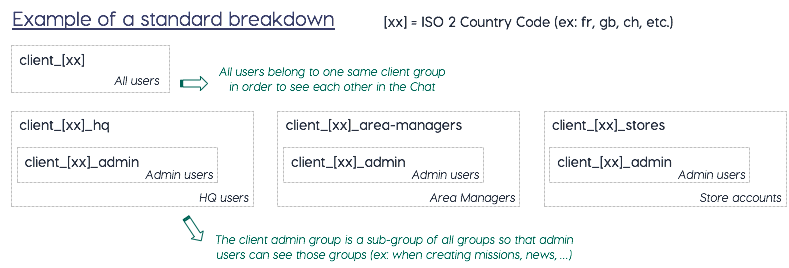
Groups are used to manage users. This is VERY important as Groups are what make using the application much simpler. By adding Users to Groups, when you need to modify sets of Users, you just change the groups properties and all the Users in the Group inherit these properties (much better than changing each individual user manually). Moreover, Groups allow to restrict visibility when some entities are shared (Missions, News, Documents, ...)
How do I structure my groups ?
Each Group usually corresponds to a population of Users (ex: Admin, HQ, VM Managers, Retail Area Managers, Stores, etc.).
General Group
Usually there is a general group, which has the name of the tenant. This group will contain all of the other Groups and will give the Users access to shared information.
Then you will usually find a Group for each type of user. These usually fall into one of these categories:
Admin
Area Managers
HQ
Itinerants
Store Users
Table groups
| Column | Type | Description |
|---|---|---|
group_id |
varchar(100) | Unique id |
title |
varchar(255) | Title of the group |
description |
varchar(255) | Description of the group |
code |
varchar(100) | The group code |
icon_url |
varchar(255) | The url of the icon |
users_count |
mediumint | Number of users in this group |
_ect |
timestamp | Creation date |
_lmt |
timestamp | Last update date |
tenant |
varchar(24) | Tenant name |
matches the users to the groups they are in, with matching ids. The user id are duplicated in front of all the group ids they match (one user can be in several groups).
Table groups_users
| Column | Type | Description |
|---|---|---|
group_id |
varchar(100) | Unique group id |
user_id |
varchar(24) | Unique user id |
tenant |
varchar(24) | Tenant name |
Table kpis_image_recognition
This table contains information about the KPIs calculated by the Image recognition algorithms.
The KPIs with operator "count", "count_linear", and "presence" refer to a single sku_name which corresponds to the "name" of the SKU in the skus_image_recognition table. KPIs with other operators often refer to multiple SKUs and are presented with one row per SKU for this KPI, with an index.
kpi_type can be classes, numerator or denominator.
classesrefers to KPIs calculated on a simple list of SKUs.numeratoranddenominatorrefer to KPIs calculated on a comparison of two lists of SKUs.
For example, the KPI count_share will calculate the share of facings (count) of the SKUs from the numerator vs the SKUs from the denominator. The calculation would be (total count of "numerator" SKUs) / (total count of "numerator" SKUs + total count of "denominator" SKUs).
| Column | Type | Description |
|---|---|---|
| kpi_file_id | varchar(24) | Unique ID of the KPI file |
| sku_catalog_id | varchar(24) | Unique ID of the SKU catalog |
| kpi_file_name | varchar(50) | Name of the KPI file |
| kpi_name | varchar(255) | Name of the KPI |
| kpi_type | varchar(20) | Type of the KPI |
| sku_name | varchar(255) | Name of the SKU |
| operator | varchar(50) | Operator used to calculate the KPI |
| index | smallint | Index of the sku_name in the KPI calculation order |
Table missionsdata_image_recognition
Contains the answers for completed missions with image recognition. It contains references to the mission, the mission's store and the campaign of the mission. Question related fields are question id, question (content), question type and the answer.
This table is populated only from image recognition campaigns
It contains two additional columns compared to the missionsdata table: photo_urls and photo_markup_urls
both columns are populated for KPI fields calculated by the image recognition algorithm. The photos in these columns are the photos used to calculate the answer of the KPI question. Only number and checkbox fields are defined as KPI fields
This table also contains photo and multiphotos fields and their answer.
| Column | Type | Description |
|---|---|---|
| mission_data_id | varchar(24) | Unique id of the mission data |
| question_id | varchar(40) | Id of the question |
| question_type | varchar(255) | Supported type: select buttons | select | number | textarea | text | star rating | select multi | checkbox | auto complete | select buttons multi | catalog | tel | ranking | productcheck | multiple choice | formula | formulaadvanced | photo | multiphotos |
| question | text | Question content |
| answer | text | Answer to the question |
| slide_number | tinyint | Page number |
| question_number | tinyint | Ordinal number of the question in the page |
| campaign_id | varchar(24) | Unique id of the associated campaign |
| campaign_title | varchar(255) | The campaign title |
| mission_id | varchar(24) | Unique id of the mission |
| store_id | varchar(24) | Unique id of associated store |
| photo_urls | varchar(255) | List of photo urls of the photo field used to calculate the image recognition result |
| photo_markup_urls | varchar(255) | List of photo markup urls of the photo field used to calculate the image recognition result |
| answer_idx | tinyint(3,0) | Answer index |
| _lmt | timestamp | Mission's data last update date |
| _ect | timestamp | Mission's data creation date |
| tenant | varchar(24) | Tenant name |
Table skus_image_recognition
This table provides information about the SKUs being tracked with the image recognition algorithm.
| Column | Type | Description |
|---|---|---|
| sku_id | varchar(24) | Unique ID of the SKU |
| name | varchar(255) | Name of the SKU |
| category | varchar(100) | Category of the SKU |
| country | varchar(80) | Country of the SKU |
| brand | varchar(24) | Brand of the SKU |
| sub_brand | varchar(100) | Sub-brand of the SKU |
| manufacturer | varchar(100) | Manufacturer of the SKU |
| bundle | boolean | Indicates whether the SKU is part of a bundle |
| bundable | boolean | Indicates whether the SKU can be bundled with other SKUs |
| _ect | timestamp | Creation date of the SKU record |
| _lmt | timestamp | Last update date of the SKU record |
An Inventory is a custom data structure to manage and use data in a similar way as in a spreadsheet or database directly from the YOOBIC Platform. Each inventory has a defined structure that rely on the same fields as in a YOOBIC campaign.
Table inventory
| Column | Type | Description |
|---|---|---|
inventory_id |
varchar(24) | Unique id of the inventory |
description |
text | The inventory description |
name |
varchar(255) | The inventory name |
title |
varchar(255) | The inventory title |
_lmt |
timestamp | Last update date |
_ect |
timestamp | Creation date |
tenant |
varchar(24) | Tenant name |
Table indexes:
PRIMARY KEY (
inventory,tenant)INDEX
tenant
Table inventory_data
Contains the data of each dataset (legacy name: inventory)
| Column | Type | Description |
|---|---|---|
inventory_data_id |
varchar(24) | Unique id of the dataset instance |
inventory_id |
nvarchar(24) | Unique id of the dataset the instance is related to |
user_id |
nvarchar(24) | User if of the user who created the instance |
question_id |
nvarchar(150) | Unique id of the field of the dataset |
question |
nvarchar(255) | Title of the field of the dataset |
answer |
text | Unique id of the plan |
_ect |
timestamp | Creation date |
_lmt |
timestamp | Last update date |
Table indexes:
PRIMARY KEY (
inventory_data_id,tenant,inventory_id,question_id,answer_idx)INDEX
user_idINDEX
store_idINDEX
question_idINDEX
tenant
Table inventory_product
Contains the data of the catalog fields from datasets (legacy name: inventory)
| Column | Type | Description |
|---|---|---|
inventory_data_id |
varchar(24) | Unique id of the dataset instance |
inventory_id |
nvarchar(24) | Unique id of the dataset the instance is related to |
question_id |
nvarchar(40) | Unique id of the field of the dataset |
product_id |
nvarchar(24) | Product id of the product selected in the catalog field for this insance for this question |
quantity |
int | Quantity of the product selected |
price |
decimal(15,2) | Unit price of the product at submission time, before discount (empty for pre-V17 data) |
currency |
varchar(3) | ISO currency code of the collected price (empty when multi-currency is off) |
product_discount |
decimal(5,2) | Product-level discount percentage applied at submission (empty if none) |
question_discount |
decimal(5,2) | Global basket discount percentage of the catalog question (empty if none) |
This table contains sections of learning paths, including their titles and orders.
Table learning_path_sections
| Column | Type | Description |
|---|---|---|
section_id |
varchar(36) | Unique ID of the section |
learning_path_id |
varchar(24) | ID of the learning path |
section_order |
tinyint unsigned | Order of the section |
title |
varchar(255) | Title of the section |
plan_id |
varchar(24) | ID of the plan |
plan_order |
tinyint unsigned | Order of the plan |
tenant |
varchar(32) | Tenant name |
Primary Key: (section_id, plan_id, tenant)
Indexes:
learning_path_indexonlearning_path_idtenant_indexontenantidx_titleontitle
Lessons are the activities the users perform during their trainings.
Table lessons
| Column | Type | Description |
|---|---|---|
lesson_id |
varchar(24) | Unique id of the lesson |
title |
varchar(255) | Title of the lesson |
title_en |
varchar(255) | title of the lesson in english based on the translation key |
type |
varchar(255) | Type of the lesson (currently just lesson) |
campaign_id |
varchar(24) | Unique id of the campaign |
course_id |
varchar(24) | Unique id of the course |
plan_id |
varchar(24) | Unique id of the plan |
user_id |
varchar(24) | Unique id of the user |
status |
varchar(40) | Whether the lesson is finished or not |
points |
decimal(5,2) | Number of points of the lesson |
score |
json | Number of points of the lesson |
badges |
json | Array of badges a user has earned during this lesson |
validated |
tinyint | Whether the lesson is successfull or a failure |
duration |
decimal(6,2) | Time spent on the lesson (in minutes) |
is_quiz |
tinyint | True if the lesson_type is one of quizz, timedquizz, confidencequiz, scorm |
finished_date |
timestamp | Date when the user completed the lesson |
lesson_type |
nvarchar(255) | Type of the lesson: content, video, quiz, timed quiz, confidence-based assessment, scorm lessons |
questions_count |
smallint | Number of questions in the lessons |
correct_answers |
smallint | Number of correct answers in the lesson |
_lmt |
timestamp | Last update date |
_ect |
timestamp | Creation date |
tenant |
varchar(24) | Tenant name |
This table archives lesson data, including titles and scores.
Table lessons_archive
| Column | Type | Description |
|---|---|---|
lesson_id |
varchar(24) | Unique ID of the lesson |
title |
varchar(255) | Title of the lesson |
type |
varchar(255) | Type of the lesson |
campaign_id |
varchar(24) | ID of the campaign |
plan_id |
varchar(24) | ID of the plan |
course_id |
varchar(24) | ID of the course |
user_id |
varchar(24) | ID of the user |
lesson_type |
varchar(255) | Type of the lesson |
status |
varchar(40) | Status of the lesson |
points |
decimal(7,2) | Points for the lesson |
score |
json | Score details |
questions_count |
smallint | Number of questions |
correct_answers |
smallint | Number of correct answers |
validated |
tinyint(1) | Indicates if validated |
duration |
decimal(8,2) | Duration of the lesson |
_ect_date |
date | Creation date |
_lmt |
timestamp(3) | Last update date |
_ect |
timestamp(3) | Creation date |
wall_time |
timestamp(3) | Wall time |
tenant |
varchar(32) | Tenant name |
Primary Key: (lesson_id, tenant)
Indexes:
lessons_campaign_id_indexoncampaign_idlessons_plan_id_indexonplan_idlessons_user_id_indexonuser_idlessons_course_id_indexoncourse_idlessons_lmt_status_tenanton (_lmt,status,tenant)tenant_indexontenant
The table gather's the most recent answers given by a user in the lesson.
Table lessonsdata
| Column | Type | Description |
|---|---|---|
lesson_data_id |
varchar(24) | Unique id of the lessondata |
campaign_id |
varchar(24) | Unique id of the campaign |
lesson_id |
varchar(24) | Unique id of the lesson |
plan_id |
varchar(24) | Unique id of the plan |
user_id |
varchar(24) | Unique id of the user |
question_id |
varchar(40) | Unique id of a question |
question_type |
varchar(255) | Type of the question |
question |
text | The question |
question_en |
text | Title of the question in english based on the translation key |
answer |
text | The answer |
answer_en |
text | Answer of the question in english based on the translation key |
page_number |
tinyint | The number of the page the question appears in |
question_number |
number | The number of the question on the page |
answer_idx |
tinyint | For multiple answers, the position of the answer |
validated |
boolean | 1 if the user answered correctly to the question |
_lmt |
timestamp | Last update date |
_ect |
timestamp | Creation date |
tenant |
varchar(24) | Tenant name |
Table lessonsdata_confidence_quiz
Contains only the latest attempt to a quiz of type confidence based.
| Column | Type | Description |
|---|---|---|
lesson_data_id |
varchar(24) | Unique id of the lessonsdata of type confidence quiz |
question_id |
nvarchar(40) | Unique id of the questions of the lesson of type confidence quiz |
confidence_level |
nvarchar(20) | Level of confidence of the user's answer. Can be low medium or high. |
Table lessonsdata_confidence_quiz_history
Contains all the historical data relating to quiz of type Confidence based learning.
| Column | Type | Description |
|---|---|---|
lesson_data_id |
varchar(24) | Unique id of the lessonsdata of type confidence quiz |
question_id |
nvarchar(40) | Unique id of the questions of the lesson of type confidence quiz |
confidence_level |
nvarchar(20) | Level of confidence of the user's answer. Can be low medium or high. |
If a user retries a lesson, we keep the data of the last attempt in lessonsdata table. The previous attempt/s will be moved to this table.
Table lessonsdata_history
| Column | Type | Description |
|---|---|---|
lesson_data_id |
varchar(24) | Unique id of the lessondata |
campaign_id |
varchar(24) | Unique id of the campaign |
lesson_id |
varchar(24) | Unique id of the lesson |
plan_id |
varchar(24) | Unique id of the plan |
user_id |
varchar(24) | Unique id of the user |
question_id |
varchar(40) | Unique id of a question |
question_type |
varchar(255) | Type of the question |
question |
text | The question |
question_en |
text | Title of the question in english based on the translation key |
answer |
text | The answer |
answer_en |
text | Answer of the question in english based on the translation key |
page_number |
tinyint | The number of the page the question appears in |
question_number |
number | The number of the question on the page |
answer_idx |
tinyint | For multiple answers, the position of the answer |
validated |
boolean | 1 if the user answered correctly to the question |
_lmt |
timestamp | Last update date |
_ect |
timestamp | Creation date |
tenant |
varchar(24) | Tenant name |
Missions are the basic campaign type. The store users will receive missions with fields to complete, for example send a photo of their display or change the location of the new collection in store. The mission creator will define its content from the dashboard, then he will publish it to the appropriate stores. Once the users have completed the mission they will be able to submit it. The managers responsible for the store will then be able to define the mission as compliant (if they deem the answers acceptable) or non compliant (if they believe there is room for improvement). If a mission is evaluated as non compliant, the manager can choose for the user to retake the mission entirely or he can specify which parts of the mission need improving and republish the mission to the store with the rest of the answers already filled in.
Tips: a mission is an entity of a campaign published on a store.
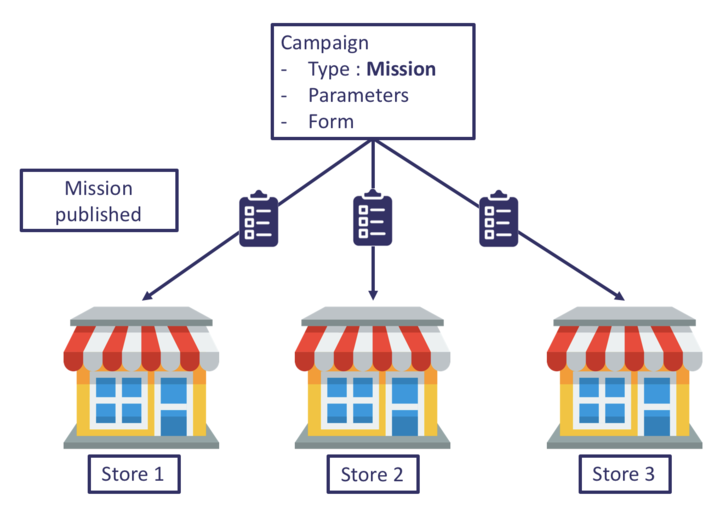
A mission is either available, ongoing or finished.
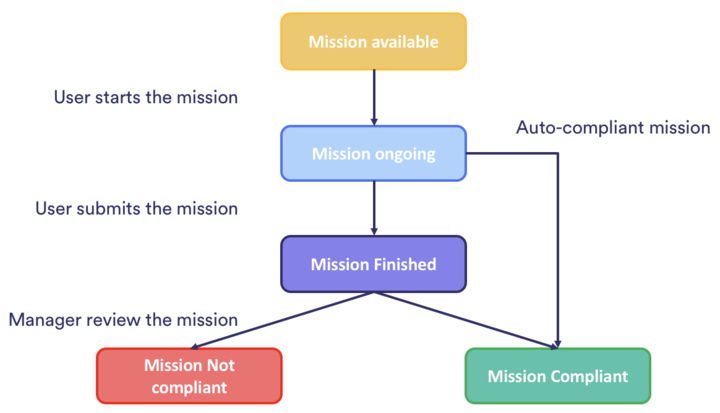
A finished mission is either "to validate", "compliant" or "not compliant".
Available : a mission is available as soon as it has been published on a store, and hasn't been started yet by a user.
Ongoing: as soon as a user starts or loads a mission, the status of the mission goes from "available" to "ongoing" (known as
bookedunder the status field of a mission)Finished : once the mission has been submitted, it is finished.
- To validate: if the mission hasn't been validated yet and marked as "compliant" or "not compliant", or isn't configured to be automatically marked as compliant.
- Compliant
- Not compliant
Scheduled: a mission is scheduled as soon as it has been published on a store and if
valid_fromdate did not reach the current date yet.Archived: a mission gets status archived as soon as it’s archived
Table missions
| Column | Type | Description |
|---|---|---|
mission_id |
varchar(24) | Unique id of the mission |
title |
varchar(255) | The title of the mission |
type |
varchar(24) | Mission type |
campaign_id |
varchar(24) | Unique id of the mission's parent campaign |
user_id |
varchar(24) | Unique id of the user who performs the mission |
creator_id |
varchar(24) | Unique id of the mission creator |
store_id |
varchar(24) | Unique id of associated store |
status |
varchar(40) | Current status of the mission: NULL, scheduled, booked, finished, archived |
valid_from |
timestamp | Mission available from |
republish_count |
int(11) | The number of times the mission was republished |
available_on_book |
boolean | If true, a new copy of this mission would be created on booking |
available_on_finished |
boolean | If true, a new copy of this mission would be created on finish |
booked_date |
timestamp | The date on which the mission was booked to a user |
due_date |
timestamp | The date by which the mission must be completed |
duration |
decimal(6,2) | Time spent on the mission (in minutes) |
finished_date |
timestamp | The date on which the mission was finished |
score |
JSON | The score of the mission as a JSON object {"title": "my score", "value": 10} |
extra_scores |
JSON | The extra scores of the mission as a JSON object {"score1": { "title": "my score", "value": 10}} |
compliant |
tinyint(3,0) | Has the mission been validated by an area manager: NULL |
compliant_by_default |
boolean | If true, the mission is automatically marked compliant on finish |
validated_date |
timestamp | The date on which the mission was validated |
reason_noncompliant |
text | The reason for the mission was unvalidated |
republished_with_answers |
boolean | Has the mission been repulished with the previous answers after being marked noncompliant |
original_mission_id |
varchar(24) | If present, the mission_id of the mission that this mission was republished from |
original_reason_noncompliant |
text | The reason_noncompliant from the original mission that was republished. |
action_plan_progress |
tinyint | Completion rate of an action plan |
validated |
boolean | 1 if the mission has been validated |
skip_validation |
boolean | 1 if the mission doesn't need to be validated |
_lmt |
timestamp | Mission's last update date |
_ect |
timestamp | Mission's creation date |
tenant |
varchar(24) | Tenant name |
Table indexes:
PRIMARY KEY (
mission_id,tenant)INDEX (
campaign_id,store_id)INDEX
store_idINDEX
statusINDEX
_lmtINDEX
finished_dateINDEX
compliantINDEX
validatedINDEX
valid_fromINDEX
creator_idINDEX (
_ect,validated_date,compliant_by_default)INDEX
tenant
Table mission_action_plans
Contains all the missions of type action plan
| Column | Type | Description |
|---|---|---|
mission_id |
varchar(24) | Unique id of the mission |
campaign_id |
varchar(24) | Unique id of the mission's parent campaign |
owner_id |
varchar(24) | Unique id of the quick task creator |
title |
text | The title of the task |
due_date |
timestamp | Due date of the quick task |
priority |
tinyint | Priority level of the quick task between 1 (high) and 4 (low) |
action_number |
smallint | Order of the task |
action_title |
text | Title of the task |
finished |
boolean | True if the quick task is completed |
finished_date |
timestamp | The date on which the quick task was finished |
action_due_date |
timestamp | Due date of the task |
assigned_user_id |
nvarchar(24) | Unique Id of the assigned user |
is_photo_required |
boolean | True if a picture is required to complete the quick task |
has_photo |
boolean | true if a picture is attached to the quick task |
_ect |
timestamp | Creation date |
View missions_all
Contains data about the mission's progress, status, analysis status and compliance
| Column | Type | Description |
|---|---|---|
mission_id |
varchar(24) | Unique id of the mission |
title |
varchar(255) | The title of the mission |
campaign_id |
varchar(24) | Unique id of the mission's parent campaign |
campaign_title |
varchar(255) | The campaign title |
campaign_published |
timestamp | Campaign publication date |
user_id |
varchar(24) | Unique id of the user who performs the mission |
creator_id |
varchar(24) | Unique id of the mission creator |
store_id |
varchar(24) | Unique id of associated store |
finished_date |
timestamp | The date on which the mission was finished |
validated_date |
timestamp | The date on which the mission was validated |
booked_date |
timestamp | The date on which the mission was booked to a user |
booked_until |
timestamp | The last date on which the mission was booked to a user |
valid_from |
timestamp | Mission available from |
validated |
tinyint(1) | Has the mission been validated by an area manager: N ULL |
skipValidation |
tinyint(1) | Indicator if to skip the validation |
status |
varchar(40) | Current status of the mission: NULL, scheduled, booked, finished, archived |
type |
varchar(24) | Mission type |
progress |
varchar(9) | The progress of the mission: finished or available |
analyzed |
varchar(11) | If the mission is analyzed or not: analyzed, to validate |
compliancy |
varchar(11) | If the mission compliant or not: compliant, not compliant |
reactivity_store |
decimal(42,4) | The time it took to the store to finish the mission (in hours) |
reactivity_manager |
decimal(24,4) | The time it took for the manager to validate the mission (in hours) |
region |
varchar(255) | Store region |
store_title |
varchar(255) | The store title |
_lmt |
timestamp | Mission's last update date |
_ect |
timestamp | Mission's creation date |
tenant |
varchar(24) | Tenant name |
Table mission_todos
Contains all the missions of type Quick Tasks
| Column | Type | Description |
|---|---|---|
mission_id |
varchar(24) | Unique id of the mission |
title |
varchar(255) | The title of the mission |
type |
varchar(24) | Mission type |
user_id |
varchar(24) | Unique id of the user who performs the mission |
creator_id |
varchar(24) | Unique id of the mission creator |
campaign_id |
varchar(24) | Unique id of the mission's parent campaign |
store_id |
varchar(24) | Unique id of associated store |
status |
varchar(40) | Current status of the mission: NULL, scheduled, booked, finished, archived |
valid_from |
timestamp | Mission available from |
republish_count |
int | The number of times the mission was republished |
available_on_book |
boolean | If true, a new copy of this mission would be created on booking |
available_on_finish |
boolean | If true, a new copy of this mission would be created on completion |
booked_date |
timestamp | The date on which the mission was booked to a user |
due_date |
timestamp | The date by which the mission must be completed |
duration |
DECIMAL(6,2) | Time spent on the mission (in minutes) |
finished_date |
timestamp | The date on which the mission was finished |
score |
json | The score of the mission as a JSON object {"title": "my score", "value": 10} |
extra_scores |
json | The extra scores of the mission as a JSON object {"score1": { "title": "my score", "value": 10}} |
validated |
boolean | True if the mission has been validated |
compliant |
boolean | Has the mission been validated by an area manager: NULL |
skip_validation |
boolean | True if the mission doesn't need to be validated |
compliant_by_default |
boolean | If true, the mission is automatically marked compliant on finish |
validated_date |
timestamp | The date on which the mission was validated |
validated_username |
nvarchar(255) | User who validated the mission |
reason_noncompliant |
text | The reason for the mission was unvalidated |
republished_with_answers |
boolean | Has the mission been repulished with the previous answers after being marked noncompliant |
original_mission_id |
nvarchar(24) | If present, the mission_id of the mission that this mission was republished from |
original_reason_noncompliant |
text | The reason_noncompliant from the original mission that was republished. |
action_plan_progress |
tinyint | Completion rate of an action plan |
_lmt |
timestamp | Mission's last update date |
_ect |
timestamp | Creation date |
Table mission_workflows
Contains the information about each individual step of workflows, with the date when it has been created and completed, its title and the user who completed it.
| Column | Type | Description |
|---|---|---|
mission_id |
varchar(24) | Unique id of the mission |
title |
varchar(255) | The title of the mission |
type |
varchar(24) | Mission type |
user_id |
varchar(24) | Unique id of the user who performs the mission |
creator_id |
varchar(24) | Unique id of the mission creator |
campaign_id |
varchar(24) | Unique id of the mission's parent campaign |
store_id |
varchar(24) | Unique id of associated store |
status |
varchar(40) | Current status of the mission: NULL, scheduled, booked, finished, archived |
valid_from |
timestamp | Mission available from |
republish_count |
int | The number of times the mission was republished |
available_on_book |
boolean | If true, a new copy of this mission would be created on booking |
available_on_finish |
boolean | If true, a new copy of this mission would be created on completion |
booked_date |
timestamp | The date on which the mission was booked to a user |
due_date |
timestamp | The date by which the mission must be completed |
duration |
DECIMAL(6,2) | Time spent on the mission (in minutes) |
finished_date |
timestamp | The date on which the mission was finished |
score |
json | The score of the mission as a JSON object {"title": "my score", "value": 10} |
extra_scores |
json | The extra scores of the mission as a JSON object {"score1": { "title": "my score", "value": 10}} |
validated |
boolean | True if the mission has been validated |
compliant |
boolean | Has the mission been validated by an area manager: NULL |
skip_validation |
boolean | True if the mission doesn't need to be validated |
compliant_by_default |
boolean | If true, the mission is automatically marked compliant on finish |
validated_date |
timestamp | The date on which the mission was validated |
validated_username |
nvarchar(255) | User who validated the mission |
reason_noncompliant |
text | The reason for the mission was unvalidated |
republished_with_answers |
boolean | Has the mission been repulished with the previous answers after being marked noncompliant |
original_mission_id |
nvarchar(24) | If present, the mission_id of the mission that this mission was republished from |
original_reason_noncompliant |
text | The reason_noncompliant from the original mission that was republished. |
action_plan_progress |
tinyint | Completion rate of an action plan |
state |
nvarchar(50) | Status of the step, can be booked, available or finished |
step_title |
nvarchar(255) | Title of the step in the workflow |
_lmt |
timestamp | Mission's last update date |
_ect |
timestamp | Creation date |
Table workflows_history
Contains the information about each individual step of workflows, with the date when it has been created and completed, its title and the user who completed it.
| Column | Type | Description |
|---|---|---|
mission_id |
varchar(24) | Unique id of the mission |
step_id |
varchar(24) | Unique id of the step of the workflow |
state |
nvarchar(255) | State of the step of the workflow (can be null, booked, or finished) |
step_title |
nvarchar(255) | Title of the step in the workflow |
user_id |
varchar(24) | Unique if of the owner of the step of the workflow |
date |
timestamp | Date when the step has been completed |
step_number |
tinyint | Step number |
creation_step_date |
timestamp | Date when the step was created |
Contains the answers for completed missions.
It contains references to the mission, the mission's store and to the campaign of the mission.
Question related fields are question id, question (content), question type and the answer.
Note - filtering by questions is not supported.
Table missionsdata
| Column | Type | Description |
|---|---|---|
mission_data_id |
varchar(24) | Unique id of the mission data |
campaign_id |
varchar(24) | Unique id of the associated campaign |
campaign_title |
varchar(255) | The campaign title |
mission_id |
varchar(24) | Unique id of the mission |
store_id |
varchar(24) | Unique id of associated store |
question_id |
varchar(40) | Id of the question |
question |
text | Question content |
slide_number |
tinyint | Page number |
question_number |
tinyint | Ordinal number of the question in the page |
question_type |
varchar(255) | Supported type: select buttons | select | number | textarea | text | star rating | select multi | checkbox | auto complete | select buttons multi | catalog | tel | ranking | productcheck | multiple choice | formulaadvanced |
answer |
text | Answer to the question |
answer_idx |
tinyint(3,0) | Answer index |
validation_comments |
text | The comment at field level added during the manual validation flow |
is_invalid |
boolean | 1 if the field is marked as not satisfactory during the manual validation flow |
value_type |
varchar(255) | Is satisfactory or unsatisfactory or null based on the form field configuration |
_lmt |
timestamp | Mission's data last update date |
_ect |
timestamp | Mission's data creation date |
tenant |
varchar(24) | Tenant name |
Table indexes:
PRIMARY KEY (
mission_data_id,question_id,answer_idx,tenant)INDEX
campaign_idINDEX (
mission_id,question_id)INDEX (
store_id,question(100))INDEX
answer(100)INDEX
tenantINDEX
_lmtINDEX
_ect
It contains the result of price detection per product and mission.
Table missionsdata_pricecheck
| Column | Type | Description |
|---|---|---|
product_id |
varchar(24) | Unique id of the mission data |
price |
decimal(5,2) | Price |
campaign_id |
varchar(24) | Unique id of the associated campaign |
mission_id |
varchar(24) | Unique id of the mission |
question_id |
varchar(40) | Id of the question |
edited |
boolean | True if the price was manually edited |
barcode_duration |
decimal(6,3) | Time taken to the barcode detection |
price_duration |
decimal(6,3) | Time taken to the price detection |
retry |
smallint | Number of retries |
tenant |
varchar(24) | Tenant name |
Table missionsdata_product
Contains the data of the catalog fields from missionsdata
| Column | Type | Description |
|---|---|---|
product_id |
varchar(24) | Product id of the product selected in the catalog field for this missionsdata |
quantity |
int | Quantity of the product selected |
price |
decimal(15,2) | Unit price of the product at submission time, before discount (empty for pre-V17 data) |
currency |
varchar(3) | ISO currency code of the collected price (empty when multi-currency is off) |
product_discount |
decimal(5,2) | Product-level discount percentage applied at submission (empty if none) |
question_discount |
decimal(5,2) | Global basket discount percentage of the catalog question (empty if none) |
campaign_id |
varchar(24) | Unique id of the associated campaign |
question_id |
varchar(40) | Id of the question |
mission_id |
varchar(24) | Unique id of the mission |
mission_data_id |
varchar(24) | Unique id of the missionsdata |
This table contains moderation data, including flagged content and deletion details.
Table moderation
| Column | Type | Description |
|---|---|---|
moderation_id |
varchar(24) | Unique ID of the moderation record |
user_id |
varchar(24) | ID of the user |
comment_id |
varchar(24) | ID of the comment |
entity_id |
varchar(24) | ID of the entity |
entity_type |
varchar(100) | Type of the entity |
url |
varchar(255) | URL of the entity |
input |
varchar(255) | Input data |
is_flagged |
tinyint(1) | Indicates if flagged |
duration_seconds |
decimal(6,2) | Duration in seconds |
error |
varchar(100) | Error details |
is_deleted_entity |
tinyint(1) | Indicates if entity is deleted |
deletion_date |
timestamp(3) | Deletion date |
deleted_by |
varchar(24) | ID of the user who deleted |
_lmt |
timestamp(3) | Last update date |
_ect |
timestamp(3) | Creation date |
tenant |
varchar(32) | Tenant name |
Primary Key: (moderation_id, tenant)
Indexes:
tenant_indexontenant
Contains information coming from the news feed tab
Table news
| Column | Type | Description |
|---|---|---|
news_id |
varchar(24) | Unique id of the news |
user_id |
varchar(24) | Unique id of a user who published the news |
title |
varchar(255) | The title of news |
description |
text | The html content of the news feed |
description_sanitize |
text | Text of the content without html |
views |
smallint | News item views count |
likes |
smallint | News item likes count |
authorised_viewers |
smallint | Number of users allowed to view this news feed |
image |
varchar(24) | Link to uploaded image |
tags |
json | Tags of the newsTags (#example) added to the post |
start_date |
timestamp | Date relevant for the publication of the post. This is a separate field than the ect which might have different values. |
event_id |
varchar(24) | If the post was created from an Event, this is the id of the related Event |
_lmt |
timestamp | News item last update date |
_ect |
timestamp | News item creation date |
tenant |
varchar(24) | Tenant name |
contains information about uploaded photos and photos taken as part of a mission and its relations to the mission.
Table photos
| Column | Type | Description |
|---|---|---|
photo_id |
varchar(24) | Unique id of the photo |
mission_id |
varchar(24) | Unique id of the mission |
campaign_id |
varchar(24) | Unique id of the campaign |
mission_data_id |
varchar(24) | Unique id of the mission data |
store_id |
varchar(24) | Unique id of the store |
title |
varchar(255) | The photo title |
url |
varchar(255) | The url to the image |
markup_url |
varchar(255) | The markup url to the image |
question_id |
varchar(24) | Unique id of the question |
created_date |
timestamp | Creation date |
phash |
varchar(255) | Perceptual hash (fingerprint) |
tags |
json | Tags assigned to the photo |
short_desc |
varchar(255) | Short description of the product |
description |
text | Description of the product |
question_type |
nvarchar(255) | Type of field used in the campaign from which the photo was submitted |
slide_number |
tinyint | Page of the field of the campaign |
question_number |
smallint | Question number in the page of the field of the campaign |
_lmt |
timestamp | Last update date |
_ect |
timestamp | Creation date |
tenant |
varchar(24) | Tenant name |
Table indexes:
PRIMARY KEY (
photo_id,tenant)INDEX
created_dateINDEX
titleINDEX
question_idINDEX
store_idINDEX (
mission_id,question_id)INDEX
mission_data_idINDEX
campaign_idINDEX
tenant
View photos_tags
Maps photo's tags to rows, so that each row includes photo id with a corresponding tag
| Column | Type | Description |
|---|---|---|
photo_id |
varchar(24) | The photo unique id |
tag |
longtext | Photo tag |
A plan is the main description of a course that's assigned to users.
Table plans
| Column | Type | Description |
|---|---|---|
plan_id |
varchar(24) | Unique id of the plan |
title |
varchar(255) | The plan title |
title_en |
varchar(255) | Title of the plan in english based on the translation key |
description |
text | Description of the plan |
enable_journey |
boolean | Journey parameter activated or not |
lessons_count |
number | Number of lessons in the course |
finished_count |
number | Number of users that completed the course |
average_completed_lesson |
number | Average progression in the course |
creator_id |
nvarchar(24) | User id of the creator of the plan |
archived |
boolean | 1 if the plan is archived |
type |
nvarchar(30) | Null if the plan is a learning module. |
plan_id_original |
nvarchar(24) | Id of the plan on which a battle was created. |
category_id |
nvarchar(24) | Id of the category of the course |
competency_id |
nvarchar(24) | Id of the competency of the course |
authorised_users_count |
int | When discover is activated, this is the number of users who are authorised to access the course based the authorised groups the course category authorization. When |
tags |
json | Tag of the plan |
background_image |
nvarchar(255) | Image of the plan |
is_active |
boolean | 1 if the plan is active |
is_discoverable |
boolean | 1 if the plan can be discovered by users in the discover section |
available_points |
smallint | Number of points available in the plan |
is_rating_enabled |
boolean | Indication if rating is enabled for the plan (value: 1) or not (value: 0). Enable the users to rate a course. The rating is available in the course table |
is_questions_enabled |
boolean | Indication if questions are enabled for the plan (value: 1) or not (value: 0). Enable users to ask questions about the course. Questions are available in the question table |
is_featured |
boolean | Indication if featured option is enabled for the plan (value: 1) or not (value: 0). Enable to pin a course in the Discover section |
time_constraint_mode |
nvarchar(15) | Indication if time constraint mode is enabled for the plan (value: 1) or not (value: 0). The user must complete the course within the specified time constraint |
_lmt |
timestamp | Last update date |
_ect |
timestamp | Creation date |
tenant |
varchar(24) | Tenant name |
This table archives plan data, including titles and descriptions.
Table plans_archive
| Column | Type | Description |
|---|---|---|
plan_id |
varchar(24) | Unique ID of the plan |
creator_id |
varchar(24) | ID of the creator |
title |
varchar(255) | Title of the plan |
title_en |
varchar(255) | Title in English |
description |
text | Description of the plan |
finished_count |
smallint unsigned | Number of finished plans |
lessons_count |
smallint unsigned | Number of lessons |
enable_journey |
tinyint(1) | Indicates if journey is enabled |
archived |
tinyint(1) | Indicates if archived |
average_completed_lesson |
decimal(5,2) | Average completed lessons |
type |
varchar(30) | Type of the plan |
plan_id_original |
varchar(24) | Original plan ID |
category_id |
varchar(24) | Category ID |
competency_id |
varchar(24) | Competency ID |
authorised_users_count |
int unsigned | Number of authorized users |
tags |
json | Tags associated with the plan |
background_image |
varchar(255) | Background image |
is_active |
tinyint(1) | Indicates if active |
is_discoverable |
tinyint(1) | Indicates if discoverable |
available_points |
smallint unsigned | Available points |
is_rating_enabled |
tinyint(1) | Indicates if rating is enabled |
is_questions_enabled |
tinyint(1) | Indicates if questions are enabled |
is_featured |
tinyint(1) | Indicates if featured |
time_constraint_mode |
varchar(15) | Time constraint mode |
_lmt |
timestamp(3) | Last update date |
_ect |
timestamp(3) | Creation date |
wall_time |
timestamp(3) | Wall time |
tenant |
varchar(32) | Tenant name |
Primary Key: (plan_id, tenant)
Indexes:
plans_lmt_indexon_lmtplans_title_indexontitleplans_category_indexoncategory_idplans_type_indexontypetenant_indexontenant
This table contains every point transaction recorded for a user: lesson and course completions, point adjustments, and battles. It is the source of truth for point calculations and allows breaking down user points by course, plan or time frame.
Table points_transactions
| Column | Type | Description |
|---|---|---|
| transaction_id | varchar(24) | Unique ID of the point transaction |
| subject | varchar(100) | Entity the transaction is about (e.g. lessondata, battle, plan, update-lesson-points, update-course-points) |
| plan_id | varchar(24) | Id of the plan the transaction relates to (mission/course plan for lessons, battle plan for battles) |
| action | varchar(100) | Point event that generated the transaction (e.g. finish-lesson, finish-lesson-smart-quiz, battle-won, battle-lost, leave-plan) |
| source_action | varchar(100) | Upstream action that triggered the transaction (usually equal to action) |
| status | varchar(100) | Battle transactions only: pending, done or declined. NULL for all other transactions |
| points | double | Number of points gained or lost in the transaction (can be fractional, e.g. a course split across lessons) |
| user_id | varchar(24) | User the points belong to |
| course_id | varchar(24) | Id of the course the points came from, when applicable |
| lesson_id | varchar(24) | Id of the lesson the points came from, when applicable |
| transaction_date | timestamp | Business date of the transaction (can be backdated, use this for time-frame breakdowns) |
| _ect | timestamp | Creation date of the transaction record |
| _lmt | timestamp | Last update date of the transaction record |
Indexes
| Index | Columns |
|---|---|
| points_transactions_user_id_index | user_id |
| points_transactions_transaction_date_index | transaction_date |
Products represent usually physical products and are organised by catalog
Table products
| Column | Type | Description |
|---|---|---|
product_id |
varchar(24) | Unique id of the product |
title |
varchar(255) | The product title |
price |
decimal(15,2) | The product price |
reference |
varchar(255) | The product reference (SKU) |
extra_references |
text | Additional references of the product |
image |
varchar(255) | The url to the image |
short_desc |
varchar(255) | Short description of the product |
description |
text | Description of the product |
catalog_id |
varchar(24) | Unique id of the catalog |
tags |
json | Tags assigned to the product |
manufacturer |
varchar(255) | The manufacturer name of the product |
brand |
varchar(255) | The brand name of the product |
category |
varchar(255) | The category name of the product |
images |
json | The images associated with this product |
out_of_stock |
boolean | Whether or not product is available |
_ect |
timestamp | Creation date |
_lmt |
timestamp | Last update date |
tenant |
varchar(24) | Tenant name |
Questions are a Social Learning feature, allowing users to learn tips / expertise from each other. They can ask questions and others can reply to them. Admins and managers can “verify” some answers to make the response official. Essentially, Questions section acts as a forum where knowledge can be shared across the company.
Table questions
| Column | Type | Description |
|---|---|---|
question_id |
varchar(24) | Unique id of the question |
title |
varchar(255) | Title of the question |
description |
text | Description of the question |
user_id |
varchar(24) | User id creating the question |
is_wiki |
boolean | Whether or not this exists in the knowledge base |
is_verified |
boolean | Whether or not this is a verified question |
likes |
smallint | Likes count |
answers |
smallint | Number of answers |
bookmarks |
smallint | Number of users who bookmarked the question |
tags |
json | List of tags |
image |
varchar(255) | The url to the image |
_ect |
timestamp | Creation date |
_lmt |
timestamp | Last update date |
tenant |
varchar(24) | Tenant name |
Salesdata allows integration of external sales data or kpi per location, and optionally a category.
Periods can be: yearly, monthly, weekly, daily, hourly.
Salesdata uniqueness is determined by:
store_id
reporting_date
title
category
value_frequency
Table salesdata
| Column | Type | Description |
|---|---|---|
salesdata_id |
varchar(24) | Unique id of the salesdata |
store_id |
varchar(24) | Unique id of the store |
reporting_date |
timestamp | Reporting date |
title |
varchar(255) | The salesdata report title |
category |
varchar(255) | The product category |
value |
decimal(15,2) | The product value |
value_currency |
char(4) | The product currency |
value_frequency |
varchar(24) | The product measuring frequency : yearly / monthly / weekly / daily / hourly |
_lmt |
timestamp | Last update date |
_ect |
timestamp | Creation date |
tenant |
varchar(24) | Tenant name |
Table scorm_registrations
Each time a user starts a SCORM course, it creates in this table a scorm_registration.
A SCORM registration is the equivalent of a course_id for a SCORM content.
| Column Name | Data Type | Description |
|---|---|---|
| course_id | VARCHAR(24) | The unique identifier for the course. This is an alphanumeric string with a maximum length of 24 characters. Each course has a unique course_id. |
| scorm_registration_id | VARCHAR(36) | The unique identifier for the SCORM registration associated to the course_id. This is an alphanumeric string with a maximum length of 36 characters. Each SCORM registration has a unique scorm_registration_id. |
| score_scaled | TINYINT UNSIGNED | The score scaled for the course content. It can be a value between 0 to 100. It can be null if there is no score set up in the lesson. |
| total_seconds_tracked | SMALLINT UNSIGNED | The total number of seconds tracked for the course content. This field can contain any positive integer value up to 65535 (maximum value of SMALLINT UNSIGNED). This field can be NULL indicating that no time has been tracked. |
| first_access_date | TIMESTAMP(3) | The timestamp of the first access to the course. This field can be NULL indicating that the course has not been accessed yet. |
| last_access_date | TIMESTAMP(3) | The timestamp of the last access to the course. This field can be NULL indicating that the course has not been accessed yet. |
| created_date | TIMESTAMP(3) | The timestamp when the SCORM registration was created. This field can be NULL indicating that the creation date is not specified. |
| completed_date | TIMESTAMP(3) | The timestamp when the course was completed. This field can be NULL indicating that the course has not been completed yet. |
| scorm_registrations_course_id | VARCHAR(36) | The unique identifier for the associated SCORM cloud object. This is an alphanumeric string with a maximum length of 36 characters. Each SCORM cloud course has a unique scorm_registrations_course_id. |
| scorm_registrations_course_title | VARCHAR(255) | The SCORM title of the course. This is a string with a maximum length of 255 characters. The title can be NULL indicating that the course title is not specified or the course doesn't have a title. |
| _lmt | TIMESTAMP(3) | The timestamp of the last modification to the registration data. This field can be NULL indicating that no modification has been made after creation. |
| tenant | VARCHAR(32) | The identifier for the tenant. This is a string with a maximum length of 32 characters. |
This table contains SKU catalog information, including names and versions.
Table sku_catalogs
| Column | Type | Description |
|---|---|---|
sku_catalog_id |
varchar(24) | Unique ID of the SKU catalog |
name |
varchar(255) | Name of the catalog |
version |
smallint | Version of the catalog |
_lmt |
timestamp | Last update date |
_ect |
timestamp | Creation date |
tenant |
varchar(32) | Tenant name |
Primary Key: (sku_catalog_id, tenant)
Indexes:
catalogs_tenant_indexontenant
This table contains workflow steps, including titles and types.
Table step_workflows
| Column | Type | Description |
|---|---|---|
campaign_id |
varchar(24) | ID of the campaign |
step_id |
varchar(36) | Unique ID of the step |
step_number |
tinyint unsigned | Step number |
step_title |
varchar(255) | Title of the step |
step_type |
varchar(24) | Type of the step |
_lmt |
timestamp(3) | Last update date |
_ect |
timestamp(3) | Creation date |
tenant |
varchar(32) | Tenant name |
Primary Key: (campaign_id, step_id, tenant)
Indexes:
tenant_indexontenant
Table Store Ratings
Contains the list of the stores and their Google, Yelp or Tripadvisor rating
| Column | Type | Description |
|---|---|---|
store_rating_id |
varchar(24) | The store rating's unique id |
store_id |
varchar(24) | The store unique id |
store_id_yelp |
varchar(100) | Unique id the site in Yelp |
store_id_tripadvisor |
varchar(100) | Unique id of the site in Trip Advisor |
store_id_google |
varchar(100) | Unique id of the site in Google |
store_url_yelp |
varchar(100) | URL of the site in Yelp |
store_url_tripadvisor |
varchar(100) | URL of the site in Trip Advisor |
store_url_google |
varchar(100) | URL of the site in Google |
review_count_yelp |
mediumint | Number of reviews in Yelp |
review_count_tripadvisor |
mediumint | Number of reviews in Trip Advisor |
review_count_google |
mediumint | Number of reviews in Google |
total_review_count |
mediumint | Total number of reviews |
average_rating_yelp |
decimal(6,1) | Average rating in Yelp |
average_rating_tripadvisor |
decimal(6,1) | Average rating in Trip Advisor |
average_rating_google |
decimal(6,1) | Average rating in Google |
total_average_rating |
decimal(6,1) | Average rating of the site |
created_date |
timestamp | Creation date of the store rating |
updated_date |
timestamp | Last update date of the store rating |
Stores always belong to specific Store Type.
Store Types determine which stores users can potentially see.
They will be linked to one or several user groups.
Store types are used to have a better view of where the stores are (regions), or what type they belong to (business unit).
Stores types are handy in the application when publishing campaigns to multiple stores.
Table store_types
| Column | Type | Description |
|---|---|---|
store_type_id |
varchar(24) | Unique id of the store type |
name |
varchar(255) | The name of the store type |
_ect |
timestamp | Creation date |
_lmt |
timestamp | Last update date |
tenant |
varchar(24) | Tenant name |
This table contains reviews for stores, including ratings and providers.
Table store_reviews
| Column | Type | Description |
|---|---|---|
store_review_id |
varchar(24) | Unique ID of the store review |
store_id |
varchar(24) | ID of the store |
review_id |
varchar(100) | ID of the review |
provider |
varchar(20) | Provider of the review |
url |
varchar(255) | URL of the review |
text |
varchar(255) | Text of the review |
time_created |
timestamp | Time created |
rating |
tinyint unsigned | Rating of the review |
created_date |
timestamp | Date created |
updated_date |
timestamp | Date updated |
tenant |
varchar(32) | Tenant name |
Primary Key: (store_review_id, tenant)
Indexes:
tenant_indexontenant
This table maps store types to groups.
Table store_type_groups
| Column | Type | Description |
|---|---|---|
store_type_id |
varchar(24) | ID of the store type |
group_id |
varchar(100) | ID of the group |
tenant |
varchar(32) | Tenant name |
Primary Key: (store_type_id, group_id)
Indexes:
group_id_indexon (group_id,tenant)tenant_indexontenant
Stores are a very important part of the application. They represent physical locations of stores. They are the entities which receive missions (not the users). The users associated to the stores will be able to see their missions and carry them out if they have the correct roles. Each store belongs to a specific Store Types. If you don't know what is a Store Type, please refer to the Store Types section which will provide you with a detailed explanation.
In the front end of the application we now call them sites, to use a wording that also applies to companies in different industries that do not have frontline locations called stores (but perhaps restaurants, pharmacies etc.). But in the context of the API, we still call these entities stores.
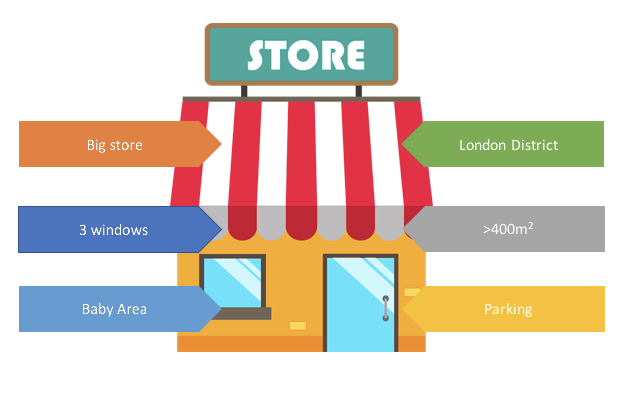
Note - Stores responding to the following criteria are excluded from BI.
- Store which tags contain
archive(case insensitive)
Table stores
| Column | Type | Description |
|---|---|---|
store_id |
varchar(24) | Unique id of the store |
store_type |
varchar(24) | The id pf the store type |
region |
varchar(255) | The region of the store |
country |
varchar(255) | The country of the store |
address |
varchar(255) | The address of the store |
area_level |
varchar(255) | The area level of the store |
client_id |
varchar(255) | The external client id of the store |
title |
varchar(255) | The title of the store |
latitude |
decimal(11,8) | The latitude of the store |
longitude |
decimal(11,8) | The longitude of the store |
tags |
json | The list of tags |
info |
text | Additional information regarding the store. Supports HTML layout |
notification_emails |
json | List of email(s) that will be notified when a mission is finished and/or a request is created/finished |
contact_email |
varchar(255) | Contact's email of the store i.e. store manager's email |
contact_phone |
varchar(255) | Contact's phone of the store i.e. store manager's phone |
contact_name |
varchar(255) | Contact's name of the store i.e. store manager's name |
properties |
json | Extra information displayed on the Store Activity page. This can be split into 4 components: columns, rows, grid, html |
vip |
boolean | Indicates if the store is a VIP store (a flagship store) |
photo |
varchar(1000) | A photo of the store |
timezone |
varchar(40) | The Time Zone allows to display the hourly sales data in the store insights in the local time of the store. |
capacity |
decimal(10,2) | The limit capacity of the store. |
_ect |
timestamp | Creation date |
_lmt |
timestamp | Last update date |
tenant |
varchar(24) | Tenant name |
The properties field is a json array and can be used to display the following columns, rows, grid, and html.
In its most generic format it looks like :
[
    {
        "title": "string",
        "type": "string",
        "headers": [
            "string"
        ],
        "values": [
            "object"
        ]
    }
]
columns
{
    "title" : "KPI S27",
    "type" : "columns",
    "values" : [
        {
            "title" : "Revenues",
            "value" : "1 456 $",
            "isPercent" : false,
            "colorHex" : "#00FF00"
        },
        {
            "title" : "Nb Hours",
            "value" : "7/66",
            "colorHex" : "#B404FF"
        },
        {
            "title" : "QP",
            "value" : 2.8,
            "isPercent" : true,
            "colorHex" : "#B40404"
        }
    ]
}
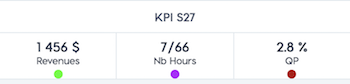
rows
{
    "title" : "S26 to S27",
    "type" : "rows",
    "values" : [
        {
            "title" : "Revenues",
            "value" : "14 647 $",
            "delta" : "+82.5 %",
            "colorHex" : "#B40404"
        },
        {
            "title" : "Clients",
            "value" : "1 753",
            "delta" : "-10.3 %",
            "colorHex" : "#B40404"
        },
        {
            "title" : "Basket",
            "value" : "8.4 $",
            "delta" : "+4.7 %",
            "colorHex" : "#04B404"
        }
    ]
}
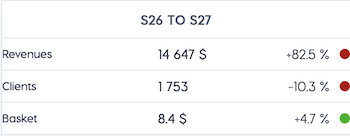
grid
{
    "title" : "Hours",
    "type" : "grid",
    "headers" : [
        "Day",
        "Morning",
        "Afternoon",
        "Nb Hours"
    ],
    "values" : [
        {
            "values" : [
                "Monday",
                "9:00",
                "20:00",
                "5/11"
            ],
            "colorHex" : "#000000"
        },
        {
            "values" : [
                "Tuesday",
                "9:00",
                "20:00",
                "2/11"
            ],
            "colorHex" : "#000000"
        },
        {
            "values" : [
                "Wednesday",
                "9:00",
                "20:00",
                "0/11"
            ],
            "colorHex" : "#000000"
        },
        {
            "values" : [
                "Thursday",
                "9:00",
                "20:00",
                "0/11"
            ],
            "colorHex" : "#000000"
        },
        {
            "values" : [
                "Friday",
                "9:00",
                "20:00",
                "0/11"
            ],
            "colorHex" : "#000000"
        },
        {
            "values" : [
                "Saturday",
                "9:00",
                "20:00",
                "0/11"
            ],
            "colorHex" : "#A0A0A0"
        },
        {
            "values" : [
                "Sunday",
                " ",
                " ",
                "0/0"
            ],
            "colorHex" : "#A0A0A0"
        }
    ]
}
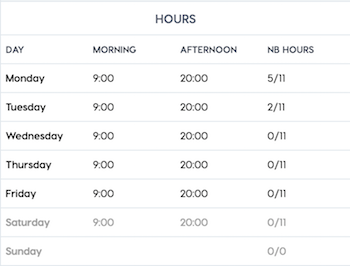
html
Expose the data of the custom fields defined for stores.
Table stores_custom_data
| Column | Type | Description |
|---|---|---|
store_id |
varchar(24) | Id of the store |
inventory_id |
varchar(24) | Id of the custom model (Inventory table) |
field_name |
varchar(255) | The custom field name from the custom model (Inventory table) |
value |
text | The value for the custom field |
value_idx |
tinyint | For multiple values, the position of the value |
_lmt |
timestamp | Last update date |
_ect |
timestamp | Creation date |
tenant |
varchar(24) | Tenant name |
View stores_active
Displays for each campaign per day if a visit was performed
| Column | Type | Description |
|---|---|---|
tenant |
varchar(24) | Tenant name |
visit |
varchar(11) | visited, not visited |
date_day |
varchar(24) | The day of the visits |
campaign_id |
varchar(24) | The campaign unique id |
View stores_tags
Maps store's tags to rows, so that each row includes store id with a corresponding tag
| Column | Type | Description |
|---|---|---|
store_id |
varchar(24) | The store unique id |
tag |
longtext | Store tag |
View stores_visited
Displays the number of stores visits per day per campaign
| Column | Type | Description |
|---|---|---|
count_stores |
bigint(21) | Number of stores visited |
date_day |
varchar(24) | The day of the visits |
campaign_id |
varchar(24) | The campaign unique id |
tenant |
varchar(24) | Tenant name |
Displays all the archived stores
Table stores_archive
| Column | Type | Description |
|---|---|---|
store_id |
varchar(24) | Unique id of the store |
store_type |
varchar(24) | The id pf the store type |
region |
varchar(255) | The region of the store |
country |
varchar(255) | The country of the store |
address |
varchar(255) | The address of the store |
area_level |
varchar(255) | The area level of the store |
client_id |
varchar(255) | The external client id of the store |
title |
varchar(255) | The title of the store |
latitude |
decimal(11,8) | The latitude of the store |
longitude |
decimal(11,8) | The longitude of the store |
tags |
json | The list of tags |
info |
text | Additional information regarding the store. Supports HTML layout |
notification_emails |
json | List of email(s) that will be notified when a mission is finished and/or a request is created/finished |
contact_email |
varchar(255) | Contact's email of the store i.e. store manager's email |
contact_phone |
varchar(255) | Contact's phone of the store i.e. store manager's phone |
contact_name |
varchar(255) | Contact's name of the store i.e. store manager's name |
properties |
json | Extra information displayed on the Store Activity page. This can be split into 4 components: columns, rows, grid, html |
vip |
boolean | Indicates if the store is a VIP store (a flagship store) |
photo |
varchar(1000) | A photo of the store |
timezone |
varchar(40) | The Time Zone allows to display the hourly sales data in the store insights in the local time of the store. |
capacity |
decimal(10,2) | Maximum number of customers which can be served at the same time |
_ect |
timestamp | Creation date |
_lmt |
timestamp | Last update date |
tenant |
varchar(24) | Tenant name |
This table contains information about tasks, including titles and descriptions.
Table tasks
| Column | Type | Description |
|---|---|---|
task_id |
varchar(24) | Unique ID of the task |
creator_id |
varchar(24) | ID of the creator |
owner_id |
varchar(24) | ID of the owner |
title |
varchar(100) | Title of the task |
description |
text | Description of the task |
task_list_name |
varchar(100) | Name of the task list |
done |
tinyint(1) | Indicates if the task is done |
_lmt |
timestamp | Last update date |
_ect |
timestamp | Creation date |
tenant |
varchar(32) | Tenant name |
Primary Key: (task_id, tenant)
Indexes:
stores_tenant_indexontenant
Exposes tenant level information.
Table plans
| Column | Type | Description |
|---|---|---|
tenant_id |
varchar(24) | Unique id of the tenant |
name |
varchar(64) | The unique tenant name |
title |
varchar(64) | The tenant title |
icon |
varchar(255) | The icon of the company |
sql_size |
decimal(10, 2) | The company's estimated size |
has_terms_of_acceptance |
boolean | Does company have acceptance terms |
terms_of_acceptance |
text | Acceptance terms |
terms_of_acceptance_lmt |
timestamp | Last date modified acceptance terms |
Contains translations of common keys used in the app to different languages.
Table Translations
| Column | Type | Description |
|---|---|---|
translation_id |
varchar(24) | Unique id of the translations |
language |
varchar(24) | Default language chosen for the key |
key |
varchar(255) | The key that references this translation |
value |
varchar(255) | Translated key by the default language |
us |
varchar(255) | English - United States |
en |
varchar(255) | English |
ca |
varchar(255) | English - Canada |
fr |
varchar(255) | French |
de |
varchar(255) | German |
es |
varchar(255) | Spanish |
nl |
varchar(255) | Dutch |
pl |
varchar(255) | Polish |
it |
varchar(255) | Italian |
ru |
varchar(255) | Russian |
zhs |
varchar(255) | Simplified Chinese |
zht |
varchar(255) | Traditional Chinese |
pt |
varchar(255) | Portuguese |
kr |
varchar(255) | Kanuri |
ja |
varchar(255) | Japanese |
ua |
varchar(255) | Ukrainian |
he |
varchar(255) | Hebrew |
ar |
varchar(255) | Arabic |
cz |
varchar(255) | Czech |
th |
varchar(255) | Thai |
tr |
varchar(255) | Turkish |
bg |
varchar(255) | Bulgarian |
el |
varchar(255) | Greek |
sl |
varchar(255) | Slovenian |
sk |
varchar(255) | Slovak |
ro |
varchar(255) | Romanian |
hu |
varchar(255) | Hungarian |
br |
varchar(255) | Brazilian Portuguese |
et |
varchar(255) | Estonian |
au |
varchar(255) | Australian |
ido |
varchar(255) | Indonesian |
vi |
varchar(255) | Vietnamese |
da |
varchar(255) | Danish |
fi |
varchar(255) | Finnish |
nb |
varchar(255) | Norwegian |
sv |
varchar(255) | Swedish |
_lmt |
timestamp | translations item last update date |
_ect |
timestamp | translations item creation date |
tenant |
varchar(24) | Tenant name |
Table indexes:
PRIMARY KEY (
translation_id,tenant)INDEX
key(100)INDEX
custom_key(100)INDEX
tenant
This table contains competency scores for users.
Table user_competency_score
| Column | Type | Description |
|---|---|---|
user_competency_id |
varchar(24) | Unique ID of the user competency |
user_id |
varchar(24) | ID of the user |
competency_id |
varchar(24) | ID of the competency |
competency_score |
decimal(5,2) | Competency score |
_lmt |
timestamp | Last update date |
_ect |
timestamp | Creation date |
tenant |
varchar(32) | Tenant name |
Primary Key: (user_competency_id, tenant)
Indexes:
user_indexonuser_idect_indexon_ecttenant_indexontenantidx_ect_fullon (_ect,competency_id,user_id,competency_score)
Expose users for your company.
Remember:
Users are the people at your company with access to the YOOBIC mobile and/or web apps.
Users can be assigned to one or more groups after they are created
Users can have multiple tags
Users that have a user tag that contains the word
archive(case insensitive) are excluded from the database. You won’t be able to see these users in the users table.If a user has been archived, the users will be moved from the table
usersto the tableusers_archive.Users which username ends with
@yoobic.comor containsyoobicserviceaccount@are excluded from the database.
Table users
| Column | Type | Description |
|---|---|---|
user_id |
varchar(24) | Unique user id |
first_name |
varchar(255) | User first name |
last_name |
varchar(255) | User last name |
email |
varchar(255) | User email |
telephone |
varchar(100) | User's phone number |
address |
varchar(255) | User's work address |
photo |
varchar(1000) | Url of the user's picture |
username |
varchar(255) | User username |
client_role |
varchar(255) | User role |
store_id |
varchar(24) | The store to which the user connnected to |
language |
varchar(4) | Preferred language |
tags |
json | User tags |
last_seen |
timestamp | The date on which the user connected for the last time. |
mobile_version |
varchar(50) | Version of the App used on mobile by the user. |
desktop_version |
varchar(50) | Version of the App used on desktop by the user. |
terms_of_acceptance_date |
timestamp | The date in which terms were last accepted |
device |
varchar(50) | The device used by the user |
is_boost |
boolean | Whether or not this user is using BOOST |
role_id |
varchar(24) | The id of the user's role (client_role_extension) |
is_invited |
boolean | 1 if the user was added to the app through the invitation feature |
mobile_app |
timestamp | Name of the app used by the user |
_lmt |
timestamp | Last update date |
_ect |
timestamp | Creation date |
points_user |
integer | Total points of the user |
battle_points_user |
integer | Points of the user from battles |
course_points_user |
integer | Points of the user from courses |
smartquiz_points |
integer | Points of the user from smartQuiz |
tenant |
varchar(24) | Tenant name |
View users_active
Displays for each campaign per day the number of active users - number of users who performed an action on a mission
| Column | Type | Description |
|---|---|---|
tenant |
varchar(24) | Tenant name |
user_count |
bigint(21) | The number of users |
date_day |
varchar(24) | The day of the visits |
campaign_id |
varchar(24) | The campaign unique id |
Table users_country
Displays data about the users for each country
| Column | Type | Description |
|---|---|---|
user_id |
varchar(24) | Unique user id |
first_name |
varchar(255) | User first name |
last_name |
varchar(255) | User last name |
email |
varchar(255) | User email |
username |
varchar(255) | User username |
client_role |
varchar(255) | User role |
store_id |
varchar(24) | The store to which the user connnected to |
language |
varchar(4) | Preferred language |
tags |
json | User tags |
country |
varchar(255) | Country name |
_lmt |
timestamp | Last update date |
_ect |
timestamp | Creation date |
tenant |
varchar(24) | Tenant name |
Expose the data of the custom fields defined for users.
Table users_custom_data
| Column | Type | Description |
|---|---|---|
user_id |
varchar(24) | Id of the user |
inventory_id |
varchar(24) | Id of the custom model (Inventory table) |
field_name |
varchar(255) | The custom field name from the custom model (Inventory table) |
value |
text | The value for the custom field |
value_idx |
tinyint | For multiple values, the position of the value |
_lmt |
timestamp | Last update date |
_ect |
timestamp | Creation date |
tenant |
varchar(24) | Tenant name |
View users_tags
Maps user's tags to rows, so that each row includes user id with a corresponding tag
| Column | Type | Description |
|---|---|---|
user_id |
varchar(24) | The user unique id |
tag |
longtext | User tag |
Displays all the archived users
Table users_archive
| Column | Type | Description |
|---|---|---|
user_id |
varchar(24) | Unique user id |
first_name |
varchar(255) | User first name |
last_name |
varchar(255) | User last name |
email |
varchar(255) | User email |
telephone |
varchar(100) | User's phone number |
address |
varchar(255) | User's work address |
photo |
varchar(1000) | Url of the user's picture |
username |
varchar(255) | User username |
client_role |
varchar(255) | User role |
store_id |
varchar(24) | The store to which the user connnected to |
language |
varchar(4) | Preferred language |
tags |
json | User tags |
last_seen |
timestamp | The date on which the user connected for the last time. |
mobile_version |
varchar(50) | Version of the App used on mobile by the user. |
desktop_version |
varchar(50) | Version of the App used on desktop by the user. |
_lmt |
timestamp | Last update date |
_ect |
timestamp | Creation date |
tenant |
varchar(24) | Tenant name |
Through this endpoint the details and/or the approval of the visit could be set.
By default, the visits will be shown as pending until they are approved (compliant).
Below is an example of a typical way of scheduling a visit:
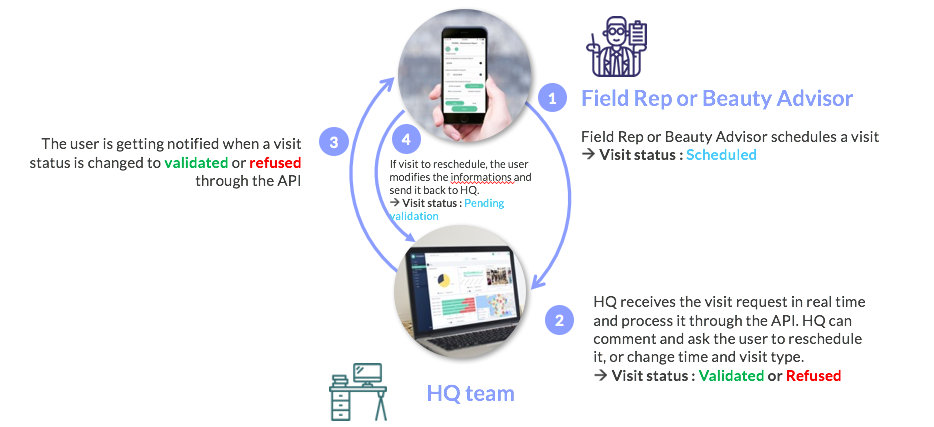
Table visits
| Column | Type | Description |
|---|---|---|
visit_id |
varchar(24) | Unique id of the visit |
compliant |
boolean | The compliance of the visit as marked by an area manager: true if marked compliant, false if marked noncompliant |
type |
varchar(40) | Type of the visit chosen among a predefined list |
user_id |
varchar(24) | Unique id of the user who will visit the store |
creator_id |
varchar(24) | Unique id of the visit creator |
store_id |
varchar(24) | Unique id of the associated store |
description |
varchar(255) | Description of the visit |
start_time |
timestamp | The scheduled time of the visit |
end_time |
timestamp | The end time of the visit |
visit_date |
timestamp | The scheduled date of the visit |
_lmt |
timestamp | Visit's last update date |
_ect |
timestamp | Visit's creation date |
tenant |
varchar(24) | Tenant name |
Expose the data of the custom fields defined for visits.
Table visits_custom_data
| Column | Type | Description |
|---|---|---|
visit_id |
varchar(24) | Id of the visit |
inventory_id |
varchar(24) | Id of the custom model (Inventory table) |
field_name |
varchar(255) | The custom field name from the custom model (Inventory table) |
value |
text | The value for the custom field |
value_idx |
tinyint | For multiple values, the position of the value |
_lmt |
timestamp | Last update date |
_ect |
timestamp | Creation date |
tenant |
varchar(24) | Tenant name |