YOOBIC Public API
Download OpenAPI specification:Download
Welcome to the YOOBIC Public API documentation.
The YOOBIC Public API is designed for developers and engineers who are interested in building custom applications or integrating with other systems or APIs. The API allows you to manage resources in a simple, programmatic way using conventional HTTPS requests.
The endpoints are intuitive and powerful, allowing you to easily make calls to retrieve information or to execute actions.
The API documentation will start with a general overview about the design and technology that has been implemented, followed by reference information about specific endpoints.
A complete YOOBIC Postman Collection is available for download, containing all API endpoints organized by resource groups with pre-configured environments.
Download: YOOBIC Postman Collection
This collection includes:
All API endpoints organized by resource groups
Pre-configured environments (sandbox, prod)
Automatic authentication handling
Example requests and responses
Ready-to-use test scripts
Import the collection into Postman to quickly start testing the YOOBIC API endpoints.
Below is a list of recent enhancements/changes to the YOOBIC Public API.
September 10th, 2026
The missions export file no longer contains the
user_idscolumn (large audiences overflowed the file cell limit). Deployed to production on September 10th, 2026.Document the full column set of the missions export file: added
valid_until,available_on_book,available_on_finish,duration,group_ids,address,user_full_name,todo,validated_byandtarget_audience;extra_scoresis a single JSON column;answersis not exported. Theavailable_on_finishedfield is now correctly namedavailable_on_finish.
September 3rd, 2026
- The reference now declares Bearer JWT authentication (see API Access) on every endpoint except
auth/login; it previously showed OAuth2 on some endpoints and nothing on others.
September 1st, 2026
- The payload limit on JSON
usersimport is now 12 MB (previously 15 MB).
August 24th, 2026
- Document the
prioritybody parameter on campaign Publish.
August 19th, 2026
- Document the field types supported to prefill
answerson campaign Publish.
July 28th, 2026
- Document the 15 MB payload limit on JSON
usersimport.
July 21st, 2026
- New rate limit for
DELETErequests (120 per minute) across all endpoints, per client organization. See Rate Limits.
June 3rd, 2026
- Clarify
scoreandextra_scoressemantics in missions CSV import/export: thescorecolumn holds the numeric value only;extra_scoresis export-only with one (translated) column per sub-score.
March 19th, 2026
Expand publish documentation on campaigns: per-site/per-user mission creation,
user_idsparameter, and request/response examples.Document that a mission must be assigned before it can be booked on missions.
March 4th, 2026
- Document escaping of special characters in CSV import files using double quotes (see Asynchronous Jobs).
January 25th, 2026
- Clarify that
group_idson files accepts an array of group ids, with an updated example.
December 29th, 2025
New automatic public api collections
Add Bot Messages endpoint.
Add Chats endpoint.
Add Upload file on files.
April 10th, 2025
February 16th, 2025
- Error messages now partially obscure usernames when relevant.
January 16th, 2025
- Added support for SCIM.
January 15th, 2025
Add Communities endpoint.
Add Community Posts endpoint.
January 1st, 2025
Add
addressfield onevents.Add
virtual_event_linkfield onevents.Add
total_usersfield onevents.
November 10th, 2024
October 30th, 2024
Add Export manager users endpoint.
Add Import manager users endpoint.
Add
positionfield on users.Add
departmentfield on users.Add
divisionfield on users.Add
companyfield on users.Add
hiring_datefield on users.Add
skillsfield on users.Add
coverfield on users.Add
descriptionfield on users.
August 1st, 2024
- Add
trigger_on_every_matchfield on webhooks.
July 15, 2024
- Add new type for import users
jsononimportendpoint.
June 27, 2024
Add Bots endpoint.
Add
earned_pointsfield on courses.Add
durationfield on courses.Add
start_datefield on courses.Add
due_datefield on courses.Add
finished_datefield on courses.
April 30, 2024
- Add
notifyfield on campaign Publish.
April 17, 2024
- New rate limit for
usersendpoint for POST, PATCH and DELETE requests
January 31, 2024
Add Invite users endpoint.
Add Export archived users endpoint. The exported file now includes custom fields.
Add Export archived stores endpoint. The exported file now includes custom fields.
November 3, 2023
- Add Mission-Comments endpoint.
October 23, 2023
- Add
da,fi,nbandsvfields on translations.
August 15, 2023
Add Import Users To Archive on users.
Add Import Users To Un Archive on users.
Add Import Stores To Archive on stores.
Add Import Stores To Un Archive on stores.
July 26, 2023
- Add extra security asymetric encryption for logins.
June 20, 2023
- webhooks change in behavior on sandbox environment.
April 23, 2023
- Add new supported topics to webhooks.
April 18, 2023
- Add Invitees endpoint on events.
March 2, 2023
- Update
group_idfield on groups.
February 7, 2023
December 20, 2022
- Add
au,idoandvifields on translations.
November 23, 2022
October 31, 2022
- Add Roles endpoint.
October 20, 2022
- Add Questions endpoint.
October 13, 2022
- Add Answers endpoint.
September 1, 2022
June 26, 2022
Publisha campaign based on its current configured audience.
June 22, 2022
Add security for webhooks.
Updated limit to the number of
notificationsthat can be sent at once to 50k.
June 14, 2022
- Add Events endpoint.
February 20, 2022
- Add
custom_fieldsfield on visits.
December 21, 2021
Add Import audience on campaigns.
Add Import new campaigns from template on campaigns.
Add Get all archives on users.
Add Get all archives on stores.
October 27, 2021
September 9, 2021
Add jobs fields' detail.
Updated the location of the file containing the errors to be under
error.
August 15, 2021
- Errors during an import job are now described in a file and returned as a
download_urlundererrorsin the job response.
May 12, 2021
Add create question on campaigns.
Add update question on campaigns.
Add delete question on campaigns.
Add partial u pdate on campaigns.
May 10, 2021
- Add get and update a missions tasks.
April 7, 2021
- Add ability to get the missions' answers missions.
March 16, 2021
- Add
out_of_stockfield on products.
March 1, 2021
- Add
Password Historymethod for users
January 17, 2021
January 13, 2021
- Add
vq_fieldsobject in stores description and endpoints to support virtual queuing
January 12, 2021
- Add webhooks endpoint.
December 28, 2020
December 7, 2020
- Add
task_numberfield on missions endpoint.
November 19, 2020
Add
capacityfield on stores endpoint.Add
last_seenfield on users.Add
mobile_versionfield on users.Add
desktop_versionfield on users.
November 10, 2020
- Add
group_idsfield on inventory.
October 26, 2020
October 22, 2020
October 14, 2020
- Add
allow_local_loginfield on users.
September 14, 2020
September 10, 2020
- Add
client_role_extensionfield on users.
August 19, 2020
- Add
action_plan_progressfield on missions table.
July 23, 2020
Add
available-slotsmethod on waitlist-yoobic-visits endpoint.Update
waitlist-yoobic-visitsresponse to return storeclient_idand storetitleon waitlist-yoobic-visits endpoints.
July 05, 2020
June 28, 2020
May 18, 2020
- Add BOOST endpoint (incentives-kpi)
May 11, 2020
- Add
timezonefield on stores endpoint.
May 5, 2020
- Add
page_titlesfield on campaigns endpoint.
April 16, 2020
February 19, 2020
February 13, 2020
February 5, 2020
- Add
timezonefield on stores endpoint.
February 4, 2020
January 28, 2020
November 5, 2019
October 2, 2019
September 5, 2019
- Add visit endpoint.
September 3, 2019
- Add
group_idsfield on notifications.
August 8, 2019
- Add inventory endpoint.
August 5, 2019
Add
scoringfield on campaigns.Add
recurringfield on campaigns.Add
bodyfield on notifications.Add
user_idsfield on notifications.Add
badge_typefield on notifications.Add
manufacturerfield on products.Add
brandfield on products.Add
categoryfield on products.Add
imagesfield on products.
July 9, 2019
June 13, 2019
June 3, 2019
May 16, 2019
May 8, 2019
- Add
markup_urlfield on photos.
April 30, 2019
- Add
catalog_titlefield on products.
Mar 24, 2019
- Add
vipfield on stores.
Mar 11, 2019
- Remove support for the replace (PUT) resource, in favor of partial update (PATCH).
Mar 6, 2019
Document Current User API
Document company name restriction on
Groupscreateandimport
Feb 25, 2019
Add endpoint to get a store's
Health Score
API Resources Overview
| Resource | GET | POST | PATCH | DELETE | IMPORT | EXPORT | COUNT |
|---|---|---|---|---|---|---|---|
auth |
x | ||||||
answers |
x | x | x | ||||
badges |
x | x | x | ||||
bots |
x | x | x | ||||
bot-messages |
x | ||||||
campaigns |
x | x | x | x | x | x | |
catalogs |
x | x | x | x | x | x | x |
chats |
x | ||||||
comments |
x | x | x | ||||
communities |
x | x | x | x | x | ||
community-posts |
x | x | x | x | x | ||
competencies |
x | x | x | ||||
course-categories |
x | x | x | ||||
courses |
x | x | x | ||||
custom-model-instances |
x | x | |||||
events |
x | x | x | x | x | x | x |
files |
x | x | x | x | |||
geofilters |
x | x | x | x | x | x | x |
groups |
x | x | x | x | x | x | |
incentives-kpi |
x | x | x | x | x | x | x |
inventory |
x | x | x | ||||
lessons |
x | x | x | ||||
missions |
x | x | x | x | x | x | |
mission_comments |
x | x | x | x | x | x | x |
news |
x | x | x | x | x | x | x |
notifications |
x | x | x | x | |||
photos |
x | x | x | x | |||
plans |
x | x | x | ||||
products |
x | x | x | x | x | x | x |
questions |
x | x | x | ||||
roles |
x | x | x | ||||
salesdata |
x | x | x | x | x | x | x |
shifts |
x | x | x | x | x | x | x |
store-types |
x | x | x | x | x | x | x |
stores |
x | x | x | x | x | x | x |
tenants |
x | ||||||
translations |
x | x | x | x | x | x | x |
users |
x | x | x | x | x | x | x |
visits |
x | x | x | x | x | x | x |
webhooks |
x | x | x | x | x | x | x |
jobs |
x |
API Help - We're here to help!
API Access - API access authentication
API Technical Requirements - Technical requirements for communicating with the API - security protocols and rate limits
API Requests - Formatting of requests sent to the RESTful YOOBIC API
API Responses - The common response format of each request
Asynchronous Jobs - How data is requested asynchronously for endpoints
Endpoint Documentation - Documentation specific for each endpoint. You may also use the links on the table on the sidebar to navigate to any endpoint.
- Security
- Answers
- Badges
- Bots
- Bot Messages
- Campaigns
- Catalogs
- Chats
- Comments
- Communities
- Comments
- Competencies
- Course-categories
- Courses
- Custom-model-instances
- Events
- Files
- Geofilters
- Groups
- Incentives Kpi
- Inventory
- Lessons
- Missions
- Missions
- News
- Notifications
- Photos
- Plans
- Products
- Questions
- Roles
- Salesdata
- SCIM
- Shifts
- Store Types
- Stores
- Tenants
- Translations
- Users
- Visits
- Webhooks
- Jobs
Have questions or need support? Email your YOOBIC Customer Success Manager or support@yoobic.com.
Authentication to the YOOBIC API uses JWT tokens. They are required for accessing API.
JWT tokens are set in the Authorization header for your requests as follows:
Authorization: Bearer eyJhbGciOiJIUzI1NiIsInR5cCI6IkpXVCJ9.eyJzdWIiOiIxMjM0NTY3ODkwIiwibmFtZSI6IkpvaG4gRG9lIiwiaWF0IjoxNTE2MjM5MDIyfQ.SflKxwRJSMeKKF2QT4fwpMeJf36POk6yJV_adQssw5c
To obtain a valid token you can either:
Use the
auth/loginendpointContact your YOOBIC Customer Success Manager or support@yoobic.com to obtain credentials to use in the /auth/login endpoint.
Please note that in the case you are using a reverse proxy you must set the parameter
proxy_ssl_server_nameto on to successfully connect to the prod environment.
Protocol and Communication
The api is only accessible via HTTPS, using TLS 1.2 or better. We forward secrecy and AES-GCM, and prohibit insecure connections using SSL 3.0 or RC4.
Environments
We provide both a Sandbox and a Production environment. Every Friday at 21:55 UTC, Sandbox is refreshed by taking a snapshot of the Production environment. Since this refresh process takes several hours, please avoid using Sandbox during that time. It is available for testing purposes outside of the refresh period.Template structure of a request:
- Base url Production: https://api.yoobic.com/public/api
- Base url Sandbox: https://api-sandbox.yoobic.com/public/api
- The
<base_url>variable in the example requests is eitherapi.yoobic.comorapi-sandbox.yoobic.com. - Get all (GET):
/{endpoint}?filter={ "where": { "property": "value" }, "skip": 0, "limit": 100, "order": "updated_date DESC", "fields": ["property"] } - Count (GET):
/{endpoint}?where={ "property": "value" } - Create (POST):
/{endpoint}should include a valid JSON object as the body. - Update (PATCH):
/{endpoint}/:idshould include a valid JSON object as the body. - Delete (DELETE):
/{endpoint}/:id
Rate Limits
All limits are applied per client organization. Exceeding a limit returns HTTP error 429 Too Many Requests (Rate Limit Exceeded); wait for the current one-minute window to pass and retry.
Interval Limit: 10 requests per second overall. Send requests serially (one at a time); bursts of concurrent requests may be rejected.
Delete Limit: 120
DELETErequests per minute across all endpoints.Users Write Limit: 180 requests per minute (3 per second) for
POST,PATCHandDELETEon the/usersendpoint. These requests also count toward the limits above.Daily Limit: 100,000 requests per day. If you need higher limits to support your specific use case, please contact your YOOBIC Customer Success Manager or support@yoobic.com — limits can be adjusted per organization.
Requests for the YOOBIC API are all RESTful, with parameters following the endpoint path or in request body. Each request in the documentation is displayed with the appropriate HTTP method and sample parameters. Data may be sent in as parameters or in the request body as JSON. The requests on the YOOBIC API allow for ordering, paging and filtering on a per entity basis.
Filter
A where filter specifies criteria for returning data. We supports the following kind of filters:
A filter must be a JSON encoded string ({"something":"value"}).
To do this, simply use the following syntax:
?filter={ Stringified-JSON }
In the JSON all text keys/strings must be enclosed in quotes (").
Important:
When using stringified JSON, you must use an equal sign after ?filter in the query string.
For example:
GET /entity?filter={"where": { "entity_id": 1234 }, "order": "updated_date DESC", "limit": 100, "fields": ["property", "property"] }
Order Filter
An order filter specifies how to sort the results: ascending (ASC) or descending (DESC) based on the specified property.
Order by one property:
{ "order": "property <ASC|DESC>" }
Order by two or more properties:
{ "order": ["property <ASC|DESC>", "property <ASC|DESC>",...] }
Where:
property is the name of the property (field) to sort by.
<ASC|DESC> signifies either ASC for ascending order or DESC for descending order.
Important:
By default ordering will be performed according to the updated_date property.
Each endpoint's table, contains information, to the properties ordering could be performed on.
Paging Filter
Paging can be achieved by a combination of limit and skip parameters.
limit filter limits the number of records returned to the specified number (or less).
The maximum number of records that could be fetched is1000.
For anything above that, you might want to consider using the export endpoint.{ "limit": 5 }skip filter omits the specified number of returned records.
{ "skip": 5 }If
paging.total > paging.limitin the response of a request:It is possible to use the skip filter. Here is an example on how to use it with the users endpoint:
https://api-sandbox.yoobic.com/public/api/users?filter={"skip": 1000}
The recommended solution is to add a condition to the API script to loop requests if there are too many elements until all of them are returned.
The condition would monitor thatpaging.total - paging.limit <= paging.skipin the response of each request, and if not send another request withnewSkip = Skip + 1000after receiving the last one.
The other way to manage large requests is to use asynchronous requests. For example with Users, it is possible to export a CSV file of all or some users. See the export section for this.
Where Filter
A where filter specifies a set of logical conditions to match, similar to a WHERE clause in a SQL query.
Use the first form below to test equivalence, that is, whether property equals value. Use the second form below for all other conditions.
{ "where": { "property": value } }
{ "where": { "property": { "op" : value } } }
{ "where": { "and|or": [{ "property": { "op" : value } }, { "property": { "op" : value } }] } }
Where:
property is the name of a property (field) in the model being queried.
value is a literal value.
op is one of the operators listed below.
| Operator | Description |
|---|---|
| gt, gte | Numerical greater than (>); greater than or equal (>=). Valid only for numerical and date values. |
| lt, lte | Numerical less than (<); less than or equal (<=). Valid only for numerical and date values. |
| between | True if the value is between the two specified values: greater than or equal to first value and less than or equal to second value. |
| inq, nin | In / not in an array of values. |
| neq | Not equal (!=) |
Fields Filter
A fields filter specifies properties (fields) to include from the results.
{ "fields": ["property", "property", ...] }
Where:
- property is the name of the proeprty (field) to include.
By default, queries return all properties in results. However, if you specify at least one fields filter, then by default the query will include only those you specifically include with filters.
Important:
The export resource for all endpoints does not allow the fields filter.
Create, update and delete requests follow standard RESTful practices. While some fields
are available on a resource, you may not be able to set values for readonly fields such as created_date during
a CREATE, UPDATE or DELETE action (it would just be ignored). The allowed parameters are listed at the beginning of each CRUD section for a particular resource.
The Response format varies depending on the type of request:
Single API requests - simple hash, whether it be an error or not.
Multiple API requests - a hash containing two lists
datafor successfull requests.errorfor failed requests.
The two correspond to the order in the request.
{
     "data": [],
     "error": []
}
For find requests an error or data with an additional paging hash -
{
    "data": [],
    "error": [],
    "paging": {
          "skip": 0,
          "limit": 1000,
          "total": 10000,
    }
}
skip- The currently requested page. Defaults to0if no page is given in the request.limit- The maximum amount of records that may be returned in this response. If not given in the filter parameter, defaults to1000.total- The total records that match this request, regardless of current paging results.
Response Headers
content-type: application/json; charset=utf-8
status: 200 OK
ratelimit-limit: 1200
ratelimit-remaining: 1137
ratelimit-reset: 1415984218
Multiple Response Body
Description Of Usual Server Responses:
200
OK- the request was successful (some API calls may return 201 instead).201
Created- the request was successful and a resource was created.204
No Content- the request was successful but there is no representation to return (i.e. the response is empty).400
Bad Request- the request could not be understood or was missing required parameters.401
Unauthorized- authentication failed or user doesn't have permissions for requested operation.403
Forbidden- access denied.404
Not Found- resource was not found.405
Method Not Allowed- requested method is not supported for resource.429
Too Many Requests- rate limit exceeded.501
Not Implemented- the server lacks the ability to fulfill the request. Usually this implies future availability.
There are 2 endpoints for async jobs
/import: Import a csv/excel file/export: Export data as a csv/excel file
By default, all requests to the External API are synchronous and all data requested are returned within the same request/response cycle. One limitation of this approach is that all responses are limited to a maximum number of records as defined in the Paging section. To enable returning an unlimited number of records, you are able to create a job to be executed asynchronously to return all records that match your current query.
Async Jobs
GET entity/exportPOST entity/import
Given the following request to get the stores:
https://api.yoobic.com/public/api/stores
It can be converted into an asynchronous job:
https://api.yoobic.com/public/api/stores/export?type=csv
Response Structure and Return Codes
When an asynchronous job is successfully created, a code of 200 will be returned. Any errors will result in a return code of 400 and error messages will be returned in the standard format.
The response structure of a requested asynchronous job includes a job_id that you use on the Jobs endpoint
to query for the current status of the endpoint. This structure is almost identical to what is returned from the Jobs endpoint.
Please refer to that endpoint for more details about obtaining the status of your job.
{
  "name": "Export csv",
  "type": "normal",
  "priority": 0,
  "nextRunAt": "2018-09-11T15:37:23.088Z",
  "_id": "5b97e133952d1c8776c9e723"
}
Export File Format
The file formats supported for exporting all records via an asynchronous job are CSV or Excel (xlsx). Once a job is completed, the response
body of the Jobs endpoint request will return the download_url key that is the URL of the CSV or Excel.
For example, the above request will result in a file containing example data delimited by the default delimiter, with headers as follows:
{
  "job_id": "5b97e133952d1c8776c9e723",
  "name": "Export file",
  "data": {
    "authorization": "",
    "input": {
      "filter": null,
      "type": "csv",
      "modelName": "stores"
    },
    "output": {
      "errors": [],
      "data": {
          "download_url": "https://s3.eu-west-1.amazonaws.com/yoobic.transient-file-storage/stores_6b97e133952d1c8776c9e723.csv"
        }
    },
    "stats": {
      "execution_time_milliseconds": 556.81776,
      "execution_time": "556.81776 ms",
      "errors": 0,
      "success": 1
    }
  },
  "progress": 1,
  "lastFinishedAt": "2018-09-11T15:37:28.496Z"
}
Response "data.input" object The input parameters when creating the job.
Response "data.output.data" object.
Thedataobject in the results hash may be either a hash or an array, depending on the endpoint action.Response "data.output.errors" hash.
Theerrorsarray only appears in results to inform the client of errors such as incorrect field formats, model validation errors or server errors.Response "data.stats" hash.
Thestatsobject informs about the total execution time and number of errors and/or successes.
Resulting CSV example:
    id; title; address; latitude; longitude; client_id; store_type_id; store_type_name; created_date; updated_date
    5b97e017952d1c8776c9e71e; Home; Statue of Liberty, New York, USA; 40.6895453; -74.0449292; 001; 5b97e00411ec54f2e3a0936e; TEST; 2018-09-11T15:32:39.607Z; 2018-09-11T15:32:39.607Z
Resulting Excel example:
In case of a request to export an excel file https://api.yoobic.com/public/api/stores/export?type=excel it would result in:
Export File Expiration
Currently all exports are set to expire one day after they are created at which point they will be inaccessible.
Import File
Import a CSV/Excel file.
This action is asynchronous and returns the id of a job. See jobs endpoint to query the status of the job.
Make sure that you make a multipart/form-data query, passing the CSV/Excel file as named parameter file.
When you create a CSV/Excel file to import, you'll probably generate this list from some other information management system or database. Most of these systems have some facility for creating a CSV/Excel export file. If you need to create the list from scratch you can use a program like Microsoft Excel or OpenOffice.org Calc.
Important:
To ensure correct handling of special characters, you must generate the CSV/Excel file using the UTF-8 character encoding.
The first row of the file is the header row, and you must include it in the file.
The header row must contain any required fields in the table below, plus any other fields listed in the table below that you want to include.
Empty columns of data in the file will overwrite any existing data for that entity (empty column is treated as a null value).
For Excel files, array type fields (i.e.:
tagsfor users or stores,client_idsfor users…) must be comma separated string i.e.: Tag1,Tag2,Tag3 or Tag1, Tag2, Tag3For CSV files, array type fields can be either comma separated strings (i.e.: Tag1,Tag2,Tag3 or Tag1, Tag2, Tag3) or JSON array with quotes (i.e.:
"["Tag1","Tag2","Tag3"]")- In Addition for CSV the field separator is;and line separator isline-break.Make sure there are no duplicates by the defined primary keys as there is no guarantee on the order in which the import iterates over the rows.
Date values should comply with the ISO format, i.e. 2019-12-31 or 2019-12-31T23:59:59:999.
Escape special characters in CSV files with double quotes, for example:
"<a href=""https://example.com"">Link</a>".
This endpoint exposes the login method in order to create a valid access token for subsequents call to the API, as well as an endpoint for invalidating the current access token. The latter will have the effect of requiring anyone currently using the existing token to login again in order to get the new one.
Login
Generates a JSON Web Token (JWT) for the API provided a valid username and password.
important
The
expires_inparameter is used during the login process to specify the duration for which the token will remain valid. The acceptable range for this value is a minimum of 1200 seconds (20 minutes) and a maximum of 157680000 seconds (5 years). If a value below the minimum is provided, it will automatically be set to 1200 seconds (20 minutes). Conversely, if a value exceeds the maximum, it will be limited to 157680000 seconds (5 years).Whenever the
expires_inparameter is provided, a new token will be generated and any previous one will be automatically invalidated. If theexpires_inparameter is not specified, the system will return the existing token if one is available. If no existing token is found, a new token will be created.
(optional) Asymmetric encryption for login
To provide an extra level of security for getting the bearer token it is possible to configure asymetric encryption for login. The type of certificate that needs to be created to use this feature is a Public Key Certificate. This certificate is also known as a Digital Certificate or Identity Certificate. This certificate uses the RSA algorithm for public key cryptography with the OAEP padding scheme and SHA-256 hash function for added security.
To decode the response the user must be in possession of the private key.
If this is the case the service account should be configured with the public key.
In that case the response from login will look like this:
{
    "encrypted": [
        "CoAxwnTyH0xPMQ3lEWEt0x+sFpj7...",
        "xZqYuAj91xpyHhnX/mOoi08nAsJA..."
    ]
}
To decode the payload you have to write a script that iterates over each encrypted string in the encrypted array and calls the decrypt function with each string as an argument using your private key. The decrypted strings should then be concatenated into a single string and parsed as JSON. The JSON should then match the same format as the payload when not using encryption.
Here is an example of code in Nodejs for this process.
const axios = require('axios');
const crypto = require('crypto');
const fs = require('fs');
const main = async () => {
  const payload = {
    username: 'some username',
    password: 'some password',
  };
  const response = await axios.post('/public/api/auth/login', payload);
  const encrypted = response.data.encrypted;
  const decrypted_parts = []
  for(item of encrypted) {
  // decrypting each item in encrypted array
    const decrypted = await decrypt(item);
    decrypted_parts.push(decrypted);
  }
  const decrypted = decrypted_parts.join('');
  const data = JSON.parse(decrypted);

  console.log(data);
}

const decrypt = async (encrypted) => {
  // loading the private key
  const privateKey = fs.readFileSync('./cert/clientprivate.key', 'utf8');
  if (typeof encrypted === 'string') {
    encrypted = Buffer.from(encrypted, 'base64');
  }
  const decryptedData = crypto.privateDecrypt(
    {
      key: privateKey,
      padding: crypto.constants.RSA_PKCS1_OAEP_PADDING,
      oaepHash: "sha256",
    },
    encrypted
  );
  return  decryptedData.toString();
}
main();
The Public Key has to be shared with YOOBIC’s Customer Implementation Manager during the API implementation phase.
Responses
Response samples
- 200
{- "token": "eyJhbGciOiJIUzI1NiIsInR5cCI6IkpXVCJ9.eyJzdWIiOiIxMjM0NTY3ODkwIiwibmFtZSI6IkpvaG4gRG9lIiwiaWF0IjoxNTE2MjM5MDIyfQ.SflKxwRJSMeKKF2QT4fwpMeJf36POk6yJV_adQssw5c",
- "user_id": "53fb03c6546847fe0d30186b",
- "username": "mycompany+yoobicserviceaccount@mycompany.com",
- "email": "support+mycompany+yoobicserviceaccount@yoobic.com",
- "created_date": "2019-02-10T17:20:11.531Z",
- "updated_date": "2019-02-10T17:20:11.531Z",
- "expires_in": 3600,
- "tenant": "mycompany"
}Invalidate Token
Invalidates the existing JSON Web Token (JWT) for the API provided in the Authorization header.
Authorizations:
header Parameters
| Accept | string Example: application/json e.g. application/json |
Responses
Response samples
- 200
{- "success": true,
- "token": "eyJhbGciOiJIUzI1NiIsInR5cCI6IkpXVCJ9.eyJzdWIiOiIxMjM0NTY3ODkwIiwibmFtZSI6IkpvaG4gRG9lIiwiaWF0IjoxNTE2MjM5MDIyfQ.SflKxwRJSMeKKF2QT4fwpMeJf36POk6yJV_adQssw5c",
- "user_id": "53fb03c6546847fe0d30186b",
- "username": "mycompany+yoobicserviceaccount@mycompany.com",
- "tenant": "mycompany"
}Answers are the users’ replies to the questions raised by their colleagues in the Questions menu. Other users can vote for answers they think are best, like them, and a user with the right permission can also validate an answer to indicate it is the right or best one.
Fields
| Field | Type | Required | Readonly | OrderBy | Description |
|---|---|---|---|---|---|
answer_id |
string | x | x | Unique id of the answer | |
question_id |
string | x | Reference to the question | ||
user_id |
string | x | User id answering this question | ||
text |
string | x | The answer | ||
image |
string | x | The url to the image | ||
is_verified |
boolean | x | Whether or not this is a verified answer | ||
user_verified |
string | x | User id verifying this answer | ||
likes |
number | x | Likes count | ||
created_date |
date | x | Creation date | ||
updated_date |
date | x | x | Last update date |
Get
Get a answer for the given id.
Authorizations:
path Parameters
| id required | string Example: 61b9b435c8f864003a552378 The id of the answer |
header Parameters
| Accept | string Example: application/json e.g. application/json |
Responses
Response samples
- 200
{- "answer_id": "63459c260a1b6d001dc60f8e",
- "question_id": "6343ee166c8a0e001de9bd7f",
- "user_id": "5e272f12e1d5f2003ad7afe6",
- "text": "Comment",
- "likes": 1,
- "created_date": "2022-10-11T16:39:02.900Z",
- "updated_date": "2022-10-11T16:41:28.566Z"
}Get All
Get all the answers.
Authorizations:
query Parameters
| filter | string Example: filter={} A valid JSON filter object |
header Parameters
| Accept | string Example: application/json e.g. application/json |
Request Body schema: application/json
object (Default_Header) |
Responses
Request samples
- Payload
{- "Authorization": {
- "Authorization": "Bearer JWT"
}
}Response samples
- 200
{- "paging": {
- "skip": 0,
- "limit": 3,
- "total": 2000
}, - "data": [
- {
- "answer_id": "63459c260a1b6d001dc60f8e",
- "question_id": "6343ee166c8a0e001de9bd7f",
- "user_id": "5e272f12e1d5f2003ad7afe6",
- "text": "Comment",
- "likes": 1,
- "created_date": "2022-10-11T16:39:02.900Z",
- "updated_date": "2022-10-11T16:41:28.566Z"
}, - {
- "answer_id": "63459c679693060027345b91",
- "question_id": "6343ee166c8a0e001de9bd7f",
- "user_id": "5e1356f0c5f0e0003d305072",
- "text": "Comm",
- "likes": 10,
- "created_date": "2022-10-11T16:40:07.994Z",
- "updated_date": "2022-10-11T16:40:16.175Z"
}, - {
- "answer_id": "63459b240a1b6d001dc60c48",
- "question_id": "63453bd184b108002a5166ae",
- "user_id": "5e1356f0c5f0e0003d305072",
- "text": "@Hq2 mention from web",
- "created_date": "2022-10-11T16:34:44.892Z",
- "updated_date": "2022-10-11T16:34:44.892Z"
}
]
}Count
Count all the existing entities based on the where filter
Authorizations:
query Parameters
| where |
header Parameters
| Accept | string Example: application/json e.g. application/json |
Request Body schema: application/json
object (Default_Header) |
Responses
Request samples
- Payload
{- "Authorization": {
- "Authorization": "Bearer JWT"
}
}Response samples
- 200
{- "count": 10
}Export
Export all results as a file.
This action is asynchronous and returns the id of a job. See jobs endpoint to query the status of the job. The file will contain the results with all of the fields specified on the resource.
Authorizations:
path Parameters
| type required | string Example: csv The type of file, either |
query Parameters
| filter | string Example: filter={} A valid JSON filter object (does not accept a |
header Parameters
| Accept | string Example: application/json e.g. application/json |
Request Body schema: application/json
object (Default_Header) |
Responses
Request samples
- Payload
{- "Authorization": {
- "Authorization": "Bearer JWT"
}
}Response samples
- 200
{- "name": "Export file",
- "type": "normal",
- "priority": 0,
- "nextRunAt": "2018-09-11T15:56:05.387Z",
- "_id": "5b97e5954b99568b4b9101af"
}A badge is a customized reward earned by a learner after completing a lesson.
Fields
| Field | Type | Required | Readonly | OrderBy | Description |
|---|---|---|---|---|---|
badge_id |
string | x | x | Unique id of the badge | |
creator_id |
string | x | Unique id of the badge creator | ||
title |
string | x | Badge title | ||
icon |
string | x | Badge icon name | ||
created_date |
date | x | Creation date | ||
updated_date |
date | x | x | Last update date |
Get
Get a badge for the given id.
Authorizations:
path Parameters
| id required | string Example: 61b9b435c8f864003a552378 The id of the badge |
header Parameters
| Accept | string Example: application/json e.g. application/json |
Responses
Response samples
- 200
{- "badge_id": "61b9b435c8f864003a552378",
- "creator_id": "61af7b01ee30bd0025145674",
- "title": "woohoo",
- "icon": "award-trophy-star",
- "created_date": "2021-12-15T09:24:05.652Z",
- "updated_date": "2021-12-15T09:24:05.652Z"
}Get All
Get all the badges.
Authorizations:
query Parameters
| filter | string Example: filter={} A valid JSON filter object |
header Parameters
| Accept | string Example: application/json e.g. application/json |
Request Body schema: application/json
object (Default_Header) |
Responses
Request samples
- Payload
{- "Authorization": {
- "Authorization": "Bearer JWT"
}
}Response samples
- 200
{- "paging": {
- "total": 2,
- "skip": 0,
- "limit": 1000
}, - "data": [
- {
- "badge_id": "61b8de5b55c2d5002449ab27",
- "creator_id": "61af7b01ee30bd0025145674",
- "title": "doc lesson",
- "icon": "folder-add",
- "created_date": "2021-12-14T18:11:39.026Z",
- "updated_date": "2021-12-14T18:11:39.026Z"
}, - {
- "badge_id": "61a622f2a9accb0024ea732b",
- "creator_id": "6194baa5aedfd900296e744f",
- "title": "Yoobic Master",
- "icon": "automotive-airplane",
- "created_date": "2021-11-30T13:11:14.247Z",
- "updated_date": "2021-11-30T13:11:14.247Z"
}
]
}Count
Count all the existing entities based on the where filter
Authorizations:
query Parameters
| where |
header Parameters
| Accept | string Example: application/json e.g. application/json |
Request Body schema: application/json
object (Default_Header) |
Responses
Request samples
- Payload
{- "Authorization": {
- "Authorization": "Bearer JWT"
}
}Response samples
- 200
{- "count": 10
}Export
Export all results as a file.
This action is asynchronous and returns the id of a job. See jobs endpoint to query the status of the job. The file will contain the results with all of the fields specified on the resource.
Authorizations:
path Parameters
| type required | string Example: csv The type of file, either |
query Parameters
| filter | string Example: filter={} A valid JSON filter object (does not accept a |
header Parameters
| Accept | string Example: application/json e.g. application/json |
Request Body schema: application/json
object (Default_Header) |
Responses
Request samples
- Payload
{- "Authorization": {
- "Authorization": "Bearer JWT"
}
}Response samples
- 200
{- "name": "Export file",
- "type": "normal",
- "priority": 0,
- "nextRunAt": "2018-09-11T15:56:05.387Z",
- "_id": "5b97e5954b99568b4b9101af"
}This API is exclusively used to handle bots external to YOOBIC. External bots are an AI feature of the YOOBIC chat that enhances user interactions by automating workflows and streamlining processes to boost efficiency. By using third party bot APIs on top of the YOOBIC NEO chatbots, we enable users to access an unlimited number of specialised bots for back-office automations, HR, IT help, and more.
Fields
| Field | Type | Required | Readonly | OrderBy | Description |
|---|---|---|---|---|---|
bot_id |
string | x | Unique id of the bot | ||
creator_id |
string | x | Unique id of the badge creator | ||
name |
string | Bot name | |||
is_active |
boolean | Enable or disable this bot (default: true) | |||
webhook_url |
string | Unique http target url to the bot | |||
created_date |
date | x | Creation date | ||
updated_date |
date | x | x | Last update date |
Get
Get a bot for the given id.
Authorizations:
path Parameters
| id required | string Example: 666abc9a8c591700299636bd The id of the bot |
header Parameters
| Accept | string Example: application/json e.g. application/json |
Responses
Response samples
- 200
{- "bot_id": "666abc9a8c591700299636bd",
- "name": "FAQ Bot",
- "is_active": true,
- "tenant": "workplace2",
- "created_date": "2024-06-13T09:32:10.859Z",
- "updated_date": "2024-06-13T09:32:10.859Z"
}Get All
Get all the bots.
Authorizations:
query Parameters
| filter | string Example: filter={} A valid JSON filter object |
header Parameters
| Accept | string Example: application/json e.g. application/json |
Request Body schema: application/json
object (Default_Header) |
Responses
Request samples
- Payload
{- "Authorization": {
- "Authorization": "Bearer JWT"
}
}Response samples
- 200
{- "paging": {
- "total": 2,
- "skip": 0,
- "limit": 1000
}, - "data": [
- {
- "bot_id": "666abc9a8c591700299636bd",
- "name": "FAQ Bot",
- "is_active": true,
- "created_date": "2024-06-13T09:32:10.859Z",
- "updated_date": "2024-06-13T09:32:10.859Z"
}, - {
- "bot_id": "666abc9a8c591700299636be",
- "name": "FAQ Bot #2",
- "is_active": true,
- "created_date": "2024-06-13T09:32:10.859Z",
- "updated_date": "2024-06-13T09:32:10.859Z"
}
]
}Count
Count all the existing entities based on the where filter
Authorizations:
query Parameters
| where |
header Parameters
| Accept | string Example: application/json e.g. application/json |
Request Body schema: application/json
object (Default_Header) |
Responses
Request samples
- Payload
{- "Authorization": {
- "Authorization": "Bearer JWT"
}
}Response samples
- 200
{- "count": 10
}Export
Export all results as a file.
This action is asynchronous and returns the id of a job. See jobs endpoint to query the status of the job. The file will contain the results with all of the fields specified on the resource.
Authorizations:
path Parameters
| type required | string Example: csv The type of file, either |
query Parameters
| filter | string Example: filter={} A valid JSON filter object (does not accept a |
header Parameters
| Accept | string Example: application/json e.g. application/json |
Request Body schema: application/json
object (Default_Header) |
Responses
Request samples
- Payload
{- "Authorization": {
- "Authorization": "Bearer JWT"
}
}Response samples
- 200
{- "name": "Export file",
- "type": "normal",
- "priority": 0,
- "nextRunAt": "2018-09-11T15:56:05.387Z",
- "_id": "5b97e5954b99568b4b9101af"
}Bot analytics allow you to improve your bots by understanding how your teams use them and how satisfied they are with the answers. The key metrics available can be used to monitor the usage of the feature and to analyze frequent questions where knowledge is lacking in order to create new content and add it to the NEO Chatbot sources.
Fields
| Field | Type | Required | Readonly | OrderBy | Description |
|---|---|---|---|---|---|
bot_id |
string | x | Unique id of the bot | ||
bot_message_id |
string | x | Unique if of the message sent to the bot | ||
user_id |
string | x | Unique id of the user that sent the question | ||
username |
string | x | Username of the user that sent the question | ||
question |
string | x | Question of the user | ||
answer |
string | x | Answer of the bot to the question of the user | ||
feedback |
boolean | x | True if the user put a ‘thumbs up’ and false if the user put a ‘thumbs down' on the answer of the bot | ||
answered |
boolean | x | True if the question was answered and false if it wasn’t (equivalent to ‘I don’t know' response from the bot') | ||
created_date |
date | x | Created Date | ||
updated_date |
date | x | Updated Date |
Get with no answer
Get analytics for a single bot where there is no answer (equivalent to ‘I don’t know' response from the bot).
Authorizations:
path Parameters
| id required | string Example: 54ab03c6546847ee0d30086a The id of the bot |
header Parameters
| Accept | string Example: application/json e.g. application/json |
Responses
Response samples
- 200
{- "name": "Export file",
- "type": "normal",
- "priority": 0,
- "nextRunAt": "2018-09-11T15:56:05.387Z",
- "_id": "5b97e5954b99568b4b9101af"
}Get with negative feedback
Get analytics for a single bot where the feedback is negative.
Authorizations:
path Parameters
| id required | string Example: 54ab03c6546847ee0d30086a The id of the bot |
header Parameters
| Accept | string Example: application/json e.g. application/json |
Responses
Response samples
- 200
{- "name": "Export file",
- "type": "normal",
- "priority": 0,
- "nextRunAt": "2018-09-11T15:56:05.387Z",
- "_id": "5b97e5954b99568b4b9101af"
}Export
Get all bot analytics.
Authorizations:
path Parameters
| type required | string Example: csv The type of file, either csv (default value) or excel |
query Parameters
| filter | string Example: filter={"where":{"answered":true,"feedback":true}} A valid JSON filter object |
header Parameters
| Accept | string Example: application/json e.g. application/json |
Responses
Response samples
- 200
{- "name": "Export file",
- "type": "normal",
- "priority": 0,
- "nextRunAt": "2018-09-11T15:56:05.387Z",
- "_id": "5b97e5954b99568b4b9101af"
}Business KPIs data allows integration of external business data per location. This is the data that will be used to display Business KPIs in the Activity Hub or Today's focus widget of the application.
Periods can be: yearly, monthly, weekly, or daily.
Salesdata uniqueness is determined by:
store_id
reporting_date
title
category
value_frequency
target
In case a new salesdata is created with values for the latter five which already exist in a salesdata, then the salesdata will be updated. Otherwise, a new salesdata entry will be created
The category parameter refers to which KPI will use this data point to calculate the value in the app. For example, the 5 predefined KPIs are based on the following categories:
salesfor the Sales KPI, calculated as the Sum of all sales data in the KPI's frequencysalesandtransactionsfor the Average Basket KPI, calculated as SUM(sales) / SUM(transactions) in the KPI's frequencyitemsandtransactionsfor the UPT KPI, calculated as SUM(items) / SUM(transactions) in the KPI's frequencytransactionsandtrafficfor the Conversion rate KPI, calculated as SUM(transactions) / SUM(traffic) in the KPI's frequencyreviewsfor the Reviews, calculated as AVG(reviews) in the KPI's frequencyFor Custom KPIs, the category must match the category defined in the Business KPI configuration menu.
Reporting Date
The
reporting_datemust correspond to the expected calculation period of the KPI.Example: For daily sales data, push one entry per store each day (e.g., timestamp at store closing time).
Targets
Define a target with the parameter
target: true.The
reporting_dateshould correspond to the target's period.- For weekly targets, use the timestamp for the start of the week.
Fields
| Field | Type | Required | Readonly | OrderBy | Description |
|---|---|---|---|---|---|
salesdata_id |
string | x | Unique id of the salesdata | ||
store_id |
string | x | Unique id of the store | ||
store_client_id |
string | client_id of the store. Can be used instead of the store_id | |||
reporting_date |
date | x | Reporting date | ||
title |
string | x | x | The salesdata report title | |
category |
string | x | x | Salesdata name | |
value |
number | x | Salesdata value | ||
value_currency |
string | Salesdata currency | |||
value_frequency |
string | x | The product measuring frequency : yearly / monthly / weekly / daily / hourly | ||
target |
boolean | Indicates if the associated value is a target | |||
created_date |
date | x | Creation date | ||
updated_date |
date | x | x | Last update date |
Either store_id or store_client_id can be used.
Get
Get a salesdata for the given id.
Authorizations:
path Parameters
| id required | string Example: 54ab03c6546847ee0d30086b The id of the salesdata |
header Parameters
| Accept | string Example: application/json e.g. application/json |
Responses
Response samples
- 200
{- "salesdata_id": "54ab03c6546847ee0d30086b",
- "store_id": "54ab03c6546847ee0d30086c",
- "reporting_date": "2018-05-23T04:51:40.862Z",
- "title": "Rockets salesdata 1",
- "category": "Electronics",
- "value": 2,
- "value_currency": "$",
- "value_frequency": "weekly",
- "created_date": "2018-05-23T04:51:40.862Z",
- "updated_date": "2018-05-23T04:51:40.862Z"
}Partial Update
Update a subset of properties of a salesdata
Authorizations:
path Parameters
| id required | string Example: 54ab03c6546847ee0d30086b The id of the salesdata |
header Parameters
| Accept | string Example: application/json e.g. application/json |
Request Body schema: application/json
| value | number |
| value_frequency | string |
Responses
Request samples
- Payload
{- "value": 10,
- "value_frequency": "yearly"
}Response samples
- 200
{- "salesdata_id": "54ab03c6546847ee0d30086b",
- "store_id": "54ab03c6546847ee0d30086c",
- "reporting_date": "2018-05-23T04:51:40.862Z",
- "title": "Rockets salesdata 1",
- "category": "Electronics",
- "value": 10,
- "value_currency": "$",
- "value_frequency": "yearly",
- "created_date": "2018-05-23T04:51:40.862Z",
- "updated_date": "2018-05-23T04:51:40.862Z"
}Get All
Get all the salesdata.
Authorizations:
query Parameters
| filter | string Example: filter={} A valid JSON filter object |
header Parameters
| Accept | string Example: application/json e.g. application/json |
Request Body schema: application/json
object (Default_Header) |
Responses
Request samples
- Payload
{- "Authorization": {
- "Authorization": "Bearer JWT"
}
}Response samples
- 200
{- "paging": {
- "total": 2,
- "skip": 0,
- "limit": 1000
}, - "data": [
- {
- "salesdata_id": "54ab03c6546847ee0d30086b",
- "store_id": "54ab03c6546847ee0d30086c",
- "reporting_date": "2018-05-23T04:51:40.862Z",
- "title": "Rockets salesdata 1",
- "category": "Electronics",
- "value": 2,
- "value_currency": "$",
- "value_frequency": "weekly",
- "created_date": "2018-05-23T04:51:40.862Z",
- "updated_date": "2018-05-23T04:51:40.862Z"
}, - {
- "salesdata_id": "54ab03c6546847ee0d30082b",
- "store_id": "54ab03c6546847ee0d30086c",
- "reporting_date": "2018-05-21T04:51:40.862Z",
- "title": "Rockets salesdata 2",
- "category": "Drinks",
- "value": 5.4,
- "value_currency": "$",
- "value_frequency": "monthly",
- "created_date": "2018-05-21T04:51:40.862Z",
- "updated_date": "2018-05-21T04:51:40.862Z"
}
]
}Count
Count all the existing entities based on the where filter
Authorizations:
query Parameters
| where |
header Parameters
| Accept | string Example: application/json e.g. application/json |
Request Body schema: application/json
object (Default_Header) |
Responses
Request samples
- Payload
{- "Authorization": {
- "Authorization": "Bearer JWT"
}
}Response samples
- 200
{- "count": 10
}Create
You may create a new single salesdata or multiple salesdatas using this action.
When creating a single salesdata the body contains a json object, when creating multiple salesdata the body contains an array of objects.
Warning: a maximum of 1000 items can be sent in a single request.
Authorizations:
header Parameters
| Accept | string Example: application/json e.g. application/json |
Request Body schema: application/json
| store_id | string |
| reporting_date | string |
| title | string |
| category | string |
| value | number |
| value_currency | string |
| value_frequency | string |
Responses
Request samples
- Payload
{- "store_id": "54ab03c6546847ee0d30086d",
- "reporting_date": "2018-05-21T04:51:40.862Z",
- "title": "Milk salesdata 1",
- "category": "Food",
- "value": 5,
- "value_currency": "$",
- "value_frequency": "hourly"
}Response samples
- 200
{- "salesdata_id": "52cb02c6546847ee0d30082b",
- "store_id": "54ab03c6546847ee0d30086c",
- "reporting_date": "2018-05-21T04:51:40.862Z",
- "title": "Weekly Sales Target",
- "category": "sales",
- "value": 100000,
- "value_currency": "USD",
- "value_frequency": "weekly",
- "target": true,
- "created_date": "2018-05-21T04:51:40.862Z",
- "updated_date": "2018-05-21T04:51:40.862Z"
}Export
Export all results as a file.
This action is asynchronous and returns the id of a job. See jobs endpoint to query the status of the job. The file will contain the results with all of the fields specified on the resource.
Authorizations:
path Parameters
| type required | string Example: csv The type of file, either |
query Parameters
| filter | string Example: filter={} A valid JSON filter object (does not accept a |
header Parameters
| Accept | string Example: application/json e.g. application/json |
Request Body schema: application/json
object (Default_Header) |
Responses
Request samples
- Payload
{- "Authorization": {
- "Authorization": "Bearer JWT"
}
}Response samples
- 200
{- "name": "Export file",
- "type": "normal",
- "priority": 0,
- "nextRunAt": "2018-09-11T15:56:05.387Z",
- "_id": "5b97e5954b99568b4b9101af"
}Import
See the Import file section for more information.
Fields
| Field | Format | Required | Description |
|---|---|---|---|
salesdata_id |
string | Unique id of the salesdata | |
store_id |
string | Unique id of the store | |
store_client_id |
string | client_id of the store. Can be used instead of the store_id | |
reporting_date |
date | x | Reporting date |
title |
string | x | The salesdata title |
category |
string | x | Salesdata name |
value |
float | x | Salesdata value |
value_currency |
string | Salesdata currency | |
value_frequency |
string | x | The salesdata measuring frequency : yearly / monthly / weekly / daily / hourly |
target |
boolean | Indicates if the associated value is a target | |
created_date |
string | Creation date | |
updated_date |
string | Last update date |
Either store_id or store_client_id can be used.
The following fields are required:
reporting_date
title
category
value_frequency
Authorizations:
path Parameters
| type required | string Example: csv The type of file, either |
header Parameters
| Content-Disposition | string Example: form-data; name="file"; filename="file.csv" e.g. form-data; name="file"; filename="file.csv" |
Request Body schema: multipart/form-data, boundary=AaB03x
object (Default_Header) |
Responses
Response samples
- 200
{- "name": "Import file",
- "type": "normal",
- "priority": 0,
- "nextRunAt": "2018-09-11T15:56:05.387Z",
- "_id": "5b97e5954b99568b4b9101af"
}A campaign is the main structure used to send tasks to frontline teams and collect data about how they execute them. It is essentially a configurable form with instructions and fields (checklists, buttons, photos, open text, etc.) that users fill in from the field. They are used for many operational needs like audits, promotions, checklists, surveys, health and safety monitoring, and other day-to-day activities.
There are 4 different types of campaigns available in YOOBIC:
Quick task
Memo
Form
Workflow
Archived campaigns are visible in the campaigns_archive table.
Fields
| Field | Type | Required | Readonly | OrderBy | Description |
|---|---|---|---|---|---|
campaign_id |
string | x | x | Unique id of the campaign | |
title |
string | x | The campaign title | ||
description |
string | The campaign description | |||
type |
string | x | The campaign type (mission, service, todo, poll, lesson, visit) | ||
group_ids |
array | x | Group ids that can see this campaign | ||
user_ids |
array | User ids that can see this campaign | |||
tags |
array | The list of tags | |||
scoring |
boolean | true if scoring is enabled for missions from this campaign, false otherwise | |||
recurring |
boolean | true if this campaign is recurring, false if it is a one-off campaign | |||
active |
boolean | x | true if campaign is neither paused nor archived | ||
archived |
boolean | x | true if campaign is paused | ||
icon_url |
string | _downloadURL of a File or a url of a Photo. Icon size recommendation is 100px X 100px. |
|||
background_url |
string | _downloadURL of a File or a url of a Photo. |
|||
page_titles |
array | An ordered list of page titles i.e. first title is the first page title etc. | |||
questions |
array | The campaign's questions | |||
created_date |
date | x | Creation date | ||
updated_date |
date | x | x | Last update date |
The questions field is defined as an array of:
| Field | Type | Description |
|---|---|---|
question_id |
string | Unique id of the question |
question_type |
string | The type of the question. Supported types: text, textarea, toggle, checkbox, information, todo, photo, multiphotos, selectbuttons, select, selectmulti, address, date, number, starrating, image. |
question |
string | The title of the question |
question_description |
string | The description of the question |
mandatory |
boolean | If true, the question has to be answered. Defaults to false |
page_number |
number | The number of the page the question appears in |
question_number |
number | The number of the question |
hide_mobile |
boolean | Hide the question on mobile devices. Defaults to false. |
question_attributes |
object | Question attributes for specific question types. |
The question_attributes field is defined as an object with the following fields:
| Field | Type | Description |
|---|---|---|
max_photos |
number | Maximum of allowed photos to upload. Applies only to questions of type multiphotos. |
values |
array | Values to be displayed as options to choose from in the question. Applies only to questions of type selectbuttons, select, selectmulti. |
min |
number | If present, value must be above or including it. Applies only to questions of type number. |
max |
number | If present, value must be below or including it. Applies only to questions of type number, starrating. |
Question Types
Important
Below is a list of the supported types and their value types:
| question_type | Type | Description |
|---|---|---|
| address | string | |
| date | string | |
| information | string | |
| select | string | Single value chosen from the values defined in question_attributes |
| textarea | string | |
| text | string | |
| photo | URL | A valid image URL |
| multiphotos | array of URLs | Valid image URLs and up to max_photos defined in question_attributes |
| selectbuttons | array | Multiple values chosen from the values defined in question_attributes |
| selectmulti | array | Multiple values chosen from the values defined in question_attributes |
| number | number | Might have min, max borders as defined in question_attributes |
| starrating | number | Might have max border as defined in question_attributes. No negatives allowed. |
| checkbox | boolean | |
| toggle | boolean | |
| image | This is a readonly property (informative) which does not have a value. |
Important
- If
page_titlesdoes not have a title for a given page then a default will be given -
So i.e. if the values are -
[ "first chapter", "second chapter" ]
and there are three pages in total, then the title for the third page will be Page 3.
- To filter on
livecampaigns only you should filter accordingly:
{ "active": true, "archived": { "neq": true } }
Get
Get a campaign for the given id.
Authorizations:
path Parameters
| id required | string Example: 54ab03c6546847ee0d30086a The id of the campaign |
header Parameters
| Accept | string Example: application/json e.g. application/json |
Responses
Response samples
- 200
{- "campaign_id": "54ab03c6546847ee0d30086a",
- "created_date": "2018-05-23T04:51:40.862Z",
- "updated_date": "2018-05-23T04:51:40.862Z",
- "title": "Rockets campaign 1",
- "description": "campaign description here",
- "tags": [
- "tag1",
- "tag2"
], - "type": "mission",
- "page_titles": [
- "Page 1"
], - "active": true,
- "questions": [
- {
- "question_id": "e8335f8d-109d-475f-b10b-113ce6876dc7",
- "question_type": "number",
- "question": "number of ice-cream flavors",
- "page_number": 1,
- "question_number": 1
}, - {
- "question_id": "e8335f8d-109d-475f-b10b-113ce6876dc8",
- "question_type": "text",
- "question": "ice-cream flavors",
- "page_number": 1,
- "question_number": 2
}
]
}Partial Update
Update a subset of properties of a campaign.
If questions are passed, they will replace the existing.
Authorizations:
path Parameters
| id required | string Example: 54ab03c6546847ee0d30086a The id of the campaign |
header Parameters
| Accept | string Example: application/json e.g. application/json |
Request Body schema: application/json
| title | string |
| description | string |
Array of objects |
Responses
Request samples
- Payload
{- "title": "<p>campaign title here updated</p>",
- "description": "campaign description here updated",
- "questions": [
- {
- "question_type": "number",
- "question": "number of ice-cream flavors",
- "page_number": 1,
- "question_number": 1
}, - {
- "question_type": "text",
- "question": "ice-cream flavors",
- "page_number": 1,
- "question_number": 2
}, - {
- "question": "Photo 2",
- "question_type": "photo",
- "page_number": 2,
- "question_number": 1,
- "question_attributes": {
- "allow_library": true,
- "hide_mobile": false,
- "mandatory": false
}
}
]
}Create
Create a campaign.
icon_url and background_url can be a file's _downloadURL or a created photo's url. Both have to begin with https://.
Authorizations:
header Parameters
| Accept | string Example: application/json e.g. application/json |
Request Body schema: application/json
| title | string |
| description | string |
| type | string |
| group_ids | Array of strings |
| icon_url | string |
| background_url | string |
| page_titles | Array of strings |
Array of objects |
Responses
Request samples
- Payload
{- "title": "<p>campaign title here</p>",
- "description": "campaign description here",
- "type": "mission",
- "group_ids": [
- "staff"
], - "page_titles": [
- "My first page title"
], - "questions": [
- {
- "question_type": "text",
- "question": "Dow do the shelves look today?",
- "question_description": "<p>Tell us what you see from left to right.</p>",
- "page_number": 1,
- "question_number": 1
}
]
}

Response samples
- 200
{- "campaign_id": "5dc18578883086880887175e",
- "title": "<p>campaign title here</p>",
- "description": "campaign description here",
- "type": "mission",
- "group_ids": [
- "staff"
], - "page_titles": [
- "My first page title"
], - "questions": [
- {
- "question_id": "32e1e38c-961a-421f-8cb7-ee1eafefbace",
- "question_type": "text",
- "question": "Dow do the shelves look today?",
- "question_description": "<p>Tell us what you see from left to right.</p>",
- "page_number": 1,
- "question_number": 1,
- "mandatory": false
}
], - "created_date": "2019-11-05T14:21:44.361Z",
- "updated_date": "2019-11-05T14:21:44.361Z"
}Publish
Publish missions of a campaign to automatically create one mission per targeted site or per targeted user. The result is the number of newly created missions and the mission ids.
Important The mission must be assigned before booking: error message: "Mission must have an assigned user before it can be booked. Please call the assign endpoint prior to booking the mission."
Only campaigns of type memo, form and workflow are supported (quick tasks not supported)
Memos cannot be personalised by site (the message is sent as configured in the YOOBIC app)
If campaign audience is set by site: not possible to specify user_ids for publication
If campaign audience is set by user: not possible to specify store_ids for publication
If store_ids specified: missions published to all sites specified OR that match the campaign audience (store_ids that do not match the campaign audience criteria are added)
If user_ids specified: missions published to all users specified AND that match the campaign audience (user_ids that do not match the campaign audience criteria are ignored)
If no store_ids specified: missions published to all sites in the audience of the campaign (if the audience is not null)
If no user_ids specified: missions published to all users in the audience of the campaign (if the audience is not null)
Example:
For a form campaign by site with an audience of 5 sites:
- if no
store_ids,store_client_ids,store_type_idsis specified in the request:
Request - Body:
{}
Response - Body:
{
  "count": 5,
  "mission_ids": [
    "5bf166a4e44684a31c7a5f86",
    "5bf166a4e44684a31c7a5f87",
    "5bf166a4e44684a31c7a5f88",
    "5bf166a4e44684a31c7a5f89",
    "5bf166a4e44684a31c7a5f8a"
  ]
}
- if
store_idsis specified in the request:
Request - Body:
{
  "store_ids": [
    "674843fbf7b5a0004845026b"
  ]
}
Response - Body:
{
  "count": 1,
  "mission_ids": [
    "5bf166a4e44684a31c7a5f8c"
  ]
}
Fields
| Field | Format | Required | Description |
|---|---|---|---|
store_ids |
array | Unique store ids | |
store_client_ids |
array | External unique ids of the stores as it may exists in your Information System | |
store_type_ids |
array | The ids of the store types | |
user_ids |
array | Unique user ids | |
skip_when_available |
boolean | Skip publishing for a store if there is already an unbooked mission of the same campaign on that store | |
skip_when_exists |
boolean | Skip publishing for a store if there is already a mission of the same campaign on that store (regardless of status) | |
valid_from |
date | Make a mission visible from the specified date | |
valid_until |
date | Archive an available or ongoing mission after the specified date & time. (Script is run every hour) | |
due_date |
date | Due date in UTC | |
priority |
string | Priority of the published missions. Accepted values: "1" (high) to "4" (low). If not specified, the campaign's priority is used. Ignored for memos |
|
mission_title |
string | If exists, it replaces the default campaign title. See below for further details | |
answers |
array | Default values for the published missions. Only simple field types are supported — see the list below | |
notify |
boolean | if true will send a notification at publication. More information on who receives the notification in this article. If false or not specified, no notification is sent. |
mission_title has two placeholders you can add:
{campaign_title}if supplied, will be replaced with the original campaign title.{date_now}if supplied, today's date will be added to the mission title.
So i.e. a mission_title could look like -"{CAMPAIGN_TITLE} - {DATE_NOW_TEMPLATE} - URGENT" => "HQ Store Visit - 01/03/2020 - URGENT".
The answers field is defined as an array of:
| Field | Format | Required | Description |
|---|---|---|---|
question_id |
string | x | Unique id of the question |
question_type |
string | The type of the question | |
question |
string | x | The title of the question |
page_number |
number | x | The number of the page the question appears in |
answer |
any | The value of the answer |
One of either options is required for the each answer object:
question_id
question, page_number
Important
Only simple field types can be prefilled through the answers array when publishing. This list is specific to the publish action and differs from the field types supported on the campaign itself. Below is the list of the supported types:
| question_type | Type | Description |
|---|---|---|
| text | string | Supports basic HTML formatting when used as readonly |
| textarea | string | Supports basic HTML formatting when used as readonly |
| number | number | |
| photo | URL | External image URL only (binary upload not supported) |
| multiphotos | array of URLs | External image URLs only (binary upload not supported) |
| select | string | Single value chosen from the values defined in the campaign's form |
| selectmulti | array | Multiple values chosen from the values defined in the campaign's form |
| selectbuttons | array | Multiple values chosen from the values defined in the campaign's form |
| checkbox | boolean | |
| toggle | boolean |
Only the types listed above are supported; any other type is unsupported at publish, including User, Site, Table, Dataset, Formula & advanced formula, Action, Catalogue, Learn and Information fields, as well as any newly added field type not explicitly listed here.
There are two ways to publish a campaign of type mission:
If you have a specific store or list of stores to target, you can specify in the body of the request one of the following:
store_ids
store_client_ids
store_type_ids
If you have already configured the campaign’s audience in the Campaign’s menu from the user interface, it is possible to publish the campaign on all the stores of the audience, only the stores where a mission from this campaign is not available (
skip_when_available: true), or only the stores where no mission from this campaign exisits (skip_when_exists: true).
Important
It is required to have either:
At least one active filter with the "Select all" function activated to publish on the selection.
At least one store manually selected.
If nothing is selected in the Campaign’s configuration (filters or manual selection) and no stores were specified in the request’s body, then an error will be returned.
Authorizations:
header Parameters
| Accept | string Example: application/json e.g. application/json |
Request Body schema: application/json
| store_client_ids | Array of strings |
Array of objects |
Responses
Request samples
- Payload
{- "store_client_ids": [
- "client_100",
- "client_101",
- "client_102"
], - "answers": [
- {
- "question_id": "8d6d072d-4dcc-42e5-9243-be149b5ef9bb",
- "question_type": "selectmulti",
- "question": "Multiple choice",
- "page_number": 1,
- "answer": [
- "2"
]
}, - {
- "question_type": "number",
- "question": "Number",
- "page_number": 3,
- "answer": 9
}
]
}Response samples
- 200
{- "count": 6,
- "mission_ids": [
- "5bf166a4e44684a31c7a5f86",
- "5bf166a4e44684a31c7a5f87",
- "5bf166a4e44684a31c7a5f88",
- "5bf166a4e44684a31c7a5f89",
- "5bf166a4e44684a31c7a5f8a",
- "5bf166a4e44684a31c7a5f8b",
- "5bf166a4e44684a31c7a5f8c"
]
}Export data for a Campaign
Exports the data from the missions that have been published for this campaign.
Exported Fields
The result file contains generic mission fields as well as specific columns for each of the questions defined on the campaign. The name of the field for each question is the question_id.
Click here to download an excel file example.
Important:
The result file contains 2 header rows. The second header row contains additional data from the corresponding question with the format <question>|<page_number>|<question_number>. All other fields in this extra header row are blank. Because of the extra header row, files exported by this endpoint contain data starting on the third line rather than the second.
Authorizations:
path Parameters
| type required | string Example: csv The type of file, either |
query Parameters
| filter | string Example: filter={} A valid JSON filter object |
header Parameters
| Accept | string Example: application/json e.g. application/json |
Responses
Response samples
- 200
{- "name": "Export file",
- "type": "normal",
- "priority": 0,
- "nextRunAt": "2018-09-11T15:56:05.387Z",
- "_id": "5b97e5954b99568b4b9101af"
}Import (update) data for a Campaign
Imports the data to update missions that have been published for this campaign.
See the Import file section for more information.
The headers and fields imported are the same as those of the campaign data export files. A typical scenario would be to start exporting data for a specific mission, alter the result file, and then import it back.
Important:
The second header row with the question alignment data must be present, but is not read. All mission fields (except readonly ones, for more details see missions) can be modified via the campaign data import.
Rows without an existing
mission_idfield will not be processed. Only existing missions may be updated by this import endpoint.Fields which contain an object as value cannot be updated. This includes fields with type: catalog, user, store, table
Fields
| Field | Format | Required | Readonly | Description |
|---|---|---|---|---|
mission_id |
string | x | x | Unique id of the mission |
title |
string | The title of the mission | ||
type |
string | x | Mission type | |
campaign_id |
string | x | Unique id of the mission's parent campaign | |
user_id |
string | x | Unique id of the user who performs the mission | |
creator_id |
string | x | Unique id of the mission creator | |
store_id |
string | x | Unique id of associated store | |
status |
string | x | Current status of the mission if set: "scheduled", "booked", "finished", "archived" |
|
valid_from |
timestamp | x | Mission available from | |
valid_until |
timestamp | x | Mission available until | |
republish_count |
number | x | The number of times the mission was republished | |
available_on_book |
boolean | x | If true, a new copy of this mission is created when the mission is started |
|
available_on_finish |
boolean | x | If true, a new copy of this mission is created on finish |
|
booked_date |
timestamp | x | The date on which the mission was booked to a user | |
due_date |
timestamp | x | The date by which the mission must be completed | |
duration |
number | x | Time spent on the mission (in minutes) | |
finished_date |
timestamp | x | The date on which the mission was finished | |
score |
number | The mission's main score as its numeric value (e.g. 10). In file exports/imports this column holds the score value only; the full {"title", "value"} object is used in the JSON API representation. |
||
extra_scores |
object | x | Export only. A single column holding the sub-scores as a JSON object keyed by the sub-score title (translated in the missions export), each value an object holding value, e.g. {"my score": {"value": 10}}. It cannot be set via import. |
|
compliant |
boolean | x | The compliance of the mission as marked by an area manager: true if marked compliant, false if marked noncompliant. If nothing is specified and if the mission is finished, status will be "to validate" |
|
compliant_by_default |
boolean | x | If true the mission is automatically marked compliant on finish |
|
validated_date |
timestamp | x | The date on which the mission was validated | |
reason_noncompliant |
string | x | The reason provided by the area manager to explain why the mission was marked noncompliant | |
republished_with_answers |
boolean | x | Has the mission been repulished with the previous answers after being marked noncompliant | |
original_mission_id |
string | x | If present, the mission_id of the mission that this mission was republished from |
|
original_reason_noncompliant |
string | x | The reason_noncompliant from the original mission that was republished. |
|
group_ids |
array | Group ids that can see this mission, comma-separated | ||
user_ids |
array | Import only. User ids that can see this mission, comma-separated. Not present in exported files. | ||
action_plan_progress |
number | x | Completion rate of an action plan. | |
address |
string | x | Address of the associated store | |
user_full_name |
string | x | Full name of the user who performs the mission | |
task_number |
number | x | Auto generated when a new mission is created. The value is unique within a campaign. | |
todo |
object | x | Always empty in exported files. Use the mission tasks endpoints to read a todo mission's tasks. |
|
validated_by |
string | x | The user who validated the mission | |
target_audience |
string | x | Target audience of the mission | |
created_date |
timestamp | x | Mission's creation date | |
updated_date |
timestamp | x | Mission's last update date |
Authorizations:
path Parameters
| type required | string Example: csv The type of file, either |
header Parameters
| Content-Disposition | string Example: form-data; name="file"; filename="file.csv" e.g. form-data; name="file"; filename="file.csv" |
Request Body schema: multipart/form-data, boundary=AaB03x
object (Default_Header) |
Responses
Response samples
- 200
{- "name": "Import file",
- "type": "normal",
- "priority": 0,
- "nextRunAt": "2018-09-11T15:56:05.387Z",
- "_id": "5b97e5954b99568b4b9101af"
}Create Question
Create a single question.
Restricted to campaigns of type
mission.If there's a conflict in the
question_numberthe request takes priority. If you add a question in position 1 in page 1 and there is already a question 1 in the page 1, the new question will be placed in position 1 and the one that already existed is moved to position 2 in page 1.The
page_numberandquestion_numberare adjusted to the current state. If i.e. thepage_numberdoes not exist, a new subsequent number will be given regardless of the input.
Authorizations:
header Parameters
| Accept | string Example: application/json e.g. application/json |
Request Body schema: application/json
| question | string |
| question_type | string |
| page_number | number |
| question_number | number |
object |
Responses
Request samples
- Payload
{- "question": "Photo 2",
- "question_type": "photo",
- "page_number": 200,
- "question_number": 12,
- "question_attributes": {
- "allow_library": true,
- "hide_mobile": false,
- "mandatory": false
}
}Update Question
Replace a single question.
Restricted to campaigns of type
mission.If there's a conflict in the
question_numberthe request takes priority. If you add a question in position 1 in page 1 and there is already a question 1 in the page 1, the new question will be placed in position 1 and the one that already existed is moved to position 2 in page 1The
page_numberandquestion_numberare adjusted to the current state. If i.e. thepage_numberdoes not exist, a new subsequent number will be given regardless of the input.
Authorizations:
path Parameters
| question_id required | string Example: e8345f6d-108d-445f-b90b-123ce6876bc9 The id of the question |
header Parameters
| Accept | string Example: application/json e.g. application/json |
Request Body schema: application/json
| question | string |
| question_type | string |
| page_number | number |
| question_number | number |
object |
Responses
Request samples
- Payload
{- "question": "Photo 2",
- "question_type": "photo",
- "page_number": 1,
- "question_number": 2,
- "question_attributes": {
- "allow_library": true,
- "hide_mobile": false,
- "mandatory": false
}
}Delete Question
Delete a single question.
Restricted to campaigns of type
mission.If a single question is removed from a page, that page would be removed as well (unless its the only page of the campaign).
Authorizations:
path Parameters
| question_id required | string Example: e8345f6d-108d-445f-b90b-123ce6876bc9 The id of the question |
header Parameters
| Accept | string Example: application/json e.g. application/json |
Responses
Response samples
- 200
{- "campaign_id": "54ab03c6546847ee0d30086a",
- "created_date": "2021-05-23T04:45:02.020Z",
- "updated_date": "2021-05-23T04:51:40.862Z",
- "title": "Rockets campaign 1",
- "description": "campaign description here",
- "tags": [
- "tag1",
- "tag2"
], - "type": "mission",
- "page_titles": [
- "Page 1"
], - "questions": [
- {
- "question_id": "e8335f8d-109d-475f-b10b-113ce6876dc7",
- "question_type": "number",
- "question": "number of ice-cream flavors",
- "page_number": 1,
- "question_number": 1
}, - {
- "question_id": "e8335f8d-109d-475f-b10b-113ce6876dc8",
- "question_type": "text",
- "question": "ice-cream flavors",
- "page_number": 1,
- "question_number": 2
}
]
}Import audience
Import a simple list of client_ids or titles of your sites to use it as the audience of an existing campaign.
Fields
| Field | Format | Required | Description |
|---|---|---|---|
client_id |
string | x | client_id of the store to be added to the audience |
title |
string | x | title of the store to be added to the audience |
Important:
Either client_id or title is required. We recommend to import client_ids as they are unique.
If multiple stores have the same title in your database they will all be added to the audience if you are importing a list of titles.
Authorizations:
path Parameters
| id required | string Example: 61c1af9dc9ee430037e6b622 The id of the campaign |
header Parameters
| Content-Disposition | string Example: form-data; name="file"; filename="file.csv" e.g. form-data; name="file"; filename="file.csv" |
Request Body schema: multipart/form-data, boundary=AaB03x
object (Default_Header) |
Responses
Response samples
- 200
{- "data": {
- "campaign_id": "61c1af9dc9ee430037e6b622",
- "title": "my campaign",
- "type": "mission",
- "storesQuery": {
- "query": {
- "where": {
- "_id": {
- "inq": [
- "5f1ff8f221cd73003b84234a",
- "5f4f6d4fb8d7fc003b62ef5c"
]
}
}
}, - "total": 1,
- "mode": "selection",
- "selectiondIds": [
- "5f1ff8f221cd73003b84234a",
- "5f4f6d4fb8d7fc003b62ef5c"
]
}, - "created_date": "2021-12-21T10:42:37.369Z",
- "updated_date": "2021-12-21T14:52:13.216Z"
}, - "errors": { }
}Import new campaigns from template
Generate multiple campaigns from an excel file containing the list of new campaigns you wish to create and the campaign template used as source for each.
Fields
| Field | Format | Required | Description |
|---|---|---|---|
template_title |
string | x | The title of the source template you want to use for the new campaign |
campaign_title |
string | x | The title of the new campaign you are creating |
campaign_description |
string | The description of the new campaign (Formatting HTML) | |
tags |
string | The list of tags (separated by commas) of the new campaign | |
start_date |
string | The date from which the missions published from this campaign will be visible to your users. Note that you still need to publish the campaign even if you specify a start_date. The date has to be written in the ISO-8601 format | |
end_date |
string | The date after which the missions will be paused for this campaign. The date has to be written in the ISO-8601 format | |
due_date |
string | The due date indicated for all the missions published from this campaign. The date has to be written in the ISO-8601 format |
Authorizations:
path Parameters
| type required | string Example: csv The type of file, either |
header Parameters
| Content-Disposition | string Example: form-data; name="file"; filename="file.csv" e.g. form-data; name="file"; filename="file.csv" |
Request Body schema: multipart/form-data, boundary=AaB03x
object (Default_Header) |
Responses
Response samples
- 200
{- "name": "Import file",
- "type": "normal",
- "priority": 0,
- "nextRunAt": "2018-09-11T15:56:05.387Z",
- "_id": "5b97e5954b99568b4b9101af"
}Get All
Get all the campaigns.
Authorizations:
query Parameters
| filter | string Example: filter={} A valid JSON filter object |
header Parameters
| Accept | string Example: application/json e.g. application/json |
Request Body schema: application/json
object (Default_Header) |
Responses
Request samples
- Payload
{- "Authorization": {
- "Authorization": "Bearer JWT"
}
}Response samples
- 200
[- {
- "campaign_id": "54ab03c6546847ee0d30086a",
- "created_date": "2018-05-23T04:51:40.862Z",
- "updated_date": "2018-05-23T04:51:40.862Z",
- "title": "Rockets campaign 1",
- "description": "campaign description here",
- "tags": [
- "tag1",
- "tag2"
], - "type": "mission",
- "page_titles": [
- "Page 1"
], - "questions": [
- {
- "question_id": "e8335f8d-109d-475f-b10b-113ce6876dc7",
- "question_type": "number",
- "question": "number of ice-cream flavors",
- "page_number": 1,
- "question_number": 1
}, - {
- "question_id": "e8335f8d-109d-475f-b10b-113ce6876dc8",
- "question_type": "text",
- "question": "ice-cream flavors",
- "page_number": 1,
- "question_number": 2
}
]
}, - {
- "campaign_id": "54ab03c6546847ee0d30086b",
- "created_date": "2018-05-23T04:51:40.862Z",
- "updated_date": "2018-05-23T04:51:40.862Z",
- "title": "Rockets campaign 2",
- "description": "campaign description here",
- "tags": [
- "tag1",
- "tag3"
], - "type": "mission",
- "page_titles": [
- "Page 1"
], - "questions": [
- {
- "question_id": "e8335f8d-109d-475f-b10b-113ce6876dc7",
- "question_type": "number",
- "question": "number of ice-cream flavors",
- "page_number": 1,
- "question_number": 1
}, - {
- "question_id": "e8335f8d-109d-475f-b10b-113ce6876dc8",
- "question_type": "text",
- "question": "do you prefer sorbet?",
- "page_number": 2,
- "question_number": 1
}
]
}
]Count
Count all the existing entities based on the where filter
Authorizations:
query Parameters
| where |
header Parameters
| Accept | string Example: application/json e.g. application/json |
Request Body schema: application/json
object (Default_Header) |
Responses
Request samples
- Payload
{- "Authorization": {
- "Authorization": "Bearer JWT"
}
}Response samples
- 200
{- "count": 10
}Export
Export all results as a file.
This action is asynchronous and returns the id of a job. See jobs endpoint to query the status of the job. The file will contain the results with all of the fields specified on the resource.
Authorizations:
path Parameters
| type required | string Example: csv The type of file, either |
query Parameters
| filter | string Example: filter={} A valid JSON filter object (does not accept a |
header Parameters
| Accept | string Example: application/json e.g. application/json |
Request Body schema: application/json
object (Default_Header) |
Responses
Request samples
- Payload
{- "Authorization": {
- "Authorization": "Bearer JWT"
}
}Response samples
- 200
{- "name": "Export file",
- "type": "normal",
- "priority": 0,
- "nextRunAt": "2018-09-11T15:56:05.387Z",
- "_id": "5b97e5954b99568b4b9101af"
}
Holds a list of catalogs and their relevant data.
Each catalog contains a list of products.
Fields
| Field | Type | Required | Readonly | OrderBy | Description |
|---|---|---|---|---|---|
catalog_id |
string | x | x | x | Unique id of the catalog |
title |
string | x | The catalog title | ||
group_ids |
array | x | Group ids that can see this catalog | ||
user _ids |
array | User ids that can see this catalog | |||
created_date |
date | x | Creation date | ||
updated_date |
date | x | x | Last update date |
Get
Get a catalog for the given id.
Authorizations:
path Parameters
| id required | string Example: 54ab03c6546847ee0d30086a The id of the catalog |
header Parameters
| Accept | string Example: application/json e.g. application/json |
Responses
Response samples
- 200
{- "catalog_id": "54ab03c6546847ee0d30086a",
- "title": "Rockets catalog",
- "group_ids": [
- "staf",
- "managers"
], - "created_date": "2018-05-23T04:51:40.862Z",
- "updated_date": "2018-05-23T04:51:40.862Z"
}Partial Update
Update a subset of properties of a catalog
Authorizations:
path Parameters
| id required | string Example: 54ab03c6546847ee0d30086a The id of the catalog |
header Parameters
| Accept | string Example: application/json e.g. application/json |
Request Body schema: application/json
| title | string |
Responses
Request samples
- Payload
{- "title": "Houston Rockets catalog."
}Response samples
- 200
{- "catalog_id": "54ab03c6546847ee0d30086a",
- "title": "Houston Rockets catalog.",
- "group_ids": [
- "staf",
- "managers"
], - "created_date": "2018-05-23T04:51:40.862Z",
- "updated_date": "2018-05-23T04:51:40.862Z"
}Get All
Get all the catalogs.
Authorizations:
query Parameters
| filter | string Example: filter={} A valid JSON filter object |
header Parameters
| Accept | string Example: application/json e.g. application/json |
Request Body schema: application/json
object (Default_Header) |
Responses
Request samples
- Payload
{- "Authorization": {
- "Authorization": "Bearer JWT"
}
}Response samples
- 200
[- {
- "catalog_id": "54ab03c6546847ee0d30086a",
- "title": "Houston Rockets catalog.",
- "group_ids": [
- "staf",
- "managers"
], - "created_date": "2018-05-23T04:51:40.862Z",
- "updated_date": "2018-05-23T04:51:40.862Z"
}, - {
- "catalog_id": "54ab03c6546847ee0d30086b",
- "group_ids": [
- "staf"
], - "title": "Rockets catalog 1",
- "created_date": "2018-05-23T04:51:40.862Z",
- "updated_date": "2018-05-23T04:51:40.862Z"
}, - {
- "catalog_id": "54ab03c6546847ee0d30086c",
- "title": "Rockets catalog 2",
- "group_ids": [
- "managers"
], - "created_date": "2018-05-23T04:51:40.862Z",
- "updated_date": "2018-05-23T04:51:40.862Z"
}
]Count
Count all the existing entities based on the where filter
Authorizations:
query Parameters
| where |
header Parameters
| Accept | string Example: application/json e.g. application/json |
Request Body schema: application/json
object (Default_Header) |
Responses
Request samples
- Payload
{- "Authorization": {
- "Authorization": "Bearer JWT"
}
}Response samples
- 200
{- "count": 10
}Create
You may create a new single catalog or multiple catalogs using this action.
When creating a single catalog the body contains a json object, when creating multiple catalogs the body contains an array of objects.
Warning: a maximum of 1000 items can be sent in a single request.
Authorizations:
header Parameters
| Accept | string Example: application/json e.g. application/json |
Request Body schema: application/json
| title | string |
| group_ids | Array of strings |
Responses
Request samples
- Payload
{- "title": "Houston Rockets' new catalog.",
- "group_ids": [
- "staf",
- "managers"
]
}Response samples
- 200
[- {
- "catalog_id": "552168f5f8d75fe77c520e7f",
- "title": "Houston Rockets' managers catalog.",
- "group_ids": [
- "managers"
], - "created_date": "2015-04-05T01:55:17.563Z",
- "updated_date": "2015-09-07T11:30:58.643Z"
}, - {
- "catalog_id": "552168f5f8d75fe77c520e80",
- "title": "Houston Rockets' staf catalog.",
- "group_ids": [
- "staf"
], - "created_date": "2015-04-05T01:55:17.563Z",
- "updated_date": "2015-09-07T11:40:58.643Z"
}
]Export
Export all results as a file.
This action is asynchronous and returns the id of a job. See jobs endpoint to query the status of the job. The file will contain the results with all of the fields specified on the resource.
Authorizations:
path Parameters
| type required | string Example: csv The type of file, either |
query Parameters
| filter | string Example: filter={} A valid JSON filter object (does not accept a |
header Parameters
| Accept | string Example: application/json e.g. application/json |
Request Body schema: application/json
object (Default_Header) |
Responses
Request samples
- Payload
{- "Authorization": {
- "Authorization": "Bearer JWT"
}
}Response samples
- 200
{- "name": "Export file",
- "type": "normal",
- "priority": 0,
- "nextRunAt": "2018-09-11T15:56:05.387Z",
- "_id": "5b97e5954b99568b4b9101af"
}Import
See the Import file section for more information.
Fields
| Field | Format | Required | Description |
|---|---|---|---|
catalog_id |
string | Unique id of the catalog | |
title |
string | x | The catalog title |
group_ids |
array | x | Group ids that can see this catalog |
created_date |
timestamp | Creation date | |
updated_date |
timestamp | Last update date |
Authorizations:
path Parameters
| type required | string Example: csv The type of file, either |
header Parameters
| Content-Disposition | string Example: form-data; name="file"; filename="file.csv" e.g. form-data; name="file"; filename="file.csv" |
Request Body schema: multipart/form-data, boundary=AaB03x
object (Default_Header) |
Responses
Response samples
- 200
{- "name": "Import file",
- "type": "normal",
- "priority": 0,
- "nextRunAt": "2018-09-11T15:56:05.387Z",
- "_id": "5b97e5954b99568b4b9101af"
}Chats are used for internal communication between users directly in the YOOBIC app.
Fields
| Field | Type | Required | Readonly | OrderBy | Description |
|---|---|---|---|---|---|
sender_id |
string | x | Unique id of the user account from which the message is sent | ||
recipient_id |
string | x | Unique id of the user that will receive the message | ||
text |
string | x | Text of the message | ||
attachments |
file | File link |
Create
Send a chat message from a user to another user.
Authorizations:
header Parameters
| Accept | string Example: application/json e.g. application/json |
Request Body schema: application/json
| sender_id | string |
| recipient_id | string |
| text | string |
| attachments | string |
Responses
Request samples
- Payload
{- "sender_id": "54ab03c6546847ee0d30086a",
- "recipient_id": "54ab03c6546847ee0d30086b",
- "text": "Hello, how are you?",
}
Response samples
- 201
{- "sender_id": "54ab03c6546847ee0d30086a",
- "recipient_id": "54ab03c6546847ee0d30086b",
- "text": "Hello, how are you?",
- "created_date": "2025-12-29T10:00:00.000Z"
}Fields
| Field | Type | Required | Readonly | OrderBy | Description |
|---|---|---|---|---|---|
comment_id |
string | x | Unique id of the comment | ||
news_id |
string | x | Related feed reference | ||
user_id |
string | x | Related user reference | ||
text |
string | x | comment text | ||
text_en |
string | x | Comment text translated to English | ||
language |
string | x | Comment text automatically detected language | ||
sentiment |
number | x | Comment text sentiment represented by a number between -1 and 1 |
Get
Get a comment for the given id.
Authorizations:
path Parameters
| id required | string Example: 5c6e7bd9d6313e003a5b73e1 The id of the comment |
header Parameters
| Accept | string Example: application/json e.g. application/json |
Responses
Response samples
- 200
{- "comment_id": "5d31ecba11e695003a9b1dfc",
- "user_id": "5beee5197fc4d50043801bd1",
- "news_id": "5d31b71a1a76e9003afd621e",
- "date": "2019-07-19T16:15:54.554Z",
- "text": "La vie est belle!",
- "text_en": "Life is beautiful!",
- "sentiment": 0.9,
- "language": "fr",
- "_lmt": "2019-07-19T16:15:54.610Z",
- "_ect": "2019-07-19T16:15:54.610Z",
- "tenant": "tenant name",
- "created_date": "2019-07-19T16:15:54.610Z",
- "updated_date": "2019-07-19T16:15:54.610Z"
}Get All
Get all comments.
Authorizations:
query Parameters
| filter | string Example: filter={} A valid JSON filter object |
header Parameters
| Accept | string Example: application/json e.g. application/json |
Request Body schema: application/json
object (Default_Header) |
Responses
Request samples
- Payload
{- "Authorization": {
- "Authorization": "Bearer JWT"
}
}Response samples
- 200
{- "paging": {
- "total": 2,
- "skip": 0,
- "limit": 1000
}, - "data": [
- {
- "comment_id": "5d31ecba11e695003a9b1dfc",
- "user_id": "5beee5197fc4d50043801bd1",
- "news_id": "5d31b71a1a76e9003afd621e",
- "date": "2019-07-19T16:15:54.554Z",
- "text": "Hello",
- "text_en": "Hello",
- "language": "en",
- "_lmt": "2019-07-19T16:15:54.610Z",
- "_ect": "2019-07-19T16:15:54.610Z",
- "tenant": "testproductv6_boost",
- "created_date": "2019-07-19T16:15:54.610Z",
- "updated_date": "2019-07-19T16:15:54.610Z"
}, - {
- "comment_id": "5d31ecba11e695003a9b1dfc",
- "user_id": "5beee5197fc4d50043801bd1",
- "news_id": "5d31b71a1a76e9003afd621e",
- "date": "2019-07-19T16:15:54.554Z",
- "text": "La vie est belle!",
- "text_en": "Life is beautiful!",
- "sentiment": 0.9,
- "language": "fr",
- "_lmt": "2019-07-19T16:15:54.610Z",
- "_ect": "2019-07-19T16:15:54.610Z",
- "tenant": "tenant name",
- "created_date": "2019-07-19T16:15:54.610Z",
- "updated_date": "2019-07-19T16:15:54.610Z"
}
]
}Count
Count all the existing entities based on the where filter
Authorizations:
query Parameters
| where |
header Parameters
| Accept | string Example: application/json e.g. application/json |
Request Body schema: application/json
object (Default_Header) |
Responses
Request samples
- Payload
{- "Authorization": {
- "Authorization": "Bearer JWT"
}
}Response samples
- 200
{- "count": 10
}Export
Export all results as a file.
This action is asynchronous and returns the id of a job. See jobs endpoint to query the status of the job. The file will contain the results with all of the fields specified on the resource.
Authorizations:
path Parameters
| type required | string Example: csv The type of file, either |
query Parameters
| filter | string Example: filter={} A valid JSON filter object (does not accept a |
header Parameters
| Accept | string Example: application/json e.g. application/json |
Request Body schema: application/json
object (Default_Header) |
Responses
Request samples
- Payload
{- "Authorization": {
- "Authorization": "Bearer JWT"
}
}Response samples
- 200
{- "name": "Export file",
- "type": "normal",
- "priority": 0,
- "nextRunAt": "2018-09-11T15:56:05.387Z",
- "_id": "5b97e5954b99568b4b9101af"
}Communities are a sub-section of the general Newsfeed tab in YOOBIC. Unlike the Newsfeed, where you can read all the posts shared for your company, a community can be narrowed to a specific topic and a specific audience, chosen by the Community creator. Depending on the Community Type ('open', ‘secret’ or ‘compulsory’), users can join or leave communities to decide what kind of content they want to see in their feed. This feature customises the content in the newsfeed for each user.
Fields
| Field | Type | Required | Readonly | OrderBy | Description |
|---|---|---|---|---|---|
community_id |
String | x | Unique id of the community | ||
name |
String | x | Name of the community | ||
description |
String | Description of the community | |||
creator_id |
String | x | Unique id of a user who created the community | ||
type |
String | x | Type of the community, can be “open”, “secret” or "compulsory" | ||
audience_id |
String | x | Audience id that has access to this community | ||
allow_posts_from_all |
Boolean | Enable all members of the community to post | |||
disable_notifications |
Boolean | Disable notifications for new posts from this community | |||
hide_posts_from_newsfeed |
Boolean | Don’t show the posts from this community in the main newsfeed | |||
created_date |
Date | x | Created Date | ||
updated_date |
Date | Updated Date |
Get
Get a community for the given id.
Authorizations:
path Parameters
| id required | string Example: 668d495b335f79001d10cfd7 The id of the community |
header Parameters
| Accept | string Example: application/json e.g. application/json |
Responses
Response samples
- 200
{- "community_id": "668d495b335f79001d10cfd7",
- "name": "Public API community",
- "creator_id": "662a0acf7495703637e9c884",
- "type": "open",
- "audience_id": "668d22072e701b001dec95bb",
- "allow_posts_from_all": true,
- "disable_notifications": false,
- "hide_posts_from_newsfeed": false,
- "created_date": "2024-07-09T14:29:47.747Z",
- "updated_date": "2025-01-07T12:55:09.085Z"
}Get all communitites
Get all communities.
Authorizations:
query Parameters
| filter | string Example: filter={"where": {"audience_id": "668d22072e701b001dec95bb"}} A valid JSON filter object |
header Parameters
| Accept | string Example: application/json e.g. application/json |
Request Body schema: application/json
object (Default_Header) |
Responses
Request samples
- Payload
{- "Authorization": {
- "Authorization": "Bearer JWT"
}
}Create
Create a community
Authorizations:
header Parameters
| Accept | string Example: application/json e.g. application/json |
Request Body schema: application/json
| name | string |
| type | string |
| audience_id | string |
| allow_posts_from_all | boolean |
| disable_notifications | boolean |
| hide_posts_from_newsfeed | boolean |
Responses
Request samples
- Payload
{- "name": "NEW Test Community",
- "type": "open",
- "audience_id": "668d22072e701b001dec95bb",
- "allow_posts_from_all": true,
- "disable_notifications": false,
- "hide_posts_from_newsfeed": false
}Response samples
- 200
[- {
- "community_id": "677e40f690f4a601c4bf8735",
- "name": "NEW Test Community",
- "creator_id": "662a0acf7495703637e9c884",
- "type": "open",
- "audience_id": "668d22072e701b001dec95bb",
- "allow_posts_from_all": true,
- "disable_notifications": false,
- "hide_posts_from_newsfeed": false,
- "created_date": "2025-01-08T09:10:14.603Z",
- "updated_date": "2025-01-08T09:10:14.603Z"
}
]Nominate a community manager
Nominate the manager of a community
Authorizations:
path Parameters
| community_id required | string Example: 668d495b335f79001d10cfd7 The id of the community |
| manager_id required | string Example: 662a4534fb6cd214b1fab989 The id of the manager |
Responses
Response samples
- 200
{- "message": "662a4534fb6cd214b1fab989 is now a manager of 668d495b335f79001d10cfd7 community"
}Count
Count all the existing entities based on the where filter
Authorizations:
query Parameters
| where |
header Parameters
| Accept | string Example: application/json e.g. application/json |
Request Body schema: application/json
object (Default_Header) |
Responses
Request samples
- Payload
{- "Authorization": {
- "Authorization": "Bearer JWT"
}
}Response samples
- 200
{- "count": 10
}Export
Export all results as a file.
This action is asynchronous and returns the id of a job. See jobs endpoint to query the status of the job. The file will contain the results with all of the fields specified on the resource.
Authorizations:
path Parameters
| type required | string Example: csv The type of file, either |
query Parameters
| filter | string Example: filter={} A valid JSON filter object (does not accept a |
header Parameters
| Accept | string Example: application/json e.g. application/json |
Request Body schema: application/json
object (Default_Header) |
Responses
Request samples
- Payload
{- "Authorization": {
- "Authorization": "Bearer JWT"
}
}Response samples
- 200
{- "name": "Export file",
- "type": "normal",
- "priority": 0,
- "nextRunAt": "2018-09-11T15:56:05.387Z",
- "_id": "5b97e5954b99568b4b9101af"
}The posts made in the communities appear both in the community newsfeed and in the main newsfeed, along with the posts in the normal newsfeed (unless otherwise configured in the Community).
Post Fields
| Field | Type | Required | Readonly | OrderBy | Description |
|---|---|---|---|---|---|
post_id |
String | x | Unique id of the post | ||
description |
String | x | Content of the post | ||
community_id |
String | x | Community id where the post is published | ||
user_id |
String | x | Unique ID of the user who will be shown as the publisher of the post | ||
publish_type |
String | x | Type of posting, can be “postnow” or “schedule” | ||
publish_date |
Date | Required field, only if you set the publish_type to ‘schedule’, to define the date when the post will appear in the community | |||
images |
Array | List of URLs of images in the post | |||
created_date |
Date | x | Created Date | ||
updated_date |
Date | x | x | Updated Date |
Post Comments Fields
| Field | Type | Required | Readonly | OrderBy | Description |
|---|---|---|---|---|---|
comment_id |
String | x | Unique id of the post comment | ||
comment |
String | x | Content of the post comment | ||
user_id |
String | x | Unique id of a user who created the comment | ||
community_post_id |
String | Community post id where the comment appears | |||
community_id |
String | x | Community id where the original post is published | ||
created_date |
Date | x | Created Date | ||
updated_date |
Date | x | x | Updated Date |
Get
Get a post for a given id
Authorizations:
path Parameters
| id required | string Example: 677d40dc0241bb002127310f The id of the post |
header Parameters
| Accept | string Example: application/json e.g. application/json |
Responses
Response samples
- 200
{- "post_id": "677d40dc0241bb002127310f",
- "description": "<div>Working test</div>",
- "community_id": "667ac0b15ba1350028ac0b99",
- "user_id": "66150878202c1cfafdb4f8f5",
- "publish_type": "postnow",
- "publish_date": "2025-01-07T14:57:32.036Z",
- "created_date": "2025-01-07T14:57:32.122Z",
- "updated_date": "2025-01-07T14:57:32.122Z"
}Get all posts
Get all posts.
Authorizations:
query Parameters
| filter | string Example: filter={"where":{"community_id": "667ac0b15ba1350028ac0b99"}} A valid JSON filter object |
header Parameters
| Accept | string Example: application/json e.g. application/json |
Request Body schema: application/json
object (Default_Header) |
Responses
Request samples
- Payload
{- "Authorization": {
- "Authorization": "Bearer JWT"
}
}Get all post comments
Get all post comments.
Authorizations:
query Parameters
| filter | string Example: filter={"where”:{"comment": "I want to join"}} A valid JSON filter object |
header Parameters
| Accept | string Example: application/json e.g. application/json |
Request Body schema: application/json
object (Default_Header) |
Responses
Request samples
- Payload
{- "Authorization": {
- "Authorization": "Bearer JWT"
}
}Create a post
Create a post
Authorizations:
header Parameters
| Accept | string Example: application/json e.g. application/json |
Request Body schema: application/json
| description | string |
| community_id | string |
| user_id | string |
| publish_type | string |
| publish_date | string |
Responses
Request samples
- Payload
{- "description": "<div>Welcome everyone!</div>",
- "community_id": "667ac0b15ba1350028ac0b99",
- "user_id": "6628ed6adc1960a7aa5c7ce4",
- "publish_type": "postnow",
- "publish_date": "2025-01-08T07:57:32.036Z"
}Response samples
- 200
{- "post_id": "677e3e49b855a6001ff46388",
- "description": "<div>Welcome everyone!</div>",
- "community_id": "667ac0b15ba1350028ac0b99",
- "user_id": "6628ed6adc1960a7aa5c7ce4",
- "publish_type": "postnow",
- "publish_date": "2025-01-08T07:57:32.036Z",
- "created_date": "2025-01-08T08:58:49.102Z",
- "updated_date": "2025-01-08T08:58:49.102Z"
}Create a post comment
Create a post comment
Authorizations:
header Parameters
| Accept | string Example: application/json e.g. application/json |
Request Body schema: application/json
| user_id | string |
| comment | string |
Responses
Request samples
- Payload
{- "user_id": "6628ed6adc1960a7aa5c7ce4",
- "comment": "Good to know :)"
}Response samples
- 200
{- "comment_id": "677e3f43b855a6001ff464a7",
- "user_id": "6628ed6adc1960a7aa5c7ce4",
- "date": "2025-01-08T09:02:59.707Z",
- "comment": "Good to know :)",
- "community_id": "667ac0b15ba1350028ac0b99",
- "community_post_id": "677ba82156e14b001e8cab37",
- "created_date": "2025-01-08T09:02:59.728Z",
- "updated_date": "2025-01-08T09:02:59.728Z"
}Count
Count all the existing entities based on the where filter
Authorizations:
query Parameters
| where |
header Parameters
| Accept | string Example: application/json e.g. application/json |
Request Body schema: application/json
object (Default_Header) |
Responses
Request samples
- Payload
{- "Authorization": {
- "Authorization": "Bearer JWT"
}
}Response samples
- 200
{- "count": 10
}Export
Export all results as a file.
This action is asynchronous and returns the id of a job. See jobs endpoint to query the status of the job. The file will contain the results with all of the fields specified on the resource.
Authorizations:
path Parameters
| type required | string Example: csv The type of file, either |
query Parameters
| filter | string Example: filter={} A valid JSON filter object (does not accept a |
header Parameters
| Accept | string Example: application/json e.g. application/json |
Request Body schema: application/json
object (Default_Header) |
Responses
Request samples
- Payload
{- "Authorization": {
- "Authorization": "Bearer JWT"
}
}Response samples
- 200
{- "name": "Export file",
- "type": "normal",
- "priority": 0,
- "nextRunAt": "2018-09-11T15:56:05.387Z",
- "_id": "5b97e5954b99568b4b9101af"
}A competency of a course allows measuring the success rate of a learner on all courses linked to that competency. Each course can be linked to only one competency.
Fields
| Field | Type | Required | Readonly | OrderBy | Description |
|---|---|---|---|---|---|
competency_id |
string | x | x | Unique id of the competency | |
creator_id |
string | x | Unique id of the competency creator | ||
title |
string | x | Competency title | ||
description |
date | x | Competency description | ||
created_date |
date | x | Creation date | ||
updated_date |
date | x | x | Last update date |
Get
Get a competency for the given id.
Authorizations:
path Parameters
| id required | string Example: 5c6e7bd9d6313e003a5b73e1 The id of the competency |
header Parameters
| Accept | string Example: application/json e.g. application/json |
Responses
Response samples
- 200
{- "competency_id": "61bb34a35f12370025d998da",
- "creator_id": "5e1356f0c5f0e0003d305072",
- "title": "new test competency ",
- "tenant": "testproductv6_boost",
- "created_date": "2021-12-16T12:44:19.018Z",
- "updated_date": "2021-12-16T12:44:19.018Z"
}Get All
Get all the competencies.
Authorizations:
query Parameters
| filter | string Example: filter={} A valid JSON filter object |
header Parameters
| Accept | string Example: application/json e.g. application/json |
Request Body schema: application/json
object (Default_Header) |
Responses
Request samples
- Payload
{- "Authorization": {
- "Authorization": "Bearer JWT"
}
}Response samples
- 200
{- "paging": {
- "total": 2,
- "skip": 0,
- "limit": 1000
}, - "data": [
- {
- "competency_id": "61bb34a35f12370025d998da",
- "creator_id": "5e1356f0c5f0e0003d305072",
- "title": "new test competency ",
- "tenant": "testproductv6_boost",
- "created_date": "2021-12-16T12:44:19.018Z",
- "updated_date": "2021-12-16T12:44:19.018Z"
}, - {
- "competency_id": "61b8de7f18a1d2002905c610",
- "creator_id": "61af7b01ee30bd0025145674",
- "title": "this is a new competency ",
- "tenant": "new_security_tenant",
- "created_date": "2021-12-14T18:12:15.385Z",
- "updated_date": "2021-12-14T18:12:15.385Z"
}
]
}Count
Count all the existing entities based on the where filter
Authorizations:
query Parameters
| where |
header Parameters
| Accept | string Example: application/json e.g. application/json |
Request Body schema: application/json
object (Default_Header) |
Responses
Request samples
- Payload
{- "Authorization": {
- "Authorization": "Bearer JWT"
}
}Response samples
- 200
{- "count": 10
}Export
Export all results as a file.
This action is asynchronous and returns the id of a job. See jobs endpoint to query the status of the job. The file will contain the results with all of the fields specified on the resource.
Authorizations:
path Parameters
| type required | string Example: csv The type of file, either |
query Parameters
| filter | string Example: filter={} A valid JSON filter object (does not accept a |
header Parameters
| Accept | string Example: application/json e.g. application/json |
Request Body schema: application/json
object (Default_Header) |
Responses
Request samples
- Payload
{- "Authorization": {
- "Authorization": "Bearer JWT"
}
}Response samples
- 200
{- "name": "Export file",
- "type": "normal",
- "priority": 0,
- "nextRunAt": "2018-09-11T15:56:05.387Z",
- "_id": "5b97e5954b99568b4b9101af"
}Category in courses allows grouping available courses by topics or themes in the Discover section of the app. Each course can be linked to only one category.
Fields
| Field | Type | Required | Readonly | OrderBy | Description |
|---|---|---|---|---|---|
course_category_id |
string | x | x | Unique id of the course category | |
creator_id |
string | x | Unique id of the course category creator | ||
title |
string | x | Course category title | ||
icon |
string | x | Course category icon name | ||
created_date |
date | x | Creation date | ||
updated_date |
date | x | x | Last update date |
Get
Get a course for the given id.
Authorizations:
path Parameters
| id required | string Example: 5c6e7bd9d6313e003a5b73e1 The id of the course |
header Parameters
| Accept | string Example: application/json e.g. application/json |
Responses
Response samples
- 200
{- "category_id": "61c058d4d1ae7c00388ef198",
- "creator_id": "5f3cfa761e8fdf003bf1fab7",
- "title": "Sales AI",
- "tenant": "vitaltest",
- "created_date": "2021-12-20T10:20:04.206Z",
- "updated_date": "2021-12-20T10:20:04.206Z"
}Get All
Get all the course-categories.
Authorizations:
query Parameters
| filter | string Example: filter={} A valid JSON filter object |
header Parameters
| Accept | string Example: application/json e.g. application/json |
Request Body schema: application/json
object (Default_Header) |
Responses
Request samples
- Payload
{- "Authorization": {
- "Authorization": "Bearer JWT"
}
}Response samples
- 200
{- "paging": {
- "total": 2,
- "skip": 0,
- "limit": 1000
}, - "data": [
- {
- "category_id": "61b86bea8300b200252164e4",
- "creator_id": "5e1356f0c5f0e0003d305072",
- "title": "hello",
- "tenant": "testproductv6_boost",
- "created_date": "2021-12-14T10:03:22.232Z",
- "updated_date": "2021-12-14T10:03:22.232Z"
}, - {
- "category_id": "61aa12c62e6c8a003d8f71c2",
- "creator_id": "61125f8d7e10d10034973329",
- "title": "Blabla",
- "tenant": "testproduct",
- "created_date": "2021-12-03T12:51:18.855Z",
- "updated_date": "2021-12-03T12:51:18.855Z"
}
]
}Count
Count all the existing entities based on the where filter
Authorizations:
query Parameters
| where |
header Parameters
| Accept | string Example: application/json e.g. application/json |
Request Body schema: application/json
object (Default_Header) |
Responses
Request samples
- Payload
{- "Authorization": {
- "Authorization": "Bearer JWT"
}
}Response samples
- 200
{- "count": 10
}Export
Export all results as a file.
This action is asynchronous and returns the id of a job. See jobs endpoint to query the status of the job. The file will contain the results with all of the fields specified on the resource.
Authorizations:
path Parameters
| type required | string Example: csv The type of file, either |
query Parameters
| filter | string Example: filter={} A valid JSON filter object (does not accept a |
header Parameters
| Accept | string Example: application/json e.g. application/json |
Request Body schema: application/json
object (Default_Header) |
Responses
Request samples
- Payload
{- "Authorization": {
- "Authorization": "Bearer JWT"
}
}Response samples
- 200
{- "name": "Export file",
- "type": "normal",
- "priority": 0,
- "nextRunAt": "2018-09-11T15:56:05.387Z",
- "_id": "5b97e5954b99568b4b9101af"
}When a plan is assigned to a user it creates a course.
Fields
| Field | Type | Required | Readonly | OrderBy | Description |
|---|---|---|---|---|---|
course_id |
string | x | x | Unique id of the course | |
plan_id |
string | x | Unique id of the plan | ||
user_id |
string | x | Unique id of the user | ||
assignment_date |
date | x | Date when the user has been assigned to the plan | ||
earned_points |
number | x | Number of points earned by the user for this course | ||
start_date |
date | x | Date when the user finished their first lesson of the course | ||
duration |
number | x | Minutes spent on this course | ||
finished_date |
date | x | Date when the user completed the course | ||
due_date |
date | x | Due date of the course | ||
created_date |
date | x | Creation date | ||
updated_date |
date | x | x | Last update date |
Course IDs
Below, you can find detailed descriptions of some of the course-related IDs mentioned above:
| ID | Description |
|---|---|
plan_id |
The course object that Admins can see in the Course Manager. This is the ID of that course. |
course_id |
The course object that a learner can see in their Courses menu. It's unique for each learner, meaning that even if two learners see the same course in their courses menu, the course they see has a different course_id. |
lesson_id |
The ID of a completed lesson. This ID is unique for each learner, meaning that if two learners completed the same lesson, their completed lesson has a different lesson_id. |
campaign_id |
The lesson object linked to a course. This is the ID of the lesson. |
Get
Get a course for the given id.
Authorizations:
path Parameters
| id required | string Example: 5c6e7bd9d6313e003a5b73e1 The id of the course |
header Parameters
| Accept | string Example: application/json e.g. application/json |
Responses
Response samples
- 200
{- "course_id": "5c6e7bd9d6313e003a5b73e1",
- "user_id": "5c46fccd73b0240042c8d1cd",
- "plan_id": "5c5b09bb924daa006bafb347",
- "assignment_date": "2019-02-21T10:22:17.130Z",
- "earned_points": 0,
- "start_date": "2019-02-22T09:00:00.000Z",
- "finished_date": "2019-02-22T10:00:00.000Z",
- "duration": 60,
- "due_date": "2019-03-01T08:00:00.000Z",
- "created_date": "2019-02-21T10:22:17.136Z",
- "updated_date": "2019-02-21T10:22:17.136Z"
}Get All
Get all the courses.
Authorizations:
query Parameters
| filter | string Example: filter={} A valid JSON filter object |
header Parameters
| Accept | string Example: application/json e.g. application/json |
Request Body schema: application/json
object (Default_Header) |
Responses
Request samples
- Payload
{- "Authorization": {
- "Authorization": "Bearer JWT"
}
}Response samples
- 200
{- "paging": {
- "total": 2,
- "skip": 0,
- "limit": 1000
}, - "data": [
- {
- "course_id": "5c6e7bd9d6313e003a5b73e1",
- "user_id": "5c46fccd73b0240042c8d1cd",
- "plan_id": "5c5b09bb924daa006bafb347",
- "assignment_date": "2019-02-21T10:22:17.130Z",
- "earned_points": 0,
- "start_date": "2019-02-22T09:08:54.000Z",
- "finished_date": "2019-02-22T09:08:54.000Z",
- "due_date": "2019-03-01T08:00:00.000Z",
- "tenant": "boost_cs",
- "created_date": "2019-02-21T10:22:17.136Z",
- "updated_date": "2019-02-21T10:22:17.136Z"
}, - {
- "course_id": "5c6e7bcdd6313e003a5b73cc",
- "user_id": "5c46fccc73b0240042c8d1ca",
- "plan_id": "5c5b09bb924daa006bafb347",
- "assignment_date": "2019-02-21T10:22:05.160Z",
- "tenant": "boost_cs",
- "created_date": "2019-02-21T10:22:05.163Z",
- "updated_date": "2019-02-21T10:22:05.163Z"
}
]
}Count
Count all the existing entities based on the where filter
Authorizations:
query Parameters
| where |
header Parameters
| Accept | string Example: application/json e.g. application/json |
Request Body schema: application/json
object (Default_Header) |
Responses
Request samples
- Payload
{- "Authorization": {
- "Authorization": "Bearer JWT"
}
}Response samples
- 200
{- "count": 10
}Export
Export all results as a file.
This action is asynchronous and returns the id of a job. See jobs endpoint to query the status of the job. The file will contain the results with all of the fields specified on the resource.
Authorizations:
path Parameters
| type required | string Example: csv The type of file, either |
query Parameters
| filter | string Example: filter={} A valid JSON filter object (does not accept a |
header Parameters
| Accept | string Example: application/json e.g. application/json |
Request Body schema: application/json
object (Default_Header) |
Responses
Request samples
- Payload
{- "Authorization": {
- "Authorization": "Bearer JWT"
}
}Response samples
- 200
{- "name": "Export file",
- "type": "normal",
- "priority": 0,
- "nextRunAt": "2018-09-11T15:56:05.387Z",
- "_id": "5b97e5954b99568b4b9101af"
}Datasets are where all your data is stored. They have some similarities to spreadsheets, for example they look similar and support some of the same functions and formulas. But, in terms of power, efficiency, and elasticity, datasets tend to behave more like a database. Datasets in Yoobic can used all the different data types available in a Yoobic Campaign.
Datasets can be used to:
Display your data dynamically in Yoobic’s missions
Update dynamically your data based on Yoobic’s missions
Filter, sort, summarise, and link data
Preserve data integrity
Trigger automations and run calculation
Endpoint: Inventory
YOOBIC’s dataset collection is stored in the inventory collection therefore we refer to the inventory endpoint to create or update a dataset.
Custom Model definition
A dataset is identified in YOOBIC’s public API by a custom_model_id . We refer to datasets as a Custom Model because each dataset object is customizable (different field type available for each of the fields). Consequently, each row of a dataset (aka Custom_model) is referred to as a custom_model_instances.
How to create new instances in a dataset
Import a csv/excel file containing in the header the name of the field and in the cells the value you want to import. If you are not sure of the format of the csv/excel file, we recommend you to first export your dataset to a csv/excel file and then to use this file as a template for the import.
How to update existing instances in a dataset
Import a csv/excel file containing in the header the name of the field and in the cells the value you want to import. If you wish to update the value, you have to provide in the custom_model_instances_id column the value of the instance you wish to update. It’s a unique identifier generated by YOOBIC. The easiest way to do it is to export the existing dataset, then to modify the value directly in the file and finally to import it into YOOBIC.
Fields
| Field | Type | Required | Readonly | OrderBy | Description |
|---|---|---|---|---|---|
custom_model_instances_id |
string | x | Unique identifier |
Important
The columns of the export/import depend on the inventory's questions.
Each question_id is a column header. See inventory for more details.
Get All
Get all the instances of a custom model.
The answers are returned in the data array, one entry per question. Each question is a question_id of the inventory. See inventory for more details.
Authorizations:
path Parameters
| custom_model_id required | string Example: 54ab03c6546847ee0d37143b The inventory whose instances are returned |
query Parameters
| filter | string Example: filter={} A valid JSON filter object |
header Parameters
| Accept | string Example: application/json e.g. application/json |
Request Body schema: application/json
object (Default_Header) |
Responses
Request samples
- Payload
{- "Authorization": {
- "Authorization": "Bearer JWT"
}
}Response samples
- 200
[- {
- "custom_model_instances_id": "5b97e5954b99568b4b9101af",
- "custom_model_id": "54ab03c6546847ee0d37143b",
- "custom_model_name": "Products",
- "created_date": "2018-09-11T15:56:05.387Z",
- "updated_date": "2018-09-11T15:56:05.387Z",
- "data": [
- {
- "question": "5b97e5954b99568b4b9101b0",
- "answer": "Rocket"
}, - {
- "question": "5b97e5954b99568b4b9101b1",
- "answer": 42
}
]
}
]Export
Export all results as a file.
This action is asynchronous and returns the id of a job. See jobs endpoint to query the status of the job. The file will contain the results with all of the fields specified on the resource.
Authorizations:
path Parameters
| custom_model_id required | string Example: 54ab03c6546847ee0d37143b The inventory for all instances of this export |
| type required | string Example: csv The type of file, either |
query Parameters
| filter | string Example: filter={} A valid JSON filter object (does not accept a |
header Parameters
| Accept | string Example: application/json e.g. application/json |
Request Body schema: application/json
object (Default_Header) |
Responses
Request samples
- Payload
{- "Authorization": {
- "Authorization": "Bearer JWT"
}
}Response samples
- 200
{- "name": "Export file",
- "type": "normal",
- "priority": 0,
- "nextRunAt": "2018-09-11T15:56:05.387Z",
- "_id": "5b97e5954b99568b4b9101af"
}Import
See the Import file section for more information.
Fields
| Field | Type | Required | Readonly | OrderBy | Description |
|---|---|---|---|---|---|
custom_model_instances_id |
string | Unique identifier |
Authorizations:
path Parameters
| custom_model_id required | string Example: 54ab03c6546847ee0d37143b The inventory for all instances of this import |
| type required | string Example: csv The type of file, either |
header Parameters
| Content-Disposition | string Example: form-data; name="file"; filename="file.csv" e.g. form-data; name="file"; filename="file.csv" |
Request Body schema: multipart/form-data, boundary=AaB03x
object (Default_Header) |
Responses
Response samples
- 200
{- "name": "Import file",
- "type": "normal",
- "priority": 0,
- "nextRunAt": "2018-09-11T15:56:05.387Z",
- "_id": "5b97e5954b99568b4b9101af"
}Events can be created and managed through the YOOBIC app and are displayed in the calendar. Events can be public (visible to all users sharing at least one group with it) or private (visible only to users invited to it).
Fields
| Field | Type | Required | Readonly | OrderBy | Description |
|---|---|---|---|---|---|
event_id |
string | x | Unique id of the event | ||
title |
string | x | The title of the event | ||
description |
string | x | The description of the event. HTML can be used for formatting | ||
start_date |
date | x | Start date of the event in UTC | ||
end_date |
date | x | End date of the event in UTC | ||
event_type |
string | x | private or public |
||
all_day |
boolean | true or false. if true, start_date should equal to end_date |
|||
tags |
array | Event’s list of tags | |||
category |
string | Category of the event. Must match the title of an existing event category | |||
user_ids |
array | Required for private events only. Ignored for public events. User ids that are invited to this event | |||
usernames |
array | For private events: usernames of the users invited to this event. Alternative to user_ids. Populated on export |
|||
group_ids |
array | Required for public events. Ignored for private events. Group ids of users who should be invited to this event | |||
images |
array | Links to uploaded images. Used as illustration on the event page. Max 3 images per event | |||
store_id |
string | Store the event is linked to | |||
shared |
boolean | x | If event shared on feeds (true/false) | ||
timezone |
string | The Time Zone allows to display the hourly sales data in the store insights in the local time of the store. | |||
address |
string | The address of the event | |||
virtual_event_link |
string | Any link e.g. video call | |||
total_users |
number | x | Total user count attending | ||
is_assigned_event_type |
boolean | true or false. Marks the event as an assigned event type |
|||
is_informative |
boolean | true or false. Informative event. Default false |
|||
video_urls |
array | Links to uploaded videos | |||
audio_urls |
array | Links to uploaded audio files | |||
file_ids |
array | Ids of documents attached to the event | |||
campaign_id |
string | Id of the campaign linked to the event | |||
is_share_location |
boolean | true or false. Share the event location |
|||
location_type |
string | Location type the event is linked to | |||
users_query |
object | Query object used to compute the invited users | |||
use_users_query |
boolean | true or false. If true the invitees are computed from users_query |
|||
recurrence |
object | Recurrence rule of the event | |||
disable_notifications |
boolean | true or false. Disable notifications for this event. Default false |
|||
disable_likes |
boolean | true or false. Disable likes on this event. Default true |
|||
disable_reactions |
boolean | true or false. Disable reactions on this event. Default true |
|||
disable_comments |
boolean | true or false. Disable comments on this event. Default true |
|||
creator_id |
string | User id of the event creator | |||
created_date |
date | Creation date | |||
updated_date |
date | x | Last update date |
Partial Update
Update a subset of properties of an event
Authorizations:
path Parameters
| id required | string Example: 61b9b435c8f864003a552378 The id of the event |
| id required | string Example: 62876c7ad1d606003e43d8bc The id of the event |
header Parameters
| Accept | string Example: application/json e.g. application/json |
Request Body schema: application/json
| tags | Array of strings |
| description | string |
| timezone | string |
Responses
Request samples
- Payload
{- "tags": [
- "event_tag"
], - "description": "update description",
- "timezone": "America/New_York"
}Response samples
- 200
{- "event_id": "62876c7ad1d606003e43d8bc",
- "title": "private event",
- "description": "update description",
- "start_date": "2022-05-23T10:24:00.000Z",
- "end_date": "2022-05-23T15:25:00.000Z",
- "event_type": "private",
- "images": [ ],
- "created_date": "2022-05-20T10:24:58.655Z",
- "updated_date": "2022-05-20T10:24:58.655Z",
- "user_ids": [
- "5f23dc9e342004004927778e",
- "5f3cfa761e8fdf003bf1faba",
- "628361451008ce002508afe1",
- "628364ac1008ce00250a18c2"
], - "tags": [
- "event_tag"
], - "timezone": "America/New_York"
}Invitees
Export list of invitees of an event.
| Field | Format | Description |
|---|---|---|
| user_id | string | id of the user |
| username | string | username of the user |
| string | email of the user | |
| first_name | string | first name of the user |
| last_name | string | last name of the user |
| attendance | string | attendance status of the user: • null if no answer from user• join• maybe• decline |
Authorizations:
path Parameters
| id required | string Example: 62876c7ad1d606003e43d8bc The id of the event |
Responses
Response samples
- 200
{- "name": "Export file",
- "type": "normal",
- "priority": 0,
- "nextRunAt": "2018-09-11T15:56:05.387Z",
- "_id": "5b97e5954b99568b4b9101af"
}Get All
Get all the events.
Authorizations:
query Parameters
| filter | string Example: filter={} A valid JSON filter object |
header Parameters
| Accept | string Example: application/json e.g. application/json |
Request Body schema: application/json
object (Default_Header) |
Responses
Request samples
- Payload
{- "Authorization": {
- "Authorization": "Bearer JWT"
}
}Response samples
- 200
{- "paging": {
- "skip": 0,
- "limit": 2,
- "total": 5
}, - "data": [
- {
- "event_id": "62a0c411fcbce30026aee2c8",
- "title": "Share to newsfeed event",
- "description": "shared in feed",
- "start_date": "2022-06-08T15:45:14.688Z",
- "end_date": "2022-06-08T16:45:18.434Z",
- "event_type": "public",
- "images": [ ],
- "created_date": "2022-06-08T15:45:21.045Z",
- "updated_date": "2022-06-08T16:20:56.579Z",
- "group_ids": [
- "documetation_api"
], - "shared": true
}, - {
- "event_id": "62a0c83271670d71266b9a55",
- "title": "Don't share to newsfeed",
- "description": "<div>Is it working?</div>",
- "start_date": "2022-06-08T15:45:14.688Z",
- "end_date": "2022-06-08T16:45:18.434Z",
- "event_type": "public",
- "images": [ ],
- "shared": false,
- "created_date": "2022-06-08T16:02:58.878Z",
- "updated_date": "2022-06-08T16:20:56.028Z",
- "group_ids": [
- "documetation_api"
]
}
]
}Create
You may create a new single or multiple events using this action.
When creating a single event object the body contains a json object, when creating multiple events objects the body contains an array of objects.
Warning: a maximum of 1000 items can be sent in a single request.
Authorizations:
header Parameters
| Accept | string Example: application/json e.g. application/json |
Request Body schema: application/json
| title | string |
| description | string |
| start_date | string |
| end_date | string |
| event_type | string |
| group_ids | Array of strings |
| images | Array of strings |
| category | string |
| store_id | string |
Responses
Request samples
- Payload
{- "title": "EVENT 1",
- "description": "<div>This is my new description 1</div>",
- "start_date": "2022-05-29T08:00:00.000Z",
- "end_date": "2022-05-29T13:00:00.000Z",
- "event_type": "public",
- "group_ids": [
- "documentation_admin",
- "documentation_stores"
], - "images": [
- "test.jpg"
], - "category": "EVENTCATEGORY1",
- "store_id": "5f3e4be0c920a5003b57bbec"
}Count
Count all the existing entities based on the where filter
Authorizations:
query Parameters
| where |
header Parameters
| Accept | string Example: application/json e.g. application/json |
Request Body schema: application/json
object (Default_Header) |
Responses
Request samples
- Payload
{- "Authorization": {
- "Authorization": "Bearer JWT"
}
}Response samples
- 200
{- "count": 10
}Export
Export all results as a file.
This action is asynchronous and returns the id of a job. See jobs endpoint to query the status of the job. The file will contain the results with all of the fields specified on the resource.
Authorizations:
path Parameters
| type required | string Example: csv The type of file, either |
query Parameters
| filter | string Example: filter={} A valid JSON filter object (does not accept a |
header Parameters
| Accept | string Example: application/json e.g. application/json |
Request Body schema: application/json
object (Default_Header) |
Responses
Request samples
- Payload
{- "Authorization": {
- "Authorization": "Bearer JWT"
}
}Response samples
- 200
{- "name": "Export file",
- "type": "normal",
- "priority": 0,
- "nextRunAt": "2018-09-11T15:56:05.387Z",
- "_id": "5b97e5954b99568b4b9101af"
}Import
Fields
| Field | Format | Required | Description |
|---|---|---|---|
event_id |
string | Unique id of the event | |
title |
string | x | The title of the event |
description |
string | x | The description of the event. HTML can be used for formatting |
start_date |
date | x | Start date of the event in UTC |
end_date |
date | x | End date of the event in UTC |
event_type |
string | x | private or public |
all_day |
boolean | true or false. if true, start_date should equal to end_date |
|
tags |
array | Event’s list of tags | |
category |
string | Category of the event. Must match the title of an existing event category | |
user_ids |
array | Required for private events only. Ignored for public events. User ids that are invited to this event | |
usernames |
array | For private events: usernames of the users invited to this event. Alternative to user_ids. Populated on export |
|
group_ids |
array | ||
images |
array | ||
store_id |
string | Store the event is linked to | |
shared_in_newsfeed |
boolean | If event shared on feeds (true/false). Default false |
|
is_assigned_event_type |
boolean | true or false. Marks the event as an assigned event type |
|
is_informative |
boolean | true or false. Informative event. Default false |
|
video_urls |
array | Links to uploaded videos | |
audio_urls |
array | Links to uploaded audio files | |
file_ids |
array | Ids of documents attached to the event | |
campaign_id |
string | Id of the campaign linked to the event | |
is_share_location |
boolean | true or false. Share the event location |
|
location_type |
string | Location type the event is linked to | |
users_query |
object | Query object used to compute the invited users | |
use_users_query |
boolean | true or false. If true the invitees are computed from users_query |
|
recurrence |
object | Recurrence rule of the event | |
disable_notifications |
boolean | true or false. Disable notifications for this event. Default false |
|
disable_likes |
boolean | true or false. Disable likes on this event. Default true |
|
disable_reactions |
boolean | true or false. Disable reactions on this event. Default true |
|
disable_comments |
boolean | true or false. Disable comments on this event. Default true |
|
creator_id |
string | User id of the event creator | |
created_date |
date | Creation date | |
updated_date |
date | Last update date |
Authorizations:
path Parameters
| type required | string Example: csv The type of file, either |
header Parameters
| Content-Disposition | string Example: form-data; name="file"; filename="file.csv" e.g. form-data; name="file"; filename="file.csv" |
Request Body schema: multipart/form-data, boundary=AaB03x
object (Default_Header) |
Responses
Response samples
- 200
{- "name": "Import file",
- "type": "normal",
- "priority": 0,
- "nextRunAt": "2018-09-11T15:56:05.387Z",
- "_id": "5b97e5954b99568b4b9101af"
}Files provides information about the external files used in the application.
Fields
| Field | Type | Required | Readonly | OrderBy | Description |
|---|---|---|---|---|---|
file_id |
string | x | x | Unique id of the file | |
folder_id |
string | x | Unique id of the parent folder of the file | ||
group_ids |
string | Unique id of the groups that have visibility of the file | |||
size |
Number | x | The size of the file in bytes | ||
folder_name |
string | x | Name of the parent folder of the file | ||
filename |
string | x | The name of the file | ||
download_url |
string | x | The url of the file | ||
mime_type |
string | x | The mime type of the file | ||
created_date |
date | x | Creation date | ||
updated_date |
date | x | x | Last update date |
Get
Get a file for the given id.
Authorizations:
path Parameters
| id required | string Example: 54ab03c6546847ee0d30087d The id of the file |
header Parameters
| Accept | string Example: application/json e.g. application/json |
Responses
Response samples
- 200
{- "file_id": "54ab03c6546847ee0d30087d",
- "folder_id": "54ab03c6546847ee0d30087b",
- "folder_name": "Rockets folder",
- "size": 25,
- "filename": "Rockets file 1",
- "download_url": "www.rocketltd.com/file/RocketsFile1.jpg",
- "mime_type": "jpg",
- "created_date": "2018-05-23T04:51:40.862Z",
- "updated_date": "2018-05-23T04:51:40.862Z"
}Create
Upload a file in YOOBIC Documents.
To upload a photo, you should make a post request of type multipart/form-data. The request body should contain two fields:
file: the binary file you want to upload.group_ids: select the groups that will have visibility of the file.Optionally,
folder_id: select the parent folder to upload the file.
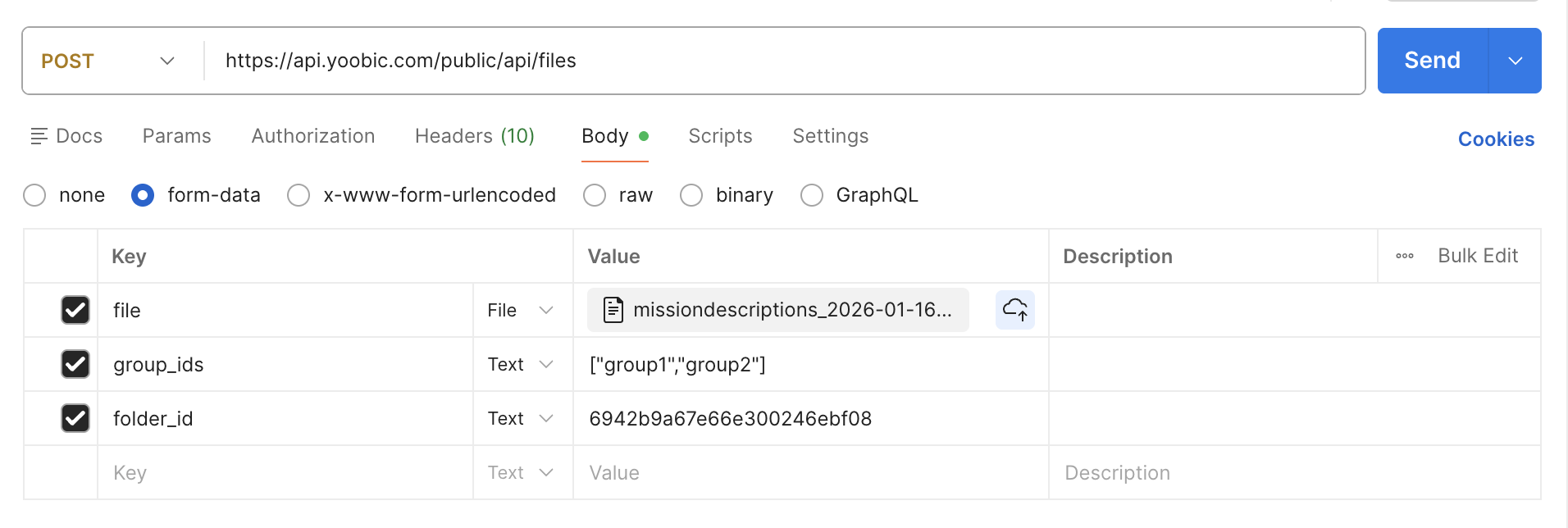
Authorizations:
header Parameters
| Accept | string Example: application/json e.g. application/json |
Responses
Response samples
- 200
{- "file_id": "54ab03c6546847ee0d30087d",
- "folder_id": "54ab03c6546847ee0d30087b",
- "folder_name": "Rockets folder",
- "size": 25,
- "filename": "Rockets file 1",
- "download_url": "www.rocketltd.com/file/RocketsFile1.jpg",
- "mime_type": "jpg",
- "created_date": "2018-05-23T04:51:40.862Z",
- "updated_date": "2018-05-23T04:51:40.862Z"
}Get All
Get all the files.
Authorizations:
query Parameters
| filter | string Example: filter={} A valid JSON filter object |
header Parameters
| Accept | string Example: application/json e.g. application/json |
Request Body schema: application/json
object (Default_Header) |
Responses
Request samples
- Payload
{- "Authorization": {
- "Authorization": "Bearer JWT"
}
}Response samples
- 200
[- {
- "file_id": "54ab03c6546847ee0d30087d",
- "folder_id": "54ab03c6546847ee0d30087b",
- "folder_name": "Rockets folder",
- "size": 25,
- "filename": "Rockets file 1",
- "download_url": "www.rocketltd.com/file/RocketsFile1.jpg",
- "mime_type": "jpg",
- "created_date": "2018-05-23T04:51:40.862Z",
- "updated_date": "2018-05-23T04:51:40.862Z"
}, - {
- "file_id": "54ab03c6546847ee0d30087e",
- "folder_id": "54ab03c6546847ee0d30087b",
- "folder_name": "Rockets folder",
- "size": 25,
- "filename": "Rockets file 2",
- "download_url": "www.rocketltd.com/file/RocketsFile2.jpg",
- "mime_type": "jpg",
- "created_date": "2018-05-23T04:51:40.862Z",
- "updated_date": "2018-05-23T04:51:40.862Z"
}
]Count
Count all the existing entities based on the where filter
Authorizations:
query Parameters
| where |
header Parameters
| Accept | string Example: application/json e.g. application/json |
Request Body schema: application/json
object (Default_Header) |
Responses
Request samples
- Payload
{- "Authorization": {
- "Authorization": "Bearer JWT"
}
}Response samples
- 200
{- "count": 10
}Export
Export all results as a file.
This action is asynchronous and returns the id of a job. See jobs endpoint to query the status of the job. The file will contain the results with all of the fields specified on the resource.
Authorizations:
path Parameters
| type required | string Example: csv The type of file, either |
query Parameters
| filter | string Example: filter={} A valid JSON filter object (does not accept a |
header Parameters
| Accept | string Example: application/json e.g. application/json |
Request Body schema: application/json
object (Default_Header) |
Responses
Request samples
- Payload
{- "Authorization": {
- "Authorization": "Bearer JWT"
}
}Response samples
- 200
{- "name": "Export file",
- "type": "normal",
- "priority": 0,
- "nextRunAt": "2018-09-11T15:56:05.387Z",
- "_id": "5b97e5954b99568b4b9101af"
}provides a mapping between users and the stores they have permission to visit
Each user may have more than one store mapped. If enabled, users could only book missions to the specified stores.
Geographic filters are extremely important in Operations. They are what control which stores a user can or can't see.
Geographic filters are assigned to stores and store types.
There are two types of geographic filters: non-dynamic and dynamic. Non dynamic filters are made by attaching stores to a user, dynamic filters are made by attaching store types to a user.

With the exception of Stores, geographic filters should always be dynamic. This is because it is easier to add a store to a type so that it inherits its geographic filter than it is to add a store to each geographic filter it needs to be in.
Fields
| Field | Type | Required | Readonly | OrderBy | Description |
|---|---|---|---|---|---|
geofilter_id |
string | x | x | Unique geofilter id | |
user_id |
string | x | x | Unique user id | |
store_ids |
array | x | Unique store ids | ||
store_client_ids |
array | External unique ids of the stores as it may exists in your Information System | |||
store_type_names |
array | The names of the store types | |||
store_type_ids |
array | x | The ids of the store types | ||
created_date |
date | x | Created Date | ||
updated_date |
date | x | x | Updated Date |
One of either fields is required in order to resolve the mapping between a user and store/s:
store_ids
store_client_ids
store_type_ids
store_type_names
Get
Get a geofilter for the given id.
Authorizations:
header Parameters
| Accept | string Example: application/json e.g. application/json |
Responses
Response samples
- 200
{- "geofilter_id": "552168f5f8d75fe77c520e7f",
- "store_ids": [
- "551d6add1077d5fb7a12cd33",
- "551da1d6e846db5b384876e3",
- "551d6addc5ba3e1c05027f75",
- "551d6adddf86ce073a80903b",
- "551d6add6356be82480274c0",
- "551d6add2c35374276027fe9",
- "54f06ac41e93dff83d000857"
], - "store_type_ids": [
- "551c1b9b11cbd1e27819ea0f",
- "551bc51e0a122f7f73e04ba7",
- "551b1a44e829ce22380028f4",
- "54357be802d0e9fa0202e9a2"
], - "user_id": "55142883b0cc8a622d01c5a1",
- "created_date": "2015-04-05T16:55:17.563Z",
- "updated_date": "2015-09-07T09:10:58.643Z"
}Partial Update
Update a subset of properties of a geofilter
Authorizations:
header Parameters
| Accept | string Example: application/json e.g. application/json |
Request Body schema: application/json
| store_client_ids | Array of strings |
Responses
Request samples
- Payload
{- "store_client_ids": [
- "ice-cream-store-10"
]
}Response samples
- 200
{- "geofilter_id": "552168f5f8d75fe77c520e7f",
- "store_ids": [
- "551d6add1077d5fb7a12ab01"
], - "store_type_ids": [
- "551c1b9b11cbd1e27819ea0f",
- "551bc51e0a122f7f73e04ba7",
- "551b1a44e829ce22380028f4",
- "54357be802d0e9fa0202e9a2"
], - "user_id": "55142883b0cc8a622d01c5a1",
- "created_date": "2015-04-05T01:55:17.563Z",
- "updated_date": "2015-09-07T11:30:58.643Z"
}Get all
Get all geofilters.
Authorizations:
query Parameters
| filter | string Example: filter={} A valid JSON filter object |
header Parameters
| Accept | string Example: application/json e.g. application/json |
Request Body schema: application/json
object (Default_Header) |
Responses
Request samples
- Payload
{- "Authorization": {
- "Authorization": "Bearer JWT"
}
}Response samples
- 200
{- "paging": {
- "total": 2,
- "skip": 0,
- "limit": 1000
}, - "data": [
- {
- "geofilter_id": "552168f5f8d75fe77c520e7f",
- "store_ids": [
- "551d6add1077d5fb7a12ab01"
], - "store_type_ids": [
- "551c1b9b11cbd1e27819ea0f",
- "551bc51e0a122f7f73e04ba7",
- "551b1a44e829ce22380028f4",
- "54357be802d0e9fa0202e9a2"
], - "user_id": "55142883b0cc8a622d01c5a1",
- "created_date": "2015-04-05T01:55:17.563Z",
- "updated_date": "2015-09-07T11:30:58.643Z"
}, - {
- "geofilter_id": "552168f5f8d75fe77c520e80",
- "store_ids": [
- "551d6add1077d5fb7a12ab02",
- "551d6add1077d5fb7a12ab03"
], - "user_id": "55142883b0cc8a622d01c5a2",
- "created_date": "2015-04-05T01:55:17.563Z",
- "updated_date": "2015-09-07T11:40:58.643Z"
}
]
}Count
Count all the existing entities based on the where filter
Authorizations:
query Parameters
| where |
header Parameters
| Accept | string Example: application/json e.g. application/json |
Request Body schema: application/json
object (Default_Header) |
Responses
Request samples
- Payload
{- "Authorization": {
- "Authorization": "Bearer JWT"
}
}Response samples
- 200
{- "count": 10
}Create
You may create a new single geofilter or multiple geofilters using this action.
When creating a single geofilter the body contains a json object, when creating multiple geofilters the body contains an array of objects.
Warning: a maximum of 1000 items can be sent in a single request.
Authorizations:
header Parameters
| Accept | string Example: application/json e.g. application/json |
Request Body schema: application/json
| store_type_names | Array of strings |
| user_id | string |
Responses
Request samples
- Payload
{- "store_type_names": [
- "yoobic-ice-creams"
], - "user_id": "5babb8a69fa6ae919f675716"
}Response samples
- 200
[- {
- "geofilter_id": "552168f5f8d75fe77c520e7f",
- "store_ids": [
- "551d6add1077d5fb7a12ab01"
], - "user_id": "55142883b0cc8a622d01c5a1",
- "created_date": "2015-04-05T01:55:17.563Z",
- "updated_date": "2015-09-07T11:30:58.643Z"
}, - {
- "geofilter_id": "552168f5f8d75fe77c520e80",
- "store_ids": [
- "551d6add1077d5fb7a12ab03"
], - "user_id": "55142883b0cc8a622d01c5a2",
- "created_date": "2015-04-05T01:55:17.563Z",
- "updated_date": "2015-09-07T11:40:58.643Z"
}
]Export
Export all results as a file.
This action is asynchronous and returns the id of a job. See jobs endpoint to query the status of the job. The file will contain the results with all of the fields specified on the resource.
Authorizations:
path Parameters
| type required | string Example: csv The type of file, either |
query Parameters
| filter | string Example: filter={} A valid JSON filter object (does not accept a |
header Parameters
| Accept | string Example: application/json e.g. application/json |
Request Body schema: application/json
object (Default_Header) |
Responses
Request samples
- Payload
{- "Authorization": {
- "Authorization": "Bearer JWT"
}
}Response samples
- 200
{- "name": "Export file",
- "type": "normal",
- "priority": 0,
- "nextRunAt": "2018-09-11T15:56:05.387Z",
- "_id": "5b97e5954b99568b4b9101af"
}Import
See the Import file section for more information.
Fields
| Field | Format | Required | Description |
|---|---|---|---|
geofilter_id |
string | Unique geofilter id | |
user_id |
string | x | Unique user id |
store_ids |
array | x | Unique store ids |
store_client_ids |
array | External unique ids of the stores as it may exists in your Information System | |
store_type_names |
array | The names of the store types | |
store_type_ids |
array | The ids of the store types |
One of either fields is required in order to resolve the mapping between a user and store/s:
store_ids
store_client_ids
store_type_ids
store_type_names
Authorizations:
path Parameters
| type required | string Example: csv The type of file, either |
header Parameters
| Content-Disposition | string Example: form-data; name="file"; filename="file.csv" e.g. form-data; name="file"; filename="file.csv" |
Request Body schema: multipart/form-data, boundary=AaB03x
object (Default_Header) |
Responses
Response samples
- 200
{- "name": "Import file",
- "type": "normal",
- "priority": 0,
- "nextRunAt": "2018-09-11T15:56:05.387Z",
- "_id": "5b97e5954b99568b4b9101af"
}Groups are used to manage users. This is VERY important as Groups are what make using the application much simpler. By adding Users to Groups, when you need to modify sets of Users, you just change the groups properties and all the Users in the Group inherit these properties (much better than changing each individual user manually). Moreover, Groups allow to restrict visibility when some entities are shared (Missions, News, Documents, ...)
How do I structure my groups ?
Each Group usually corresponds to a population of Users (ex: Admin, HQ, VM Managers, Retail Area Managers, Stores, etc.).
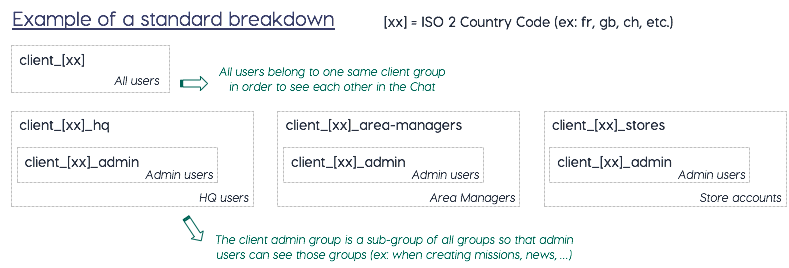
General Group
Usually there is a general group, which has the name of the tenant. This group will contain all of the other Groups and will give the Users access to shared information.
Then you will usually find a Group for each type of user. These usually fall into one of these categories:
Admin
Area Managers
HQ
Itinerants
Store Users
Fields
| Field | Type | Required | Readonly | OrderBy | Description |
|---|---|---|---|---|---|
group_id |
string | x | The group_id corresponds to the Group title in lowercase letters, with _ instead of spaces, and without special characters |
||
title |
string | x | Group Title | ||
description |
string | Group Description | |||
group_ids |
array | x | group ids that belong to this group | ||
user_ids |
array | x | user ids that belong to this group | ||
created_date |
date | x | Created Date | ||
updated_date |
date | x | x | Updated Date | |
icon_url |
string | Icon URL |
Tip
To summarise, remember that:
Users are organised in groups
Groups must be created prior to importing any users to the database
A user can belong to multiple groups
There can be sub-groups
Users inherit their level or rights from the group(s) they belong to
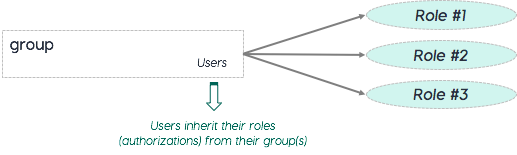
Get
Get a group for the given id.
Authorizations:
header Parameters
| Accept | string Example: application/json e.g. application/json |
Responses
Response samples
- 200
{- "group_id": "mycompany_test",
- "user_ids": [
- "53fb03c6546847ee0d33386b",
- "53fb03c6546847ee0d30086a"
], - "updated_date": "2018-05-22T11:45:22.100Z",
- "created_date": "2018-05-22T11:45:22.100Z",
- "title": "My Company Title",
- "description": "My Company Description",
}
Partial Update
Update a subset of properties of a group.
Important:
It is not possible to update group_ids or user_ids through this endpoint. To update these properties, please read the endpoints above.
Authorizations:
header Parameters
| Accept | string Example: application/json e.g. application/json |
Request Body schema: application/json
| title | string |
| description | string |
| icon_url | string |
Responses
Request samples
- Payload
{- "title": "My New Company Title",
- "description": "My New Company Description",
}Response samples
- 200
{- "group_id": "mycompany_test",
- "user_ids": [
- "53fb03c6546847ee0d33386b",
- "53fb03c6546847ee0d30086a"
], - "title": "My New Company Title",
- "description": "My New Company Description",
}Add Groups to Group
Add groups to a group
Authorizations:
header Parameters
| Accept | string Example: application/json e.g. application/json |
Responses
Response samples
- 200
{- "group_id": "mycompany_mycompany_test",
- "user_ids": [
- "53fb03c6546847ee0d33386b",
- "53fb03c6546847ee0d30086a"
], - "group_ids": [
- "mycompany_mycompany_group_1",
- "mycompany_mycompany_group_2"
], - "updated_date": "2018-10-08T10:15:22.100Z",
- "created_date": "2018-05-22T11:45:22.100Z"
}Remove Groups from Group
Remove groups from a group
Authorizations:
header Parameters
| Accept | string Example: application/json e.g. application/json |
Responses
Response samples
- 200
{- "group_id": "mycompany_test",
- "user_ids": [
- "53fb03c6546847ee0d33386b",
- "53fb03c6546847ee0d30086a"
], - "updated_date": "2018-10-08T10:15:22.100Z",
- "created_date": "2018-05-22T11:45:22.100Z"
}Add Users to Group
Add users to a group
Authorizations:
header Parameters
| Accept | string Example: application/json e.g. application/json |
Responses
Response samples
- 200
{- "group_id": "mycompany_test",
- "user_ids": [
- "53fb03c6546847ee0d33386b",
- "53fb03c6546847ee0d30086a",
- "53fb03c6546847ee0d33387c",
- "53fb03c6546847ee0d33387d"
], - "updated_date": "2018-10-08T10:15:22.100Z",
- "created_date": "2018-05-22T11:45:22.100Z"
}Remove Users from Group
Remove users from a group
Authorizations:
header Parameters
| Accept | string Example: application/json e.g. application/json |
Responses
Response samples
- 200
{- "group_id": "mycompany_test",
- "user_ids": [
- "53fb03c6546847ee0d33386b",
- "53fb03c6546847ee0d30086a"
], - "updated_date": "2018-10-08T10:15:22.100Z",
- "created_date": "2018-05-22T11:45:22.100Z"
}Get All
Get all the groups.
Authorizations:
query Parameters
| filter | string Example: filter={} A valid JSON filter object |
header Parameters
| Accept | string Example: application/json e.g. application/json |
Request Body schema: application/json
object (Default_Header) |
Responses
Request samples
- Payload
{- "Authorization": {
- "Authorization": "Bearer JWT"
}
}Response samples
- 200
{- "paging": {
- "total": 2,
- "skip": 0,
- "limit": 1000
}, - "data": [
- {
- "group_id": "mycompany_test",
- "user_ids": [
- "53fb03c6546847ee0d33386b",
- "53fb03c6546847ee0d30086a"
], - "updated_date": "2018-10-08T10:15:22.100Z",
- "created_date": "2018-05-22T11:45:22.100Z",
- "title": "My Company Title",
- "description": "My Company Description",
}, - {
- "group_id": "mycompany_another_test_group",
- "user_ids": [
- "53fb03c6546847ee0d33387b",
- "53fb03c6546847ee0d30086a"
], - "updated_date": "2018-10-08T10:15:22.100Z",
- "created_date": "2018-05-22T11:45:22.100Z"
}
]
}Count
Count all the existing entities based on the where filter
Authorizations:
query Parameters
| where |
header Parameters
| Accept | string Example: application/json e.g. application/json |
Request Body schema: application/json
object (Default_Header) |
Responses
Request samples
- Payload
{- "Authorization": {
- "Authorization": "Bearer JWT"
}
}Response samples
- 200
{- "count": 10
}Create
You may create a new single group or multiple groups using this action.
When creating a single group the body contains a json object, when creating multiple groups the body contains an array of objects.
Warning: a maximum of 1000 items can be sent in a single request.
Important:
The group_id is generated automatically when a new group is created. The group_id corresponds to the group's title in lowercase letters, with _ instead of spaces, and without special caracters
Authorizations:
header Parameters
| Accept | string Example: application/json e.g. application/json |
Request Body schema: application/json
| user_ids | Array of strings |
| title | string |
| description | string |
| icon_url | string |
Responses
Request samples
- Payload
{- "user_ids": [
- "53fb03c6546847ee0d33386b",
- "53fb03c6546847ee0d30086a"
], - "title": "My Company Title",
- "description": "My Company Description",
}Response samples
- 200
[- {
- "group_id": "mycompany_sub-test",
- "user_ids": [
- "53fb03c6546847ee0d33386b",
- "53fb03c6546847ee0d30086a"
], - "updated_date": "2018-10-08T10:15:22.100Z",
- "created_date": "2018-05-22T11:45:22.100Z",
- "title": "sub-test",
- "description": "My Company Description",
}, - {
- "group_id": "mycompany_my_company_title",
- "user_ids": [
- "53fb03c6546847ee0d33386b",
- "53fb03c6546847ee0d30086a"
], - "group_ids": [
- "mycompany_sub-test"
], - "title": "My Company Title",
- "updated_date": "2018-10-08T10:15:22.100Z",
- "created_date": "2018-05-22T11:45:22.100Z"
}
]Export
Export all results as a file.
This action is asynchronous and returns the id of a job. See jobs endpoint to query the status of the job. The file will contain the results with all of the fields specified on the resource.
Authorizations:
path Parameters
| type required | string Example: csv The type of file, either |
query Parameters
| filter | string Example: filter={} A valid JSON filter object (does not accept a |
header Parameters
| Accept | string Example: application/json e.g. application/json |
Request Body schema: application/json
object (Default_Header) |
Responses
Request samples
- Payload
{- "Authorization": {
- "Authorization": "Bearer JWT"
}
}Response samples
- 200
{- "name": "Export file",
- "type": "normal",
- "priority": 0,
- "nextRunAt": "2018-09-11T15:56:05.387Z",
- "_id": "5b97e5954b99568b4b9101af"
}Import
See the Import file section for more information.
Important:
The group_id is generated automatically when a new group is created. The group_id corresponds to the Group title in lowercase letters, with _ instead of spaces, and without special caracters
Fields
| Field | Format | Required | Description |
|---|---|---|---|
group_id |
string | Unique group name/id | |
user_ids |
array | User ids of the group | |
group_ids |
array | Sub group ids of the group | |
title |
string | x | Group Title |
description |
string | Group Description | |
icon_url |
string | Icon URL |
Authorizations:
path Parameters
| type required | string Example: csv The type of file, either |
header Parameters
| Content-Disposition | string Example: form-data; name="file"; filename="file.csv" e.g. form-data; name="file"; filename="file.csv" |
Request Body schema: multipart/form-data, boundary=AaB03x
object (Default_Header) |
Responses
Response samples
- 200
{- "name": "Import file",
- "type": "normal",
- "priority": 0,
- "nextRunAt": "2018-09-11T15:56:05.387Z",
- "_id": "5b97e5954b99568b4b9101af"
}Incentives-KPIs are an indicator for users’ progress within an incentive. Each incentives-kpi represents the sale of one or more items of a single product. When a user submits new progress for an incentive, the data is then broken down product by product, creating one or several new kpis. In case there are no products involved, submitting new progress will generate a single incentive kpi with an empty product
Fields
| Field | Type | Required | Readonly | OrderBy | Description |
|---|---|---|---|---|---|
incentive_kpi_id |
string | x | Unique id incentive_kpi | ||
incentive_id |
string | x | The incentive_id | ||
owner_id |
string | x | The user who submitted the kpi | ||
username |
string | x | The owner username | ||
first_name |
string | x | The owner first name | ||
last_name |
string | x | The owner last name | ||
participant_type |
string | x | Type of incentives-kpi ('individual' or 'team') | ||
start_time |
date | x | The start time of the kpi | ||
end_time |
date | x | The end time of the kpi | ||
participant_user_id |
string | The participant user in kpi | |||
participant_group_id |
string | The participant group in kpi | |||
product_id |
string | product_id involved in the kpi | |||
price |
number | x | The product's price | ||
count |
number | Number of units in the kpi | |||
weight |
number | x | Weight of product in total calculation | ||
total |
number | Total value of the kpi | |||
created_date |
date | x | KPI submission date | ||
updated_date |
date | x | x | Last update date |
Only one of these fields is required:
participant_user_id
participant_group_id
Important:
If
participant_typeequalsteams,participant_group_idmust be filled withgroup_idvalue.If
participant_typeequalsindividual,participant_user_idmust be filled withuser_idvalue.product_idis optional and appear only if product is part of the related incentive.pricehas a value only if aproduct_idexists.
Get
Get an incentive-kpi for the given id.
Authorizations:
path Parameters
| id required | string Example: 5eb8fd0a7d5ff5748adcb039 The id of the incentive-kpi |
header Parameters
| Accept | string Example: application/json e.g. application/json |
Responses
Response samples
- 200
{- "incentive_kpi_id": "5eb8fd0a7d5ff5748adcb039",
- "incentive_id": "5eb8fd017d5ff5748adcaf09",
- "owner_id": "5eb8fd017d5ff5748adcaef5",
- "first_name": "my",
- "last_name": "company",
- "username": "mcompany@mycompany.com",
- "participant_id": "5eb8fd017d5ff5748adcaef5",
- "start_time": "2020-01-01T00:00:00.000Z",
- "end_time": "2020-01-31T23:59:59.999Z",
- "total": 12,
- "count": 6,
- "weight": 2,
- "participant_type": "individual",
- "created_date": "2020-01-01T00:00:00.000Z",
- "updated_date": "2020-01-01T00:10:00.000Z"
}Partial Update
Update a subset of properties of an incentive-kpi
Authorizations:
path Parameters
| id required | string Example: 5eb8fd0a7d5ff5748adcb039 The id of the incentive-kpi |
| id required | string Example: 5eb8fd0a7d5ff5748adcb039 The id of the incentive-kpi |
header Parameters
| Accept | string Example: application/json e.g. application/json |
Request Body schema: application/json
| total | number |
| count | number |
Responses
Request samples
- Payload
{- "total": 10,
- "count": 5
}Response samples
- 200
{- "incentive_kpi_id": "5eb8fd0a7d5ff5748adcb039",
- "incentive_id": "5eb8fd017d5ff5748adcaf09",
- "owner_id": "5eb8fd017d5ff5748adcaef5",
- "first_name": "my",
- "last_name": "company",
- "username": "mcompany@mycompany.com",
- "participant_id": "5eb8fd017d5ff5748adcaef5",
- "start_time": "2020-01-01T00:00:00.000Z",
- "end_time": "2020-01-31T23:59:59.999Z",
- "total": 10,
- "count": 5,
- "weight": 2,
- "participant_type": "individual",
- "created_date": "2020-01-01T00:00:00.000Z",
- "updated_date": "2020-01-01T00:35:00.000Z"
}Get All
Get all the incentive-kpis.
Authorizations:
query Parameters
| filter | string Example: filter={} A valid JSON filter object |
header Parameters
| Accept | string Example: application/json e.g. application/json |
Request Body schema: application/json
object (Default_Header) |
Responses
Request samples
- Payload
{- "Authorization": {
- "Authorization": "Bearer JWT"
}
}Response samples
- 200
{- "paging": {
- "total": 2,
- "skip": 0,
- "limit": 1000
}, - "data": [
- {
- "incentive_kpi_id": "5eb8fd0a7d5ff5748adcb039",
- "incentive_id": "5eb8fd017d5ff5748adcaf09",
- "owner_id": "5eb8fd017d5ff5748adcaef5",
- "first_name": "my",
- "last_name": "company",
- "username": "mcompany@mycompany.com",
- "participant_id": "5eb8fd017d5ff5748adcaef5",
- "start_time": "2020-01-01T00:00:00.000Z",
- "end_time": "2020-01-31T23:59:59.999Z",
- "total": 10,
- "count": 5,
- "weight": 2,
- "participant_type": "individual",
- "created_date": "2020-01-01T00:00:00.000Z",
- "updated_date": "2020-01-01T00:35:00.000Z"
}, - {
- "incentive_kpi_id": "5eb8fd147d5ff5748adcb096",
- "incentive_id": "5eb8fd017d5ff5748adcaf08",
- "participant_id": "api_team",
- "product_id": "5eb8fd017d5ff5748adcaef5",
- "product_name": "myproduct",
- "owner_id": "5eb8fd017d5ff5748adcaef4",
- "first_name": "John",
- "last_name": "Doe",
- "username": "jdoe@mycompany.com",
- "start_time": "2020-01-01T00:00:00.000Z",
- "end_time": "2020-01-31T23:59:59.999Z",
- "total": 20,
- "count": 2,
- "weight": 2,
- "price": 5,
- "participant_type": "teams",
- "created_date": "2020-05-11T07:21:56.182Z",
- "updated_date": "2020-05-11T08:21:56.182Z"
}
]
}Count
Count all the existing entities based on the where filter
Authorizations:
query Parameters
| where |
header Parameters
| Accept | string Example: application/json e.g. application/json |
Request Body schema: application/json
object (Default_Header) |
Responses
Request samples
- Payload
{- "Authorization": {
- "Authorization": "Bearer JWT"
}
}Response samples
- 200
{- "count": 10
}Create
You may create a new single incentives-kpi or multiple incentives-kpi using this action.
When creating a single incentives-kpi the body contains a json object, when creating multiple incentives-kpi the body contains an array of objects.
Warning: a maximum of 1000 items can be sent in a single request.
Authorizations:
header Parameters
| Accept | string Example: application/json e.g. application/json |
Request Body schema: application/json
| incentive_id | string |
| start_time | string |
| end_time | string |
| owner_id | string |
| participant_id | string |
| participant_type | string |
| total | number |
| weight | number |
| count | number |
Responses
Request samples
- Payload
{- "incentive_id": "5eb8fd017d5ff5748adcaf08",
- "start_time": "2019-05-21T04:51:40.862Z",
- "end_time": "2019-05-28T04:51:40.862Z",
- "owner_id": "5eb8fd017d5ff5748adcaef4",
- "participant_id": "5eb8fd017d5ff5748adcaef4",
- "participant_type": "individual",
- "total": 35,
- "weight": 5,
- "count": 7
}Response samples
- 200
[- {
- "incentive_kpi_id": "5eb8fd147d5ff5748adcb097",
- "incentive_id": "5eb8fd017d5ff5748adcaf08",
- "start_time": "2019-05-21T04:51:40.862Z",
- "end_time": "2019-05-28T04:51:40.862Z",
- "owner_id": "5eb8fd017d5ff5748adcaef4",
- "first_name": "John",
- "last_name": "Doe",
- "username": "jdoe@mycompany.com",
- "participant_id": "5eb8fd017d5ff5748adcaef4",
- "participant_type": "individual",
- "total": 35,
- "weight": 5,
- "count": 7,
- "created_date": "2020-05-11T07:21:56.182Z",
- "updated_date": "2020-05-11T08:21:56.182Z"
}, - {
- "incentive_kpi_id": "5eb8fd147d5ff5748adcb096",
- "incentive_id": "5eb8fd017d5ff5748adcaf08",
- "participant_id": "api_team",
- "product_id": "5eb8fd017d5ff5748adcaef5",
- "product_name": "myproduct",
- "owner_id": "5eb8fd017d5ff5748adcaef4",
- "first_name": "John",
- "last_name": "Doe",
- "username": "jdoe@mycompany.com",
- "start_time": "2020-01-01T00:00:00.000Z",
- "end_time": "2020-01-31T23:59:59.999Z",
- "total": 20,
- "count": 2,
- "weight": 2,
- "price": 5,
- "participant_type": "teams",
- "created_date": "2020-05-11T07:21:56.182Z",
- "updated_date": "2020-05-11T08:21:56.182Z"
}
]Export
Export all results as a file.
This action is asynchronous and returns the id of a job. See jobs endpoint to query the status of the job. The file will contain the results with all of the fields specified on the resource.
Authorizations:
path Parameters
| type required | string Example: csv The type of file, either |
query Parameters
| filter | string Example: filter={} A valid JSON filter object (does not accept a |
header Parameters
| Accept | string Example: application/json e.g. application/json |
Request Body schema: application/json
object (Default_Header) |
Responses
Request samples
- Payload
{- "Authorization": {
- "Authorization": "Bearer JWT"
}
}Response samples
- 200
{- "name": "Export file",
- "type": "normal",
- "priority": 0,
- "nextRunAt": "2018-09-11T15:56:05.387Z",
- "_id": "5b97e5954b99568b4b9101af"
}Import
See the Import file section for more information.
Fields
| Field | Type | Required | Readonly | OrderBy | Description |
|---|---|---|---|---|---|
incentive_kpi_id |
string | x | Unique id incentive_kpi | ||
incentive_id |
string | x | The incentive_id | ||
participant_type |
string | x | Type of incentives-kpi ('individual' or 'team') | ||
participant_user_id |
string | The participant user in kpi | |||
participant_group_id |
string | The participant group in kpi | |||
product_id |
string | product_id involved in the kpi | |||
product_name |
string | x | The product's name | ||
owner_id |
string | x | The user who submitted the kpi | ||
username |
string | x | The owner username | ||
first_name |
string | x | The owner first name | ||
last_name |
string | x | The owner last name | ||
start_time |
date | x | The start time of the kpi | ||
end_time |
date | x | The end time of the kpi | ||
price |
number | x | The product's price | ||
count |
number | Number of units in the kpi | |||
weight |
number | x | Weight of product in total calculation | ||
total |
number | Total value of the kpi | |||
created_date |
date | x | KPI submission date | ||
updated_date |
date | x | x | Last update date |
Only One of either fields is required (inserting both will fail validation):
participant_user_id
participant_group_id
The rule to define which one to use, is according to the value of participant_type.
Important:
If
participant_typeequals'teams',participant_group_idmust be filled withgroup_idvalue.If
participant_typeequals'individual',participant_user_idmust be filled withuser_idvalue.product_idis optional and exists only if a product is part of incentives.pricehas a value only if aproduct_idexists.start_timemust be beforeend_time.totalis the multiplicity ofcount,weightandpriceifproduct_idexists
Authorizations:
path Parameters
| type required | string Example: csv The type of file, either |
header Parameters
| Content-Disposition | string Example: form-data; name="file"; filename="file.csv" e.g. form-data; name="file"; filename="file.csv" |
Request Body schema: multipart/form-data, boundary=AaB03x
object (Default_Header) |
Responses
Response samples
- 200
{- "name": "Import file",
- "type": "normal",
- "priority": 0,
- "nextRunAt": "2018-09-11T15:56:05.387Z",
- "_id": "5b97e5954b99568b4b9101af"
}An Inventory is a custom data structure to manage and use data in a similar way as in a spreadsheet or database directly from the YOOBIC Platform. Each inventory has a defined structure that rely on the same fields as in a YOOBIC campaign.
Fields
| Field | Type | Required | Readonly | OrderBy | Description |
|---|---|---|---|---|---|
inventory_id |
string | x | x | Unique id of the inventory | |
description |
string | x | The inventory description | ||
name |
string | x | The inventory name | ||
title |
string | x | The inventory title | ||
group_ids |
array | x | Group ids that can see this inventory | ||
page_titles |
array | x | An ordered list of page titles i.e. first title is the first page title etc. | ||
questions |
array | x | The inventory's questions | ||
created_date |
date | x | Creation date | ||
updated_date |
date | x | x | Last update date |
The questions field is defined as an array of:
| Field | Type | Description |
|---|---|---|
question_id |
string | Unique id of the question |
question_type |
string | The type of the question. Supported types: text, textarea, toggle, checkbox, information, todo, photo, multiphotos, selectbuttons, select, selectmulti, address, date, number, starrating, image. |
question |
string | The title of the question |
question_description |
string | The description of the question |
mandatory |
boolean | If true, the question has to be answered. Defaults to false |
page_number |
number | The number of the page the question appears in |
question_number |
number | The number of the question |
hide_mobile |
boolean | Hide the question on mobile devices. Defaults to false. |
question_attributes |
object | Question attributes for specific question types. |
The question_attributes field is defined as an object with the following fields:
| Field | Type | Description |
|---|---|---|
max_photos |
number | Maximum of allowed photos to upload. Applies only to questions of type multiphotos. |
values |
array | Values to be displayed as options to choose from in the question. Applies only to questions of type selectbuttons, select, selectmulti. |
min |
number | If present, value must be above or including it. Applies only to questions of type number. |
max |
number | If present, value must be below or including it. Applies only to questions of type number, starrating. |
Question Types
Important
Below is a list of the supported types and their value types:
| question_type | Type | Description |
|---|---|---|
| address | string | |
| date | string | |
| information | string | |
| select | string | Single value chosen from the values defined in question_attributes |
| textarea | string | |
| text | string | |
| photo | URL | A valid image URL |
| multiphotos | array of URLs | Valid image URLs and up to max_photos defined in question_attributes |
| selectbuttons | array | Multiple values chosen from the values defined in question_attributes |
| selectmulti | array | Multiple values chosen from the values defined in question_attributes |
| number | number | Might have min, max borders as defined in question_attributes |
| starrating | number | Might have max border as defined in question_attributes. No negatives allowed. |
| checkbox | boolean | |
| toggle | boolean | |
| image | This is a readonly property (informative) which does not have a value. |
Important
- If
page_titlesdoes not have a title for a given page then a default will be given -
So i.e. if the values are -
[ "first chapter", "second chapter" ]
and there are three pages in total, then the title for the third page will be Page 3.
- To filter on
livecampaigns only you should filter accordingly:
{ "active": true, "archived": { "neq": true } }
Get
Get an inventory for the given id.
Authorizations:
path Parameters
| id required | string Example: 5c015012ad45490041a52f64 The id of the inventory |
header Parameters
| Accept | string Example: application/json e.g. application/json |
Responses
Response samples
- 200
{- "inventory_id": "5c015012ad45490041a52f64",
- "title": "Items",
- "name": "Grade A products",
- "description": "Listing of our A products",
- "group_ids": [
- "testproduct"
], - "created_date": "2018-11-30T14:58:26.716Z",
- "updated_date": "2019-01-25T13:34:14.819Z"
}Get All
Get all the inventories.
Authorizations:
query Parameters
| filter | string Example: filter={} A valid JSON filter object |
header Parameters
| Accept | string Example: application/json e.g. application/json |
Request Body schema: application/json
object (Default_Header) |
Responses
Request samples
- Payload
{- "Authorization": {
- "Authorization": "Bearer JWT"
}
}Response samples
- 200
{- "paging": {
- "total": 2,
- "skip": 0,
- "limit": 1000
}, - "data": [
- {
- "inventory_id": "5c015012ad45490041a52f64",
- "title": "Items",
- "name": "Grade A products",
- "description": "Listing of our A products",
- "group_ids": [
- "testproduct"
], - "created_date": "2018-11-30T14:58:26.716Z",
- "updated_date": "2019-01-25T13:34:14.819Z"
}, - {
- "inventory_id": "5c015012ad45490041a52f65",
- "title": "Items",
- "name": "Grade B products",
- "description": "Listing of our B products",
- "group_ids": [
- "testproduct"
], - "created_date": "2018-11-30T14:58:26.716Z",
- "updated_date": "2019-01-25T13:34:14.819Z"
}
]
}Count
Count all the existing entities based on the where filter
Authorizations:
query Parameters
| where |
header Parameters
| Accept | string Example: application/json e.g. application/json |
Request Body schema: application/json
object (Default_Header) |
Responses
Request samples
- Payload
{- "Authorization": {
- "Authorization": "Bearer JWT"
}
}Response samples
- 200
{- "count": 10
}Export
Export all results as a file.
This action is asynchronous and returns the id of a job. See jobs endpoint to query the status of the job. The file will contain the results with all of the fields specified on the resource.
Authorizations:
path Parameters
| type required | string Example: csv The type of file, either |
query Parameters
| filter | string Example: filter={} A valid JSON filter object (does not accept a |
header Parameters
| Accept | string Example: application/json e.g. application/json |
Request Body schema: application/json
object (Default_Header) |
Responses
Request samples
- Payload
{- "Authorization": {
- "Authorization": "Bearer JWT"
}
}Response samples
- 200
{- "name": "Export file",
- "type": "normal",
- "priority": 0,
- "nextRunAt": "2018-09-11T15:56:05.387Z",
- "_id": "5b97e5954b99568b4b9101af"
}Lessons are the activities the users perform during their trainings.
Fields
| Field | Type | Required | Readonly | OrderBy | Description |
|---|---|---|---|---|---|
lesson_id |
string | x | x | Unique id of the lesson | |
title |
string | x | Title of the lesson | ||
type |
string | x | Type of lesson (currently just lesson) | ||
campaign_id |
string | x | x | Unique id of the campaign | |
plan_id |
string | x | Unique id of the plan | ||
course_id |
string | x | Unique id of the course | ||
user_id |
string | x | Unique id of the user | ||
status |
string | x | x | Whether the lesson is finished or not | |
points |
number | x | Number of points of the lesson | ||
score |
object | x | Score of the user | ||
duration |
number | x | Time spent on the lesson (in minutes) | ||
validated |
boolean | x | Whether the lesson is successfull or a failure | ||
created_date |
date | x | Creation date | ||
updated_date |
date | x | x | Last update date |
The answers field is defined as an array of:
| Field | Type | Required | Readonly | Description |
|---|---|---|---|---|
question_id |
string | x | Unique id of the question | |
question_type |
string | x | The type of the question | |
question |
string | x | The title of the question | |
page_number |
number | x | The number of the page the question appears in | |
question_number |
number | x | The number of the question on the page | |
answer |
string | x | The value of the answer |
Get
Get a lesson for the given id.
Authorizations:
path Parameters
| id required | string Example: 5c7004c1b31ec3003a56af4e The id of the lesson |
header Parameters
| Accept | string Example: application/json e.g. application/json |
Responses
Response samples
- 200
{- "paging": {
- "total": 2,
- "skip": 0,
- "limit": 1000
}, - "data": [
- {
- "lesson_id": "5c7004c1b31ec3003a56af4e",
- "title": "Feedback",
- "type": "lesson",
- "campaign_id": "5c582b8f4a35650044aea049",
- "plan_id": "5bf2d58ae553190041467eef",
- "course_id": "5bf4448528b7420041ba9b62",
- "user_id": "5beee3717fc4d50043801a97",
- "status": "finished",
- "score": {
- "total": 0,
- "value": 0
}, - "duration": 2.3,
- "validated": true,
- "tenant": "testproductv6_boost",
- "created_date": "2019-02-22T14:18:41.667Z",
- "updated_date": "2019-02-22T14:18:41.667Z",
- "answers": [
- {
- "question_id": "e886902d-ddef-43c1-8894-c9f5f101fa56",
- "question_type": "feedback",
- "question": "Feedback",
- "page_number": 1,
- "question_number": 1,
- "answer": 3
}
]
}
]
}Get All
Get all the lessons.
Authorizations:
query Parameters
| filter | string Example: filter={} A valid JSON filter object |
header Parameters
| Accept | string Example: application/json e.g. application/json |
Request Body schema: application/json
object (Default_Header) |
Responses
Request samples
- Payload
{- "Authorization": {
- "Authorization": "Bearer JWT"
}
}Response samples
- 200
[- {
- "lesson_id": "5c7004c1b31ec3003a56af4e",
- "title": "Feedback",
- "type": "lesson",
- "campaign_id": "5c582b8f4a35650044aea049",
- "plan_id": "5bf2d58ae553190041467eef",
- "course_id": "5bf4448528b7420041ba9b62",
- "user_id": "5beee3717fc4d50043801a97",
- "status": "finished",
- "score": {
- "total": 0,
- "value": 0
}, - "validated": true,
- "tenant": "testproductv6_boost",
- "created_date": "2019-02-22T14:18:41.667Z",
- "updated_date": "2019-02-22T14:18:41.667Z",
- "answers": [
- {
- "question_id": "e886902d-ddef-43c1-8894-c9f5f101fa56",
- "question_type": "feedback",
- "question": "Feedback",
- "page_number": 1,
- "question_number": 1,
- "answer": 3
}
]
}, - {
- "lesson_id": "5c7004b8b31ec3003a56af0c",
- "title": "Categories",
- "type": "lesson",
- "campaign_id": "5c582b5b4a35650044aea033",
- "plan_id": "5bf2d58ae553190041467eef",
- "course_id": "5bf4448528b7420041ba9b62",
- "user_id": "5beee3717fc4d50043801a97",
- "status": "finished",
- "points": 10,
- "score": {
- "total": 1,
- "value": 100,
- "isPercentage": true,
- "completed": 1
}, - "validated": true,
- "tenant": "testproductv6_boost",
- "created_date": "2019-02-22T14:18:32.878Z",
- "updated_date": "2019-02-22T14:18:32.878Z",
- "answers": [
- {
- "question_id": "fd91d037-769d-46d8-ac56-059a85db745e",
- "question_type": "categorizewords",
- "question": "Categorize words",
- "page_number": 1,
- "question_number": 1,
- "answer": [
- [
- "1",
- "2",
- "3"
], - [
- "A",
- "B",
- "C"
]
]
}
]
}
]Count
Count all the existing entities based on the where filter
Authorizations:
query Parameters
| where |
header Parameters
| Accept | string Example: application/json e.g. application/json |
Request Body schema: application/json
object (Default_Header) |
Responses
Request samples
- Payload
{- "Authorization": {
- "Authorization": "Bearer JWT"
}
}Response samples
- 200
{- "count": 10
}Export
Export all results as a file.
This action is asynchronous and returns the id of a job. See jobs endpoint to query the status of the job. The file will contain the results with all of the fields specified on the resource.
Authorizations:
path Parameters
| type required | string Example: csv The type of file, either |
query Parameters
| filter | string Example: filter={} A valid JSON filter object (does not accept a |
header Parameters
| Accept | string Example: application/json e.g. application/json |
Request Body schema: application/json
object (Default_Header) |
Responses
Request samples
- Payload
{- "Authorization": {
- "Authorization": "Bearer JWT"
}
}Response samples
- 200
{- "name": "Export file",
- "type": "normal",
- "priority": 0,
- "nextRunAt": "2018-09-11T15:56:05.387Z",
- "_id": "5b97e5954b99568b4b9101af"
}Missions are the basic campaign type. The store users will receive missions with fields to complete, for example send a photo of their display or change the location of the new collection in store. The mission creator will define its content from the dashboard, then he will publish it to the appropriate stores. Once the users have completed the mission they will be able to submit it. The managers responsible for the store will then be able to define the mission as compliant (if they deem the answers acceptable) or non compliant (if they believe there is room for improvement). If a mission is evaluated as non compliant, the manager can choose for the user to retake the mission entirely or he can specify which parts of the mission need improving and republish the mission to the store with the rest of the answers already filled in.
Tips: a mission is an entity of a campaign published on a store.
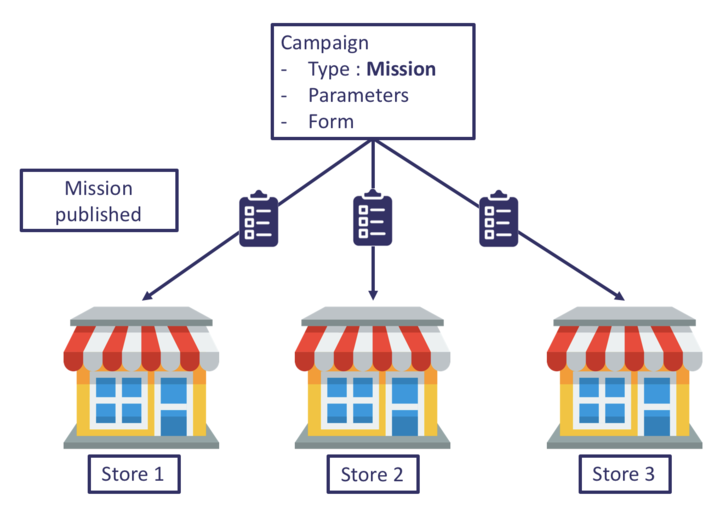
A mission is either available, ongoing or finished.
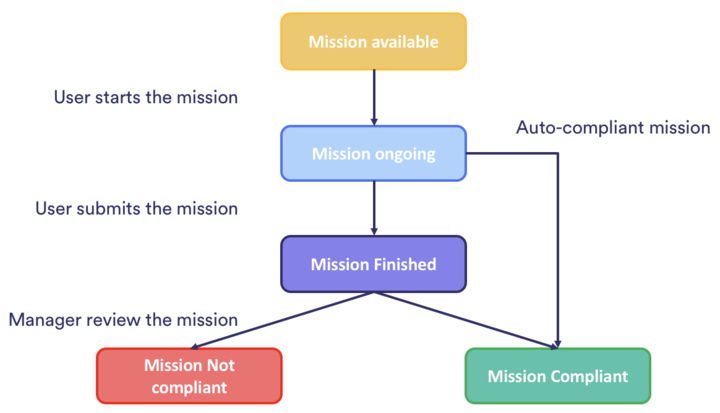
A finished mission is either "to validate", "compliant" or "not compliant".
Available : a mission is available as soon as it has been published on a store, and hasn't been started yet by a user.
Ongoing: as soon as a user starts or loads a mission, the status of the mission goes from "available" to "ongoing" (known as
bookedunder the status field of a mission)Finished : once the mission has been submitted, it is finished.
- To validate: if the mission hasn't been validated yet and marked as "compliant" or "not compliant", or isn't configured to be automatically marked as compliant.
- Compliant
- Not compliant
Scheduled: a mission is scheduled as soon as it has been published on a store and if
valid_fromdate did not reach the current date yet.Archived: a mission gets status archived as soon as it’s archived
Fields
| Field | Type | Required | Readonly | OrderBy | Description |
|---|---|---|---|---|---|
mission_id |
string | x | x | Unique id of the mission | |
title |
string | The title of the mission | |||
type |
string | x | Mission type | ||
campaign_id |
string | x | x | Unique id of the mission's parent campaign | |
user_id |
string | x | x | Unique id of the user who performs the mission | |
creator_id |
string | x | Unique id of the mission creator | ||
store_id |
string | x | x | Unique id of associated store | |
status |
string | x | x | Current status of the mission if set: "scheduled", "booked", "finished", "archived" |
|
valid_from |
timestamp | x | Mission available from | ||
republish_count |
number | The number of times the mission was republished | |||
available_on_book |
boolean | x | If true, a new copy of this mission would be created when the mission is started |
||
available_on_finish |
boolean | x | If true, a new copy of this mission would be created on finish |
||
booked_date |
timestamp | x | The date on which the mission was booked to a user | ||
due_date |
timestamp | x | The date by which the mission must be completed | ||
duration |
number | x | Time spent on the mission (in minutes) | ||
finished_date |
timestamp | x | x | The date on which the mission was finished | |
score |
object | The score of the mission as a JSON object {"title": "my score", "value": 10} |
|||
extra_scores |
object | The extra scores of the mission as a JSON object {"score1": { "title": "my score", "value": 10}} |
|||
compliant |
boolean | x | The compliance of the mission as marked by an area manager: true if marked compliant, false if marked noncompliant. If nothing is specified and if the mission is finished, status will be "to validate" |
||
compliant_by_default |
boolean | If true the mission is automatically marked compliant on finish |
|||
validated_date |
timestamp | x | The date on which the mission was validated | ||
reason_noncompliant |
string | The reason provided by the area manager to explain why the mission was marked noncompliant | |||
republished_with_answers |
boolean | x | Has the mission been repulished with the previous answers after being marked noncompliant | ||
original_mission_id |
string | x | If present, the mission_id of the mission that this mission was republished from |
||
original_reason_noncompliant |
string | x | The reason_noncompliant from the original mission that was republished. |
||
updated_date |
timestamp | x | x | Mission's last update date | |
created_date |
timestamp | x | Mission's creation date | ||
answers |
array | Mission's questions and answers, if misssion is finished (see below) | |||
group_ids |
array | Group ids that can see this mission | |||
user_ids |
array | User ids that can see this mission | |||
action_plan_progress |
number | x | Completion rate of an action plan. | ||
task_number |
number | x | Auto generated when a new mission is created. The value is unique within a campaign |
Important:
Please note that to retrieve the value of the answers for a specific mission, you will need to use the single mission endpoint.
The answers field is defined as an array of:
| Field | Type | Description |
|---|---|---|
question_id |
string | Unique id of the question |
question_type |
string | The type of the question |
question |
string | The title of the question |
page_number |
number | The number of the page the question appears in |
question_number |
number | The number of the question on the page |
answer |
string | The value of the answer |
Get
Get a mission for the given id.
Authorizations:
path Parameters
| id required | string Example: 54ab03c6546847ee0d30084a The id of the mission |
header Parameters
| Accept | string Example: application/json e.g. application/json |
Responses
Response samples
- 200
{- "mission_id": "54ab03c6546847ee0d30084a",
- "title": "Rockets mission 1",
- "created_date": "2018-05-23T04:51:40.862Z",
- "updated_date": "2018-05-23T04:51:40.862Z",
- "campaign_id": "54ab03c6546847ee0d30088a",
- "user_id": "54ab03c6546847ee0d30089a",
- "creator_id": "54ab03c6546847ee0d30089a",
- "store_id": "54ab03c6546847ee0d30081a",
- "score": {
- "title": "my score",
- "value": 10
}, - "extra_scores": {
- "score1": {
- "title": "my score2",
- "value": 8
}
}, - "republish_count": "2",
- "reason_noncompliant": "missing photo",
- "finished_date": "2018-05-29T04:51:40.862Z",
- "validated_date": "2018-05-30T04:51:40.862Z",
- "compliant": true,
- "status": "finished",
- "type": "mission",
- "answers": [
- {
- "question_id": "e8335f8d-109d-475f-b10b-113ce6876dc7",
- "question_type": "number",
- "question": "number of ice-cream flavors",
- "answer": 2,
- "page_number": 1,
- "question_number": 1
}, - {
- "question_id": "e8335f8d-109d-475f-b10b-113ce6876dc8",
- "question_type": "text",
- "question": "ice-cream flavors",
- "answer": [
- "chocolate",
- "vanilla"
], - "page_number": 1,
- "question_number": 2
}
], - "task_number": 1
}Partial Update
Update a subset of properties of a mission
Authorizations:
path Parameters
| id required | string Example: 54ab03c6546847ee0d30084a The id of the mission |
header Parameters
| Accept | string Example: application/json e.g. application/json |
Request Body schema: application/json
object | |
Array of objects |
Responses
Request samples
- Payload
{- "score": {
- "title": "my other score",
- "value": 20
}, - "answers": [
- {
- "question_id": "e8335f8d-109d-475f-b10b-113ce6876dc7",
- "answer": 3
}, - {
- "question_type": "text",
- "question": "ice-cream flavors",
- "answer": [
- "chocolate",
- "vanilla",
- "strawberry"
], - "page_number": 1
}
]
}Find mission's tasks
Find the tasks for missions of type todo
Authorizations:
header Parameters
| Accept | string Example: application/json e.g. application/json |
Responses
Response samples
- 200
{- "mission_id": "54ab03c6546847ee0d30084b",
- "title": "Action plans",
- "created_date": "2021-05-10T09:21:40.232Z",
- "updated_date": "2021-05-10T09:21:40.232Z",
- "campaign_id": "54ab03c6546847ee0d30088b",
- "user_id": "5fbea9662804f40033935d9b",
- "creator_id": "54ab03c6546847ee0d30089a",
- "store_id": "54ab03c6546847ee0d30081a",
- "todo": {
- "user_id": "5fbea9662804f40033935d9b",
- "tasks": [
- {
- "value": "TEST"
}
]
}
}Replace mission's tasks
Update the tasks on a mission of type todo.
The todo object must contain all the tasks defined with the new values.
Once updated the status of the mission is set to finished.
Authorizations:
header Parameters
| Accept | string Example: application/json e.g. application/json |
Responses
Book
Book an available mission.
Important The mission must be assigned before booking: error message: "Mission must have an assigned user before it can be booked. Please call the assign endpoint prior to booking the mission."
If the mission was republished with answers during the validation of a non-compliant mission, the booked mission will contain:
original_mission_idoriginal_reason_noncompliantoriginal_mission_answers
The original_mission_answers can be used as a starting point for the answers provided to /missions/{id}/finish.
Authorizations:
header Parameters
| Accept | string Example: application/json e.g. application/json |
Responses
Response samples
- 200
{- "mission_id": "54ab03c6546847ee0d30084a",
- "title": "Rockets mission 1",
- "created_date": "2018-05-23T04:51:40.862Z",
- "updated_date": "2018-05-23T04:51:40.862Z",
- "campaign_id": "54ab03c6546847ee0d30088a",
- "user_id": "54ab03c6546847ee0d30089a",
- "store_id": "54ab03c6546847ee0d30081a",
- "status": "booked",
- "type": "mission"
}Unbook
Unbook a mission.
Make available a mission that was previously booked.
Authorizations:
header Parameters
| Accept | string Example: application/json e.g. application/json |
Responses
Response samples
- 200
{- "mission_id": "54ab03c6546847ee0d30084a",
- "title": "Rockets mission 1",
- "created_date": "2018-05-23T04:51:40.862Z",
- "updated_date": "2018-05-23T04:51:40.862Z",
- "campaign_id": "54ab03c6546847ee0d30088a",
- "store_id": "54ab03c6546847ee0d30081a",
- "type": "mission"
}Assign
Assign an available mission to a user whose user_id is provided.
Authorizations:
header Parameters
| Accept | string Example: application/json e.g. application/json |
Responses
Response samples
- 200
{- "mission_id": "54ab03c6546847ee0d30084a",
- "title": "Rockets mission 1",
- "created_date": "2018-05-23T04:51:40.862Z",
- "updated_date": "2018-05-23T04:51:40.862Z",
- "campaign_id": "54ab03c6546847ee0d30088a",
- "user_id": "53fb03c6546847fe0d30186b",
- "creator_id": "54ab03c6546847ee0d30089a",
- "store_id": "54ab03c6546847ee0d30081a",
- "status": "booked",
- "type": "mission"
}Unassign
Unassign a mission.
Make available a mission that was previously assigned. Important: Only the user that previously assigned the mission can unassign it.
Authorizations:
header Parameters
| Accept | string Example: application/json e.g. application/json |
Responses
Response samples
- 200
{- "mission_id": "54ab03c6546847ee0d30084a",
- "title": "Rockets mission 1",
- "created_date": "2018-05-23T04:51:40.862Z",
- "updated_date": "2018-05-23T04:51:40.862Z",
- "campaign_id": "54ab03c6546847ee0d30088a",
- "store_id": "54ab03c6546847ee0d30081a",
- "status": "booked",
- "type": "mission"
}Validate
Validate a mission.
Fields
| Field | Format | Required | Description |
|---|---|---|---|
compliant |
boolean | x | Validated if true, rejected otherwise. |
rating |
number | Rating of the mission. | |
republish |
boolean | If true, republish this mission. | |
republish_with_answers |
boolean | If republish is true, control whether or not to prefill the republished mission with previous mission answers. |
|
reason_noncompliant |
string | Explanation why the mission was not compliant. | |
reason_noncompliant_key |
string | Explanation key. |
Authorizations:
header Parameters
| Accept | string Example: application/json e.g. application/json |
Responses
Response samples
- 200
{- "validated_mission": {
- "mission_id": "54ab03c6546847ee0d30084a",
- "title": "Rockets mission 1",
- "created_date": "2018-05-23T04:51:40.862Z",
- "updated_date": "2018-05-23T04:51:40.862Z",
- "campaign_id": "54ab03c6546847ee0d30088a",
- "user_id": "54ab03c6546847ee0d30089a",
- "creator_id": "54ab03c6546847ee0d30089a",
- "store_id": "54ab03c6546847ee0d30081a",
- "finished_date": "2018-05-29T04:51:40.862Z",
- "status": "finished",
- "compliant": true,
- "validated_date": "2018-05-30T04:51:40.862Z",
- "rating": 100,
- "republish_count": "3",
- "type": "mission"
}
}Archive
Archive a mission.
The status of the mission will be set to archived.
Authorizations:
header Parameters
| Accept | string Example: application/json e.g. application/json |
Responses
Response samples
- 200
{- "mission_id": "54ab03c6546847ee0d30084a",
- "title": "Rockets mission 1",
- "created_date": "2018-05-23T04:51:40.862Z",
- "updated_date": "2018-05-23T04:51:40.862Z",
- "campaign_id": "54ab03c6546847ee0d30088a",
- "user_id": "54ab03c6546847ee0d30089a",
- "creator_id": "54ab03c6546847ee0d30089a",
- "store_id": "54ab03c6546847ee0d30081a",
- "score": {
- "title": "my score",
- "value": 10
}, - "extra_scores": {
- "score1": {
- "title": "my score2",
- "value": 8
}
}, - "republish_count": "2",
- "reason_noncompliant": "missing photo",
- "finished_date": "2018-05-29T04:51:40.862Z",
- "validated_date": "2018-05-30T04:51:40.862Z",
- "compliant": true,
- "status": "archived",
- "type": "mission"
}Find mission's workflow
Get information about the workflow of a mission.
The workflow_history field is defined as an array of:
| Field | Type | Description |
|---|---|---|
state |
string | State of the step |
step_id |
string | Unique id of the step |
step_title |
string | The title of the step |
user_id |
string | Id of the user that completed the step |
date |
date | Date the user completed the step |
Authorizations:
header Parameters
| Accept | string Example: application/json e.g. application/json |
Responses
Response samples
- 200
{- "mission_id": "67726366dc8e0300a774e23d",
- "title": "Field Answer Group by date field",
- "created_date": "2025-01-01T09:21:40.232Z",
- "updated_date": "2025-01-01T09:21:40.232Z",
- "campaign_id": "6772631ddc8e0300a774e03b",
- "user_id": "5fbea9662804f40033935d9b",
- "creator_id": "54ab03c6546847ee0d30089a",
- "store_id": "5b912704e64618003830c194",
- "type": "mission",
- "booked_date": "2024-12-30T09:10:11.225Z",
- "task_number": 6,
- "workflowState": {
- "state": "available",
- "step_id": "8cbe48e3-52b5-4ffa-bb2b-1cb51f40bf8d",
- "step_title": "Step 2"
}, - "workflowHistory": [
- {
- "state": "completed",
- "step_id": "f93f7fdb-8253-4ab3-8f81-d05485c6181e",
- "step_title": "Step 1",
- "user_id": "5a57539eb937d8003ba3d17f",
- "date": "2024-12-30T09:11:51.315Z"
}
]
}Get All
Get all the missions.
Authorizations:
query Parameters
| filter | string Example: filter={ include: ["answers"] } A valid JSON filter object. Optionally add the answers to the result if exist. |
header Parameters
| Accept | string Example: application/json e.g. application/json |
Request Body schema: application/json
object (Default_Header) |
Responses
Request samples
- Payload
{- "Authorization": {
- "Authorization": "Bearer JWT"
}
}Response samples
- 200
[- {
- "mission_id": "54ab03c6546847ee0d30084a",
- "title": "Rockets mission 1",
- "created_date": "2018-05-23T04:51:40.862Z",
- "updated_date": "2018-05-23T04:51:40.862Z",
- "campaign_id": "54ab03c6546847ee0d30088a",
- "user_id": "54ab03c6546847ee0d30089a",
- "creator_id": "54ab03c6546847ee0d30089a",
- "store_id": "54ab03c6546847ee0d30081a",
- "score": {
- "title": "my score",
- "value": 10
}, - "duration": 2.3,
- "extra_scores": {
- "score1": {
- "title": "my score2",
- "value": 8
}
}, - "republish_count": "2",
- "reason_noncompliant": "missing photo",
- "finished_date": "2018-05-29T04:51:40.862Z",
- "validated_date": "2018-05-30T04:51:40.862Z",
- "compliant": true,
- "status": "finished",
- "type": "mission",
- "task_number": 1,
- "answers": [
- {
- "question_id": "e8335f8d-109d-475f-b10b-113ce6876dc7",
- "question_type": "number",
- "question": "number of ice-cream flavors",
- "answer": 2,
- "page_number": 1,
- "question_number": 1
}, - {
- "question_id": "e8335f8d-109d-475f-b10b-113ce6876dc8",
- "question_type": "text",
- "question": "ice-cream flavors",
- "answer": [
- "chocolate",
- "vanilla"
], - "page_number": 1,
- "question_number": 2
}
]
}, - {
- "mission_id": "54ab03c6546847ee0d30084b",
- "title": "Rockets mission 2",
- "created_date": "2018-05-23T04:51:40.862Z",
- "updated_date": "2018-05-23T04:51:40.862Z",
- "campaign_id": "54ab03c6546847ee0d30088a",
- "user_id": "54ab03c6546847ee0d30089b",
- "creator_id": "54ab03c6546847ee0d30089a",
- "store_id": "54ab03c6546847ee0d30081b",
- "status": "booked",
- "type": "mission",
- "task_number": 2
}
]Count
Count all the existing entities based on the where filter
Authorizations:
query Parameters
| where |
header Parameters
| Accept | string Example: application/json e.g. application/json |
Request Body schema: application/json
object (Default_Header) |
Responses
Request samples
- Payload
{- "Authorization": {
- "Authorization": "Bearer JWT"
}
}Response samples
- 200
{- "count": 10
}Export
Important:
Since September 10th, 2026 the exported file no longer contains the
user_idscolumn. Large audiences made this column overflow the file cell limit and forced a CSV fallback. Do not rely on column positions in the header row, and add the column yourself if you re-import the file to updateuser_ids.The exported file contains the columns listed in the Fields table below, in that order.
answersis never included; use the campaign data export endpoint for answers.
Export all results as a file.
This action is asynchronous and returns the id of a job. See jobs endpoint to query the status of the job. The file will contain the results with all of the fields specified on the resource.
Authorizations:
path Parameters
| type required | string Example: csv The type of file, either |
query Parameters
| filter | string Example: filter={} A valid JSON filter object (does not accept a |
header Parameters
| Accept | string Example: application/json e.g. application/json |
Request Body schema: application/json
object (Default_Header) |
Responses
Request samples
- Payload
{- "Authorization": {
- "Authorization": "Bearer JWT"
}
}Response samples
- 200
{- "name": "Export file",
- "type": "normal",
- "priority": 0,
- "nextRunAt": "2018-09-11T15:56:05.387Z",
- "_id": "5b97e5954b99568b4b9101af"
}Import
See the Import file section for more information.
Important:
Rows without an existing
mission_idfield will not be processed. Only existing missions may be updated by this import endpoint.Only the following fields can be modified via a mission import:
- title
- score (the numeric score value, e.g.
10— the score column holds the value, not the{title, value}object) - group_ids
- user_ids
extra_scoresis export-only: it is a single JSON column and is not read back on import.For any other change, please refer to the corresponding endpoint.
Fields
| Field | Format | Required | Readonly | Description |
|---|---|---|---|---|
mission_id |
string | x | x | Unique id of the mission |
title |
string | The title of the mission | ||
type |
string | x | Mission type | |
campaign_id |
string | x | Unique id of the mission's parent campaign | |
user_id |
string | x | Unique id of the user who performs the mission | |
creator_id |
string | x | Unique id of the mission creator | |
store_id |
string | x | Unique id of associated store | |
status |
string | x | Current status of the mission if set: "scheduled", "booked", "finished", "archived" |
|
valid_from |
timestamp | x | Mission available from | |
valid_until |
timestamp | x | Mission available until | |
republish_count |
number | x | The number of times the mission was republished | |
available_on_book |
boolean | x | If true, a new copy of this mission is created when the mission is started |
|
available_on_finish |
boolean | x | If true, a new copy of this mission is created on finish |
|
booked_date |
timestamp | x | The date on which the mission was booked to a user | |
due_date |
timestamp | x | The date by which the mission must be completed | |
duration |
number | x | Time spent on the mission (in minutes) | |
finished_date |
timestamp | x | The date on which the mission was finished | |
score |
number | The mission's main score as its numeric value (e.g. 10). In file exports/imports this column holds the score value only; the full {"title", "value"} object is used in the JSON API representation. |
||
extra_scores |
object | x | Export only. A single column holding the sub-scores as a JSON object keyed by the sub-score title (translated in the missions export), each value an object holding value, e.g. {"my score": {"value": 10}}. It cannot be set via import. |
|
compliant |
boolean | x | The compliance of the mission as marked by an area manager: true if marked compliant, false if marked noncompliant. If nothing is specified and if the mission is finished, status will be "to validate" |
|
compliant_by_default |
boolean | x | If true the mission is automatically marked compliant on finish |
|
validated_date |
timestamp | x | The date on which the mission was validated | |
reason_noncompliant |
string | x | The reason provided by the area manager to explain why the mission was marked noncompliant | |
republished_with_answers |
boolean | x | Has the mission been repulished with the previous answers after being marked noncompliant | |
original_mission_id |
string | x | If present, the mission_id of the mission that this mission was republished from |
|
original_reason_noncompliant |
string | x | The reason_noncompliant from the original mission that was republished. |
|
group_ids |
array | Group ids that can see this mission, comma-separated | ||
user_ids |
array | Import only. User ids that can see this mission, comma-separated. Not present in exported files. | ||
action_plan_progress |
number | x | Completion rate of an action plan. | |
address |
string | x | Address of the associated store | |
user_full_name |
string | x | Full name of the user who performs the mission | |
task_number |
number | x | Auto generated when a new mission is created. The value is unique within a campaign. | |
todo |
object | x | Always empty in exported files. Use the mission tasks endpoints to read a todo mission's tasks. |
|
validated_by |
string | x | The user who validated the mission | |
target_audience |
string | x | Target audience of the mission | |
created_date |
timestamp | x | Mission's creation date | |
updated_date |
timestamp | x | Mission's last update date |
Authorizations:
path Parameters
| type required | string Example: csv The type of file, either |
header Parameters
| Content-Disposition | string Example: form-data; name="file"; filename="file.csv" e.g. form-data; name="file"; filename="file.csv" |
Request Body schema: multipart/form-data, boundary=AaB03x
object (Default_Header) |
Responses
Response samples
- 200
{- "name": "Import file",
- "type": "normal",
- "priority": 0,
- "nextRunAt": "2018-09-11T15:56:05.387Z",
- "_id": "5b97e5954b99568b4b9101af"
}Perform operations on comments linked to missions.
Fields
| Field | Type | Required | Readonly | OrderBy | Description |
|---|---|---|---|---|---|
comment_id |
string | x | Unique id of the comment | ||
| user_id | string | x | Id of the user who created the comment | ||
| mission_id | string | x | Id of the mission that was interacted with this comment | ||
text |
string | x | Comment text | ||
photo_url |
string | x | Comment photo | ||
comment_date |
date | The date of the comment | |||
updated_date |
date | x | Last update date | ||
created_date |
date | Creation date |
Important:
Either
textorphoto_urlare requiredThe message can be only a single text or a single photo url. The photo url to be visible in YOOBIC should be a valid url to an image (jpg, png, gif, etc...).
The mission comment does not support sub comments or reply to comments or reaction to comments. It is a simple comment with no reference to the original comment.
To handle historical comment you should use the
comment_datefield. In case thecomment_dateis not provided, theupdated_datewill be used instead.The text of the comment is limited to 2000 characters.
Partial Update
Update a subset of properties of a mission comment
Authorizations:
path Parameters
| id required | string Example: 5d31ecba11e695003a9b1dfc The id of the comment |
header Parameters
| Accept | string Example: application/json e.g. application/json |
Request Body schema: application/json
| photo_url | string |
Responses
Request samples
- Payload

Get All
Get all the mission-comments.
Authorizations:
query Parameters
| filter | string Example: filter={} A valid JSON filter object |
header Parameters
| Accept | string Example: application/json e.g. application/json |
Request Body schema: application/json
object (Default_Header) |
Responses
Request samples
- Payload
{- "Authorization": {
- "Authorization": "Bearer JWT"
}
}Count
Count all the existing entities based on the where filter
Authorizations:
query Parameters
| where |
header Parameters
| Accept | string Example: application/json e.g. application/json |
Request Body schema: application/json
object (Default_Header) |
Responses
Request samples
- Payload
{- "Authorization": {
- "Authorization": "Bearer JWT"
}
}Response samples
- 200
{- "count": 10
}Create
You may create a new single mission comment or multiple mission comments using this action.
When creating a single mission comment, the body contains a json object, when creating multiple mission comments, the body contains an array of objects.
Warning: a maximum of 1000 items can be sent in a single request.
Authorizations:
header Parameters
| Accept | string Example: application/json e.g. application/json |
Request Body schema: application/json
| user_id | string |
| mission_id | string |
| text | string |
Responses
Request samples
- Payload
{- "user_id": "5beee5197fc4d50043801bd1",
- "mission_id": "5d31b71a1a76e9003afd621e",
- "text": "Life is beautiful!"
}Export
Export all results as a file.
This action is asynchronous and returns the id of a job. See jobs endpoint to query the status of the job. The file will contain the results with all of the fields specified on the resource.
Authorizations:
path Parameters
| type required | string Example: csv The type of file, either |
query Parameters
| filter | string Example: filter={} A valid JSON filter object (does not accept a |
header Parameters
| Accept | string Example: application/json e.g. application/json |
Request Body schema: application/json
object (Default_Header) |
Responses
Request samples
- Payload
{- "Authorization": {
- "Authorization": "Bearer JWT"
}
}Response samples
- 200
{- "name": "Export file",
- "type": "normal",
- "priority": 0,
- "nextRunAt": "2018-09-11T15:56:05.387Z",
- "_id": "5b97e5954b99568b4b9101af"
}Import
See the Import file section for more information.
Authorizations:
path Parameters
| type required | string Example: csv The type of file, either |
header Parameters
| Content-Disposition | string Example: form-data; name="file"; filename="file.csv" e.g. form-data; name="file"; filename="file.csv" |
Request Body schema: multipart/form-data, boundary=AaB03x
object (Default_Header) |
Responses
Response samples
- 200
{- "name": "Import file",
- "type": "normal",
- "priority": 0,
- "nextRunAt": "2018-09-11T15:56:05.387Z",
- "_id": "5b97e5954b99568b4b9101af"
}Contains information coming from the news feed tab
Fields
| Field | Type | Required | Readonly | OrderBy | Description |
|---|---|---|---|---|---|
news_id |
string | x | Unique id of the news | ||
user_id |
string | x | x | Unique id of a user who published the news | |
title |
string | The title of news | |||
description |
string | x | The html content of the news feed | ||
group_ids |
array | x | Group ids that can see this news | ||
user_ids |
array | User ids that can see this news | |||
views |
number | x | News item views count | ||
likes |
number | x | News item likes count | ||
authorised_viewers |
number | x | Number of users allowed to view this news feed | ||
images |
array | Images to illustrate the news. Max 20 images per news | |||
tags |
array | News' list of tags | |||
created_date |
date | x | News item creation date | ||
updated_date |
date | x | x | News item last update date |
Get
Get news for the given id.
Authorizations:
path Parameters
| id required | string Example: 54ab03c6546847ee0d30083e The id of the news |
header Parameters
| Accept | string Example: application/json e.g. application/json |
Responses
Response samples
- 200
{- "news_id": "54ab03c6546847ee0d30083e",
- "updated_date": "2018-05-23T04:51:40.862Z",
- "created_date": "2018-05-23T04:51:40.862Z",
- "user_id": "54ab03c6546847ee0d30072b",
- "title": "Rocket ltd news",
- "description": "Contents of the feed.",
- "views": 3,
- "likes": 10,
- "authorised_viewers": 100,
- "images": [
- "www.rocketltd.com/file/RocketsFile1.jpg"
], - "group_ids": [
- "rockets_hq",
- "rockets_pr",
- "rockets_employees"
]
}Partial Update
Update a subset of properties of a news object
Authorizations:
path Parameters
| id required | string Example: 54ab03c6546847ee0d30083e The id of the news |
| id required | string Example: 54ab03c6546847ee0d30081a The id of the news |
header Parameters
| Accept | string Example: application/json e.g. application/json |
Responses
Response samples
- 200
{- "news_id": "54ab03c6546847ee0d30081a",
- "updated_date": "2018-05-23T04:51:40.862Z",
- "created_date": "2018-05-23T04:51:40.862Z",
- "user_id": "54ab03c6546847ee0d30072b",
- "title": "Rocket ltd incoming news",
- "description": "Contents of the feed.",
- "views": 3,
- "likes": 10,
- "authorised_viewers": 100,
- "images": [
- "www.rocketltd.com/file/RocketsFile1.jpg"
], - "group_ids": [
- "rockets_hq",
- "rockets_pr",
- "rockets_employees"
]
}Get All
Get all the news.
Authorizations:
query Parameters
| filter | string Example: filter={} A valid JSON filter object |
header Parameters
| Accept | string Example: application/json e.g. application/json |
Request Body schema: application/json
object (Default_Header) |
Responses
Request samples
- Payload
{- "Authorization": {
- "Authorization": "Bearer JWT"
}
}Response samples
- 200
[- {
- "news_id": "54ab03c6546847ee0d30081a",
- "updated_date": "2018-05-23T04:51:40.862Z",
- "created_date": "2018-05-23T04:51:40.862Z",
- "user_id": "54ab03c6546847ee0d30072b",
- "title": "Rocket ltd news",
- "description": "Contents of the feed.",
- "views": 3,
- "likes": 10,
- "authorised_viewers": 100,
- "images": [
- "www.rocketltd.com/file/RocketsFile1.jpg"
], - "group_ids": [
- "rockets_hq",
- "rockets_pr",
- "rockets_employees"
]
}, - {
- "news_id": "54ab03c6546847ee0d30081c",
- "updated_date": "2018-05-23T04:51:40.862Z",
- "created_date": "2018-05-23T04:51:40.862Z",
- "user_id": "54ab03c6546847ee0d30072b",
- "title": "Rocket ltd news 3",
- "description": "Contents of the feed.",
- "views": 1,
- "likes": 12,
- "authorised_viewers": 100,
- "images": [
- "www.rocketltd.com/file/RocketsFile2.jpg"
], - "group_ids": [
- "rockets_hq",
- "rockets_pr",
- "rockets_employees"
]
}
]Count
Count all the existing entities based on the where filter
Authorizations:
query Parameters
| where |
header Parameters
| Accept | string Example: application/json e.g. application/json |
Request Body schema: application/json
object (Default_Header) |
Responses
Request samples
- Payload
{- "Authorization": {
- "Authorization": "Bearer JWT"
}
}Response samples
- 200
{- "count": 10
}Create
You may create a new single or multiple news using this action.
When creating a single news object the body contains a json object, when creating multiple news objects the body contains an array of objects.
Warning: a maximum of 1000 items can be sent in a single request.
Authorizations:
header Parameters
| Accept | string Example: application/json e.g. application/json |
Request Body schema: application/json
| user_id | string |
| title | string |
| description | string |
| authorised_viewers | number |
| images | Array of strings |
| group_ids | Array of strings |
| tags | Array of strings |
Responses
Request samples
- Payload
{- "user_id": "54ab03c6546847ee0d30072b",
- "title": "Rocket ltd exciting news",
- "description": "News content",
- "authorised_viewers": 100,
- "images": [
- "www.rocketltd.com/file/RocketsFile1.jpg"
], - "group_ids": [
- "rockets_hq",
- "rockets_pr",
- "rockets_employees"
], - "tags": [
- "rockets_stars",
- "rockets_fans"
]
}Export
Export all results as a file.
This action is asynchronous and returns the id of a job. See jobs endpoint to query the status of the job. The file will contain the results with all of the fields specified on the resource.
Authorizations:
path Parameters
| type required | string Example: csv The type of file, either |
query Parameters
| filter | string Example: filter={} A valid JSON filter object (does not accept a |
header Parameters
| Accept | string Example: application/json e.g. application/json |
Request Body schema: application/json
object (Default_Header) |
Responses
Request samples
- Payload
{- "Authorization": {
- "Authorization": "Bearer JWT"
}
}Response samples
- 200
{- "name": "Export file",
- "type": "normal",
- "priority": 0,
- "nextRunAt": "2018-09-11T15:56:05.387Z",
- "_id": "5b97e5954b99568b4b9101af"
}Notifications provide information about the internal notifications sent to users in the application.
Fields
| Field | Type | Required | Readonly | OrderBy | Description |
|---|---|---|---|---|---|
notification_id |
string | x | x | Unique id of the notification | |
title |
string | x | The title of notification | ||
mode |
string | The way in which the notification is sent. Possible values (push, email, all) |
|||
body |
string | x | Notification body | ||
user_ids |
array | x | Target user ids to send the notification | ||
group_ids |
array | Send notification to all users in group_ids, but not to users from imbricated groups | |||
badge_type |
string | x | Specifies which badge in the Operations or Boost app should be incremented for recipients of this notification | ||
sender_id |
string | x | Unique id of the user triggering the notification | ||
push_recipients |
number | x | Number of recipients | ||
entity_type |
string | The entity's type for which the notification was created. Possible values (missions, news, campaigns) |
|||
entity_id |
string | The unique id of the entity | |||
created_date |
date | x | Creation date | ||
updated_date |
date | x | x | Last update date |
Important:
entity_typeandentity_idare used to redirect the user once he/she click on the notification.group_idsis used only when creating the notification. Therefore, it won't be provided on the response. Instead, all the recipients.There is a limit of 50k notifications. If you need to send more than this, you can split the recipients in separate requests targetting different groups.
Get
Get a notification for the given id.
Authorizations:
path Parameters
| id required | string Example: 54ab03c6546847ee0d30083e The id of the notification |
header Parameters
| Accept | string Example: application/json e.g. application/json |
Responses
Response samples
- 200
{- "notification_id": "54ab03c6546847ee0d30081d",
- "title": "Rocket ltd notification 1",
- "mode": "notification",
- "sender_id": "54ab03c6546847ee0d30072b",
- "push_recipients": 3,
- "entity_type": "Mission",
- "entity_id": "54ab03c6546847ee0d30072a",
- "updated_date": "2018-05-23T04:51:40.862Z",
- "created_date": "2018-05-23T04:51:40.862Z"
}Get All
Get all the notifications.
Authorizations:
query Parameters
| filter | string Example: filter={} A valid JSON filter object |
header Parameters
| Accept | string Example: application/json e.g. application/json |
Request Body schema: application/json
object (Default_Header) |
Responses
Request samples
- Payload
{- "Authorization": {
- "Authorization": "Bearer JWT"
}
}Response samples
- 200
[- {
- "notification_id": "54ab03c6546847ee0d30081d",
- "title": "Rocket ltd notification 1",
- "mode": "notification",
- "sender_id": "54ab03c6546847ee0d30072b",
- "push_recipients": 3,
- "entity_type": "Mission",
- "entity_id": "54ab03c6546847ee0d30072a",
- "updated_date": "2018-05-23T04:51:40.862Z",
- "created_date": "2018-05-23T04:51:40.862Z"
}, - {
- "notification_id": "54ab03c6546847ee0d30081e",
- "title": "Rocket ltd notification 2",
- "mode": "notification",
- "sender_id": "54ab03c6546847ee0d30072b",
- "push_recipients": "1",
- "entity_type": "Mission",
- "entity_id": "54ab03c6546847ee0d30072a",
- "updated_date": "2018-05-23T04:51:40.862Z",
- "created_date": "2018-05-23T04:51:40.862Z"
}
]Create
You may create a new single notification or multiple notifications using this action.
When creating a single notification the body contains a json object, when creating multiple notifications the body contains an array of objects.
Warning: a maximum of 1000 items can be sent in a single request.
Authorizations:
header Parameters
| Accept | string Example: application/json e.g. application/json |
Request Body schema: application/json
| user_ids | Array of strings |
| group_ids | Array of strings |
| title | string |
| body | string |
| mode | string |
| entity_type | string |
| entity_id | string |
Responses
Request samples
- Payload
{- "user_ids": [
- "5babb8a69fa6ae919f675715",
- "5babb8a69fa6ae919f675716"
], - "group_ids": [
- "company_employees"
], - "title": "Major news",
- "body": "New deal signed with ...",
- "mode": "push",
- "entity_type": "news",
- "entity_id": "54ab03c6546847ee0d30084a"
}Count
Count all the existing entities based on the where filter
Authorizations:
query Parameters
| where |
header Parameters
| Accept | string Example: application/json e.g. application/json |
Request Body schema: application/json
object (Default_Header) |
Responses
Request samples
- Payload
{- "Authorization": {
- "Authorization": "Bearer JWT"
}
}Response samples
- 200
{- "count": 10
}Export
Export all results as a file.
This action is asynchronous and returns the id of a job. See jobs endpoint to query the status of the job. The file will contain the results with all of the fields specified on the resource.
Authorizations:
path Parameters
| type required | string Example: csv The type of file, either |
query Parameters
| filter | string Example: filter={} A valid JSON filter object (does not accept a |
header Parameters
| Accept | string Example: application/json e.g. application/json |
Request Body schema: application/json
object (Default_Header) |
Responses
Request samples
- Payload
{- "Authorization": {
- "Authorization": "Bearer JWT"
}
}Response samples
- 200
{- "name": "Export file",
- "type": "normal",
- "priority": 0,
- "nextRunAt": "2018-09-11T15:56:05.387Z",
- "_id": "5b97e5954b99568b4b9101af"
}contains information about uploaded photos and photos taken as part of a mission and its relations to the mission.
Fields
| Field | Type | Required | Readonly | OrderBy | Description |
|---|---|---|---|---|---|
photo_id |
string | x | x | Unique id of the photo | |
mission_id |
string | x | x | Unique id of the mission | |
campaign_id |
string | x | x | Unique id of the campaign | |
store_id |
string | x | Unique id of the store | ||
title |
string | x | The photo title | ||
url |
string | x | The url to the image | ||
markup_url |
string | x | The markup url to the image | ||
question_id |
string | x | x | Unique id of the question | |
phash |
string | x | x | Perceptual hash (fingerprint) | |
tags |
array | x | Tags assigned to the photo | ||
created_date |
date | x | Creation date | ||
updated_date |
date | x | x | Last update date |
Get
Get a photo for the given id.
Authorizations:
path Parameters
| id required | string Example: 54ab03c6546847ee0d30081d The id of the photo |
header Parameters
| Accept | string Example: application/json e.g. application/json |
Responses
Response samples
- 200
{- "photo_id": "54ab03c6546847ee0d30081d",
- "updated_date": "2018-05-23T04:51:40.862Z",
- "created_date": "2018-05-23T04:51:40.862Z",
- "mission_id": "54ab03c6546847ee0d30081c",
- "campaign_id": "54ab03c6546847ee0d30077a",
- "mission_data_id": "54ab03c6546847ee0d300790",
- "store_id": "54ab03c6546847ee0d30076a",
- "title": "Rocket ltd photo 1",
- "question_id": "54ab03c6546847ee0d30072b",
- "phash": "12a34b6cd6cb2134",
- "tags": [
- "OK"
], - "short_desc": "Mission",
- "entity_id": "54ab03c6546847ee0d30072a"
}

Create
Upload a photo.
To upload a photo, you should make a post request of type multipart/form-data.
The request body should contain two fields:
file: the binary image file you want to upload.
title: give a title to the photo.
Authorizations:
header Parameters
| Accept | string Example: application/json e.g. application/json |
Responses
Response samples
- 200
{- "photo_id": "5dc14612234f047cfe100a09",
- "title": "Shelf No. 1",
- "created_date": "2019-11-05T09:51:14.937Z",
- "updated_date": "2019-11-05T09:51:14.937Z"
}
Get All
Get all the photos.
Authorizations:
query Parameters
| filter | string Example: filter={} A valid JSON filter object |
header Parameters
| Accept | string Example: application/json e.g. application/json |
Request Body schema: application/json
object (Default_Header) |
Responses
Request samples
- Payload
{- "Authorization": {
- "Authorization": "Bearer JWT"
}
}Response samples
- 200
[- {
- "photo_id": "54ab03c6546847ee0d30081d",
- "updated_date": "2018-05-23T04:51:40.862Z",
- "created_date": "2018-05-23T04:51:40.862Z",
- "mission_id": "54ab03c6546847ee0d30081c",
- "campaign_id": "54ab03c6546847ee0d30077a",
- "mission_data_id": "54ab03c6546847ee0d300790",
- "store_id": "54ab03c6546847ee0d30076a",
- "title": "Rocket ltd photo 1",
- "question_id": "54ab03c6546847ee0d30072b",
- "phash": "12a34b6cd6cb2134",
- "tags": [
- "OK"
], - "short_desc": "Mission",
- "entity_id": "54ab03c6546847ee0d30072a"
}, - {
- "photo_id": "54ab03c6546847ee0d30081e",
- "updated_date": "2018-05-23T04:51:40.862Z",
- "created_date": "2018-05-23T04:51:40.862Z",
- "mission_id": "54ab03c6546847ee0d30081c",
- "campaign_id": "54ab03c6546847ee0d30077a",
- "mission_data_id": "54ab03c6546847ee0d300790",
- "store_id": "54ab03c6546847ee0d30076a",
- "title": "Rocket ltd photo 2",
- "question_id": "54ab03c6546847ee0d30072c",
- "phash": "12a34b6cd6cb2134",
- "tags": [
- "No"
], - "short_desc": "Mission",
- "entity_id": "54ab03c6546847ee0d30072b"
}
]Count
Count all the existing entities based on the where filter
Authorizations:
query Parameters
| where |
header Parameters
| Accept | string Example: application/json e.g. application/json |
Request Body schema: application/json
object (Default_Header) |
Responses
Request samples
- Payload
{- "Authorization": {
- "Authorization": "Bearer JWT"
}
}Response samples
- 200
{- "count": 10
}Export
Export all results as a file.
This action is asynchronous and returns the id of a job. See jobs endpoint to query the status of the job. The file will contain the results with all of the fields specified on the resource.
Authorizations:
path Parameters
| type required | string Example: csv The type of file, either |
query Parameters
| filter | string Example: filter={} A valid JSON filter object (does not accept a |
header Parameters
| Accept | string Example: application/json e.g. application/json |
Request Body schema: application/json
object (Default_Header) |
Responses
Request samples
- Payload
{- "Authorization": {
- "Authorization": "Bearer JWT"
}
}Response samples
- 200
{- "name": "Export file",
- "type": "normal",
- "priority": 0,
- "nextRunAt": "2018-09-11T15:56:05.387Z",
- "_id": "5b97e5954b99568b4b9101af"
}A plan is the main description of a course that's assigned to users.
Fields
| Field | Type | Required | Readonly | OrderBy | Description |
|---|---|---|---|---|---|
plan_id |
string | x | x | Unique id of the plan | |
title |
string | x | The plan title | ||
description |
string | x | Description of the plan | ||
enable_journey |
boolean | x | Journey parameter activated or not | ||
average_completed_lesson |
number | x | Average progression in the course | ||
user_ids |
array | User ids that are assigned to the plan | |||
creator_id |
string | ||||
category_id |
string | ||||
competency_id |
string | ||||
created_date |
date | x | Creation date | ||
updated_date |
date | x | x | Last update date |
Get
Get a plan for the given id.
Authorizations:
path Parameters
| id required | string Example: 5c015012ad45490041a52f64 The id of the plan |
header Parameters
| Accept | string Example: application/json e.g. application/json |
Responses
Response samples
- 200
{- "plan_id": "5c015012ad45490041a52f64",
- "title": "QA - Document",
- "description": "Course to test Documents Lessons",
- "tenant": "qa_boost",
- "created_date": "2018-11-30T14:58:26.716Z",
- "updated_date": "2019-01-25T13:34:14.819Z"
}Assign
Assign a plan to users. Response is an array of courses ids created for each assigned user.
Authorizations:
header Parameters
| Accept | string Example: application/json e.g. application/json |
Responses
Response samples
- 200
[- "5e4514ac98ab7400553bf15f",
- "5e4514ac98ab7400553bf160"
]Get All
Get all the plans.
Authorizations:
query Parameters
| filter | string Example: filter={} A valid JSON filter object |
header Parameters
| Accept | string Example: application/json e.g. application/json |
Request Body schema: application/json
object (Default_Header) |
Responses
Request samples
- Payload
{- "Authorization": {
- "Authorization": "Bearer JWT"
}
}Response samples
- 200
{- "paging": {
- "total": 2,
- "skip": 0,
- "limit": 1000
}, - "data": [
- {
- "plan_id": "5c015012ad45490041a52f64",
- "title": "QA - Document",
- "description": "Course to test Documents Lessons",
- "tenant": "qa_boost",
- "created_date": "2018-11-30T14:58:26.716Z",
- "updated_date": "2019-01-25T13:34:14.819Z"
}, - {
- "plan_id": "5c015558ad45490041a53473",
- "title": "QA - Video",
- "description": "Course to test Video Lessons",
- "tenant": "qa_boost",
- "created_date": "2018-11-30T15:20:56.392Z",
- "updated_date": "2019-01-25T13:34:05.098Z"
}
]
}Count
Count all the existing entities based on the where filter
Authorizations:
query Parameters
| where |
header Parameters
| Accept | string Example: application/json e.g. application/json |
Request Body schema: application/json
object (Default_Header) |
Responses
Request samples
- Payload
{- "Authorization": {
- "Authorization": "Bearer JWT"
}
}Response samples
- 200
{- "count": 10
}Export
Export all results as a file.
This action is asynchronous and returns the id of a job. See jobs endpoint to query the status of the job. The file will contain the results with all of the fields specified on the resource.
Authorizations:
path Parameters
| type required | string Example: csv The type of file, either |
query Parameters
| filter | string Example: filter={} A valid JSON filter object (does not accept a |
header Parameters
| Accept | string Example: application/json e.g. application/json |
Request Body schema: application/json
object (Default_Header) |
Responses
Request samples
- Payload
{- "Authorization": {
- "Authorization": "Bearer JWT"
}
}Response samples
- 200
{- "name": "Export file",
- "type": "normal",
- "priority": 0,
- "nextRunAt": "2018-09-11T15:56:05.387Z",
- "_id": "5b97e5954b99568b4b9101af"
}
Products represent usually physical products and are organised by catalog
Fields
| Field | Type | Required | Readonly | OrderBy | Description |
|---|---|---|---|---|---|
product_id |
string | x | Unique id of the product | ||
title |
string | x | The product title | ||
price |
number | The product price | |||
reference |
string | x | The product reference (SKU) | ||
image |
string | The url to the image | |||
short_desc |
string | Short description of the product | |||
description |
string | Description of the product | |||
catalog_id |
string | x | x | Unique id of the catalog | |
catalog_title |
string | x | Title of the catalog | ||
tags |
array | Tags assigned to the product | |||
manufacturer |
string | The manufacturer name of the product | |||
brand |
string | The brand name of the product | |||
category |
string | The category name of the product | |||
images |
array | The images associated with this product | |||
out_of_stock |
boolean | Whether or not product is available | |||
created_date |
date | x | Creation date | ||
updated_date |
date | x | x | Last update date | |
custom_fields |
object | Dynamic properties (optional) |
One of either fields is required:
catalog_id
catalog_title
Important:
The
imageproperty should be a secured public URL (HTTPS).For best experience in the app, its recommended that the
imagebe a square picture.custom_fieldscontains new attributes that can be used to describe more precisely a product.
Custom fields provide a new way to customize your product data by allowing you to filter and select the relevant data in the application.
You can create your own custom fields in the YOOBIC Web Application in order to enrich your product data.
For the full list of supported field types see campaignsreferenceis unique per catalog. If a product is uploaded with a combination ofcatalog_idorcatalog_titleand reference that already exist, then the corresponding product is updated.
Get
Get a product for the given id.
Authorizations:
path Parameters
| id required | string Example: 54ab03c6546847ee0d30081d The id of the product |
header Parameters
| Accept | string Example: application/json e.g. application/json |
Responses
Response samples
- 200
{- "product_id": "54ab03c6546847ee0d30081d",
- "created_date": "2018-05-23T04:51:40.862Z",
- "updated_date": "2018-05-23T04:51:40.862Z",
- "title": "Rocket ltd product 1",
- "price": 20.4,
- "reference": "Rocket ltd SKU 1",
- "short_desc": "<p>Rocket</p>",
- "out_of_stock": false,
- "description": "<p>Great rocket example</p>",
- "catalog_id": "54ab03c6546847ee0d30076b",
- "catalog_title": "Rockets Catalog"
}Get All
Get all the products.
Authorizations:
query Parameters
| filter | string Example: filter={} A valid JSON filter object |
header Parameters
| Accept | string Example: application/json e.g. application/json |
Request Body schema: application/json
object (Default_Header) |
Responses
Request samples
- Payload
{- "Authorization": {
- "Authorization": "Bearer JWT"
}
}Count
Count all the existing entities based on the where filter
Authorizations:
query Parameters
| where |
header Parameters
| Accept | string Example: application/json e.g. application/json |
Request Body schema: application/json
object (Default_Header) |
Responses
Request samples
- Payload
{- "Authorization": {
- "Authorization": "Bearer JWT"
}
}Response samples
- 200
{- "count": 10
}Export
Export all results as a file.
This action is asynchronous and returns the id of a job. See jobs endpoint to query the status of the job. The file will contain the results with all of the fields specified on the resource.
Authorizations:
path Parameters
| type required | string Example: csv The type of file, either |
query Parameters
| filter | string Example: filter={} A valid JSON filter object (does not accept a |
header Parameters
| Accept | string Example: application/json e.g. application/json |
Request Body schema: application/json
object (Default_Header) |
Responses
Request samples
- Payload
{- "Authorization": {
- "Authorization": "Bearer JWT"
}
}Response samples
- 200
{- "name": "Export file",
- "type": "normal",
- "priority": 0,
- "nextRunAt": "2018-09-11T15:56:05.387Z",
- "_id": "5b97e5954b99568b4b9101af"
}Import
See the Import file section for more information.
Fields
| Field | Type | Required | Description |
|---|---|---|---|
product_id |
string | Unique id of the product | |
title |
string | x | The product title |
price |
number | The product price | |
reference |
string | x | The product reference (SKU) |
image |
string | The url to the image | |
short_desc |
string | Short description of the product | |
description |
string | Description of the product | |
catalog_id |
string | x | Unique id of the catalog |
catalog_title |
string | x | Title of the catalog |
tags |
array | Tags of the product in the form "aaa,bbb" - multiple tags are comma separated | |
manufacturer |
string | The manufacturer name of the product | |
brand |
string | The brand name of the product | |
category |
string | The category name of the product | |
images |
array | The image urls associated with this product - multiple images are comma separated | |
out_of_stock |
boolean | Whether or not product is available | |
created_date |
date | Creation date | |
updated_date |
date | Last update date |
One of either fields is required:
catalog_id
catalog_title
important:
If you are using custom_fields, you can also add columns corresponding to the name of each of your custom_fields in your import file
Authorizations:
path Parameters
| type required | string Example: csv The type of file, either |
header Parameters
| Content-Disposition | string Example: form-data; name="file"; filename="file.csv" e.g. form-data; name="file"; filename="file.csv" |
Request Body schema: multipart/form-data, boundary=AaB03x
object (Default_Header) |
Responses
Response samples
- 200
{- "name": "Import file",
- "type": "normal",
- "priority": 0,
- "nextRunAt": "2018-09-11T15:56:05.387Z",
- "_id": "5b97e5954b99568b4b9101af"
}Questions are a Social Learning feature, allowing users to learn tips / expertise from each other. They can ask questions and others can reply to them. Admins and managers can “verify” some answers to make the response official. Essentially, Questions section acts as a forum where knowledge can be shared across the company.
Fields
| Field | Type | Required | Readonly | OrderBy | Description |
|---|---|---|---|---|---|
question_id |
string | x | x | Unique id of the question | |
title |
string | x | Title of the question | ||
description |
string | x | Description of the question | ||
user_id |
string | x | User id creating the question | ||
is_wiki |
boolean | x | Whether or not the question exists in the knowledge base | ||
is_verified |
boolean | x | Whether or not this is a verified question | ||
likes |
number | x | Likes count | ||
answers |
number | x | Answers count | ||
bookmarks |
number | x | Number of users who bookmarked the question | ||
tags |
array | x | List of tags | ||
image |
string | x | The url to the image | ||
created_date |
date | x | Creation date | ||
updated_date |
date | x | x | Last update date |
Get
Get a question for the given id.
Authorizations:
path Parameters
| id required | string Example: 61b9b435c8f864003a552378 The id of the question |
header Parameters
| Accept | string Example: application/json e.g. application/json |
Responses
Response samples
- 200
{- "question_id": "634925735aa7ab001df22cda",
- "title": "new article test",
- "user_id": "63482186d676de001d29288b",
- "is_wiki": true,
- "likes": 1,
- "created_date": "2022-10-14T09:01:39.744Z",
- "updated_date": "2022-10-18T09:33:29.552Z"
}Get All
Get all the questions.
Authorizations:
query Parameters
| filter | string Example: filter={} A valid JSON filter object |
header Parameters
| Accept | string Example: application/json e.g. application/json |
Request Body schema: application/json
object (Default_Header) |
Responses
Request samples
- Payload
{- "Authorization": {
- "Authorization": "Bearer JWT"
}
}Count
Count all the existing entities based on the where filter
Authorizations:
query Parameters
| where |
header Parameters
| Accept | string Example: application/json e.g. application/json |
Request Body schema: application/json
object (Default_Header) |
Responses
Request samples
- Payload
{- "Authorization": {
- "Authorization": "Bearer JWT"
}
}Response samples
- 200
{- "count": 10
}Export
Export all results as a file.
This action is asynchronous and returns the id of a job. See jobs endpoint to query the status of the job. The file will contain the results with all of the fields specified on the resource.
Authorizations:
path Parameters
| type required | string Example: csv The type of file, either |
query Parameters
| filter | string Example: filter={} A valid JSON filter object (does not accept a |
header Parameters
| Accept | string Example: application/json e.g. application/json |
Request Body schema: application/json
object (Default_Header) |
Responses
Request samples
- Payload
{- "Authorization": {
- "Authorization": "Bearer JWT"
}
}Response samples
- 200
{- "name": "Export file",
- "type": "normal",
- "priority": 0,
- "nextRunAt": "2018-09-11T15:56:05.387Z",
- "_id": "5b97e5954b99568b4b9101af"
}
Get the list of Roles available for the users in your organization. The roles are defined by a combination of client_role and client_role_extension
The client_role refers to a YOOBIC specific role name between ROLEFIELD, ROLEMANAGER, ROLEEDITOR, ROLESTOREMANAGER, ROLESTORE, ROLEADMIN, and ROLEVIEWER and has an impact on some default features of the platform. It also determines what license level the user is attached to.
The client_role_extension refers to a customer-specific designation of a user role, usually based on the job or responsibility of the teams. It is used to differentiate users with the same license level but access to different modules of the platform.
Each combination of client_role and client_role_extension is given a unique acl_role_id at creation
Roles are created during the implementation of the platform and cannot be changed by an administrator either via the public API or from the admin interface.
Fields
| Field | Type | Required | Readonly | OrderBy | Description |
|---|---|---|---|---|---|
acl_role_id |
string | x | x | Unique id of the role object | |
client_role |
string | x | x | User roles: ROLEFIELD | |
client_role_extension |
string | x | x | Additional role information | |
created_date |
date | x | Creation date | ||
updated_date |
date | x | x | Last update date |
Get
Get a role for the given id.
Authorizations:
path Parameters
| id required | string Example: 635fa9a8fffb8783206ea224 The id of the role |
header Parameters
| Accept | string Example: application/json e.g. application/json |
Responses
Response samples
- 200
{- "acl_role_id": "635fa9a8fffb8783206ea224",
- "client_role": "ROLESTORE",
- "client_role_extension": "test",
- "created_date": "2022-10-31T10:55:36.857Z",
- "updated_date": "2022-10-31T10:55:36.857Z"
}Get All
Get all the roles.
Authorizations:
query Parameters
| filter | string Example: filter={} A valid JSON filter object |
header Parameters
| Accept | string Example: application/json e.g. application/json |
Request Body schema: application/json
object (Default_Header) |
Responses
Request samples
- Payload
{- "Authorization": {
- "Authorization": "Bearer JWT"
}
}Response samples
- 200
[- {
- "acl_role_id": "5f591f87933fa329c5956d7d",
- "client_role": "ROLESTORE",
- "client_role_extension": "Tudor",
- "created_date": "2020-09-09T18:31:35.542Z",
- "updated_date": "2022-10-31T10:54:27.973Z"
}, - {
- "acl_role_id": "61538d4de9967a003670703c",
- "client_role": "ROLEVIEWER",
- "created_date": "2021-09-28T21:46:53.325Z",
- "updated_date": "2022-10-28T21:01:37.131Z"
}
]Count
Count all the existing entities based on the where filter
Authorizations:
query Parameters
| where |
header Parameters
| Accept | string Example: application/json e.g. application/json |
Request Body schema: application/json
object (Default_Header) |
Responses
Request samples
- Payload
{- "Authorization": {
- "Authorization": "Bearer JWT"
}
}Response samples
- 200
{- "count": 10
}Export
Export all results as a file.
This action is asynchronous and returns the id of a job. See jobs endpoint to query the status of the job. The file will contain the results with all of the fields specified on the resource.
Authorizations:
path Parameters
| type required | string Example: csv The type of file, either |
query Parameters
| filter | string Example: filter={} A valid JSON filter object (does not accept a |
header Parameters
| Accept | string Example: application/json e.g. application/json |
Request Body schema: application/json
object (Default_Header) |
Responses
Request samples
- Payload
{- "Authorization": {
- "Authorization": "Bearer JWT"
}
}Response samples
- 200
{- "name": "Export file",
- "type": "normal",
- "priority": 0,
- "nextRunAt": "2018-09-11T15:56:05.387Z",
- "_id": "5b97e5954b99568b4b9101af"
}YOOBIC supports SCIM (System for Cross-domain Identity Management) integrations, enabling seamless user provisioning and management. We offer a dedicated integration with Microsoft Entra ID (formerly Azure AD) to simplify user synchronization and automate identity management. Additionally, we provide a complete Postman collection and detailed documentation to help you effectively use our SCIM endpoint. For more details, please refer to our Microsoft Entra ID SCIM provisioning guide or our SCIM documentation.
A shift object represents a scheduled period of time in which a specific employee is expected to work at a specific store. The object includes information about the start and end times of the shift, as well as the store location and the ID of the employee who is scheduled to work during that time
Fields
| Field | Type | Required | Readonly | OrderBy | Description |
|---|---|---|---|---|---|
| username | string | x | The unique username of the employee assigned to the shift. | ||
| user_id | string | x | An external identifier for the employee | ||
| title | string | x | The title of the shift. (visible in the calendar of the user) | ||
| store_id | string | x | An external identifier for the employee | ||
| start_date | string | x | x | The start date and time of the shift. | |
| shift_id | string | x | The unique identifier of the shift. | ||
| end_date | string | x | x | The end date and time of the shift. | |
| description | string | The description of the shift. | |||
| client_id | string | x | The unique client_id of the location where the shift takes place. | ||
| _lmt | string | x | The last modified time of the shift. | ||
| _ect | string | x | The time when the shift was created. |
Get
Get a shift for the given id
Authorizations:
path Parameters
| id required | string Example: 5efd1157b2e93c96bc8ea071 The id of the shifts |
header Parameters
| Accept | string Example: application/json e.g. application/json |
Responses
Response samples
- 200
{- "shift_id": "63dbe3f3fb2603001d1f958c",
- "title": "New shift4",
- "description": "10:00 - 16:00",
- "start_date": "2022-12-14T09:00:00.000Z",
- "end_date": "2022-12-14T16:00:00.000Z",
- "user_id": "62c2adf1e926980025f9986f",
- "store_id": "5f3e4cc1fe89be003bc29bd6",
- "created_date": "2023-02-02T16:25:23.119Z",
- "updated_date": "2023-02-02T16:25:23.119Z",
- "client_id": "VT008",
- "username": "newgeofilter1"
}Create
Creating a single shifts
Authorizations:
path Parameters
| id required | string Example: 5efd1157b2e93c96bc8ea071 The id of the shifts |
header Parameters
| Accept | string Example: application/json e.g. application/json |
Request Body schema: application/json
| client_id | string |
| title | string |
| description | string |
| start_date | string |
| end_date | string |
| username | string |
Responses
Request samples
- Payload
{- "client_id": "VT008",
- "title": "New shift4",
- "description": "10:00 - 16:00",
- "start_date": "2022-12-14T09:00:00.000Z",
- "end_date": "2022-12-14T16:00:00.000Z",
- "username": "newgeofilter1"
}Response samples
- 200
{- "shift_id": "63dbe3f3fb2603001d1f958c",
- "title": "New shift4",
- "description": "10:00 - 16:00",
- "start_date": "2022-12-14T09:00:00.000Z",
- "end_date": "2022-12-14T16:00:00.000Z",
- "user_id": "62c2adf1e926980025f9986f",
- "store_id": "5f3e4cc1fe89be003bc29bd6",
- "created_date": "2023-02-02T16:25:23.119Z",
- "updated_date": "2023-02-02T16:25:23.119Z",
- "client_id": "VT008",
- "username": "newgeofilter1"
}Partial Update
Update a subset of properties of a shift
Authorizations:
path Parameters
| id required | string Example: 5efd1157b2e93c96bc8ea071 The id of the shifts |
header Parameters
| Accept | string Example: application/json e.g. application/json |
Responses
Response samples
- 200
{- "shift_id": "63dbe3f3fb2603001d1f958c",
- "title": "New shift4",
- "description": "updated description",
- "start_date": "2022-12-14T09:00:00.000Z",
- "end_date": "2022-12-14T16:00:00.000Z",
- "user_id": "62c2adf1e926980025f9986f",
- "store_id": "5f3e4cc1fe89be003bc29bd6",
- "created_date": "2023-02-02T16:25:23.119Z",
- "updated_date": "2023-02-02T16:25:23.119Z",
- "client_id": "VT008",
- "username": "newgeofilter1"
}Get All
Get all the shifts.
Authorizations:
query Parameters
| filter | string Example: filter={} A valid JSON filter object |
header Parameters
| Accept | string Example: application/json e.g. application/json |
Request Body schema: application/json
object (Default_Header) |
Responses
Request samples
- Payload
{- "Authorization": {
- "Authorization": "Bearer JWT"
}
}Response samples
- 200
[- {
- "shift_id": "63dbe3f3fb2603001d1f958c",
- "title": "New shift4",
- "description": "10:00 - 16:00",
- "start_date": "2022-12-14T09:00:00.000Z",
- "end_date": "2022-12-14T16:00:00.000Z",
- "user_id": "62c2adf1e926980025f9986f",
- "store_id": "5f3e4cc1fe89be003bc29bd6",
- "tenant": "vitaltest",
- "created_date": "2023-02-02T16:25:23.119Z",
- "updated_date": "2023-02-02T16:25:23.119Z",
- "client_id": "VT008",
- "username": "newgeofilter1"
}, - {
- "shift_id": "63d1289f955423001dde00fc",
- "title": "New shift8",
- "description": "10:00 - 16:00",
- "start_date": "2022-12-18T09:00:00.000Z",
- "end_date": "2022-12-18T16:00:00.000Z",
- "user_id": "62c2adf1e926980025f9986f",
- "store_id": "5f3e4cc1fe89be003bc29bd6",
- "tenant": "vitaltest",
- "created_date": "2023-01-25T13:03:27.676Z",
- "updated_date": "2023-01-25T13:03:27.676Z",
- "client_id": "VT008",
- "username": "newgeofilter1"
}
]Count
Count all the existing entities based on the where filter
Authorizations:
query Parameters
| where |
header Parameters
| Accept | string Example: application/json e.g. application/json |
Request Body schema: application/json
object (Default_Header) |
Responses
Request samples
- Payload
{- "Authorization": {
- "Authorization": "Bearer JWT"
}
}Response samples
- 200
{- "count": 10
}Export
Export all results as a file.
This action is asynchronous and returns the id of a job. See jobs endpoint to query the status of the job. The file will contain the results with all of the fields specified on the resource.
Authorizations:
path Parameters
| type required | string Example: csv The type of file, either |
query Parameters
| filter | string Example: filter={} A valid JSON filter object (does not accept a |
header Parameters
| Accept | string Example: application/json e.g. application/json |
Request Body schema: application/json
object (Default_Header) |
Responses
Request samples
- Payload
{- "Authorization": {
- "Authorization": "Bearer JWT"
}
}Response samples
- 200
{- "name": "Export file",
- "type": "normal",
- "priority": 0,
- "nextRunAt": "2018-09-11T15:56:05.387Z",
- "_id": "5b97e5954b99568b4b9101af"
}Import
See the Import file section for more information.
Fields
| Field | Format | Required | Description |
|---|---|---|---|
| shift_id | string | x | The unique identifier of the shift. |
| username | string | x | The unique username of the employee assigned to the shift. |
| user_id | string | An external identifier for the employee | |
| title | string | x | The title of the shift. (visible in the calendar of the user) |
| store_id | string | An external identifier for the employee | |
| start_date | string | x | The start date and time of the shift. |
| end_date | string | x | The end date and time of the shift. |
| description | string | The description of the shift. | |
| client_id | string | x | The unique client_id of the location where the shift takes place. |
| _lmt | string | The last modified time of the shift. | |
| _ect | string | The time when the shift was created. |
Authorizations:
path Parameters
| type required | string Example: csv The type of file, either |
header Parameters
| Content-Disposition | string Example: form-data; name="file"; filename="file.csv" e.g. form-data; name="file"; filename="file.csv" |
Request Body schema: multipart/form-data, boundary=AaB03x
object (Default_Header) |
Responses
Response samples
- 200
{- "name": "Import file",
- "type": "normal",
- "priority": 0,
- "nextRunAt": "2018-09-11T15:56:05.387Z",
- "_id": "5b97e5954b99568b4b9101af"
}
Stores always belong to specific Store Type.
Store Types determine which stores users can potentially see.
They will be linked to one or several user groups.
Store types are used to have a better view of where the stores are (regions), or what type they belong to (business unit).
Stores types are handy in the application when publishing campaigns to multiple stores.
Fields
| Field | Type | Required | Readonly | OrderBy | Description |
|---|---|---|---|---|---|
store_type_id |
string | x | Unique id of the store type | ||
name |
string | x | x | Name of the store type | |
group_ids |
array | x | Group ids that can see this store type | ||
user_ids |
array | User ids that can see this store type | |||
created_date |
date | x | Created Date | ||
updated_date |
date | x | x | Updated Date |
Tip
To summarize remember that stores always belong to specific store type.
For example, all stores in the UK might belong to the type "UK Stores".
Store Types must be created before importing or creating stores.
Get
Get a store type for the given id.
Authorizations:
header Parameters
| Accept | string Example: application/json e.g. application/json |
Responses
Response samples
- 200
{- "store_type_id": "56b0c262e9a22a4e5f02be7d",
- "name": "ice-cream",
- "group_ids": [
- "managers"
], - "created_date": "2016-02-02T14:51:14.644Z",
- "updated_date": "2016-07-15T14:18:41.750Z"
}Partial Update
Update a subset of properties of a store type
Authorizations:
header Parameters
| Accept | string Example: application/json e.g. application/json |
Request Body schema: application/json
| name | string |
Responses
Request samples
- Payload
{- "name": "ice-cream"
}Response samples
- 200
{- "store_type_id": "56b0c262e9a22a4e5f02be7d",
- "name": "ice-cream",
- "group_ids": [
- "managers"
], - "created_date": "2016-02-02T14:51:14.644Z",
- "updated_date": "2016-07-15T14:18:41.750Z"
}Get all
Get all stores.
Authorizations:
query Parameters
| filter | string Example: filter={} A valid JSON filter object |
header Parameters
| Accept | string Example: application/json e.g. application/json |
Request Body schema: application/json
object (Default_Header) |
Responses
Request samples
- Payload
{- "Authorization": {
- "Authorization": "Bearer JWT"
}
}Response samples
- 200
{- "paging": {
- "total": 2,
- "skip": 0,
- "limit": 1000
}, - "data": [
- {
- "store_type_id": "56b0c262e9a22a4e5f02be7d",
- "name": "ice-cream",
- "group_ids": [
- "managers"
], - "created_date": "2016-02-02T14:51:14.644Z",
- "updated_date": "2016-07-15T14:18:41.750Z"
}, - {
- "store_type_id": "56b0c262e9a22a4e5f02be7e",
- "name": "fruit",
- "group_ids": [
- "staf",
- "managers"
], - "created_date": "2016-02-02T14:51:14.644Z",
- "updated_date": "2016-07-15T14:18:41.750Z"
}
]
}Count
Count all the existing entities based on the where filter
Authorizations:
query Parameters
| where |
header Parameters
| Accept | string Example: application/json e.g. application/json |
Request Body schema: application/json
object (Default_Header) |
Responses
Request samples
- Payload
{- "Authorization": {
- "Authorization": "Bearer JWT"
}
}Response samples
- 200
{- "count": 10
}Create
You may create a new single store type or multiple store types using this action.
When creating a single store type, the body contains a json object, when creating multiple store types, the body contains an array of objects.
Warning: a maximum of 1000 items can be sent in a single request.
Authorizations:
header Parameters
| Accept | string Example: application/json e.g. application/json |
Request Body schema: application/json
| name | string |
| group_ids | Array of strings |
Responses
Request samples
- Payload
{- "name": "ice-cream",
- "group_ids": [
- "managers"
]
}Response samples
- 200
[- {
- "store_type_id": "56b0c262e9a22a4e5f02be7d",
- "name": "ice-cream",
- "group_ids": [
- "managers"
], - "created_date": "2016-02-02T14:51:14.644Z",
- "updated_date": "2016-07-15T14:18:41.750Z"
}, - {
- "store_type_id": "56b0c262e9a22a4e5f02be7e",
- "name": "fruit",
- "group_ids": [
- "managers",
- "staf"
], - "created_date": "2016-02-02T14:51:14.644Z",
- "updated_date": "2016-07-15T14:18:41.750Z"
}
]Export
Export all results as a file.
This action is asynchronous and returns the id of a job. See jobs endpoint to query the status of the job. The file will contain the results with all of the fields specified on the resource.
Authorizations:
path Parameters
| type required | string Example: csv The type of file, either |
query Parameters
| filter | string Example: filter={} A valid JSON filter object (does not accept a |
header Parameters
| Accept | string Example: application/json e.g. application/json |
Request Body schema: application/json
object (Default_Header) |
Responses
Request samples
- Payload
{- "Authorization": {
- "Authorization": "Bearer JWT"
}
}Response samples
- 200
{- "name": "Export file",
- "type": "normal",
- "priority": 0,
- "nextRunAt": "2018-09-11T15:56:05.387Z",
- "_id": "5b97e5954b99568b4b9101af"
}Import
See the Import file section for more information.
Fields
| Field | Format | Required | Description |
|---|---|---|---|
store_type_id |
string | Unique store type id | |
name |
string | x | Name of the store type |
group_ids |
array | x | Group ids that can see this store type |
Authorizations:
path Parameters
| type required | string Example: csv The type of file, either |
header Parameters
| Content-Disposition | string Example: form-data; name="file"; filename="file.csv" e.g. form-data; name="file"; filename="file.csv" |
Request Body schema: multipart/form-data, boundary=AaB03x
object (Default_Header) |
Responses
Response samples
- 200
{- "name": "Import file",
- "type": "normal",
- "priority": 0,
- "nextRunAt": "2018-09-11T15:56:05.387Z",
- "_id": "5b97e5954b99568b4b9101af"
}Stores are a very important part of the application. They represent physical locations of stores. They are the entities which receive missions (not the users). The users associated to the stores will be able to see their missions and carry them out if they have the correct roles. Before you can create or import stores, you need to have created the store types. If you don't know how to do that, please refer to the Store Types section which will provide you with a detailed explanation on how to create store types.
In the front end of the application we now call them sites, to use a wording that also applies to companies in different industries that do not have frontline locations called stores (but perhaps restaurants, pharmacies etc.). But in the context of the API, we still call these entities stores.
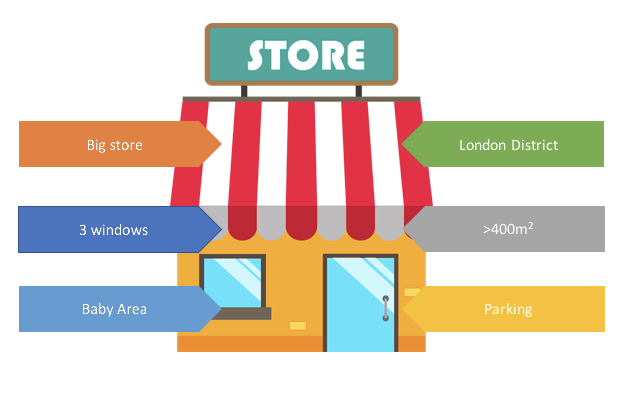
When you use your GPS to get your position on your smartphone, how are you located?
Every point on the Earth's surface can be defined with a pair of coordinates: latitude and longitude.
When you are creating new stores, geo location data is required (latitude and longitude). In these fields you have to enter the coordinates pair of the store you are trying to locate.
In the case you don't provide them, the coordinates will be infered automatically from the address but it may result in a less accurate location than the exact geolocation of the store.
Fields
| Field | Type | Required | Readonly | OrderBy | Description |
|---|---|---|---|---|---|
store_id |
string | x | Unique store id | ||
title |
string | x | Name of the store | ||
address |
string | x | The full address allows us to locate the store on the map. This is used to display the missions available near the user's position | ||
tags |
array | Tags allow to specify additional information about the store | |||
latitude |
float | x | Latitude of the store | ||
longitude |
float | x | Longitude of the store | ||
client_id |
string | x | x | The external unique id of the store as it may exists in your Information System | |
store_type_name |
string | x | The name of the store type | ||
store_type_id |
string | x | The id of the store type | ||
info |
string | Additional information regarding the store. Supports HTML layout | |||
country |
string | x | Country location of the store | ||
notification_emails |
array | List of email(s) that will be notified when a mission is finished and/or a request is created/finished | |||
contact_email |
string | Contact's email of the store i.e. store manager's email | |||
contact_phone |
string | Contact's phone of the store i.e. store manager's phone | |||
contact_name |
string | Contact's name of the store i.e. store manager's name | |||
properties |
json | Extra information that enables you to customize the display of the data shown on the Store Activity page. This can be split into 4 components: columns, rows, grid, html |
|||
photo |
string | A photo of the store | |||
vip |
boolean | Indicates if the store is a VIP store (a flagship store) | |||
timezone |
string | x | The Time Zone allows to display the hourly sales data in the store insights in the local time of the store. | ||
capacity |
number | Maximum number of customers which can be served at the same time | |||
created_date |
date | x | Created Date | ||
updated_date |
date | x | x | Updated Date | |
custom_fields |
object | Dynamic properties (optional) |
One of either fields is required:
address
geoloc (latitude + longitude)
In case one of the fields' missing the other one will be inferred automatically by using Google Map API.
Please note that the results may be incorrect and it's always recommended to supply both fields.country field will be resolved using either the geoloc or address. Order of precedence is to resolve by the geoloc and if not present, by address.
One of either fields is required:
store_type_name
store_type_id
The properties field is a json array and can be used to display the following columns, rows, grid, and html.
In its most generic format it looks like :
[
    {
        "title": "string",
        "type": "string",
        "headers": [
            "string"
        ],
        "values": [
            "object"
        ]
    }
]
columns
{
    "title" : "KPI S27",
    "type" : "columns",
    "values" : [
        {
            "title" : "Revenues",
            "value" : "1 456 $",
            "isPercent" : false,
            "colorHex" : "#00FF00"
        },
        {
            "title" : "Nb Hours",
            "value" : "7/66",
            "colorHex" : "#B404FF"
        },
        {
            "title" : "QP",
            "value" : 2.8,
            "isPercent" : true,
            "colorHex" : "#B40404"
        }
    ]
}
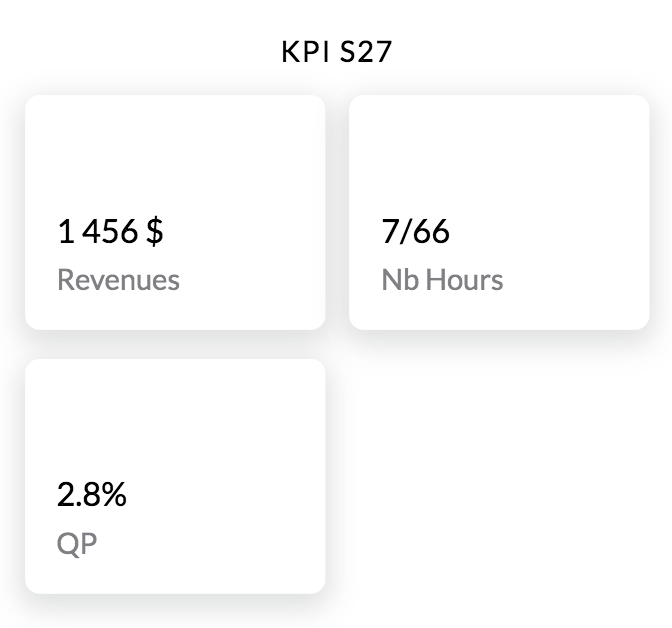
rows
{
    "title" : "S26 to S27",
    "type" : "rows",
    "values" : [
        {
            "title" : "Revenues",
            "value" : "14 647 $",
            "delta" : "+82.5 %",
            "colorHex" : "#B40404"
        },
        {
            "title" : "Clients",
            "value" : "1 753",
            "delta" : "-10.3 %",
            "colorHex" : "#B40404"
        },
        {
            "title" : "Basket",
            "value" : "8.4 $",
            "delta" : "+4.7 %",
            "colorHex" : "#04B404"
        }
    ]
}
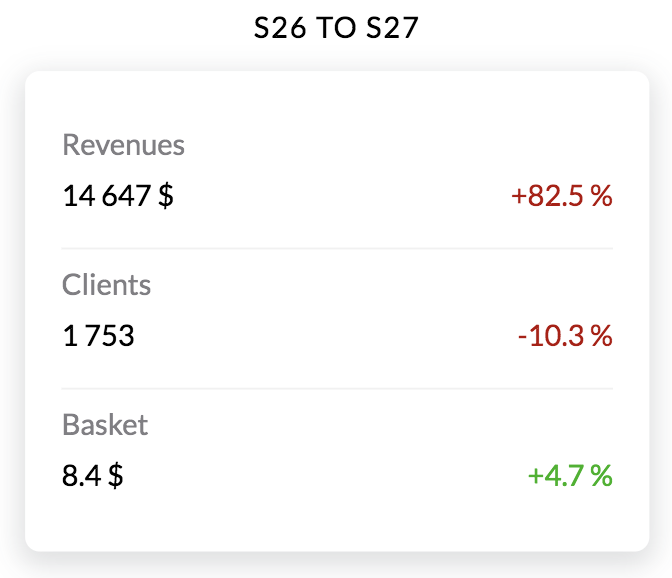
grid
{
    "title" : "Hours",
    "type" : "grid",
    "headers" : [
        "Day",
        "Morning",
        "Afternoon",
        "Nb Hours"
    ],
    "values" : [
        {
            "values" : [
                "Monday",
                "9:00",
                "20:00",
                "5/11"
            ],
            "colorHex" : "#000000"
        },
        {
            "values" : [
                "Tuesday",
                "9:00",
                "20:00",
                "2/11"
            ],
            "colorHex" : "#000000"
        },
        {
            "values" : [
                "Wednesday",
                "9:00",
                "20:00",
                "0/11"
            ],
            "colorHex" : "#000000"
        },
        {
            "values" : [
                "Thursday",
                "9:00",
                "20:00",
                "0/11"
            ],
            "colorHex" : "#000000"
        },
        {
            "values" : [
                "Friday",
                "9:00",
                "20:00",
                "0/11"
            ],
            "colorHex" : "#000000"
        },
        {
            "values" : [
                "Saturday",
                "9:00",
                "20:00",
                "0/11"
            ],
            "colorHex" : "#A0A0A0"
        },
        {
            "values" : [
                "Sunday",
                " ",
                " ",
                "0/0"
            ],
            "colorHex" : "#A0A0A0"
        }
    ]
}
html
{
    "title" : "Reference docs",
    "type" : "html",
    "value" : "<center>Your engagement: <br><b>85%</b><br><br>Share of shelf :<br><img src=\"https://res.cloudinary.com/www-yoobic-com/image/upload/a_exif/w_50/v1516113345/upyw8n7f9fz3v6zhfq29.png\"><br><font color=#69D0C0><a href=\"mailto:support@yoobic.com?Subject=Reference\" target=\"_top \">Contact us</a></font></center>"
}
Important:
custom_fields contains new attributes that can be used to describe more precisely a store.
Custom fields provide a new way to customize your store data by allowing you to filter and select the relevant data in the application.
You can create your own custom fields in the YOOBIC Web Application in order to enrich your store data.
For the full list of supported field types see campaigns
Get
Get a store for the given id.
Authorizations:
header Parameters
| Accept | string Example: application/json e.g. application/json |
Responses
Response samples
- 200
{- "store_id": "5b2122014ebf5300360acae1",
- "title": "ice-cream-store",
- "address": "Statue of Liberty, New York, USA",
- "tags": [
- "The dream ice-cream",
- "number 1 ice-cream"
], - "client_id": "007",
- "store_type_name": "ice-cream",
- "latitude": 40.6895453,
- "longitude": -74.0449292,
- "contact_email": "support@store.com",
- "contact_phone": "1800-007-007",
- "contact_name": "james",
- "notification_emails": [
- "james@store.com",
- "jane@store.com"
], - "country": "United States",
- "timezone": "America/New_York",
- "vip": true,
- "properties": [
- {
- "title": "KPI S27",
- "type": "columns",
- "values": [
- {
- "title": "Revenues",
- "value": "1 456 $",
- "isPercent": false,
- "colorHex": "#00FF00"
}, - {
- "title": "Nb Hours",
- "value": "7/66",
- "colorHex": "#B404FF"
}, - {
- "title": "QP",
- "value": 2.8,
- "isPercent": true,
- "colorHex": "#B40404"
}
]
}
], - "created_date": "2018-05-24T04:51:40.862Z",
- "updated_date": "2018-05-24T04:51:40.862Z"
}Partial Update
Update a subset of properties of a store
Authorizations:
header Parameters
| Accept | string Example: application/json e.g. application/json |
Request Body schema: application/json
| tags | Array of strings |
Responses
Request samples
- Payload
{- "tags": [
- "ICE ICE BABY"
]
}Response samples
- 200
{- "store_id": "5b2122014ebf5300360acae1",
- "title": "ice-cream-store",
- "address": "Statue of Liberty, New York, USA",
- "tags": [
- "ICE ICE BABY"
], - "client_id": "007",
- "store_type_name": "ice-cream",
- "latitude": 40.6895453,
- "longitude": -74.0449292,
- "contact_email": "support@store.com",
- "contact_phone": "1800-007-007",
- "contact_name": "james",
- "notification_emails": [
- "james@store.com",
- "jane@store.com"
], - "country": "United States",
- "timezone": "America/New_York",
- "created_date": "2018-05-23T04:51:40.862Z",
- "updated_date": "2018-07-20T09:51:40.862Z"
}Health Score of a store API
An in house KPI to help measure a store's condition. The Health Score is determined according to 4 criteria:
reactivity: Percentage of completed missions on time.accuracy: Percentage of compliant missions.compliance: Percentage of compliant campaigns. Campaign compliancy is set when the last mission on the store is compliant.review: This concept aims to integrate audits completed by managers over the store in the Health Score
The final score is then given with two additional parameters:
healthscore: Is the final grade calculated according to the average of the 4 criteria above.evolution: This is the history of the store'shealthscore(determined by thedaysparameter and defaults to7).
Authorizations:
query Parameters
| days | number Example: days=7 The number of days back to calculate the healthscore (defaults to 7) |
header Parameters
| Accept | string Example: application/json e.g. application/json |
Responses
Response samples
- 200
{- "healthscore": {
- "today": 28,
- "yesterday": 28
}, - "reactivity": {
- "today": 31,
- "yesterday": 31
}, - "compliance": {
- "today": 9,
- "yesterday": 9
}, - "accuracy": {
- "today": 38,
- "yesterday": 38
}, - "review": {
- "today": 32,
- "yesterday": 32
}, - "evolution": {
- "lowest": 25,
- "highest": 30,
- "evolution": [
- {
- "date": "2019-02-24T03:08:35.501Z",
- "value": 28
}, - {
- "date": "2019-02-23T03:08:09.680Z",
- "value": 28
}, - {
- "date": "2019-02-22T03:08:19.140Z",
- "value": 28
}, - {
- "date": "2019-02-21T03:15:25.134Z",
- "value": 29
}, - {
- "date": "2019-02-20T03:14:16.949Z",
- "value": 27
}, - {
- "date": "2019-02-19T03:09:00.727Z",
- "value": 25
}, - {
- "date": "2019-02-18T03:09:59.539Z",
- "value": 30
}, - {
- "date": "2019-02-17T03:08:11.926Z",
- "value": 28
}, - {
- "date": "2019-02-16T03:14:42.549Z",
- "value": 28
}
], - "current": 28
}
}Get all
Get all stores.
Authorizations:
query Parameters
| filter | string Example: filter={} A valid JSON filter object |
header Parameters
| Accept | string Example: application/json e.g. application/json |
Request Body schema: application/json
object (Default_Header) |
Responses
Request samples
- Payload
{- "Authorization": {
- "Authorization": "Bearer JWT"
}
}Response samples
- 200
{- "paging": {
- "total": 2,
- "skip": 0,
- "limit": 1000
}, - "data": [
- {
- "store_id": "5b2122014ebf5300360acae1",
- "title": "ice-cream-store",
- "address": "Statue of Liberty, New York, USA",
- "tags": [
- "ICE ICE BABY"
], - "client_id": "007",
- "store_type_name": "ice-cream",
- "latitude": 40.6895453,
- "longitude": -74.0449292,
- "contact_email": "support@store.com",
- "contact_phone": "1800-007-007",
- "contact_name": "james",
- "notification_emails": [
- "james@store.com",
- "jane@store.com"
], - "country": "United States",
- "timezone": "America/New_York",
- "capacity": 100,
- "created_date": "2018-05-23T04:51:40.862Z",
- "updated_date": "2018-07-20T09:51:40.862Z"
}, - {
- "store_id": "5b2122014ebf5300360acae2",
- "title": "ice-cream-store-2",
- "address": "Statue of Liberty, New York, USA",
- "tags": [
- "ICE ICE BABY"
], - "client_id": "008",
- "store_type_name": "ice-cream",
- "latitude": 40.6895453,
- "longitude": -74.0449292,
- "contact_email": "support@store2.com",
- "contact_phone": "1800-008-008",
- "contact_name": "jane",
- "notification_emails": [
- "james@store2.com",
- "jane@store2.com"
], - "country": "United States",
- "timezone": "America/New_York",
- "created_date": "2018-05-23T04:51:40.862Z",
- "updated_date": "2018-07-20T09:51:40.862Z"
}
]
}Get all archives
Get all archived stores. You can use the same filters as for the regular “Get all stores” method
Authorizations:
query Parameters
| filter | string Example: filter={} A valid JSON filter object |
header Parameters
| Accept | string Example: application/json e.g. application/json |
Request Body schema: application/json
object (Default_Header) |
Responses
Request samples
- Payload
{- "Authorization": {
- "Authorization": "Bearer JWT"
}
}Response samples
- 200
{- "paging": {
- "total": 2,
- "skip": 0,
- "limit": 1000
}, - "data": [
- {
- "store_id": "5b2122014ebf5300360acbd4",
- "title": "ice-cream-store",
- "address": "Statue of Liberty, New York, USA",
- "tags": [
- "ICE ICE BABY"
], - "client_id": "007",
- "store_type_name": "ice-cream",
- "latitude": 40.6895453,
- "longitude": -74.0449292,
- "contact_email": "support@store.com",
- "contact_phone": "1800-007-007",
- "contact_name": "james",
- "notification_emails": [
- "james@store.com",
- "jane@store.com"
], - "country": "United States",
- "timezone": "America/New_York",
- "capacity": 100,
- "created_date": "2018-05-23T04:51:40.862Z",
- "updated_date": "2018-07-20T09:51:40.862Z"
}, - {
- "store_id": "5b2122014ebf5300360acbde2",
- "title": "ice-cream-store-2",
- "address": "Statue of Liberty, New York, USA",
- "tags": [
- "ICE ICE BABY"
], - "client_id": "008",
- "store_type_name": "ice-cream",
- "latitude": 40.6895453,
- "longitude": -74.0449292,
- "contact_email": "support@store2.com",
- "contact_phone": "1800-008-008",
- "contact_name": "jane",
- "notification_emails": [
- "james@store2.com",
- "jane@store2.com"
], - "country": "United States",
- "timezone": "America/New_York",
- "created_date": "2018-05-23T04:51:40.862Z",
- "updated_date": "2018-07-20T09:51:40.862Z"
}
]
}Count
Count all the existing entities based on the where filter
Authorizations:
query Parameters
| where |
header Parameters
| Accept | string Example: application/json e.g. application/json |
Request Body schema: application/json
object (Default_Header) |
Responses
Request samples
- Payload
{- "Authorization": {
- "Authorization": "Bearer JWT"
}
}Response samples
- 200
{- "count": 10
}Create
You may create a new single store or multiple stores using this action.
When creating a single store the body contains a json object, when creating multiple stores the body contains an array of objects.
Warning: a maximum of 1000 items can be sent in a single request.
Authorizations:
header Parameters
| Accept | string Example: application/json e.g. application/json |
Request Body schema: application/json
| title | string |
| address | string |
| tags | Array of strings |
| client_id | string |
| store_type_name | string |
| capacity | number |
Responses
Request samples
- Payload
{- "title": "ice-cream-store",
- "address": "Statue of Liberty, New York, USA",
- "tags": [
- "The dream ice-cream",
- "number 1 ice-cream"
], - "client_id": "007",
- "store_type_name": "ice-cream",
- "capacity": 100
}Response samples
- 200
[- {
- "store_id": "5b2122014ebf5300360acae1",
- "title": "ice-cream-store",
- "address": "Statue of Liberty, New York, USA",
- "tags": [
- "The dream ice-cream",
- "number 1 ice-cream"
], - "client_id": "007",
- "store_type_name": "ice-cream",
- "latitude": 40.6895453,
- "longitude": -74.0449292,
- "country": "United States",
- "timezone": "America/New_York",
- "created_date": "2018-05-23T04:51:40.862Z",
- "updated_date": "2018-05-23T04:51:40.862Z"
}, - {
- "store_id": "5b2122014ebf5300360acae2",
- "title": "another-ice-cream-store",
- "address": "77th Street, East Elmhurst, NY, USA",
- "tags": [
- "The dream ice-cream",
- "number 1 ice-cream"
], - "client_id": "007",
- "store_type_name": "ice-cream",
- "latitude": 40.765361,
- "longitude": -73.8940281,
- "country": "United States",
- "timezone": "America/New_York",
- "created_date": "2018-05-23T04:51:40.862Z",
- "updated_date": "2018-05-23T04:51:40.862Z"
}
]Export archived stores
Export all results as a file.
This action is asynchronous and returns the id of a job. See jobs endpoint to query the status of the job. The file will contain the results with all of the fields specified on the resource.
Authorizations:
path Parameters
| type required | string Example: csv The type of file, either |
query Parameters
| filter | string Example: filter={} A valid JSON filter object (does not accept a |
header Parameters
| Accept | string Example: application/json e.g. application/json |
Request Body schema: application/json
object (Default_Header) |
Responses
Request samples
- Payload
{- "Authorization": {
- "Authorization": "Bearer JWT"
}
}Response samples
- 200
{- "name": "Export file",
- "type": "normal",
- "priority": 0,
- "nextRunAt": "2018-09-11T15:56:05.387Z",
- "_id": "5b97e5954b99568b4b9101af"
}Import Stores To Archive
This method will archive all stores found from the imported file.
Fields
| Field | Format | Required | Description |
|---|---|---|---|
store_id |
string | x | Unique store id |
client_id |
string | x | The external unique id of the store as it may exists in your Information System |
Only one of store_id or client_id is required
Authorizations:
path Parameters
| type required | string Example: csv The type of file, either |
header Parameters
| Content-Disposition | string Example: form-data; name="file"; filename="file.csv" e.g. form-data; name="file"; filename="file.csv" |
Request Body schema: multipart/form-data, boundary=AaB03x
object (Default_Header) |
Responses
Response samples
- 200
{- "name": "Import file",
- "type": "normal",
- "priority": 0,
- "nextRunAt": "2018-09-11T15:56:05.387Z",
- "_id": "5b97e5954b99568b4b9101af"
}Import Stores To Un Archive
This method will unarchive all stores found from the imported file.
Fields
| Field | Format | Required | Description |
|---|---|---|---|
store_id |
string | x | Unique store id |
client_id |
string | x | The external unique id of the store as it may exists in your Information System |
Only one of store_id or client_id is required
Authorizations:
path Parameters
| type required | string Example: csv The type of file, either |
header Parameters
| Content-Disposition | string Example: form-data; name="file"; filename="file.csv" e.g. form-data; name="file"; filename="file.csv" |
Request Body schema: multipart/form-data, boundary=AaB03x
object (Default_Header) |
Responses
Response samples
- 200
{- "name": "Import file",
- "type": "normal",
- "priority": 0,
- "nextRunAt": "2018-09-11T15:56:05.387Z",
- "_id": "5b97e5954b99568b4b9101af"
}Export
Export all results as a file.
This action is asynchronous and returns the id of a job. See jobs endpoint to query the status of the job. The file will contain the results with all of the fields specified on the resource.
Authorizations:
path Parameters
| type required | string Example: csv The type of file, either |
query Parameters
| filter | string Example: filter={} A valid JSON filter object (does not accept a |
header Parameters
| Accept | string Example: application/json e.g. application/json |
Request Body schema: application/json
object (Default_Header) |
Responses
Request samples
- Payload
{- "Authorization": {
- "Authorization": "Bearer JWT"
}
}Response samples
- 200
{- "name": "Export file",
- "type": "normal",
- "priority": 0,
- "nextRunAt": "2018-09-11T15:56:05.387Z",
- "_id": "5b97e5954b99568b4b9101af"
}Import
See the Import file section for more information.
Fields
| Field | Format | Required | Description |
|---|---|---|---|
store_id |
string | Unique store id | |
title |
string | x | Name of the store |
address |
string | x | The full address allows us to locate the store on the map. This is used to display the missions available near the user's position. |
tags |
string | Tags allow to specify additional information about the store in the form "AAA,BBB" - multiple tags are comma separated, and we only use capital letter by convention | |
latitude |
float | Latitude of the store in the form "0.00" | |
longitude |
float | Longitude of the store in the form "0.00" | |
client_id |
string | x | The external unique id of the store as it may exists in your Information System |
store_type_name |
string | x | The name of the store type |
store_type_id |
string | The id of the store type | |
info |
string | Additional information regarding the store. Supports HTML layout | |
notification_emails |
array | List of email(s) that will be notified when a mission is finished and/or a request is created/finished | |
contact_email |
string | Contact's email of the store i.e. store manager's email | |
contact_phone |
string | Contact's phone of the store i.e. store manager's phone | |
contact_name |
string | Contact's name of the store i.e. store manager's name | |
properties |
string | (.json format) Will enable you to customize the display of the data shown on the Store Activity Page. This can be split into 4 components (Columns, Grid, Chart and HTML | |
timezone |
string | The Time Zone allows to display the hourly sales data in the store insights in the local time of the store. | |
capacity |
number | Maximum number of customers which can be served at the same time |
One of either fields is required:
address
geoloc (latitude + longitude)
In the case one of the field is missing the other one will be inferred automatically by using Google Map API. Please note that the results may be incorrect and it is always recommanded to supply both fields.
One of either fields is required:
store_type_name
store_type_id
important:
If you are using
custom_fields, you can also add columns corresponding to the name of each of yourcustom_fieldsin your import filethe
client_idis used as primary key when importing a store file. This means you don’t need to store the YOOBICstore_idin your systems. For each row in the import file, the import process will check if a store exists in the database with the sameclient_id:- If the
client_idis found and the store is not archived, then the store is updated - If the
client_idis not found, a new store is created - If the
client_idis found and the store is archived, an error is returned to indicate this store is archived
- If the
Authorizations:
path Parameters
| type required | string Example: csv The type of file, either |
header Parameters
| Content-Disposition | string Example: form-data; name="file"; filename="file.csv" e.g. form-data; name="file"; filename="file.csv" |
Request Body schema: multipart/form-data, boundary=AaB03x
object (Default_Header) |
Responses
Response samples
- 200
{- "name": "Import file",
- "type": "normal",
- "priority": 0,
- "nextRunAt": "2018-09-11T15:56:05.387Z",
- "_id": "5b97e5954b99568b4b9101af"
}Exposes tenant level information.
Fields
| Field | Type | Required | Readonly | OrderBy | Description |
|---|---|---|---|---|---|
tenant_id |
string | x | x | Unique id of the tenant | |
name |
string | x | The unique tenant name | ||
title |
string | x | The tenant title | ||
icon |
string | x | The icon of the company | ||
sql_size |
number | x | The company's estimated size | ||
has_terms_of_acceptance |
boolean | x | Does company have acceptance terms | ||
terms_of_acceptance |
string | x | Acceptance terms | ||
terms_of_acceptance_lmt |
date | x | Last date modified acceptance terms |
Get All
Get the tenant data.
Authorizations:
query Parameters
| filter | string Example: filter={} A valid JSON filter object |
header Parameters
| Accept | string Example: application/json e.g. application/json |
Request Body schema: application/json
object (Default_Header) |
Responses
Request samples
- Payload
{- "Authorization": {
- "Authorization": "Bearer JWT"
}
}Contains translations of common keys used in the app to different languages.
Table Translations
| Field | Type | Required | Readonly | OrderBy | Description |
|---|---|---|---|---|---|
translation_id |
string | x | Unique id of the translations | ||
language |
string | x | x | Default language chosen for the key | |
key |
string | x | x | The key that references this translation | |
value |
string | x | Translated key by the default language | ||
group_ids |
array | x | Group ids that can see these translations | ||
user_ids |
array | User ids that can see these translations | |||
us |
string | English - United States | |||
en |
string | English | |||
ca |
string | English - Canada | |||
fr |
string | French | |||
de |
string | German | |||
es |
string | Spanish | |||
nl |
string | Dutch | |||
pl |
string | Polish | |||
it |
string | Italian | |||
ru |
string | Russian | |||
zhs |
string | Simplified Chinese | |||
zht |
string | Traditional Chinese | |||
pt |
string | Portuguese | |||
kr |
string | Kanuri | |||
ja |
string | Japanese | |||
ua |
string | Ukrainian | |||
he |
string | Hebrew | |||
ar |
string | Arabic | |||
cz |
string | Czech | |||
th |
string | Thai | |||
tr |
string | Turkish | |||
bg |
string | Bulgarian | |||
el |
string | Greek | |||
sl |
string | Slovenian | |||
sk |
string | Slovak | |||
ro |
string | Romanian | |||
hu |
string | Hungarian | |||
br |
string | Brazilian Portuguese | |||
et |
string | Estonian | |||
au |
string | Australian | |||
ido |
string | Indonesian | |||
vi |
string | Vietnamese | |||
da |
string | Danish | |||
fi |
string | Finnish | |||
nb |
string | Norwegian | |||
sv |
string | Swedish | |||
base_language |
string | the base language code of the plan | |||
created_date |
date | translations item creation date | |||
updated_date |
date | x | translations item last update date |
Get
Get a translation for the given id.
Authorizations:
path Parameters
| id required | string Example: 54ab03c6546847ee0d30083e The id of the translation |
header Parameters
| Accept | string Example: application/json e.g. application/json |
Responses
Response samples
- 200
{- "translation_id": "587de6c4e000eb001877e3a1",
- "language": "fr",
- "key": "ACTIONPLANCAMPAIGNDESCRIPTION",
- "value": "Faites le tour du magasin avec cette fiche de visite",
- "us": "Walk around the store with the visit sheet",
- "en": "Walk around the store with the visit sheet",
- "ca": "Walk around the store with the visit sheet",
- "fr": "Faites le tour du magasin avec cette fiche de visite",
- "de": "Gehen Sie um den Laden mit dem Besuch Blatt",
- "es": "Paseo por la tienda con la hoja de visita",
- "nl": "Loop rond de winkel met het bezoek vel",
- "pl": "Spacer po sklepie z arkuszem wizyty",
- "it": "Passeggiata intorno al negozio con la scheda di visita",
- "ru": "Прогулка вокруг магазина с посещением листа",
- "created_date": "2017-01-17T09:41:24.401Z",
- "updated_date": "2017-01-18T15:27:49.026Z",
- "group_ids": [
- "yoobicprojectmanager"
]
}Partial Update
Update a subset of properties of a translation
Authorizations:
path Parameters
| id required | string Example: 54ab03c6546847ee0d30083e The id of the translation |
header Parameters
| Accept | string Example: application/json e.g. application/json |
Request Body schema: application/json
| pr | string |
| ru | string |
Responses
Request samples
- Payload
{- "pr": "personalizado",
- "ru": "обычай"
}Get All
Get all the translations.
Authorizations:
query Parameters
| filter | string Example: filter={} A valid JSON filter object |
header Parameters
| Accept | string Example: application/json e.g. application/json |
Request Body schema: application/json
object (Default_Header) |
Responses
Request samples
- Payload
{- "Authorization": {
- "Authorization": "Bearer JWT"
}
}Create
You may create a new single translation or multiple translations using this action.
When creating a single translation the body contains a json object, when creating multiple translations the body contains an array of objects.
Warning: a maximum of 1000 items can be sent in a single request.
Authorizations:
header Parameters
| Accept | string Example: application/json e.g. application/json |
Responses
Count
Count all the existing entities based on the where filter
Authorizations:
query Parameters
| where |
header Parameters
| Accept | string Example: application/json e.g. application/json |
Request Body schema: application/json
object (Default_Header) |
Responses
Request samples
- Payload
{- "Authorization": {
- "Authorization": "Bearer JWT"
}
}Response samples
- 200
{- "count": 10
}Export
Export all results as a file.
This action is asynchronous and returns the id of a job. See jobs endpoint to query the status of the job. The file will contain the results with all of the fields specified on the resource.
Authorizations:
path Parameters
| type required | string Example: csv The type of file, either |
query Parameters
| filter | string Example: filter={} A valid JSON filter object (does not accept a |
header Parameters
| Accept | string Example: application/json e.g. application/json |
Request Body schema: application/json
object (Default_Header) |
Responses
Request samples
- Payload
{- "Authorization": {
- "Authorization": "Bearer JWT"
}
}Response samples
- 200
{- "name": "Export file",
- "type": "normal",
- "priority": 0,
- "nextRunAt": "2018-09-11T15:56:05.387Z",
- "_id": "5b97e5954b99568b4b9101af"
}Import
See the Import file section for more information.
Fields
| Column | Format | Required | Description |
|---|---|---|---|
translation_id |
string | Unique id of the translations | |
language |
string | x | Default language chosen for the key |
key |
string | x | The key that references this translation |
value |
string | x | Translated key by the default language |
group_ids |
array | x | Group ids that can see these translations |
us |
string | English - United States | |
en |
string | English | |
ca |
string | English - Canada | |
fr |
string | French | |
de |
string | German | |
es |
string | Spanish | |
nl |
string | Dutch | |
pl |
string | Polish | |
it |
string | Italian | |
ru |
string | Russian | |
zhs |
string | Simplified Chinese | |
zht |
string | Traditional Chinese | |
pt |
string | Portuguese | |
kr |
string | Kanuri | |
ja |
string | Japanese | |
ua |
string | Ukrainian | |
he |
string | Hebrew | |
ar |
string | Arabic | |
cz |
string | Czech | |
th |
string | Thai | |
tr |
string | Turkish | |
bg |
string | Bulgarian | |
el |
string | Greek | |
sl |
string | Slovanian | |
sk |
string | Slovak | |
ro |
string | Romanian | |
hu |
string | Hungarian | |
br |
string | Brazilian Portuguese | |
et |
string | Estonian | |
au |
string | Australian | |
ido |
string | Indonesian | |
vi |
string | Vietnamese | |
da |
string | Danish | |
fi |
string | Finnish | |
nb |
string | Norwegian | |
sv |
string | Swedish | |
base_language |
string | the base language code of the plan | |
updated_date |
date | translations item last update date | |
created_date |
date | translations item creation date |
Authorizations:
path Parameters
| type required | string Example: csv The type of file, either |
header Parameters
| Content-Disposition | string Example: form-data; name="file"; filename="file.csv" e.g. form-data; name="file"; filename="file.csv" |
Request Body schema: multipart/form-data, boundary=AaB03x
object (Default_Header) |
Responses
Response samples
- 200
{- "name": "Import file",
- "type": "normal",
- "priority": 0,
- "nextRunAt": "2018-09-11T15:56:05.387Z",
- "_id": "5b97e5954b99568b4b9101af"
}Expose users for your company.
Remember:
Users are the people at your company with access to the YOOBIC mobile and/or web apps.
Users can be assigned to one or more groups after they are created
Users can have multiple tags
Fields
| Field | Type | Required | Readonly | OrderBy | Available for all users | Description |
|---|---|---|---|---|---|---|
user_id |
string | x | x | Unique user id | ||
username |
string | x | x | x | Unique username | |
password |
string | x | x | Password, required on creation only | ||
first_name |
string | x | x | First name | ||
last_name |
string | x | x | Last name | ||
client_role |
string | x | x | User roles: ROLEFIELD | ROLEMANAGER | ROLEEDITOR | ROLESTOREMANAGER | ROLESTORE | ROLEADMIN | ROLEVIEWER | ||
client_role_extension |
string | x | Indicates an extension of a user role. Has to match an existing role extension in the database | |||
email |
string | x | ||||
address |
string | x | User's work address | |||
groups |
array | x | x | The list of groups the user is in | ||
language |
string | x | Preferred language | |||
phone |
string | x | Phone number | |||
photo |
string | x | Url of the user's picture | |||
store_id |
string | x | x | x | Primary Store. Setting up a store_id on a user will create a geofilter on this user | |
tags |
array | x | Tags allow to specify additional information about the user | |||
sso |
boolean | x | x | Flag if a user will login through a third party | ||
allow_local_login |
boolean | x | Flag if a user will login with password, even if set to third party in tenant (company) configuration | |||
last_seen |
date | x | x | The date on which the user connected for the last time. | ||
terms_of_acceptance_date |
date | x | x | The date in which terms were last accepted | ||
mobile_version |
string | x | x | Version of the App used on mobile by the user. | ||
desktop_version |
string | x | x | Version of the App used on desktop by the user. | ||
created_date |
date | x | x | Created Date | ||
updated_date |
date | x | x | x | Updated Date | |
custom_fields |
object | x | Dynamic properties (optional) | |||
weekly_schedule |
object | x | Contains data on an employee's working hours for each day of the week. | |||
client_ids |
array | x | List of stores that the user can have access to, selected with their client_id. Creates or updates the corresponding user's geofilter if not empty | |||
store_type_names |
array | x | List of stores' store_types that the user can have access to, selected with their store_type_name. Creates or updates the corresponding user's geofilter if not empty | |||
position |
string | Position | ||||
department |
string | Department | ||||
division |
string | Division | ||||
company |
string | Company | ||||
hiring_date |
date | Date when the user joined the company | ||||
skills |
array | Skills | ||||
cover |
string | Cover URL | ||||
description |
string | Description |
Important:
One of either fields is required in case of user creation:
- password
- sso
allow_local_loginis required only if in tenant (company) configuration it is specified to allow login using a third party, but would like to enable specific user a login with a password instead.Combination of
client_roleandclient_role_extensiondefines the user's permission. A wrong combination of these two will cause a validation error, specifying an invalid permission. Ifclient_role_extensionis not passed (optional),client_rolewill refer to the corresponding base permission.custom_fieldscontains new attributes that can be used to describe more precisely a user.
Custom fields provide a new way to customize your user data by allowing you to filter and select the relevant data in the application.
You can create your own custom fields in the YOOBIC Web Application in order to enrich your user data.
For the full list of supported field types see campaignsThe
usernameof a user has to be unique across live and archived users and is used to log in to the platform.If a user already has a
store_idin their profile, the corresponding store’sclient_idwill be exported in the next export. It can be used instead of thestore_idIt is possible to add several
client_idsand/orstore_type_namesfor a single user. When updating a user, the list ofclient_idsandstore_type_nameswill replace the previous one in the user's geofilter.It is not possible to filter users on the
client_idsorstore_type_namesattributes. Please use the geofilter collection to find if a geofilter exist for a user on a specific store or store_type
Description of the weekly_schedule object:
This object contains data on an employee's working hours for each day of the week.
Each day of the week is represented by a key (e.g.
mon,tue, etc.) and has a corresponding value that contains information about the working periods for that day.
Fields
| Field | Type | Required | Readonly | OrderBy | Description |
|---|---|---|---|---|---|
| mon | JSON | no | no | no | Contains data on the working hours for Monday |
| tue | JSON | no | no | no | Contains data on the working hours for Tuesday |
| wed | JSON | no | no | no | Contains data on the working hours for Wednesday |
| thu | JSON | no | no | no | Contains data on the working hours for Thursday |
| fri | JSON | no | no | no | Contains data on the working hours for Friday |
| sat | JSON | no | no | no | Contains data on the working hours for Saturday |
| sun | JSON | no | no | no | Contains data on the working hours for Sunday |
For each day of the week, the corresponding value is an object with the following fields:
| Field | Type | Required | Readonly | OrderBy | Description |
|---|---|---|---|---|---|
| periods | array | no | no | no | Contains an array of objects, each of which represents a working period for the day. |
Each object in the periods array has the following fields:
| Field | Type | Required | Readonly | OrderBy | Description |
|---|---|---|---|---|---|
| from | string | no | no | no | The start time of the working period. Format is hh:mm in UTC. |
| to | string | no | no | no | The end time of the working period. Format is hh:mm in UTC. |
If a day doesn’t have data in the weekly_schedule object, it is considered that the user is not scheduled to work on that day.
Get
Get the serivce account user for the current token.
Important:
The tenant property returned by this endpoint contains the string value of the company name that should be used as the prefix for new Groups.
Authorizations:
header Parameters
| Accept | string Example: application/json e.g. application/json |
Responses
Response samples
- 200
{- "user_id": "53fb03c6546847fe0d30186b",
- "username": "mycompany+yoobicserviceaccount@mycompany.com",
- "email": "support+mycompany+yoobicserviceaccount@yoobic.com",
- "groups": [
- "mycompany_group"
], - "created_date": "2019-02-10T17:20:11.531Z",
- "updated_date": "2020-11-10T12:11:15.439Z",
- "tenant": "mycompany"
}Get
Get a user for the given id.
Authorizations:
path Parameters
| id required | string Example: 53fb03c6546847ee0d30086a The id of the User |
header Parameters
| Accept | string Example: application/json e.g. application/json |
Responses
Response samples
- 200
{- "user_id": "53fb03c6546847ee0d30086a",
- "username": "johndoe9@houston.com",
- "first_name": "John",
- "last_name": "Doe",
- "client_role": "ROLEVIEWER",
- "email": "johndoe9@houston.com",
- "groups": [
- "test"
], - "language": "en",
- "store_id": "5739b18c6b8e2ac941fbee86",
- "tags": [
- "regional"
], - "allow_local_login": true,
- "mobile_version": "6.5.16",
- "desktop_version": "7.0.16-9",
- "last_seen": "2020-11-19T14:21:44.625Z",
- "client_id": [
- "SITE_1"
], - "created_date": "2019-02-10T17:20:11.531Z",
- "updated_date": "2020-11-10T12:11:15.439Z"
}
Partial Update
Update a subset of properties of an user.
Important - password cannot be updated (will be ignored) via this endpoint.
Authorizations:
path Parameters
| id required | string Example: 53fb03c6546847ee0d30086a The id of the User |
header Parameters
| Accept | string Example: application/json e.g. application/json |
Request Body schema: application/json
| tags | Array of strings |
| client_role_extension | string |
| store_type_names | Array of strings |
object |
Responses
Request samples
- Payload
{- "tags": [
- "The Dream",
- "Hakeem the Dream Olajuwon",
- "The Dream Shake"
], - "client_role_extension": "Super",
- "store_type_names": [
- "ST1",
- "ST2"
], - "weekly_schedule": {
- "fri": {
- "periods": [
- {
- "from": "09:00",
- "to": "13:00"
}
]
}
}
}Response samples
- 200
{- "user_id": "53fb03c6546847ee0d30086a",
- "username": "johndoe9@houston.com",
- "first_name": "John",
- "last_name": "Doe",
- "client_role": "ROLEMANAGER",
- "client_role_extension": "Super",
- "email": "johndoe9@houston.com",
- "groups": [
- "test"
], - "language": "en",
- "store_id": "5739b18c6b8e2ac941fbee86",
- "tags": [
- "The Dream",
- "Hakeem the Dream Olajuwon",
- "The Dream Shake"
], - "mobile_version": "6.5.16",
- "desktop_version": "7.0.16-9",
- "store_type_names": [
- "ST1",
- "ST2"
], - "last_seen": "2020-11-19T14:21:44.625Z",
- "created_date": "2019-02-10T17:20:11.531Z",
- "updated_date": "2020-11-10T12:11:15.439Z",
- "weekly_schedule": {
- "mon_hours": {
- "periods": [
- {
- "from": "08:00",
- "to": "20:00"
}
]
}, - "tue_hours": {
- "periods": [
- {
- "from": "08:00",
- "to": "17:00"
}
]
}, - "wed_hours": {
- "periods": [
- {
- "from": "08:20",
- "to": "10:00"
}, - {
- "from": "11:00",
- "to": "16:20"
}
]
}, - "thu_hours": {
- "periods": [
- {
- "from": "08:00",
- "to": "20:10"
}
]
}, - "fri": {
- "periods": [
- {
- "from": "09:00",
- "to": "13:00"
}
]
}
}
}Change Password
Update user's password.
Note - dontSendMail / boolean / not required / if true no email is sent to the user. If false or not specified, an email is sent to the user to inform them about the change.
Authorizations:
path Parameters
| id required | string Example: 54ab03c6546847ee0d30086a The id of the user |
header Parameters
| Accept | string Example: application/json e.g. application/json |
Request Body schema: application/json
| password | string |
| dontSendMail | boolean |
Responses
Request samples
- Payload
{- "password": "<the-new-password>",
- "dontSendMail": true
}Password History
Get the dates on which a user changed his password.
Note - currently only the date field exists, thus filtering is done solely on it.
Authorizations:
path Parameters
| id required | string Example: 54ab03c6546847ee0d30086a The id of the user |
query Parameters
| filter | string Example: filter={} A valid JSON filter object |
header Parameters
| Accept | string Example: application/json e.g. application/json |
Responses
Get All
Get all the users.
Important:
Combination of client_role and client_role_extension defines the user's permission. A wrong combination of these two will cause a validation error, specifying an invalid permission. If client_role_extension is not passed (optional), client_role will refer to the corresponding base permission.
To filter on user roles, always pass both the client_role and client_role_extension. Example:
filter={"where": { "client_role": "ROLEVIEWER","client_role_extension": "roleTitle"}}
Authorizations:
query Parameters
| filter | string Example: filter={} A valid JSON filter object |
header Parameters
| Accept | string Example: application/json e.g. application/json |
Request Body schema: application/json
object (Default_Header) |
Responses
Request samples
- Payload
{- "Authorization": {
- "Authorization": "Bearer JWT"
}
}Response samples
- 200
{- "paging": {
- "total": 2,
- "skip": 0,
- "limit": 1000
}, - "data": [
- {
- "user_id": "53fb03c6546847ee0d30086a",
- "username": "johndoe9@houston.com",
- "first_name": "John",
- "last_name": "Doe",
- "client_role": "ROLEMANAGER",
- "client_role_extension": "Super",
- "email": "johndoe9@houston.com",
- "groups": [
- "test"
], - "language": "en",
- "store_id": "5739b18c6b8e2ac941fbee86",
- "tags": [
- "The Dream"
], - "allow_local_login": true,
- "mobile_version": "6.5.16",
- "desktop_version": "7.0.16-9",
- "last_seen": "2020-11-19T14:21:44.625Z",
- "client_ids": [
- "CL1",
- "CL2"
], - "created_date": "2019-02-10T17:20:11.531Z",
- "updated_date": "2020-11-10T12:11:15.439Z"
}, - {
- "user_id": "53fb03c6546847ee0d33386b",
- "username": "dianedoe9@houston.com",
- "first_name": "Diane",
- "last_name": "Doe",
- "client_role": "ROLEMANAGER",
- "email": "dianedoe9@houston.com",
- "groups": [
- "test"
], - "language": "en",
- "store_id": "5739b18c6b8e2ac941fbee87",
- "tags": [
- "The Dream"
], - "allow_local_login": true,
- "terms_of_acceptance_date": "2019-01-23T10:18:32.977Z",
- "weekly_schedule": {
- "mon_hours": {
- "periods": [
- {
- "from": "08:00",
- "to": "20:00"
}
]
}, - "tue_hours": {
- "periods": [
- {
- "from": "08:00",
- "to": "17:00"
}
]
}, - "wed_hours": {
- "periods": [
- {
- "from": "08:20",
- "to": "10:00"
}, - {
- "from": "11:00",
- "to": "16:20"
}
]
}, - "thu_hours": {
- "periods": [
- {
- "from": "08:00",
- "to": "20:10"
}
]
}, - "fri_hours": {
- "periods": [
- {
- "from": "08:00",
- "to": "20:05"
}
]
}
}, - "created_date": "2018-05-23T04:55:50.862Z",
- "updated_date": "2018-05-23T04:55:50.862Z"
}
]
}Get all archives
Get all archived users. You can use the same filters as for the regular “Get all users” method
Authorizations:
query Parameters
| filter | string Example: filter={} A valid JSON filter object |
header Parameters
| Accept | string Example: application/json e.g. application/json |
Request Body schema: application/json
object (Default_Header) |
Responses
Request samples
- Payload
{- "Authorization": {
- "Authorization": "Bearer JWT"
}
}Response samples
- 200
{- "paging": {
- "total": 2,
- "skip": 0,
- "limit": 1000
}, - "data": [
- {
- "user_id": "53fb03c6546847ee0d30093f",
- "username": "johndoe9@houston.com",
- "first_name": "John",
- "last_name": "Doe",
- "client_role": "ROLEMANAGER",
- "client_role_extension": "Super",
- "email": "johndoe9@houston.com",
- "groups": [
- "test"
], - "language": "en",
- "store_id": "5739b18c6b8e2ac941fbee86",
- "tags": [
- "The Dream"
], - "allow_local_login": true,
- "mobile_version": "6.5.16",
- "desktop_version": "7.0.16-9",
- "last_seen": "2020-11-19T14:21:44.625Z",
- "created_date": "2019-02-10T17:20:11.531Z",
- "updated_date": "2020-11-10T12:11:15.439Z"
}, - {
- "user_id": "53fb03c6546847ee0d33394c",
- "username": "dianedoe9@houston.com",
- "first_name": "Diane",
- "last_name": "Doe",
- "client_role": "ROLEMANAGER",
- "email": "dianedoe9@houston.com",
- "groups": [
- "test"
], - "language": "en",
- "store_id": "5739b18c6b8e2ac941fbee87",
- "tags": [
- "The Dream"
], - "allow_local_login": true,
- "terms_of_acceptance_date": "2019-01-23T10:18:32.977Z",
- "created_date": "2018-05-23T04:55:50.862Z",
- "updated_date": "2018-05-23T04:55:50.862Z"
}
]
}Count
Count all the existing entities based on the where filter
Authorizations:
query Parameters
| where |
header Parameters
| Accept | string Example: application/json e.g. application/json |
Request Body schema: application/json
object (Default_Header) |
Responses
Request samples
- Payload
{- "Authorization": {
- "Authorization": "Bearer JWT"
}
}Response samples
- 200
{- "count": 10
}Create
You may create a new single user or multiple users using this action.
When creating a single user the body contains a json object, when creating multiple users the body contains an array of objects.
Warning: a maximum of 1000 items can be sent in a single request.
Authorizations:
header Parameters
| Accept | string Example: application/json e.g. application/json |
Request Body schema: application/json
| username | string |
| password | string |
| first_name | string |
| last_name | string |
string | |
| language | string |
| store_id | string |
| photo | string |
| client_role | string |
| client_role_extension | string |
| client_ids | Array of strings |
| tags | Array of strings |
| groups | Array of strings |
Responses
Request samples
- Payload
{- "username": "johndoe9@houston.com",
- "password": "deqwfVFRE456",
- "first_name": "John",
- "last_name": "Doe",
- "email": "johndoe9@houston.com",
- "language": "en",
- "store_id": "5739b18c6b8e2ac941fbee86",
- "client_role": "ROLEVIEWER",
- "client_role_extension": "ROLEVIEWER",
- "client_ids": [
- "CL1",
- "CL2",
- "CL3"
], - "tags": [
- "The Dream"
], - "groups": [
- "test"
]
}Response samples
- 200
[- {
- "user_id": "53fb03c6546847ee0d30086a",
- "username": "johndoe9@houston.com",
- "first_name": "John",
- "last_name": "Doe",
- "client_role": "ROLEVIEWER",
- "email": "johndoe9@houston.com",
- "groups": [
- "test"
], - "language": "en",
- "store_id": "5739b18c6b8e2ac941fbee86",
- "tags": [
- "The Dream"
], - "client_ids": [
- "CL1",
- "CL2",
- "CL3"
], - "created_date": "2018-05-23T04:51:40.862Z",
- "updated_date": "2018-05-23T04:51:40.862Z"
}, - {
- "user_id": "53fb03c6546847fe0d30186b",
- "username": "janedoe9@houston.com",
- "first_name": "Jane",
- "last_name": "Doe",
- "client_role": "ROLEMANAGER",
- "email": "janedoe9@houston.com",
- "language": "en",
- "groups": [
- "test"
], - "store_id": "5739b18c6b8e2ac941fbee86",
- "tags": [
- "The Dream"
], - "created_date": "2018-05-23T04:51:40.862Z",
- "updated_date": "2018-05-23T04:51:40.862Z"
}
]
Invite users
Send account activation reminder
Sends a reminder email to users. Only users who have not already logged in the application and have a work email
(user.email) will be notified. This email contains information for the user to log in the application with their account.
Authorizations:
header Parameters
| Accept | string Example: application/json e.g. application/json |
Request Body schema: application/json
| userIds | Array of strings |
Responses
Request samples
- Payload
{- "userIds": [
- "53fb03c6546847ee0d30086a",
- "53fb03c6546847ee0d30086b"
]
}Export Weekly Schedule
Export all results as a file.
This action is asynchronous and returns the id of a job. See jobs endpoint to query the status of the job. The file will contain the results with all of the fields specified on the resource.
Authorizations:
path Parameters
| type required | string Example: csv The type of file, either |
query Parameters
| filter | string Example: filter={} A valid JSON filter object (does not accept a |
header Parameters
| Accept | string Example: application/json e.g. application/json |
Request Body schema: application/json
object (Default_Header) |
Responses
Request samples
- Payload
{- "Authorization": {
- "Authorization": "Bearer JWT"
}
}Response samples
- 200
{- "name": "Export file",
- "type": "normal",
- "priority": 0,
- "nextRunAt": "2018-09-11T15:56:05.387Z",
- "_id": "5b97e5954b99568b4b9101af"
}Import Weekly Schedule
See the Import file section for more information.
Fields
| Field | Format | Required | Description |
|---|---|---|---|
user_id |
string | Unique user id | |
username |
string | x | Username |
mon_hours |
string | Contains data on the working hours for Monday i.e. 06:00-12:00,15:00-17:00 | |
tue_hours |
string | Contains data on the working hours for Tuesday i.e. 09:00-17:00 | |
wed_hours |
string | Contains data on the working hours for Wednesday i.e. 09:00-17:00 | |
thu_hours |
string | Contains data on the working hours for Thursday i.e. 09:00-17:00 | |
fri_hours |
string | Contains data on the working hours for Friday i.e. 09:00-16:00 | |
sat_hours |
string | Contains data on the working hours for Saturday | |
sun_hours |
string | Contains data on the working hours for Sunday |
Authorizations:
path Parameters
| type required | string Example: csv The type of file, either |
header Parameters
| Content-Disposition | string Example: form-data; name="file"; filename="file.csv" e.g. form-data; name="file"; filename="file.csv" |
Request Body schema: multipart/form-data, boundary=AaB03x
object (Default_Header) |
Responses
Response samples
- 200
{- "name": "Import file",
- "type": "normal",
- "priority": 0,
- "nextRunAt": "2018-09-11T15:56:05.387Z",
- "_id": "5b97e5954b99568b4b9101af"
}Import Users To Archive
This method will archive all users found from the imported file.
Fields
| Field | Format | Required | Description |
|---|---|---|---|
user_id |
string | x | Unique user id |
username |
string | x | Username |
Only one of user_id or username is required.
Authorizations:
path Parameters
| type required | string Example: csv The type of file, either |
header Parameters
| Content-Disposition | string Example: form-data; name="file"; filename="file.csv" e.g. form-data; name="file"; filename="file.csv" |
Request Body schema: multipart/form-data, boundary=AaB03x
object (Default_Header) |
Responses
Response samples
- 200
{- "name": "Import file",
- "type": "normal",
- "priority": 0,
- "nextRunAt": "2018-09-11T15:56:05.387Z",
- "_id": "5b97e5954b99568b4b9101af"
}Export archived users
Export all results as a file.
This action is asynchronous and returns the id of a job. See jobs endpoint to query the status of the job. The file will contain the results with all of the fields specified on the resource.
Authorizations:
path Parameters
| type required | string Example: csv The type of file, either |
query Parameters
| filter | string Example: filter={} A valid JSON filter object (does not accept a |
header Parameters
| Accept | string Example: application/json e.g. application/json |
Request Body schema: application/json
object (Default_Header) |
Responses
Request samples
- Payload
{- "Authorization": {
- "Authorization": "Bearer JWT"
}
}Response samples
- 200
{- "name": "Export file",
- "type": "normal",
- "priority": 0,
- "nextRunAt": "2018-09-11T15:56:05.387Z",
- "_id": "5b97e5954b99568b4b9101af"
}Import Users To Un Archive
This method will unarchive all users found from the imported file.
Fields
| Field | Format | Required | Description |
|---|---|---|---|
user_id |
string | x | Unique user id |
username |
string | x | Username |
Only one of user_id or username is required.
Authorizations:
path Parameters
| type required | string Example: csv The type of file, either |
header Parameters
| Content-Disposition | string Example: form-data; name="file"; filename="file.csv" e.g. form-data; name="file"; filename="file.csv" |
Request Body schema: multipart/form-data, boundary=AaB03x
object (Default_Header) |
Responses
Response samples
- 200
{- "name": "Import file",
- "type": "normal",
- "priority": 0,
- "nextRunAt": "2018-09-11T15:56:05.387Z",
- "_id": "5b97e5954b99568b4b9101af"
}Export
Export all results as a file.
This action is asynchronous and returns the id of a job. See jobs endpoint to query the status of the job. The file will contain the results with all of the fields specified on the resource.
Authorizations:
path Parameters
| type required | string Example: csv The type of file, either |
query Parameters
| filter | string Example: filter={} A valid JSON filter object (does not accept a |
header Parameters
| Accept | string Example: application/json e.g. application/json |
Request Body schema: application/json
object (Default_Header) |
Responses
Request samples
- Payload
{- "Authorization": {
- "Authorization": "Bearer JWT"
}
}Response samples
- 200
{- "name": "Export file",
- "type": "normal",
- "priority": 0,
- "nextRunAt": "2018-09-11T15:56:05.387Z",
- "_id": "5b97e5954b99568b4b9101af"
}Import
See the Import file section for more information.
Fields
| Field | Format | Required | Description |
|---|---|---|---|
user_id |
string | Unique user id | |
username |
string | x | Username |
password |
string | x | Password, required on creation only. |
first_name |
string | x | First name |
last_name |
string | x | Last name |
client_role |
string | x | User roles: ROLEFIELD | ROLEMANAGER | ROLEEDITOR | ROLESTOREMANAGER | ROLESTORE | ROLEADMIN | ROLEVIEWER |
client_role_extension |
string | Indicates an extension of a user role. Has to match an existing role extension in the database | |
email |
string | ||
address |
string | Address | |
groups |
array | x | The list of groups the user is in |
language |
string | Preferred language | |
phone |
string | Phone number | |
photo |
string | Url of the user's picture | |
store_id |
string | Primary Store. Setting up a store_id on a user will create a geofilter on this user. | |
tags |
string | Tags allow to specify additional information about the store in the form "AAA,BBB" - multiple tags are comma separated, and we only use capital letter by convention | |
last_seen |
date | The date on which the user connected for the last time. | |
terms_of_acceptance_date |
date | The date in which terms were last accepted. | |
mobile_version |
string | Version of the App used on mobile by the user. | |
desktop_version |
string | Version of the App used on desktop by the user. | |
client_ids |
array | List of stores that the user can have access to, selected with their client_id. Creates or updates the corresponding user's geofilter if not empty | |
store_type_names |
array | List of stores' store_types that the user can have access to, selected with their store_type_name. Creates or updates the corresponding user's geofilter if not empty |
Important -
Combination of
client_roleandclient_role_extensiondefines the user's permission. A wrong combination of these two will cause a validation error, specifying an invalid permission. Ifclient_role_extensionis not passed (optional),client_rolewill refer to the corresponding base permission.passwordcannot be updated (will be ignored) in case the row exists.If you are using custom_fields, you can also add columns corresponding to the name of each of your custom_fields in your import file
The
usernameis used as primary key when importing a user file. This means you don’t need to store the YOOBICuser_idin your systems. For each row in the import file, the import process will check if a user exists in the database with the sameusername:- If the
usernameis found and the user is not archived, then the user is updated - If the
usernameis not found, a new user is created - If the
usernameis found and the user is archived, an error is returned to indicate this user is archived
- If the
If the import type is
json, the body should consist of an array of user objects for creation or update. The request payload must not exceed 12 MB — the entire JSON input is stored as a single database record; larger payloads will be rejected, so split them into several requests.
e.g. here is a valid JSON body for the import action:
[
    {
        "username": "user1",
        "password": "password",
        "first_name": "John",
        "last_name": "Doe",
        "client_role": "ROLEFIELD",
        "email": "john@company.com"
    },
    {
        "user_id": "5b97e5954b99568b4b9101af",
        "first_name": "Jane"
    },
    {
        "username": "user2",
        "email": "new_mail@company.com"
    }
]
Please note that there is no strict limit on the number of items that can be imported in a single request when using this action.
Authorizations:
path Parameters
| type required | string Example: csv The type of file, either |
header Parameters
| Content-Disposition | string Example: form-data; name="file"; filename="file.csv" e.g. form-data; name="file"; filename="file.csv" |
Request Body schema: multipart/form-data, boundary=AaB03x
object (Default_Header) |
Responses
Response samples
- 200
{- "name": "Import file",
- "type": "normal",
- "priority": 0,
- "nextRunAt": "2018-09-11T15:56:05.387Z",
- "_id": "5b97e5954b99568b4b9101af"
}Export manager users
User managers are used to replicate real-life hierarchy within the YOOBIC app. This enables the use of the Org Chart tab, which provides users with search and visualisation tools to find relationships between managers and their direct reports.
Export all results as a file.
This action is asynchronous and returns the id of a job. See jobs endpoint to query the status of the job. The file will contain the results with all of the fields specified on the resource.
Authorizations:
path Parameters
| type required | string Example: csv The type of file, either |
query Parameters
| filter | string Example: filter={} A valid JSON filter object (does not accept a |
header Parameters
| Accept | string Example: application/json e.g. application/json |
Request Body schema: application/json
object (Default_Header) |
Responses
Request samples
- Payload
{- "Authorization": {
- "Authorization": "Bearer JWT"
}
}Response samples
- 200
{- "name": "Export file",
- "type": "normal",
- "priority": 0,
- "nextRunAt": "2018-09-11T15:56:05.387Z",
- "_id": "5b97e5954b99568b4b9101af"
}Import manager users
Fields
| Field | Type | Required | Description |
|---|---|---|---|
manager_username |
string | x | Manager |
direct_report_username |
string | x | Direct report of the manager |
Important:
Each correspondance between a user and his manager should be entered as a single row in the import file
Each user can only have one manager
A user cannot be managed by another user who reports directly or indirectly to them
Authorizations:
path Parameters
| type required | string Example: csv The type of file, either |
header Parameters
| Content-Disposition | string Example: form-data; name="file"; filename="file.csv" e.g. form-data; name="file"; filename="file.csv" |
Request Body schema: multipart/form-data, boundary=AaB03x
object (Default_Header) |
Responses
Response samples
- 200
{- "name": "Import file",
- "type": "normal",
- "priority": 0,
- "nextRunAt": "2018-09-11T15:56:05.387Z",
- "_id": "5b97e5954b99568b4b9101af"
}
Through this endpoint the details and/or the approval of the visit could be set.
By default, the visits will be shown as pending until they are approved (compliant).
Below is an example of a typical way of scheduling a visit:
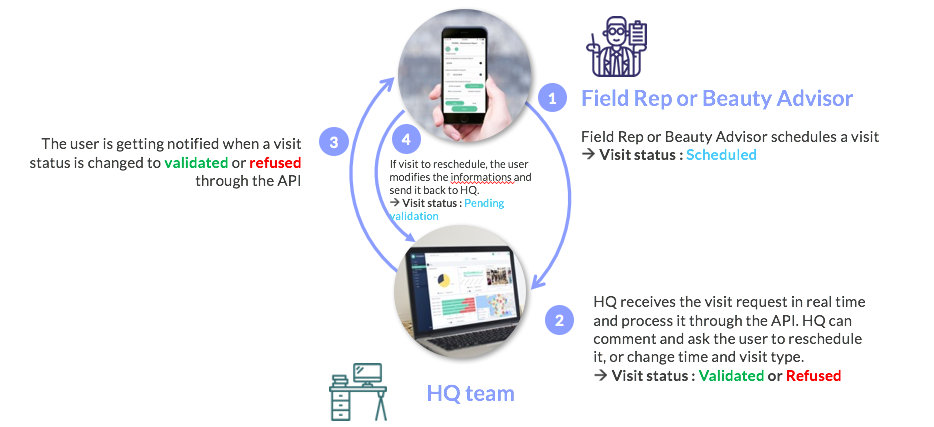
Fields
| Field | Type | Required | Readonly | OrderBy | Description |
|---|---|---|---|---|---|
visit_id |
string | x | Unique id of the visit | ||
user_id |
string | x | x | Unique id of the user who will visit the store | |
store_id |
string | x | x | Unique id of the associated store | |
group_ids |
timestamp | x | Group ids that can see this visit | ||
user_ids |
array | User ids that can see this visit | |||
start_time |
string | The scheduled time of the visit. Format is HH:mm | |||
end_time |
string | The end time of the visit. Format is HH:mm | |||
visit_date |
date | x | The scheduled date of the visit. Format is YYYY-MM-DD | ||
compliant |
boolean | The compliance of the visit as marked by an area manager: true if marked compliant, false if marked noncompliant |
|||
type |
string | Type of the visit chosen among a predefined list | |||
description |
string | Description of the visit | |||
creator_id |
string | x | x | Unique id of the visit creator | |
custom_fields |
object | Dynamic properties (optional) | |||
updated_date |
timestamp | x | x | Visit's last update date | |
created_date |
timestamp | x | Visit's creation date |
Important:
custom_fields contains new attributes that can be used to describe more precisely a user.
Custom fields provide a new way to customize your user data by allowing you to filter and select the relevant data in the application.
You can create your own custom fields in the YOOBIC Web Application in order to enrich your user data.
For the full list of supported field types see campaigns
Get
Get a visit for the given id.
Authorizations:
path Parameters
| id required | string Example: 54ab03c6546847ee0d30084a The id of the visit |
header Parameters
| Accept | string Example: application/json e.g. application/json |
Responses
Response samples
- 200
{- "visit_id": "54ab03c6546847ee0d30084a",
- "type": "stocktaking",
- "description": "scheduled store visit",
- "visit_date": "2019-09-04T00:00:00.000Z",
- "start_time": "17:00"
}Partial Update
Update a subset of properties of a visit
Authorizations:
path Parameters
| id required | string Example: 54ab03c6546847ee0d30084a The id of the visit |
header Parameters
| Accept | string Example: application/json e.g. application/json |
Responses
Response samples
- 200
{- "visit_id": "54ab03c6546847ee0d30084a",
- "type": "stocktaking",
- "description": "Approved store visit.",
- "user_id": "5d160d2486191e003b3e538b",
- "creator_id": "5d160d2486191e003b3e538b",
- "store_id": "5d160a327411ab005c986216",
- "visit_date": "2019-09-04T00:00:00.000Z",
- "start_time": "17:00",
- "end_time": "18:30",
- "compliant": true
}Get All
Get all the visits.
Authorizations:
query Parameters
| filter | string Example: filter={} A valid JSON filter object |
header Parameters
| Accept | string Example: application/json e.g. application/json |
Request Body schema: application/json
object (Default_Header) |
Responses
Request samples
- Payload
{- "Authorization": {
- "Authorization": "Bearer JWT"
}
}Response samples
- 200
[- {
- "visit_id": "54ab03c6546847ee0d30084a",
- "type": "stocktaking",
- "description": "Approved store visit.",
- "user_id": "5d160d2486191e003b3e538b",
- "creator_id": "5aaf8a1bad9a1800354732bd",
- "store_id": "5d160a327411ab005c986216",
- "visit_date": "2019-09-04T00:00:00.000Z",
- "start_time": "17:00",
- "end_time": "18:30",
- "compliant": true,
- "created_date": "2019-09-04T08:24:30.793Z",
- "updated_date": "2019-09-04T08:24:30.793Z"
}, - {
- "visit_id": "5d4bdc3e1fca0e003b469a7f",
- "type": "stocktaking",
- "user_id": "5d160d2486191e003b3e538b",
- "creator_id": "5aaf8a1bad9a1800354732bd",
- "store_id": "5ae065ec5d77d00035a6e9fb",
- "visit_date": "2019-09-04T00:00:00.000Z",
- "start_time": "12:00",
- "end_time": "13:30",
- "created_date": "2019-09-04T08:24:30.793Z",
- "updated_date": "2019-09-04T08:24:30.793Z"
}
]Count
Count all the existing entities based on the where filter
Authorizations:
query Parameters
| where |
header Parameters
| Accept | string Example: application/json e.g. application/json |
Request Body schema: application/json
object (Default_Header) |
Responses
Request samples
- Payload
{- "Authorization": {
- "Authorization": "Bearer JWT"
}
}Response samples
- 200
{- "count": 10
}Create
You may create a new single visit or multiple visits using this action.
When creating a single visit the body contains a json object, when creating multiple visits the body contains an array of objects.
Warning: a maximum of 1000 items can be sent in a single request.
Authorizations:
header Parameters
| Accept | string Example: application/json e.g. application/json |
Responses
Export
Export all results as a file.
This action is asynchronous and returns the id of a job. See jobs endpoint to query the status of the job. The file will contain the results with all of the fields specified on the resource.
Authorizations:
path Parameters
| type required | string Example: csv The type of file, either |
query Parameters
| filter | string Example: filter={} A valid JSON filter object (does not accept a |
header Parameters
| Accept | string Example: application/json e.g. application/json |
Request Body schema: application/json
object (Default_Header) |
Responses
Request samples
- Payload
{- "Authorization": {
- "Authorization": "Bearer JWT"
}
}Response samples
- 200
{- "name": "Export file",
- "type": "normal",
- "priority": 0,
- "nextRunAt": "2018-09-11T15:56:05.387Z",
- "_id": "5b97e5954b99568b4b9101af"
}Import
See the Import file section for more information.
Fields
| Field | Format | Required | Readonly | Description |
|---|---|---|---|---|
visit_id |
string | x | Unique id of the visit | |
user_id |
string | x | Unique id of the user who will visit the store | |
store_id |
string | x | Unique id of the associated store | |
group_ids |
array | x | Group ids that can see this visit | |
start_time |
string | x | The scheduled time of the visit. Format is HH:mm | |
end_time |
string | The end time of the visit. Format is HH:mm | ||
visit_date |
date | x | The scheduled date of the visit. Format is YYYY-MM-DD | |
compliant |
boolean | The compliance of the visit as marked by an area manager: true if marked compliant, false if marked noncompliant |
||
type |
string | Type of the visit chosen among a predefined list | ||
creator_id |
string | x | Unique id of the visit creator | |
description |
timestamp | Description of the visit | ||
updated_date |
timestamp | x | Visit's last update date | |
created_date |
timestamp | x | Visit's creation date |
Authorizations:
path Parameters
| type required | string Example: csv The type of file, either |
header Parameters
| Content-Disposition | string Example: form-data; name="file"; filename="file.csv" e.g. form-data; name="file"; filename="file.csv" |
Request Body schema: multipart/form-data, boundary=AaB03x
object (Default_Header) |
Responses
Response samples
- 200
{- "name": "Import file",
- "type": "normal",
- "priority": 0,
- "nextRunAt": "2018-09-11T15:56:05.387Z",
- "_id": "5b97e5954b99568b4b9101af"
}You can create webhooks with HTTP targets to build integrations with the services or with your back-end system. Examples:
Alert your team in Slack when a mission is created
Pass mission to your docs team in Asana after a mission is completed
Update Salesforce when a new store is created
An HTTP target lets you pass information to third-party services and REST APIs that accept JSON in HTTP requests.
The list of topics supporting webhooks are:
campaigns
courses
events
files
lessons
mission-workflows
missions
mission-comments
mission-services
store-types
stores
users
visits
webhooks
For visits, the
deleteaction is not supported. To receive deleted visit objects you need to subscribe to themissionstopic. The deleted visits are sent as their correspondingmissionobject as a visit is a sub-type of missions.For mission-comments, only
createandupdateactions are supported.
See example use case here.For mission-services, only
createandupdateactions are supported.
See example use case here.If the webhook has a filter, the webhook will fire only once per object when it matches the filter the first time. For example, if the webhook is on topic
missions, operationsupdateand the filter is{"status": "finished"}, then each mission will trigger a new message only when it isfinished. If another update happens later, to validate the mission for example, it will not fire a new message.To send multiple messages for the same object and operation, set
trigger_on_every_matchto true. For example if you want to track every update formission-workflowsfor every step of the workflow.On mission-workflows, possible to filter on
step_titleandstate. Both can be used together to only fire the webhook when a step is reached. Otherwise, having only a filter onstep_titleresults in the webhook firing twice when the step is reached due to the mission being updated when it is assigned to a user.The object output of mission-workflows contains the same fields as for a regular mission, with an addition of
workflow_step_title,workflow_step_idandworkflow_state.
Errors
If a webhook fails it becomes inactive. In addition a failure object with the http status and reason are set on the webhook's object.
  {
      "is_active": false",
      "error": {
        "status": 404,
        "message": "Not Found."
      }
  }
Once the webhook becomes active again, the error object will be cleared.
i.e. a PATCH request to fix the broken webhook:
  {
    "is_active": true,
    "url": "<new working callback url>"
  }
Callback response body
The callback url will have the following fields -
action: create/update/delete
topic: one of the supported topics i.e. store-types
data: the actual entity
updatedFields: list of fields that were updated
{
    "action": "update",
    "topic": "store-types",
    "data": {
        "store_type_id": "56b0c262e9a22a4e5f02be7d",
        "name": "ice-cream",
        "group_ids": ["managers"],
        "created_date": "2016-02-02T14:51:14.644Z",
        "updated_date": "2020-07-15T14:18:41.750Z"
    },
    "updatedFields": [
      "group_ids"
    ]
}
Security
Webhooks provide an additional security measure to verify that the webhook is genuine and has come from YOOBIC.
This can be useful if you're looking to ensure only YOOBIC webhooks are being made to your endpoint and ensure the information is genuine and as the system expects. These signatures will also help prevent against replay attacks. Verifying the signing secret is optional.
When registering a webhook you can set an additional secret field in the payload.
Webhook requests will contain two headers which can be used to verify the request's authenticity:
x-yoobic-webhook-signature- the main signaturex-yoobic-webhook-signature-timestamp- the timestamp used to verify the signature This is used in conjunction with the payload of the request (if there is one).Verifying the signature
Sign the body and signature timestamp with the webhook secret key using SHA256, then base64 encoding the resulting digest.Represented simply: base64(HMACSHA256(TIMESTAMP + BODY))
To verify the signature, create the same SHA256 HMAC signature and then compare it to the webhook payload to ensure that they match. If they match, then you can be sure that the webhook came from YOOBIC. If they don't, it may be a request from another source.
Here is an example of a verification signature function in nodejs
const crypto = require('crypto');
const SIGNING_SECRET = <the secret you used when registering the webhook>
function isValidSignature(signature, body, timestamp) {
  let hmac = crypto.createHmac('sha256', SIGNING_SECRET);
  let sig = hmac.update(timestamp + body).digest("base64");

  return (
    Buffer.compare(
      Buffer.from(signature),
      Buffer.from(sig.toString("base64"))
    ) === 0
  );
}

// assuming you have access to the HTTP request (req) object your webhook endpoint has been called with
const signature = req.headers["x-yoobic-webhook-signature"];
const timestamp = req.headers["x-yoobic-webhook-signature-timestamp"];
const raw_body = JSON.stringify(req.body);

const isValid = isValidSignature(signature, raw_body, timestamp)
if (isValid) {
  console.log("HMAC signature is valid");
} else {
  console.log("HMAC signature is invalid");
}
Webhooks and sandbox
You can create webhooks in the sandbox environment but they are automatically removed every week when the sandbox environment is refreshed. Active webhooks in production are not copied to the sandbox environment during the weekly sandbox refresh.
Fields
| Field | Type | Required | Readonly | OrderBy | Description |
|---|---|---|---|---|---|
webhook_id |
string | x | Unique webhook id | ||
url |
string | x | Unique http target url | ||
topics |
array | A list of entities to listen for (default: all) | |||
operations |
array | A list of operations to listen for ["create", "update", "delete"] (default: all) | |||
is_active |
boolean | enable or disable this webhook (default: true) | |||
trigger_on_every_match |
boolean | Specifies if an object should trigger the webhook on every match or only once | |||
has_secret |
boolean | x | True if secret has been provided | ||
error |
object | x | A description object (http status, message) to the reason this webhook is inactive | ||
secret |
string | Encryption key | |||
created_date |
date | x | Creation date | ||
updated_date |
date | x | x | Last update date |
Get
Get a webhook for the given id
Authorizations:
path Parameters
| id required | string Example: 5efd1157b2e93c96bc8ea071 The id of the webhooks |
header Parameters
| Accept | string Example: application/json e.g. application/json |
Responses
Response samples
- 200
{- "webhook_id": "5ea689b6bd436e37567caffe",
- "topics": [
- "stores",
- "store-types",
- "users",
- "missions",
- "campaigns"
], - "operations": [
- "create",
- "update",
- "delete"
], - "is_active": true,
- "created_date": "2020-04-27T07:28:54.324Z",
- "updated_date": "2020-04-27T07:28:54.324Z"
}Partial Update
Update a subset of properties of a webhook
Authorizations:
path Parameters
| id required | string Example: 5efd1157b2e93c96bc8ea071 The id of the webhooks |
header Parameters
| Accept | string Example: application/json e.g. application/json |
Request Body schema: application/json
| is_active | boolean |
Responses
Request samples
- Payload
{- "is_active": false
}Response samples
- 200
{- "webhook_id": "5ea689b6bd436e37567caffe",
- "topics": [
- "stores",
- "store-types",
- "users",
- "missions",
- "campaigns"
], - "is_active": false,
- "created_date": "2020-04-27T07:28:54.324Z",
- "updated_date": "2020-04-27T07:28:54.324Z"
}Get All
Get all the webhooks.
Authorizations:
query Parameters
| filter | string Example: filter={} A valid JSON filter object |
header Parameters
| Accept | string Example: application/json e.g. application/json |
Request Body schema: application/json
object (Default_Header) |
Responses
Request samples
- Payload
{- "Authorization": {
- "Authorization": "Bearer JWT"
}
}Response samples
- 200
[- {
- "webhook_id": "5ea689b6bd436e37567caffe",
- "topics": [
- "missions"
], - "is_active": true,
- "created_date": "2020-04-27T07:28:54.324Z",
- "updated_date": "2020-04-27T07:28:54.324Z"
}, - {
- "webhook_id": "5ea689b6bd436e37567caffe",
- "topics": [
- "stores"
], - "is_active": true,
- "created_date": "2020-04-27T07:28:54.324Z",
- "updated_date": "2020-04-27T07:28:54.324Z"
}
]Create
Creating webhooks.
- note: The body can accept a
filterfor the webhook based on the chosen topic. Thefiltercan be about any filterable property of the objects from this topic (example:campaign_idfor topicmissions)
Authorizations:
header Parameters
| Accept | string Example: application/json e.g. application/json |
Request Body schema: application/json
| url | string |
| topics | Array of strings |
| operations | Array of strings |
object |
Responses
Request samples
- Payload
{- "topics": [
- "missions"
], - "operations": [
- "create"
], - "filter": {
- "campaign_id": "6548ec4dee43840028a59a56"
}
}Response samples
- 200
{- "webhook_id": "5ea689b6bd436e37567caffe",
- "topics": [
- "missions"
], - "operations": [
- "create"
], - "is_active": true,
- "created_date": "2020-04-27T07:28:54.324Z",
- "updated_date": "2020-04-27T07:28:54.324Z"
}Count
Count all the existing entities based on the where filter
Authorizations:
query Parameters
| where |
header Parameters
| Accept | string Example: application/json e.g. application/json |
Request Body schema: application/json
object (Default_Header) |
Responses
Request samples
- Payload
{- "Authorization": {
- "Authorization": "Bearer JWT"
}
}Response samples
- 200
{- "count": 10
}Export
Export all results as a file.
This action is asynchronous and returns the id of a job. See jobs endpoint to query the status of the job. The file will contain the results with all of the fields specified on the resource.
Authorizations:
path Parameters
| type required | string Example: csv The type of file, either |
query Parameters
| filter | string Example: filter={} A valid JSON filter object (does not accept a |
header Parameters
| Accept | string Example: application/json e.g. application/json |
Request Body schema: application/json
object (Default_Header) |
Responses
Request samples
- Payload
{- "Authorization": {
- "Authorization": "Bearer JWT"
}
}Response samples
- 200
{- "name": "Export file",
- "type": "normal",
- "priority": 0,
- "nextRunAt": "2018-09-11T15:56:05.387Z",
- "_id": "5b97e5954b99568b4b9101af"
}Import
See the Import file section for more information.
Authorizations:
path Parameters
| type required | string Example: csv The type of file, either |
header Parameters
| Content-Disposition | string Example: form-data; name="file"; filename="file.csv" e.g. form-data; name="file"; filename="file.csv" |
Request Body schema: multipart/form-data, boundary=AaB03x
object (Default_Header) |
Responses
Response samples
- 200
{- "name": "Import file",
- "type": "normal",
- "priority": 0,
- "nextRunAt": "2018-09-11T15:56:05.387Z",
- "_id": "5b97e5954b99568b4b9101af"
}
The Jobs endpoint allows you to query the status of your asynchronous jobs, whether they are queued, running, completed, or expired.
The id required to request status is returned from your requests that are queued asynchronously on enabled endpoints.
Fields
| Field | Type | Required | Readonly | OrderBy | Description |
|---|---|---|---|---|---|
job_id |
string | x | x | Unique id of the inventory | |
name |
string | x | Job name suffixed with a UUID | ||
progress |
number | x | Between 0-1, the progress of a job, 1 being complete | ||
lastFinishedAt |
date | x | The date the job finished | ||
data.stats.execution_time_milliseconds |
number | x | How long the job ran in milliseconds | ||
data.stats.execution_time |
number | x | How long the job ran in words | ||
data.stats.errors |
number | x | Number of errors in the run | ||
data.stats.success |
number | x | Number of successes in the run | ||
data.input |
object | x | Request parameters supplied to the job (see below details for export/import) | ||
data.output |
object | x | Response parameters of the job (see below details for export/import) |
Fields Export
| Field | Type | Required | Readonly | OrderBy | Description |
|---|---|---|---|---|---|
data.input.filter |
object | x | The filter object passed to the request | ||
data.input.modelName |
string | x | The endpoint's entity name | ||
data.input.type |
string | x | The exported file type (csv/xlsx) | ||
data.output.errors |
array | x | General error or errors that may have occurred for this export job | ||
data.output.data.download_url |
string | x | The exported file | ||
data.output.data.expires_at |
string | x | The date at which the file will no longer be available for download |
Fields Import
| Field | Type | Required | Readonly | OrderBy | Description |
|---|---|---|---|---|---|
data.input.originalFilename |
string | x | The file passed to the request | ||
data.input.modelName |
string | x | The endpoint's entity name | ||
data.input.type |
string | x | The imported file type (csv/xlsx) | ||
data.output.error.download_url |
string | x | The file containing all errors (if any) | ||
data.output.error.expires_at |
date | x | The date at which the file will no longer be available for download |